
springboot mybatis的pagehelper分页
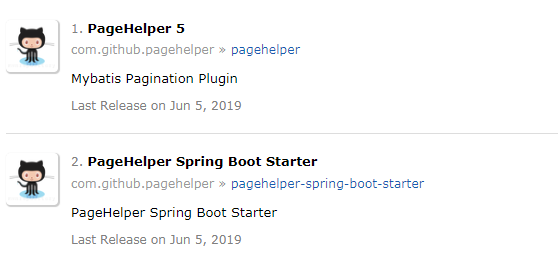
maven repositary里,分页组件常用的有两个
com.github.pagehelper » pagehelper-spring-boot-starter
com.github.pagehelper » pagehelper
躺了很多坑,记录一个能够成功的方式:
===============================分割线========================
1.在pom.xml中引入依赖:选择pagehelper的4.2.x版本(如果选了5.1.2,我就不知道咋配置,网上没找到)
<dependency>

       <groupId>com.github.pagehelper</groupId>

       <artifactId>pagehelper</artifactId>

       <version>4.2.</version>

</dependency>
2.配置类,这是4.x.x版本的写法,如果是5.1.2,就不能像下面这样写(不会生效)
package com.yggdrasill.framework;

import com.github.pagehelper.PageHelper;

import org.springframework.context.annotation.Bean;

import org.springframework.context.annotation.Configuration;

import java.util.Properties;

@Configuration

public class PageMybatisConf {

    @Bean

    public PageHelper pageHelper() {

        System.out.println("MyBatisConfiguration.pageHelper()");

        PageHelper pageHelper = new PageHelper();

        Properties p = new Properties();

        p.setProperty("offsetAsPageNum", "true");

        p.setProperty("rowBoundsWithCount", "true");

        p.setProperty("reasonable", "true");

        p.setProperty("dialect","postgresql");

        pageHelper.setProperties(p);

        return pageHelper;

    }

}
3.调用代码
public PageInfo<Slave> queryApiSlaveList(Pager<Slave> page) {

    // PageHelper.startPage(page,pageSize);开启分页插件,放在查询语句上面 帮助生成分页语句

    PageHelper.startPage(page.getPage(), page.getPageSize());//1,10

    List<Slave> listSlave = slaveMapper.selectAll();

    // 封装分页之后的数据  返回给客户端展示  PageInfo做了一些封装 作为一个类

    PageInfo<Slave> pageInfoUser = new PageInfo<Slave>(listSlave);
    return pageInfoUser;

}
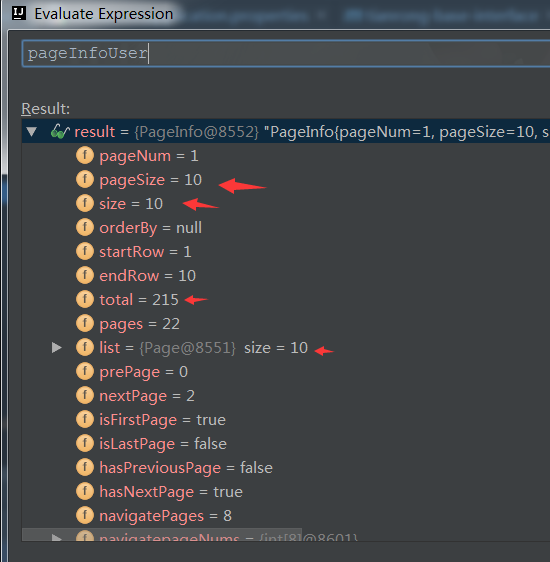
效果如图
完成!!!
===================================================================
ps:不用在application.properties配置那几个参数了,入如果是 pagehelper-spring-boot-starter ,则需要配置
pagehelper.helperDialect=postgresql
pagehelper.reasonable=true
pagehelper.supportMethodsArguments=true
pagehelper.params=count=countSql
pagehelper.page-size-zero=true
至于 pagehelper-spring-boot-starter 方式,可参考 https://blog.csdn.net/csdn_huzeliang/article/details/79350425
springboot mybatis的pagehelper分页的更多相关文章
- SpringBoot+Mybatis配置Pagehelper分页插件实现自动分页
SpringBoot+Mybatis配置Pagehelper分页插件实现自动分页 **SpringBoot+Mybatis使用Pagehelper分页插件自动分页,非常好用,不用在自己去计算和组装了. ...
- springboot+mybatis使用PageHelper分页
项目结构和spring搭建mybatis请参考springboot整合mybatis.在这个基础上配置分页. 一:导入PageHelper依赖 <dependency> <group ...
- Mybatis的PageHelper分页插件的PageInfo的属性参数,成员变量的解释,以及页面模板
作者:个人微信公众号:程序猿的月光宝盒 //当前页 private int pageNum; //每页的数量 private int pageSize; //当前页的数量 private int si ...
- SpringBoot+Mybatis+ Druid+PageHelper 实现多数据源并分页
前言 本篇文章主要讲述的是SpringBoot整合Mybatis.Druid和PageHelper 并实现多数据源和分页.其中SpringBoot整合Mybatis这块,在之前的的一篇文章中已经讲述了 ...
- Springboot 系列(十二)使用 Mybatis 集成 pagehelper 分页插件和 mapper 插件
前言 在 Springboot 系列文章第十一篇里(使用 Mybatis(自动生成插件) 访问数据库),实验了 Springboot 结合 Mybatis 以及 Mybatis-generator 生 ...
- 小白的springboot之路(十五)、mybatis的PageHelper分页插件使用
0.前言 用mybatis,那么分页必不可少,基本都是用PageHelper这个分页插件,好用方便: 1.实现 1.1.添加依赖: <!-- 3.集成 mybatis pagehelper--& ...
- springBoot mybatis mysql pagehelper layui 分页
<!-- 加入 pagehelper 分页插件 jar包--><dependency> <groupId>com.github.pagehelper</gro ...
- SpringBoot整合系列-PageHelper分页插件
原创作品,可以转载,但是请标注出处地址:https://www.cnblogs.com/V1haoge/p/9971043.html SpringBoot整合MyBatis分页插件PageHelper ...
- 【spring boot】14.spring boot集成mybatis,注解方式OR映射文件方式AND pagehelper分页插件【Mybatis】pagehelper分页插件分页查询无效解决方法
spring boot集成mybatis,集成使用mybatis拖沓了好久,今天终于可以补起来了. 本篇源码中,同时使用了Spring data JPA 和 Mybatis两种方式. 在使用的过程中一 ...
随机推荐
- 微博MySQL优化之路
数据库是所有架构中不可缺少的一环,一旦数据库出现性能问题,那对整个系统都回来带灾难性的后果.并且数据库一旦出现问题,由于数据库天生有状态(分主从)带数据(一般还不小),所以出问题之后的恢复时间一般不太 ...
- linux上如何删除文件名乱码的文件
这里写图片描述今天在服务上发现了两个文件名是乱码的文件,如图所示.这里写图片描述于是想用rm命令把它们删掉,但提示没有此文件. 网上搜了一下,找到解决方法,首先执行ls -i命令,此时在文件前面会出现 ...
- Fiddler使用资料-整理
以下是一个博主写的一个系列. 随笔分类 - Fiddler 10.Fiddler中设置断点修改Response 摘要:当然Fiddler中也能修改Response 第一种:打开Fiddler 点击 ...
- One Class SVM 对于样本不均衡处理思路——拿出白样本建模,算出outlier,然后用黑去检验效果
One Class SVM 是指你的training data 只有一类positive (或者negative)的data, 而没有另外的一类.在这时,你需要learn的实际上你training d ...
- 神经网络(4)---神经网络是如何帮助我们学习复杂的nonlinear hypotheses
神经网络是如何一步步进行计算的,以及对计算过程的向量化 Z1(2),Z2(2),Z3(2) are just weighted linear combination of input value x1 ...
- windows 使用SVN命令
在不用安装TortoiseSVN客户端的情况,大家可以再http://subversion.apache.org/packages.html#windows 找到windows下的svn客户端工具.选 ...
- Dubbo源码分析(2):ServiceBean
ServiceBean时序图
- windows nginx 目录配置
http { server { listen 80; server_name www.test.com; location / { root E:/data/www; index index.html ...
- 3D-2D透视投影数学推导
请尊重作者,禁止私自盗用图片!
- ElasticSearch 初识ES
版权声明:本文为博主原创文章,遵循CC 4.0 by-sa版权协议,转载请附上原文出处链接和本声明. 本文链接:https://blog.csdn.net/u013047584/article/det ...