
Pycharm use GUP server
1、配置远程服务器信息
Tools——Deployment——Configuration
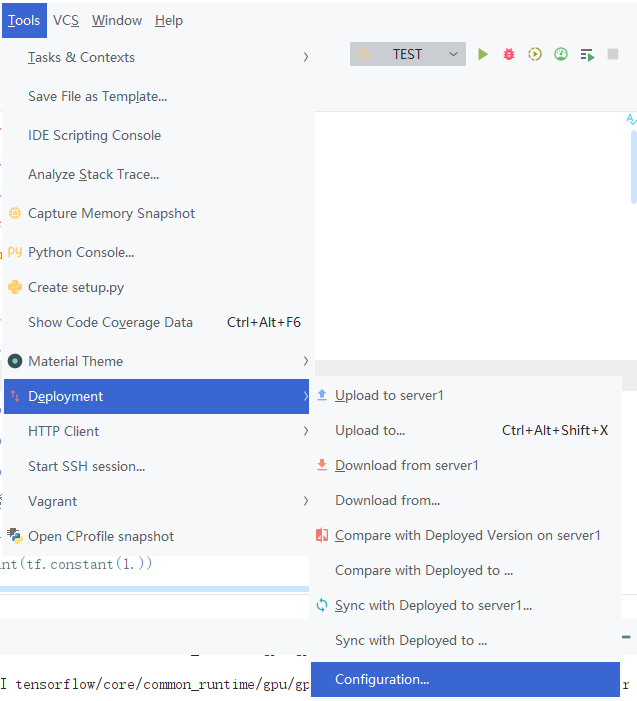
然后,点击加号Add一个远程服务信息。
我这里命名为server1;Type选择SFTP;Host即ip地址,也就是服务器的地址;Port是端口号;User name即用户名;再输一下password,顺便save一下。
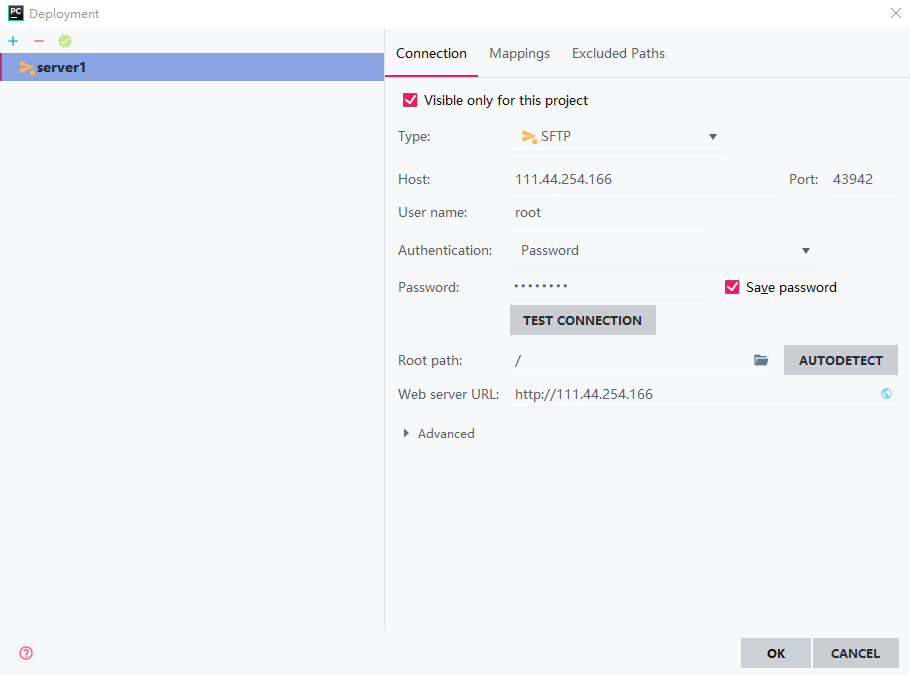
Test一下Connection,然后自动生成一下Root path,OK。

2、添加远程调试环境
File——Settings——Project——Project Interpreter(解释器)
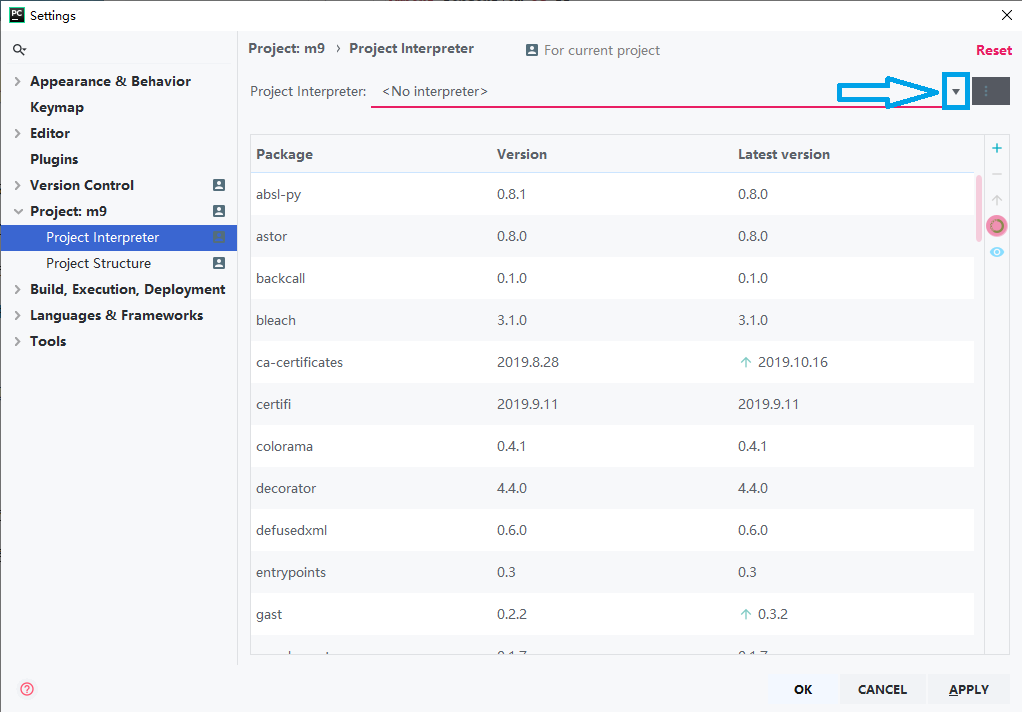
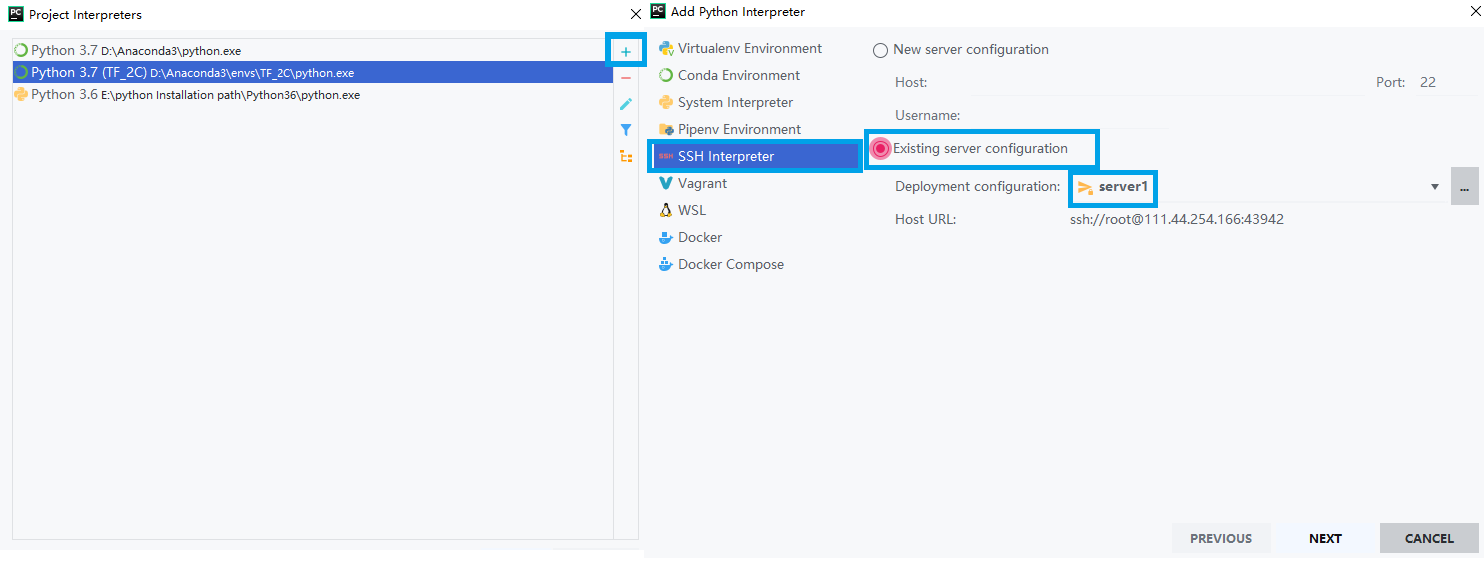
Show all——加号——SSH Interpreter——Existing server configuration——server1——Next——Finish

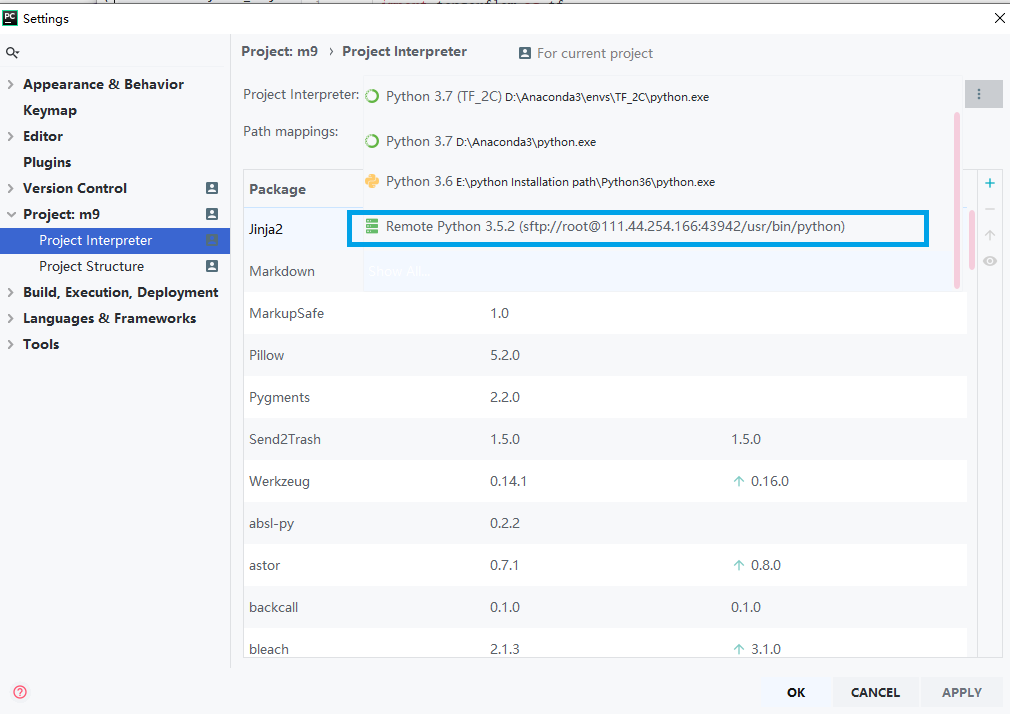
3、Test
新建一个项目文件,跑一下code。
import tensorflow as tf

a = tf.test.is_built_with_cuda()

b = tf.test.is_gpu_available(

    cuda_only=False,

    min_cuda_compute_capability=None

)

print(a)

print(b)
结果:
ssh://root@111.44.254.166:43942/usr/bin/python -u /root/tmp/pycharm_project_928/test.py

-- ::51.954587: I tensorflow/core/platform/cpu_feature_guard.cc:] Your CPU supports instructions that this TensorFlow binary was not compiled to use: AVX2 FMA

-- ::52.058581: I tensorflow/stream_executor/cuda/cuda_gpu_executor.cc:] successful NUMA node read from SysFS had negative value (-), but there must be at least one NUMA node, so returning NUMA node zero

-- ::52.059029: I tensorflow/core/common_runtime/gpu/gpu_device.cc:] Found device  with properties:

name: GeForce RTX  major:  minor:  memoryClockRate(GHz): 1.71

pciBusID: ::00.0

totalMemory: .77GiB freeMemory: .62GiB

-- ::52.059044: I tensorflow/core/common_runtime/gpu/gpu_device.cc:] Adding visible gpu devices:

-- ::52.275783: I tensorflow/core/common_runtime/gpu/gpu_device.cc:] Device interconnect StreamExecutor with strength  edge matrix:

-- ::52.275834: I tensorflow/core/common_runtime/gpu/gpu_device.cc:]

-- ::52.275842: I tensorflow/core/common_runtime/gpu/gpu_device.cc:] :   N

-- ::52.275968: I tensorflow/core/common_runtime/gpu/gpu_device.cc:] Created TensorFlow device (/device:GPU: with  MB memory) -> physical GPU (device: , name: GeForce RTX , pci bus id: ::00.0, compute capability: 7.5)

True

True

Process finished with exit code
Pycharm use GUP server的更多相关文章
- PyCharm激活(License server)
打开激活窗口 选择 Activate new license with: License server (用license server 激活) 在 License sever address 处填入 ...
- pycharm 注册码/License server 2017年最新
两种方法: 1.选License server激活,输入:http://idea.imsxm.com 2.2017年激活码 时效1年BIG3CLIK6F-eyJsaWNlbnNlSWQiOiJCSUc ...
- pycharm pro版server激活
从网上搜集了一些 License server 地址(有钱的一定要支持正版哦) http://idea.iteblog.com/key.php http://intellij.mandroid.cn ...
- pycharm 注册 License server方式
在输入框输入以下内容即可:http://idea.yangyusb.com
- pycharm 设置django server
- [python工具篇][pycharm安装与配置][1]安装与设置
1 官网下载专业版 2 打开pycharm,选择license server 激活,地址输入:http://idea.imsxm.com 3 新建工程(一个大文件夹) 4 设置字体大小(file-&g ...
- 最新JetBrains PyCharm 使用教程--创建或导入项目(二)
Python简介 Python是一种非常流行的开源编程语言.得益于无尽的模块选项,Python今天广泛用于脚本语言.Web开发.移动和桌面在许多领域.随着人工智能的复兴,数据科学的崛起,Python更 ...
- pycharm professional 2019版长效激活
PyCharm是一种Python IDE,带有一整套可以帮助用户在使用Python语言开发时提高其效率的工具,比如调试.语法高亮.Project管理.代码跳转.智能提示.自动完成.单元测试.版本控制. ...
- 【Tools】Pycharm2017 windows安装与修改中文界面教程
[windows] 1.到官网下载Pycharm最新版 https://www.jetbrains.com/pycharm/download/#section=windows 2.安装激活 Pycha ...
随机推荐
- C# 可为空?及(??、?. )
可空类型修饰符(?): 引用类型可以使用空引用表示一个不存在的值,而值类型通常不能表示为空. 例如:string str=null; 是正确的,int i=null; 编译器就会报错. 为了使值类型也 ...
- shell脚本之字符串运算的使用
字符串运算符 下表列出了常用的字符串运算符,假定变量 a 为 "abc",变量 b 为 "efg": 运算符 说明 举例 = 检测两个字符串是否相等,相等返回 ...
- 数组splay ------ luogu P3369 【模板】普通平衡树(Treap/SBT)
二次联通门 : luogu P3369 [模板]普通平衡树(Treap/SBT) #include <cstdio> #define Max 100005 #define Inline _ ...
- AtCoder Beginner Contest 133 E - Virus Tree 2(组合数学)
题意 n个点的树k种颜色,距离不超过2的点对需颜色不同,求方案数 Code(copy) #include<iostream> #include<cstdio> #include ...
- 如何快速关联/修改Git远程仓库地址
如何快速关联/修改Git远程仓库地址?按照如下步骤即可快速实现关联/修改Git远程仓库地址: 删除本地仓库当前关联的无效远程地址,再为本地仓库添加新的远程仓库地址 git remote -v //查看 ...
- 开启和关闭oracle数据库中的审计功能
第1步:查看审计功能是否开启?SQL> show parameter audit;NAME TYPE VALUE-- ...
- python matplotlib生成图形
y=2x+3 import matplotlib.pyplot as plt#约定俗成的写法plt #首先定义两个函数(正弦&余弦) import numpy as np #plt.figur ...
- 在 delphi (Object Pascal 语言)中,使用 array 关键字进行数组定义。
如果需要定义二维数组可以采取以下定义形式: 一.静态数组定义 静态数组定义,通常用于数组元素的数目确定的情况.定义形式如下: 示例: 1 2 3 4 5 6 7 8 9 10 11 type // ...
- C# 获取USB设备信息
C# 获取USB设备信息WMI方式 using System; using System.Management; using System.Text.RegularExpressions; using ...
- mariadb galera群集故障记录
负责galera上执行删除语句 delete from t1 where group_id= and group_id=; 执行后,群集破坏,除了主节点存活,其他俩个节点全都停掉. 查看galera的 ...