
[MySQL]安装和启动
一 MySQL简介
1)MySQL
MySQL是MySQL AB公司的数据库管理系统软件,是最流行的开源(Open Source,开放源代码)的关系型数据库管理系统。
2) MySQL具有以下主要特点。
高速:高速是MySQL的显著特性,在MySQL中,使用了极快的“B树”磁盘表(MyISAM)和索引压缩;通过使用优化的“单扫描多连接”,能够实现极快的连接;SQL函数使用高度优化的类库实现,运行速度快。一直以来,高速都是MySQL吸引众多用户的特性之一,这一点可能只有亲自使用才能体会。
支持多平台:MySQL支持超过20种开发平台,包括Linux、Windows、FreeBSD、IBM AIX、HP-UX、Mac OS、OpenBSD、Solaris等,这使得用户可以选择多种平台实现自己的应用,并且在不同平台上开发的应用系统可以很容易在各种平台之间进行移植。
支持各种开发语言:MySQL为各种流行的程序设计语言提供支持,为它们提供了很多API函数,包括C、C++、Java、Perl、PHP等。
提供多种存储器引擎:MySQL中提供了多种数据库存储引擎,各引擎各有所长,适用于不同的应用场合,用户可以选择最合适的引擎以得到最高性能。
功能强大:强大的存储引擎使MySQL能够有效应用于任何数据库应用系统,高效完成各种任务,无论是大量数据的高速传输系统,还是每天访问量超过数亿的高强度的搜索Web站点。MySQL 5是MySQL发展历程中的一个里程碑,使MySQL具备了企业级数据库管理系统的特性,提供强大的功能,例如子查询、事务、外键、视图、存储过程、触发器、查询缓存等功能。
支持大型数据库:InnoDB存储引擎将InnoDB表保存在一个表空间内,该表空间可由数个文件创建。这样,表的大小就能超过单独文件的最大容量。表空间还可以包括原始磁盘分区,从而使构建很大的表成为可能,最大容量可以达到64TB。
安全:灵活和安全的权限和密码系统,允许基于主机的验证。连接到服务器时,所有的密码传输均采用加密形式,从而保证了密码安全。
价格低廉:MySQL采用GPL许可,很多情况下,用户可以免费使用MySQL;对于一些商业用途,需要购买MySQL商业许可,但价格相对低廉。
3)中文帮助 : http://dev.mysql.com/doc/refman/5.1/zh/index.html
二 MySQL下载安装
1) 下载
下载: MySQL Community Server 5.1.50
地址: http://www.mysql.com/downloads/mysql/
2)安装

三 MySQL配置
1) 在安装目录下(类似于C:\Program Files\MySQL\MySQL Server 5.1\bin)运行MySQLInstanceConfig.exe 。或者在开始菜单中执行MySQL->MySQL Server 5.1->MySQL Server Instance Config Wizard。
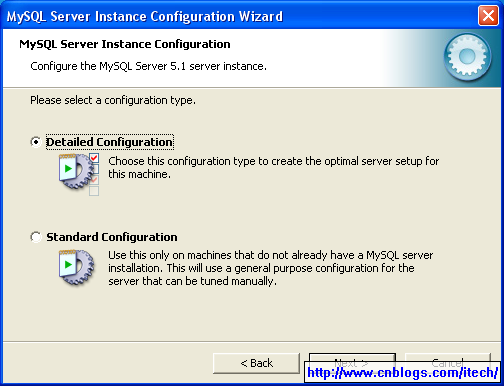
2) 选择详细配置
3)选择所在的server类型

4)选择数据库引擎的类型

5)选择数据库的存储位置

6)选择大概的并行连接数

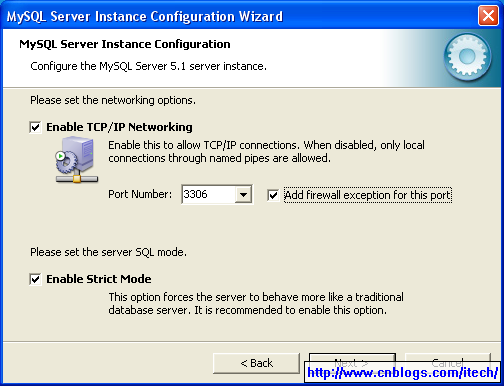
7)配置MySQL支持网络访问和其端口号
8)配置数据库支持的字符集

9)选择数据库的运行方式(一般以service运行)

10)配置MySQL的root用户的密码

11)安装完成,配置文件为my.ini。

12)my.ini配置文件如下

# MySQL Server Instance Configuration File
# ----------------------------------------------------------------------
# Generated by the MySQL Server Instance Configuration Wizard
#
#
# Installation Instructions
# ----------------------------------------------------------------------
#
# On Linux you can copy this file to /etc/my.cnf to set global options,
# mysql-data-dir/my.cnf to set server-specific options
# (@localstatedir@ for this installation) or to
# ~/.my.cnf to set user-specific options.
#
# On Windows you should keep this file in the installation directory
# of your server (e.g. C:\Program Files\MySQL\MySQL Server X.Y). To
# make sure the server reads the config file use the startup option
# "--defaults-file".
#
# To run run the server from the command line, execute this in a
# command line shell, e.g.
# mysqld --defaults-file="C:\Program Files\MySQL\MySQL Server X.Y\my.ini"
#
# To install the server as a Windows service manually, execute this in a
# command line shell, e.g.
# mysqld --install MySQLXY --defaults-file="C:\Program Files\MySQL\MySQL Server X.Y\my.ini"
#
# And then execute this in a command line shell to start the server, e.g.
# net start MySQLXY
#
#
# Guildlines for editing this file
# ----------------------------------------------------------------------
#
# In this file, you can use all long options that the program supports.
# If you want to know the options a program supports, start the program
# with the "--help" option.
#
# More detailed information about the individual options can also be
# found in the manual.
#
#
# CLIENT SECTION
# ----------------------------------------------------------------------
#
# The following options will be read by MySQL client applications.
# Note that only client applications shipped by MySQL are guaranteed
# to read this section. If you want your own MySQL client program to
# honor these values, you need to specify it as an option during the
# MySQL client library initialization.
#
[client]
port=3306
[mysql]
default-character-set=utf8
# SERVER SECTION
# ----------------------------------------------------------------------
#
# The following options will be read by the MySQL Server. Make sure that
# you have installed the server correctly (see above) so it reads this
# file.
#
[mysqld]
# The TCP/IP Port the MySQL Server will listen on
port=3306
#Path to installation directory. All paths are usually resolved relative to this.
basedir="C:/Program Files/MySQL/MySQL Server 5.1/"
#Path to the database root
datadir="C:/Documents and Settings/All Users/Application Data/MySQL/MySQL Server 5.1/Data/"
# The default character set that will be used when a new schema or table is
# created and no character set is defined
default-character-set=utf8
# The default storage engine that will be used when create new tables when
default-storage-engine=INNODB
# Set the SQL mode to strict
sql-mode="STRICT_TRANS_TABLES,NO_AUTO_CREATE_USER,NO_ENGINE_SUBSTITUTION"
# The maximum amount of concurrent sessions the MySQL server will
# allow. One of these connections will be reserved for a user with
# SUPER privileges to allow the administrator to login even if the
# connection limit has been reached.
max_connections=100
# Query cache is used to cache SELECT results and later return them
# without actual executing the same query once again. Having the query
# cache enabled may result in significant speed improvements, if your
# have a lot of identical queries and rarely changing tables. See the
# "Qcache_lowmem_prunes" status variable to check if the current value
# is high enough for your load.
# Note: In case your tables change very often or if your queries are
# textually different every time, the query cache may result in a
# slowdown instead of a performance improvement.
query_cache_size=0
# The number of open tables for all threads. Increasing this value
# increases the number of file descriptors that mysqld requires.
# Therefore you have to make sure to set the amount of open files
# allowed to at least 4096 in the variable "open-files-limit" in
# section [mysqld_safe]
table_cache=256
# Maximum size for internal (in-memory) temporary tables. If a table
# grows larger than this value, it is automatically converted to disk
# based table This limitation is for a single table. There can be many
# of them.
tmp_table_size=103M
# How many threads we should keep in a cache for reuse. When a client
# disconnects, the client's threads are put in the cache if there aren't
# more than thread_cache_size threads from before. This greatly reduces
# the amount of thread creations needed if you have a lot of new
# connections. (Normally this doesn't give a notable performance
# improvement if you have a good thread implementation.)
thread_cache_size=8
#*** MyISAM Specific options
# The maximum size of the temporary file MySQL is allowed to use while
# recreating the index (during REPAIR, ALTER TABLE or LOAD DATA INFILE.
# If the file-size would be bigger than this, the index will be created
# through the key cache (which is slower).
myisam_max_sort_file_size=100G
# If the temporary file used for fast index creation would be bigger
# than using the key cache by the amount specified here, then prefer the
# key cache method. This is mainly used to force long character keys in
# large tables to use the slower key cache method to create the index.
myisam_sort_buffer_size=205M
# Size of the Key Buffer, used to cache index blocks for MyISAM tables.
# Do not set it larger than 30% of your available memory, as some memory
# is also required by the OS to cache rows. Even if you're not using
# MyISAM tables, you should still set it to 8-64M as it will also be
# used for internal temporary disk tables.
key_buffer_size=175M
# Size of the buffer used for doing full table scans of MyISAM tables.
# Allocated per thread, if a full scan is needed.
read_buffer_size=64K
read_rnd_buffer_size=256K
# This buffer is allocated when MySQL needs to rebuild the index in
# REPAIR, OPTIMZE, ALTER table statements as well as in LOAD DATA INFILE
# into an empty table. It is allocated per thread so be careful with
# large settings.
sort_buffer_size=256K
#*** INNODB Specific options ***
innodb_data_home_dir="C:/MySQL Datafiles/"
# Use this option if you have a MySQL server with InnoDB support enabled
# but you do not plan to use it. This will save memory and disk space
# and speed up some things.
#skip-innodb
# Additional memory pool that is used by InnoDB to store metadata
# information. If InnoDB requires more memory for this purpose it will
# start to allocate it from the OS. As this is fast enough on most
# recent operating systems, you normally do not need to change this
# value. SHOW INNODB STATUS will display the current amount used.
innodb_additional_mem_pool_size=7M
# If set to 1, InnoDB will flush (fsync) the transaction logs to the
# disk at each commit, which offers full ACID behavior. If you are
# willing to compromise this safety, and you are running small
# transactions, you may set this to 0 or 2 to reduce disk I/O to the
# logs. Value 0 means that the log is only written to the log file and
# the log file flushed to disk approximately once per second. Value 2
# means the log is written to the log file at each commit, but the log
# file is only flushed to disk approximately once per second.
innodb_flush_log_at_trx_commit=1
# The size of the buffer InnoDB uses for buffering log data. As soon as
# it is full, InnoDB will have to flush it to disk. As it is flushed
# once per second anyway, it does not make sense to have it very large
# (even with long transactions).
innodb_log_buffer_size=3499K
# InnoDB, unlike MyISAM, uses a buffer pool to cache both indexes and
# row data. The bigger you set this the less disk I/O is needed to
# access data in tables. On a dedicated database server you may set this
# parameter up to 80% of the machine physical memory size. Do not set it
# too large, though, because competition of the physical memory may
# cause paging in the operating system. Note that on 32bit systems you
# might be limited to 2-3.5G of user level memory per process, so do not
# set it too high.
innodb_buffer_pool_size=339M
# Size of each log file in a log group. You should set the combined size
# of log files to about 25%-100% of your buffer pool size to avoid
# unneeded buffer pool flush activity on log file overwrite. However,
# note that a larger logfile size will increase the time needed for the
# recovery process.
innodb_log_file_size=170M
# Number of threads allowed inside the InnoDB kernel. The optimal value
# depends highly on the application, hardware as well as the OS
# scheduler properties. A too high value may lead to thread thrashing.
innodb_thread_concurrency=8
四 运行
当MySQL安装和配置完成后,MySQL server已经以Service的方式运行了。运行mysqlshow查看默认的database如下:

完!
[MySQL]安装和启动的更多相关文章
- MySQL 安装和启动服务,“本地计算机 上的 MySQL 服务启动后停止。某些服务在未由其他服务或程序使用时将自动停止。”
MySQL 安装和启动服务,以及遇到的问题 MySQL版本: mysql-5.7.13-winx64.zip (免安装,解压放到程序文件夹即可,比如 C:\Program Files\mysql-5. ...
- [Mysql] 安装后启动不了
Mysql安装后启动报错: ERROR 2002 (HY000): Can't connect to local MySQL server through socket '/var/lib/mysql ...
- MySQL安装与启动——Windows系统下
以下书写结合菜鸟教程以及本人理解书写. 数据库下载(开源免费) MySQL数据库下载地址https://dev.mysql.com/downloads/mysql/ 可自由选择版本,一般选择Achiv ...
- mysql安装完启动问题解决
一.初始化报错问题: 1./usr/local/mysql/bin/mysqld --user=mysql --basedir=/usr/local/mysql --datadir=/usr/loca ...
- 2017.7.1 mysql安装与启动(已验证可以使用)
下载地址:http://learning.happymmall.com/ 之前一直用解压版安装,启动mysql服务的时候总是失败,这次用mysql installer安装一遍,终于成功启动. 1.下载 ...
- mysql 安装与启动
1.下载mysql installer 2.安装 一直点next,直到finish. 3.安装时的配置 安装完后,选择立即开始配置. 选择standard configuration 勾选安装mysq ...
- mysql安装到启动遇见的问题
一.有时候安装mysql后使用mysql命令时报错 Can't connect to MySQL server on localhost (10061),或者用net start mysql 时报服务 ...
- MySQL安装,启动
一.安装.配置环境变量 http://www.cnblogs.com/mr-wid/archive/2013/05/09/3068229.html 配置环境变量:把你的安装目录复制下,例如:G:\Do ...
- mysql安装和启动
1.在cmd的bin目录执行 mysqld --initialize-insecure程序会在动MySQL文件夹下创建data文件夹以及对应的文件2.bin目录下执行,mysqld --install ...
随机推荐
- ubuntu查看版本命令
有两种方法 1,cat /etc/issue 2,sudo lsb_release -a 这个查询出来的结果比上面的那个全一些.
- 导出Excel之Epplus使用教程3(图表设置)
导出Excel之Epplus使用教程1(基本介绍) 导出Excel之Epplus使用教程2(样式设置) 导出Excel之Epplus使用教程3(图表设置) 导出Excel之Epplus使用教程4(其他 ...
- bzoj1816 扑克牌
Description 你有n种牌,第i种牌的数目为ci.另外有一种特殊的牌:joker,它的数目是m.你可以用每种牌各一张来组成一套牌,也可以用一张joker和除了某一种牌以外的其他牌各一张组成1套 ...
- UIImageView 动画 / UIImage 方向
UIImage 方向 UIImage imageOrientation是相对当前屏幕的横竖屏来判断方向 如果本身是横屏, 照片也是横屏的话, 方向是正方向 BOOL b1 = (originalIma ...
- 2维特征Feature2D(转)
转自:http://blog.csdn.net/yang_xian521/article/details/6901762 主要介绍的是如何用SURF进行特征匹配,和SIFT的使用方法基本一致.
- HDU 1978 记忆化搜索(dfs+dp)
Y - How many ways Time Limit:1000MS Memory Limit:32768KB 64bit IO Format:%I64d & %I64u S ...
- puppet 安装
yum源配置 1. wget http://ftp.kaist.ac.kr/fedora//epel/6/i386/epel-release-6-8.noarch.rpm 2. yum list | ...
- 脚本重定向输出【错误、正确】——分析service脚本中用到的语法
<1> >&2 即 1>&2 也就是把结果输出到和标准错误一样:之前如果有定义标准错误重定向到某log文件,那么标准输出也重定向到这个log文件如:ls 2&g ...
- PhpStorm主题
图的github仓库有很多编辑器的主题,jetbrains目录下都是PhpStorm支持的主题 1.到http://daylerees.github.io/预览各个主题的风格,找到自己喜欢的: 2.在 ...
- 经典的SQL面试题
SQL中 inner join. left join .right join. outer join之间的区别 A表(a1,b1,c1) B表(a2,b2) a1 b1 c1 a2 b2 01 数学 ...