JSONModel

https://github.com/icanzilb/JSONModel/

一. 获取属性的元数据

const char *attrs = property_getAttributes(property);

propertyAttributes=T@"NSArray<OrderDetail><Optional>",&,N,V_OrderDetails

1. T

T表示普通属性

R表示只读属性

Tc,表示BOOL

2. @"NSArray<OrderDetail><Optional>"

@里面"<"之前是类型

@里面"<"和">"之间是协议

3. V_OrderDetails

V表示变量

后面的OrderDetails表示变量名称

二.获取对象的父类

obj.superclass

[isKindOfClass:class]


原文地址:http://www.cnblogs.com/YouXianMing/p/3638648.html


使用 JSONModel

Posted on 2014-04-01 20:30 游贤明 阅读(205) 评论(0) 编辑 收藏

Magical Data Modelling Framework for JSON

https://github.com/icanzilb/JSONModel

New: In version 0.12.0 I added experimental support for exporting JSON models to CoreData.

最新消息:在0.12.0版本中,我试验性的支持将 JSON models 转化成 CoreData .

Give it a try and let me know, post an issue or just get in touch. Try something like that:

如果你试验过了,有空告知哥一下,哥写开源库也不容易,发一篇博文或者给个链接以表支持:

NSError* error = nil;
GitHubRepoEntity* entity = [GitHubRepoEntity entityWithModel:model
inContext:self.managedObjectContext
error:&error];
[self.managedObjectContext save: nil];

If you like JSONModel and use it can you please: 1) star this repo 2)send me some feedback. Thanks!

JSONModel is a library, which allows rapid creation of smart data models. You can use it in your iOS or OSX apps.

JSONModel automatically introspects your model classes and the structure of your JSON input and reduces drastically the amount of code you have to write.

如果你喜欢 JSONModel ,那么你可以:1)长期关注这个开源项目,2)你是土豪的话,给哥捐点吧,谢谢.

JSONModel 是一个库,他能智能并且快速的创建出数据 model,你可以在你的 iOS 项目或者 OSX 项目上使用它.

Adding JSONModel to your project

添加 JSONModel 到你的工程中

Requirements

需要的环境:

  • ARC only; iOS 5.0+ / OSX 10.7+
  • SystemConfiguration.framework
  • ARC,iOS 5.0+ / OSX 10.7 +
  • 引入框架SystemConfiguration.framework

Get it as: 1) source files

  1. Download the JSONModel repository as a zip file or clone it
  2. Copy the JSONModel sub-folder into your Xcode project
  3. Link your app to SystemConfiguration.framework

1.  下载 JSONModel zip包

2.  将 JSONModel 文件夹拷贝到你的工程项目中

3.  将库 SystemConfiguration.framework 添加上

or 2) via Cocoa pods

In your project's Podfile add the JSONModel pod:

使用 Cocoa pods 来安装:

pod 'JSONModel'

If you want to read more about CocoaPods, have a look at this short tutorial.

如果你不会用 CocoaPods,你可以看看这简单的教程。

Source code documentation

源码的文档

The source code includes class docs, which you can build yourself and import into Xcode:

源码本身包含了类的文档,你可以自己编译后导入到你的Xcode中:

  1. If you don't already have appledoc installed, install it with homebrew by typing brew install appledoc.
  2. Install the documentation into Xcode by typing appledoc . in the root directory of the repository.
  3. Restart Xcode if it's already running.

1.  如果你还没安装 appledoc ,先安装 appledoc

2.  在Xcode上键入 appledoc 安装文档,在根目录下

3.  重启Xcode


Basic usage

基本使用

Consider you have a JSON like this:

假设你的 JSON 串像下面这样子:

{"id":"10", "country":"Germany", "dialCode": 49, "isInEurope":true}
  • Create a new Objective-C class for your data model and make it inherit the JSONModel class.
  • Declare properties in your header file with the name of the JSON keys:
  • 创建一个你自己的类,并继承至 JSONModel
  • 在你的头文件里面进行声明你所需要的 JSON key值
#import "JSONModel.h"

@interface CountryModel : JSONModel

@property (assign, nonatomic) int id;
@property (strong, nonatomic) NSString* country;
@property (strong, nonatomic) NSString* dialCode;
@property (assign, nonatomic) BOOL isInEurope; @end

There's no need to do anything in the .m file.

.m文件中你不需要做其他的事情了.

  • Initialize your model with data:
  • 初始化你的 model ,如下所示:
#import "CountryModel.h"
... NSString* json = (fetch here JSON from Internet) ...
NSError* err = nil;
CountryModel* country = [[CountryModel alloc] initWithString:json error:&err];

If the validation of the JSON passes you have all the corresponding properties in your model populated from the JSON. JSONModel will also try to convert as much data to the types you expect, in the example above it will:

如果传过来的 JSON 合法,你所定义的所有的属性都会与该 JSON 值相匹配,并且 JSONModel 也会尝试尽可能的转换成你所想要的数据,就像上面的例子:

  • convert "id" from string (in the JSON) to an int for your class
  • just copy country's value
  • convert dialCode from number (in the JSON) to an NSString value
  • finally convert isInEurope to a BOOL for your BOOL property
  • 转化 "id",从字符串转换成 int 型
  • 拷贝 country 属性的值
  • 转换 dialCode ,从NSNumber 转换为 NSString 值
  • 最后一个呢是将 isInEurope 转换成 BOOL 的属性

And the good news is all you had to do is define the properties and their expected types.

所以,你需要做的就是定义出你期望的属性就行了。


Online tutorials

在线教程

Official website: http://www.jsonmodel.com

Class docs online: http://jsonmodel.com/docs/

Step-by-step tutorials:

傻瓜教程:


Examples

例子

Automatic name based mapping

命名自动匹配

{
"id": "123",
"name": "Product name",
"price": 12.95
}
@interface ProductModel : JSONModel
@property (assign, nonatomic) int id;
@property (strong, nonatomic) NSString* name;
@property (assign, nonatomic) float price;
@end @implementation ProductModel
@end

Model cascading (models including other models)

model中含有其他的model

{
"order_id": 104,
"total_price": 13.45,
"product" : {
"id": "123",
"name": "Product name",
"price": 12.95
}
}
@interface OrderModel : JSONModel
@property (assign, nonatomic) int order_id;
@property (assign, nonatomic) float total_price;
@property (strong, nonatomic) ProductModel* product;
@end @implementation OrderModel
@end

Model collections

model中含有其他model的集合

{
"order_id": 104,
"total_price": 103.45,
"products" : [
{
"id": "123",
"name": "Product #1",
"price": 12.95
},
{
"id": "137",
"name": "Product #2",
"price": 82.95
}
]
}
@protocol ProductModel
@end
@interface ProductModel : JSONModel
@property (assign, nonatomic) int id;
@property (strong, nonatomic) NSString* name;
@property (assign, nonatomic) float price;
@end @implementation ProductModel
@end @interface OrderModel : JSONModel
@property (assign, nonatomic) int order_id;
@property (assign, nonatomic) float total_price;
@property (strong, nonatomic) NSArray<ProductModel>* products;
@end @implementation OrderModel
@end

Key mapping

键值转回匹配

{
"order_id": 104,
"order_details" : [
{
"name": "Product#1",
"price": {
"usd": 12.95
}
}
]
}
@interface OrderModel : JSONModel
@property (assign, nonatomic) int id;
@property (assign, nonatomic) float price;
@property (strong, nonatomic) NSString* productName;
@end @implementation OrderModel +(JSONKeyMapper*)keyMapper
{
return [[JSONKeyMapper alloc] initWithDictionary:@{
@"order_id": @"id",
@"order_details.name": @"productName",
@"order_details.price.usd": @"price"

}];
} @end

Global key mapping (applies to all models in your app)

设置全局的键值转回匹配

[JSONModel setGlobalKeyMapper:[
[JSONKeyMapper alloc] initWithDictionary:@{
@"item_id":@"ID",
@"item.name": @"itemName"
}]
];

Map automatically under_score case to camelCase

将下滑线转换成首字母大写

{
"order_id": 104,
"order_product" : @"Product#1",
"order_price" : 12.95
}
@interface OrderModel : JSONModel

@property (assign, nonatomic) int orderId;
@property (assign, nonatomic) float orderPrice;
@property (strong, nonatomic) NSString* orderProduct; @end @implementation OrderModel +(JSONKeyMapper*)keyMapper
{
return [JSONKeyMapper mapperFromUnderscoreCaseToCamelCase];
} @end

Optional properties (i.e. can be missing or null)

可以为空的属性值

{
"id": "123",
"name": null,
"price": 12.95
}
@interface ProductModel : JSONModel
@property (assign, nonatomic) int id;
@property (strong, nonatomic) NSString<Optional>* name;
@property (assign, nonatomic) float price;
@property (strong, nonatomic) NSNumber<Optional>* uuid;
@end @implementation ProductModel
@end

Ignored properties (i.e. JSONModel completely ignores them)

忽略某些属性

{
"id": "123",
"name": null
}
@interface ProductModel : JSONModel
@property (assign, nonatomic) int id;
@property (strong, nonatomic) NSString<Ignore>* customProperty;
@end @implementation ProductModel
@end

Make all model properties optional (avoid if possible)

让所有的属性都可以有空的属性值

@implementation ProductModel
+(BOOL)propertyIsOptional:(NSString*)propertyName
{
return YES;
}

@end

Lazy convert collection items from dictionaries to models

将集合元素转换成 model

{
"order_id": 104,
"total_price": 103.45,
"products" : [
{
"id": "123",
"name": "Product #1",
"price": 12.95
},
{
"id": "137",
"name": "Product #2",
"price": 82.95
}
]
}
@protocol ProductModel
@end @interface ProductModel : JSONModel
@property (assign, nonatomic) int id;
@property (strong, nonatomic) NSString* name;
@property (assign, nonatomic) float price;
@end @implementation ProductModel
@end @interface OrderModel : JSONModel
@property (assign, nonatomic) int order_id;
@property (assign, nonatomic) float total_price;
@property (strong, nonatomic) NSArray<ProductModel, ConvertOnDemand>* products;
@end @implementation OrderModel
@end

Using the built-in thin HTTP client

使用内置的 HTTP 链接

//add extra headers
[[JSONHTTPClient requestHeaders] setValue:@"MySecret" forKey:@"AuthorizationToken"]; //make post, get requests
[JSONHTTPClient postJSONFromURLWithString:@"http://mydomain.com/api"
params:@{@"postParam1":@"value1"}
completion:^(id json, JSONModelError *err) { //check err, process json ... }];

Export model to NSDictionary or to JSON text

将 model 导出为字典或者json字符串

ProductModel* pm = [[ProductModel alloc] initWithString:jsonString error:nil];
pm.name = @"Changed Name"; //convert to dictionary
NSDictionary* dict = [pm toDictionary]; //convert to text
NSString* string = [pm toJSONString];
  • json validation
  • data transformations
  • error handling
  • custom data validation
  • automatic compare and equality features
  • and more.
  • json数据键值匹配
  • 数据转换
  • 好的容错能力
  • 自定义数据键值匹配
  • 自动比较以及判断的特性
  • 还有更多的等待亲来挖掘

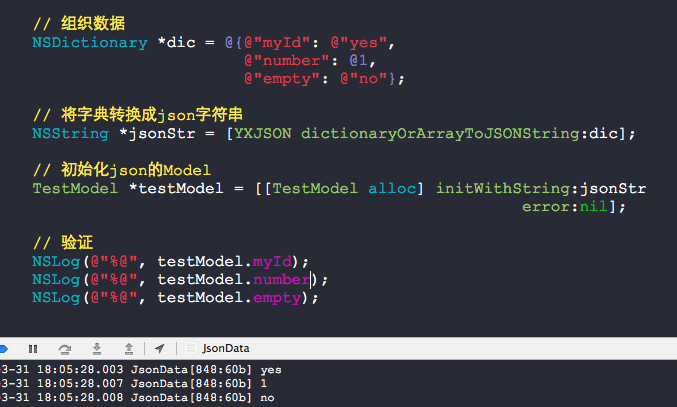
以下是本人使用的测试结果


标签: iOSJSON

JSONModel - 字符串换转实体类的更多相关文章

  1. silverlight依据json字符串动态创建实体类

    1.接收json字符串: //用JsonValue转换json字符串是为了之后获得json字符串的每行数据和每一列的列名 JsonValue jv = JsonValue.Parse(json);   ...

  2. 由json字符串生成C#实体类的工具

    json作为互联网上轻量便捷的数据传输格式,越来越受到重视.但在服务器端编程过程中,我们常常希望能通过智能提示来提高编码效率.JSON C# Class Generator 能将json格式所表示的J ...

  3. JSON C# Class Generator ---由json字符串生成C#实体类的工具(转)

    转载地址:http://www.cnblogs.com/finesite/archive/2011/07/31/2122984.html json作为互联网上轻量便捷的数据传输格式,越来越受到重视.但 ...

  4. JSON C# Class Generator ---由json字符串生成C#实体类的工具

    json作为互联网上轻量便捷的数据传输格式,越来越受到重视.但在服务器端编程过程中,我们常常希望能通过智能提示来提高编码效率.JSON C# Class Generator 能将json格式所表示的J ...

  5. json字符串生成C#实体类的工具

    转载:http://www.cnblogs.com/finesite/archive/2011/07/31/2122984.html json作为互联网上轻量便捷的数据传输格式,越来越受到重视.但在服 ...

  6. JSON字符串转C#实体Class类

    在项目开发过程中,经常需要和不同部门或者不同的组员一起协同工作,但对方写的json返回的结果集,我们需要用,那么如何来生成对应的类代码和实体对象呢?于是参考了网上的做法,做一个简单的字符串转实体类的功 ...

  7. c# json数据解析——将字符串json格式数据转换成对象或实体类

    网络中数据传输经常是xml或者json,现在做的一个项目之前调其他系统接口都是返回的xml格式,刚刚遇到一个返回json格式数据的接口,通过例子由易到难总结一下处理过程,希望能帮到和我一样开始不会的朋 ...

  8. JSon实体类快速生成插件 GsonFormat 1.2.0

    写在前头:本插件只适用 android studio和 Intellij IDEA 工具,eclipse 的少年无视我吧!!! 这是一个根据JSONObject格式的字符串,自动生成实体类参数. gi ...

  9. android开发学习 ------- json数据与实体类之间的相互转换

    在网络请求的时候,会返回给我们实体类,我们需要将实体类转化为json字符串,方便处理数据: 有时候也会将json数据转换为实体类. 在Android Studio中,json要互相转换,需要用到gso ...

随机推荐

  1. Android Studio导入Eclipse项目和一些常见的问题

    Android Studio版本 Eclipse项目工程:一个主工程,一个Emojicon依赖库. 有两种方式导入Eclipse工程: 1.兼容Eclipse 2.全新的Android Gradle ...

  2. [POJ2155]Matrix(二维树状数组)

    题目:http://poj.org/problem?id=2155 中文题意: 给你一个初始全部为0的n*n矩阵,有如下操作 1.C x1 y1 x2 y2 把矩形(x1,y1,x2,y2)上的数全部 ...

  3. Bootstrap3.0学习第二十一轮(JavaScript插件——工具提示)

    详情请查看http://aehyok.com/Blog/Detail/27.html 个人网站地址:aehyok.com QQ 技术群号:206058845,验证码为:aehyok 本文文章链接:ht ...

  4. GCD 深入理解:第一部分

    虽然 GCD 已经出现过一段时间了,但不是每个人都明了其主要内容.这是可以理解的:并发一直很棘手,而 GCD 是基于 C 的 API ,它们就像一组尖锐的棱角戳进 Objective-C 的平滑世界. ...

  5. javascript 漏洞

    1.javascript语言中,每一个对象都有一个对应的原型对象,称为prototype对象.  继承是基于原型的! 2.prototype对象的作用,就是定义所有实例对象共享的属性和方法! 3.“原 ...

  6. 自动化测试UI Test, Performance Test, Load Test 总结整理

    MSDN: 测试应用程序,Test apps early and often ,Improve Code Quality 推荐书: <Visual Studio 2015高级编程> < ...

  7. java.lang.NoClassDefFoundError: org/jaxen/JaxenException

    今天想要解析 xml 文件,查了下,解析xml 的可以用:jdom 或者 dom4j 使用dom4j 来选用某一个指定元素的时候,如 List<Element> childElements ...

  8. Request获取信息总结

    Request.ServerVariables("REMOTE_ADDR")          '获取访问IPRequest.ServerVariables("LOCAL ...

  9. 关于“wining attitude”

    同学转的诺基亚招聘启事上看到这样一则要求:“a real team player with wining attitude”.我的反应先是好奇,后是惊讶!好奇是好奇怎么个wining attitude ...

  10. view视图文件中的input等输入框必须含有name属性,不然控制器里的动作formCollection是没有值的

    view视图文件中的input等输入框必须含有name属性,不然控制器里的动作formCollection是没有值的,就是没有name属性,后台获取不到值