
Python 3.X 实现定时器 Timer,制作抽象的Timer定时器基类
Python 在不依赖第三方库的前提下,对于定时器的实现并不是很完美,但是这不意味着我们无法实现。
阅读了网上的一些资料,得出一些结论,顺手写了一个基类的定时器(Python3)
BaseTimer:
 # -*- coding: utf-8 -*-

 from abc import ABCMeta, abstractmethod

 import time

 import threading

 class BaseTimer(threading.Thread):

     """

     基础定时器抽象类,可以随意继承本类并且实现exec抽象方法即可定时产生任务

     """

     __metaclass__ = ABCMeta

     def __init__(self,howtime=1.0,enduring=True):

         """

         howtime 每次定时的时间

         enduring 是否是一个持久性的任务,用这个可以控制开关

         """

         self.enduring = enduring

         self.howtime = howtime

         threading.Thread.__init__(self)

     def run(self):

         time.sleep(self.howtime)  #至少执行一次 任务

         self.exec()

         while self.enduring:    #是否持久,或者是否进行运行

             time.sleep(self.howtime)

             self.exec()    #每次开始执行任务

     @abstractmethod

     def exec(self):

         """抽象方法,子类实现"""

         pass

     def destroy(self):

         """销毁自身"""

         self.enduring = False

         del self

     def stop(self):

         self.enduring = False

     def restart(self):

         self.enduring = True

     def get_status(self):

         return self.enduring
如何使用?
我们来建立一个新的任务,这个任务是过一段时间就输出:
 class TimerMask(BaseTimer):

     """定时任务类,不同的业务逻辑"""

     def __init__(self,howtime=1.0,enduring=True):

         BaseTimer.__init__(self,howtime,enduring)

         self.ws=0

     def exec(self):

         print("HelloWorld!")

         self.ws = self.ws + 1  #这里是过0.8秒输出一次

         if self.ws >5:

             self.destroy()
加入如下:
 if __name__ == "__main__":

     Q_w = 0

     w = TimerMask(howtime=0.8)

     print("-")

     w.start()

     #这里线程输出这些,做其他事情的

     while True:

         time.sleep(0.4) #0.4秒

         print("- ",Q_w," - WMask:",w)

         Q_w += 1

         pass
输出:
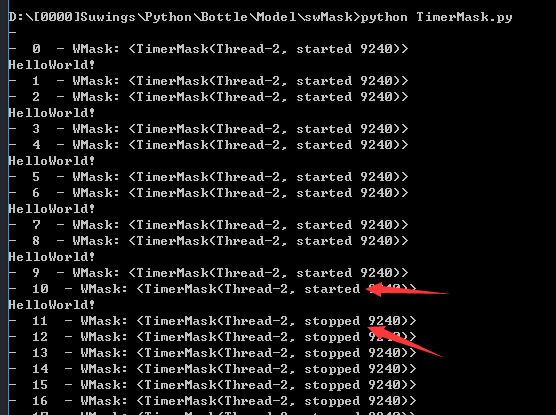
于是你可能会想问,那岂不是每个不同的行为都要写一个继承了BaseTimer的类来做事呢,其实不然,你可以写个函数调用的TimerFunc类:
 class TimerFunc(BaseTimer):

     """可传递任何函数的定时任务类"""

     def __init__(self,func,howtime=1.0,enduring=True):

         BaseTimer.__init__(self,howtime,enduring)

         self.func = func

     def exec(self):

         self.func() #调用函数

 #使用方法:

 def doing():

     print("Hello")

 w = TimerFunc(doing)

 w.start()
输出:"Hello",并且会每隔1秒执行一次
是不是觉得可以做一堆事情了?你可以自由发挥,继承BaseTimer类
 w = TimerFunc(doing,5,False) #这样就可以定义延迟5秒使用了~

 w.start()
在搜索资料的时候,找到了网上大部分的实现方法,其实都差不多,感兴趣你可以看看:
 import threading ,time

 from time import sleep, ctime

 class Timer(threading.Thread):

         """

         very simple but useless timer.

         """

         def __init__(self, seconds):

                 self.runTime = seconds

                 threading.Thread.__init__(self)

         def run(self):

                 time.sleep(self.runTime)

                 print ("Buzzzz!! Time's up!")

 class CountDownTimer(Timer):

         """

         a timer that can counts down the seconds.

         """

         def run(self):

                 counter = self.runTime

                 for sec in range(self.runTime):

                         print (counter)

                         time.sleep(1.0)

                         counter -= 1

                 print ("Done")

 class CountDownExec(CountDownTimer):

         """

         a timer that execute an action at the end of the timer run.

         """

         def __init__(self, seconds, action, args=[]):

                 self.args = args

                 self.action = action

                 CountDownTimer.__init__(self, seconds)

         def run(self):

                 CountDownTimer.run(self)

                 self.action(self.args)

 def myAction(args=[]):

         print ("Performing my action with args:")

         print (args)

 if __name__ == "__main__":

         t = CountDownExec(3, myAction, ["hello", "world"])

         t.start()

         print("")
 '''

 使用sched模块实现的timer,sched模块不是循环的,一次调度被执行后就Over了,如果想再执行,可以使用while循环的方式不停的调用该方法

 Created on 2013-7-31

 @author: Eric

 '''

 import time, sched

 #被调度触发的函数

 def event_func(msg):

     print("Current Time:", time.strftime("%y-%m-%d %H:%M:%S"), 'msg:', msg)

 def run_function():

     #初始化sched模块的scheduler类

     s = sched.scheduler(time.time, time.sleep)

     #设置一个调度,因为time.sleep()的时间是一秒,所以timer的间隔时间就是sleep的时间,加上enter的第一个参数

     s.enter(0, 2, event_func, ("Timer event.",))

     s.run()

 def timer1():

     while True:

         #sched模块不是循环的,一次调度被执行后就Over了,如果想再执行,可以使用while循环的方式不停的调用该方法

         time.sleep(1)

         run_function()

 if __name__ == "__main__":

     timer1()
感谢耐心阅读,希望对你有帮助。
Python 3.X 实现定时器 Timer,制作抽象的Timer定时器基类的更多相关文章
- cocos2d-js 越来越慢的定时器schedule 制作不变慢的定时器
对于动画控制,可能一点误差,大家不会察觉,但如果多次循环累积或网络同步等,大家就会很清楚意识到schedule的误差问题. 首先做一个例子证明一下: var InaccuracyTestLayer = ...
- python(七):元类与抽象基类
一.实例创建 在创建实例时,调用__new__方法和__init__方法,这两个方法在没有定义时,是自动调用了object来实现的.python3默认创建的类是继承了object. class A(o ...
- 两种流行Spring定时器配置:Java的Timer类和OpenSymphony的Quartz
1.Java Timer定时 首先继承java.util.TimerTask类实现run方法 import java.util.TimerTask; public class EmailReportT ...
- python面对对象编程---------6:抽象基类
抽象基本类的几大特点: 1:要定义但是并不完整的实现所有方法 2:基本的意思是作为父类 3:父类需要明确表示出那些方法的特征,这样在写子类时更加简单明白 用抽象基本类的地方: 1:用作父类 2:用作检 ...
- 流畅python学习笔记:第十一章:抽象基类
__getitem__实现可迭代对象.要将一个对象变成一个可迭代的对象,通常都要实现__iter__.但是如果没有__iter__的话,实现了__getitem__也可以实现迭代.我们还是用第一章扑克 ...
- Python 接口:从协议到抽象基类
p.p1 { margin: 0.0px 0.0px 0.0px 0.0px; font: 15.0px Helvetica } 抽象基类的常见用途:实现接口时作为超类使用.然后,说明抽象基类如何检查 ...
- guxh的python笔记七:抽象基类
1,鸭子类型和白鹅类型 1.1,白鹅类型 白鹅类型对接口有明确定义,比如不可变序列(Sequence),需要实现__contains__,__iter__,__len__,__getitem__,__ ...
- python之抽象基类
抽象基类特点 1.不能够实例化 2.在这个基础的类中设定一些抽象的方法,所有继承这个抽象基类的类必须覆盖这个抽象基类里面的方法 思考 既然python中有鸭子类型,为什么还要使用抽象基类? 一是我们在 ...
- Python中的对象行为与特殊方法(二)类型检查与抽象基类
类型检查 创建类的实例时,该实例的类型为类本身: class Foo(object): pass f = Foo() 要测试实例是否属于某个类,可以使用type()内置函数: >>> ...
随机推荐
- 删除.gitignore中的在version control中的文件
如果有一个文件例如xyz在版本控制系统中,然后你发现这个文件不应该提交到git上,所以加了.gitignore文件并将其加入其中,但是git不会自动讲其从版本库中移除它.如果你只有一个文件,你可以使用 ...
- IOS开发 图形绘制,绘制线条,矩形,和垂直和居中绘制文字
概述 吐槽下IOS下 的图形绘图,代码冗长,不得不自己重新封装方法.整理形成本文. 绘制线 // 绘制直线 + (void)toDrawLineFromX:(CGFloat)x1 Y:(CGFloat ...
- Python Flask UnicodeDecodeError 编码错误解决
折腾Python做快速Web开发.最后定下来用Flask,相对教程全面. utf8编码上遇到问题,所有文件已经是utf8编码保存,加载css.js等静态文件,如果用GBK编码就正常:用utf8就报Un ...
- bit操作 转
http://www.catonmat.net/blog/low-level-bit-hacks-you-absolutely-must-know/ Bit Hack #6. Turn off the ...
- unity3d 本地数据存储
using UnityEngine; using System.Collections; //路径工具类 public class PathKit { /** 后缀常量字符 */ public con ...
- 控制反转(Ioc)和依赖注入(DI)
控制反转IOC, 全称 “Inversion of Control”.依赖注入DI, 全称 “Dependency Injection”. 面向的问题:软件开发中,为了降低模块间.类间的耦合度,提倡基 ...
- Ext.grid.GridPanel属性及方法等
1.Ext.grid.GridPanel主要配置项:store:表格的数据集columns:表格列模式的配置数组,可自动创建ColumnModel列模式autoExpandColumn:自动充满表格未 ...
- c# dataGridview的Cellclick移除事件
private void gvMoldInfo_CellClick(object sender, DataGridViewCellEventArgs e) { ) return; string col ...
- linux rdate
检查服务器时间,发现服务器时间与当前时间错了很多.于是调整. 使用ntpdate ,不管如何设置,包括关闭防火期,设置ntp.conf,结果都不成功. 随即使用网上提供的另外一种方法,临时先解决一下燃 ...
- 【Head-First设计模式】C#版-学习笔记-开篇及文章目录
原文地址:[Head-First设计模式]C#版-学习笔记-开篇及文章目录 最近一年断断续续的在看技术书,但是回想看的内容,就忘了书上讲的是什么东西了,为了记住那些看过的东西,最好的办法就是敲代码验证 ...