
一个Lucene.Net的Demo
今天突然想来看一下全文检索,于是就了解了一下Lucene.Net,然后把公司目前的产品表拿来练手,写了这么个Demo。
先看一下Demo的代码
    public class ProductRepository

    {

        private Logger logger = new Logger(typeof(ProductRepository));

        /// <summary>

        /// 分页获取商品数据

        /// </summary>

        /// <param name="tableNum"></param>

        /// <param name="pageIndex">从1开始</param>

        /// <param name="pageSize"></param>

        /// <returns></returns>

        public List<Product> QueryList(int tableNum, int pageIndex, int pageSize)

        {

            string sql = string.Format("SELECT top {2} ProductID,ProductCode,ProductName,PreferentialPrice AS Price,ProductImage AS ImageUrl FROM Product WHERE ProductID>{1};", tableNum.ToString(""), pageSize * Math.Max(, pageIndex - ), pageSize);

            return SqlHelper.QueryList<Product>(sql);

        }

    }
internal class LuceneTest

{

        public static void Show(string searchInput)

        {

            FSDirectory dir = FSDirectory.Open(StaticConstant.TestIndexPath);

            IndexSearcher searcher = new IndexSearcher(dir);//查找器

            QueryParser parser = new QueryParser(Lucene.Net.Util.Version.LUCENE_30, "title", new PanGuAnalyzer());//解析器

            {

                string keyword = searchInput;

                {

                    Query query = parser.Parse(keyword);

                    TopDocs docs = searcher.Search(query, null, );//找到的数据

                    int i = ;

                    foreach (ScoreDoc sd in docs.ScoreDocs)

                    {

                        if (i++ < )

                        {

                            Document doc = searcher.Doc(sd.Doc);

                            Console.WriteLine("***************************************");

                            Console.Write(string.Format(" id={0}", doc.Get("id")));

                            Console.Write(string.Format(" title={0}", doc.Get("title")));

                            Console.Write(string.Format(" time={0}", doc.Get("time")));

                            Console.Write(string.Format(" price={0}", doc.Get("price")));

                            Console.WriteLine("***************************************");

                        }

                    }

                    Console.WriteLine($"一共命中了{docs.TotalHits}个");

                }

            }

        }

        /// <summary>

        /// 初始化索引

        /// </summary>

        public static void InitIndex()

        {

            List<Product> productList = GetList();

            FSDirectory directory = FSDirectory.Open(StaticConstant.TestIndexPath);//FSDirectory表示存放在文件中

            using (IndexWriter writer = new IndexWriter(directory, new PanGuAnalyzer(), true, IndexWriter.MaxFieldLength.LIMITED))//索引写入器

            {

                foreach (Product product in productList)

                {

                        Document doc = new Document();//一条数据

                        doc.Add(new Field("id", product.ProductID.ToString(), Field.Store.NO, Field.Index.NOT_ANALYZED));//一个字段  列名  值   是否保存值  是否分词

                        doc.Add(new Field("title", product.ProductName, Field.Store.YES, Field.Index.ANALYZED));

                        doc.Add(new Field("imageurl", product.ImageUrl, Field.Store.NO, Field.Index.NOT_ANALYZED));

                        doc.Add(new Field("content", "this is lucene working,powerful tool ", Field.Store.YES, Field.Index.ANALYZED));

                        doc.Add(new NumericField("price", Field.Store.YES, true).SetDoubleValue((double)(product.Price)));

                        doc.Add(new NumericField("time", Field.Store.YES, true).SetIntValue(int.Parse(DateTime.Now.ToString("yyyyMMdd"))));

                        writer.AddDocument(doc);//写进去

                }

                writer.Optimize();//优化合并

            }

        }

        /// <summary>

        /// 数据库取5000条数据测试

        /// </summary>

        /// <returns></returns>

        private static List<Product> GetList()

        {

            ProductRepository repository = new ProductRepository();

            List<Product> productList = repository.QueryList(, , );

            return productList;

        }

}
class Program

{

    static void Main(string[] args)

    {

        LuceneTest.InitIndex();

        string input;

        while ((input = Console.ReadLine()).ToUpper() != "EXIT")

        {

            if (input == "") continue;

            LuceneTest.Show(input);

        }

    }

}
现在来看一下LuceneTest的InitIndex方法。
FSDirectory directory = FSDirectory.Open(StaticConstant.TestIndexPath); 该语句表示将创建的索引保存到文件中;
IndexWriter writer = new IndexWriter(directory, new PanGuAnalyzer(), true, IndexWriter.MaxFieldLength.LIMITED) 接着我们创建了一个writer,并指定存放索引的目录为刚创建的directory,使用的分析器为PanGuAnalyzer,第三个参数说明如果已经有索引文件在索引目录下,我们将覆盖它们。
我们循环遍历productList,创建Document,然后往Document添加Filed。这里说明一下Document是表示含文档的数据结构,定义了存储文档的数据结构,Field类定义了document一个域。Field有两个属性可选:存储和索引。通过存储属性你可以控制是否对这个Field进行存储;通过索引属性你可以控制是否对该Field进行索引。最后将document加入到IndexWriter里,使用IndexWriter.Optimize()进行优化合并。
之后我们可以看到在我们制定的目录下生成了下面的文件
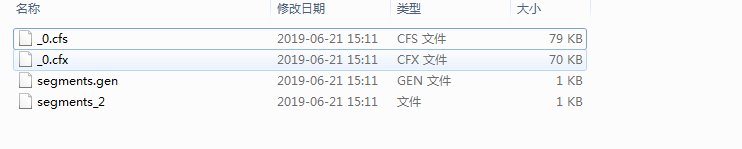
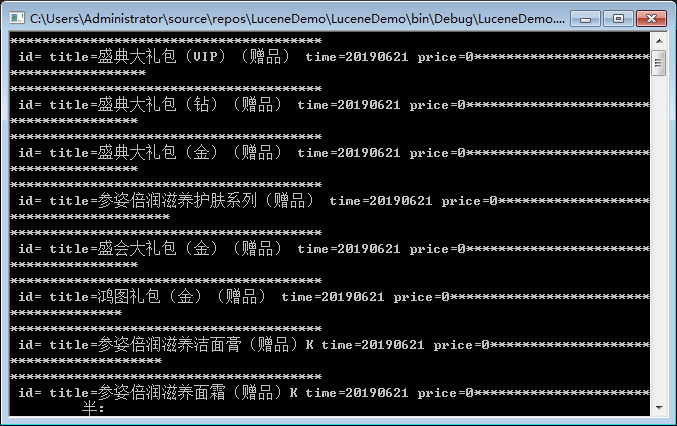
最后我们在Show方法中使用 IndexSearcher 进行检索。
一个Lucene.Net的Demo的更多相关文章
- ios学习-制作一个浏览图片的Demo
一.项目要求:制作一个浏览图片的Demo,要求包含夜间模式,以及改变图片大小,能够显示不同的图片描述 二.开发步骤: 1.在storyboard上添加一个空白的View,然后添加”设置“按钮,添加im ...
- 2.Lucene3.6.2包介绍,第一个Lucene案例介绍,查看索引信息的工具lukeall介绍,Luke查看的索引库内容,索引查找过程
1 Lucen目录介绍 2 lucene-core-3.6.2.jar是lucene开发核心jar包 contrib 目录存放,包含一些扩展jar包 3 案例 建立第一个Lucene项目 ...
- WebRTC系列(1)-手把手教你实现一个浏览器拍照室Demo
1.WebRTC开发背景 由于业务需求,需要在项目中实现实时音视频通话功能,之前基于浏览器开发的Web项目要进行音视频通话,需要安装flash插件才能实现或者使用C/S客户端进行通信.随着互联网技术的 ...
- 一个lucene源码分析的博客
ITpub上的一个lucene源码分析的博客,写的比较全面:http://blog.itpub.net/28624388/cid-93356-list-1/
- C#中缓存的使用 ajax请求基于restFul的WebApi(post、get、delete、put) 让 .NET 更方便的导入导出 Excel .net core api +swagger(一个简单的入门demo 使用codefirst+mysql) C# 位运算详解 c# 交错数组 c# 数组协变 C# 添加Excel表单控件(Form Controls) C#串口通信程序
C#中缓存的使用 缓存的概念及优缺点在这里就不多做介绍,主要介绍一下使用的方法. 1.在ASP.NET中页面缓存的使用方法简单,只需要在aspx页的顶部加上一句声明即可: <%@ Outp ...
- Dubbo入门介绍---搭建一个最简单的Demo框架
Dubbo入门---搭建一个最简单的Demo框架 置顶 2017年04月17日 19:10:44 是Guava不是瓜娃 阅读数:320947 标签: dubbozookeeper 更多 个人分类: D ...
- Lucene3.6.2包介绍,第一个Lucene案例介绍,查看索引信息的工具lukeall介绍,Luke查看的索引库内容,索引查找过程
2.Lucene3.6.2包介绍,第一个Lucene案例介绍,查看索引信息的工具lukeall介绍,Luke查看的索引库内容,索引查找过程 2014-12-07 23:39 2623人阅读 评论(0) ...
- 一个发邮件的demo 用golang
一个比较成熟的第三方包用来发邮件,可以带图片 和附件,项目地址 : github.com/go-gomail/gomail 一个发邮件的demo 用golang 文件目录树: -d:\test\goe ...
- DeWeb进阶 :控件开发 --- 1 完成一个纯html的demo
最近随着DeWeb(以下简称DW)的完善,和群友的应用的深入,已经有网友开始尝试做DeWeb支持控件的开发了! 这太令人兴奋了! 作为DeWeb的开发者,感觉DeWeb的优势之一就是简洁的第三方控件扩 ...
随机推荐
- egret 和cocos2d-x-js哪个目前更稳定更好用? ?
问题: 貌似cocos名气大一些?因为神经猫的大火才知道egret,玩了一下他们的demo,貌似性能一般,不过对flash开发者特别亲切.有人对比过这两个引擎吗?分析下 百牛信息技术bainiu.lt ...
- Jmeter学习之While Controller
参考 https://www.cnblogs.com/richered/p/8404641.html https://blog.csdn.net/rwang99/article/details/511 ...
- centos7添加新硬盘并挂载
一.查看现有磁盘设备 fdisk -l 发现/dev/sdb 为新加的硬盘: 二.开始分区 fdisk /dev/sdb fdisk -l #再次查看分区情况,已经有了/dev/sdb1 三.创建文件 ...
- 015--python集合和字符串
一.集合 关系测试 交集: 两个都有 .intersettion() 或用 & 符号 差集: 列表a有,列表b没有 .difference() 或用 - 符号 并集: 两列表合并 ...
- 005--linux基础一作业
1.最小化安装centos7操作系统 2.新增硬盘分两个分区,两个分区的文件系统依次为ext4和xfs 3.将两个文件系统分别挂在到/mnt和/opt目录 4.新增普通用户egon并采用无需重复确认的 ...
- POJ1236【图的前连通(缩点)】
题意: 1.初始至少需要向多少个学校发放软件,使得网络内所有的学校最终都能得到软件. 2.至少需要添加几条传输线路(边),使任意向一个学校发放软件后,经过若干次传送,网络内所有的学校最终都能得到软件. ...
- 开发者神器!Windows上最强大的虚拟桌面工具-Dexpot
简介 : 用过Linux和Mac计算机的人都知道 , 这两个系统上都有个多桌面的功能非常使用 . 而在Windows上并没有该项功能 , 虽然目前Win10已经增加了多桌面的程序 , 但使用上仍体验不 ...
- iOS NavigationBar 导航栏自定义
1. 设置导航栏NavigationBar的背景颜色: a) setBarTintColor : 设置NagivationBar的颜色 也可以用 : [[UINavigationBar appear ...
- JQUERY 获取 DIV 宽度与高度(width,padding,margin,border)
一般讲的宽度指的是内容宽度,但一个 div 的实际宽度不仅只于内容宽度,尤其在做 CSS 排版时更不能搞错,必须同时考虑 Padding.Border 与 Margin 的宽度,四个加起来才是 di ...
- jQuery access()方法
最开始只是想了解attr方法,发现它内部调用了jQuery.access()方法.除了attr,还有prop.text.html.css.data 都是内部调用了jQuery.access()方法,可 ...