
EXTJS中整合tinymce的富文本编辑器,添加上传图片功能
提供部分代码。
Ext.create('Ext.window.Window', {
id: 'wind',
title: 'CRUD窗口',
modal: true,
height: 800,
width: 1050,
hideMode: 'display',
closeAction: 'hide',
maximizable: false,
layout: { type: 'fit', align: 'left' },
bodyPadding: 0,
items: [{
xtype: 'form',
layout: 'anchor',
autoScroll: true,
bodyPadding: 10,
defaults: {
xtype: 'combo',
anchor: '10',
labelAlign: 'left'
},
items: [{
fieldLabel: '(案件)物证名称', name: 'EName', maxLength: 100,
allowBlank: false,
queryMode: 'local',
valueField: 'EName',
displayField: 'EName',
listConfig: {
maxHeight: 200, },
editable: true,
value: '------请选择或输入(案件)物证名称------',
store: Ext.StoreManager.lookup("comboEvidenceStore")
}, {
fieldLabel: '鉴定科目', name: 'IdentificationSubject', maxLength: 100,//maxLength表示可输入的最大字符长度是20
allowBlank: false,
queryMode: 'local',
editable: false,
listConfig: {
maxHeight: 200,
},
valueField: 'IdentificationSubject',
displayField: 'IdentificationSubject',
store: Ext.StoreManager.lookup("IdentificationSubjectStore"),
id: "IdentificationSubject",
value: '------请选择或输入所需的鉴定科目-----',
listeners: {
select: function (combo, record, index) {
// combo.getValue(); }
},
{
xtype: "tinymce_field", name: "content", height: 530, border: 1,
tinyMCEConfig: {
relative_urls: false,
convert_urls: false,
theme: "modern",
file_browser_callback: function (field_name, url, type, win) {
if (type == 'image') {
//$('#mce_135').css("z-index", "0");
var add_winForm = Ext.create('Ext.form.Panel', {
frame: true, //frame属性
//title: 'Form Fields',
width: 350,
height: 140,
bodyPadding: 35, style: 'border-width:2 2 2 2;',
margin: 45,
bodyStyle: "padding:5px 5px 0",
//renderTo:"panel21",
fieldDefaults: {
labelAlign: 'center',
labelWidth: 60,
anchor: '100%'
},
items: [{
//显示文本框,相当于label
xtype: 'displayfield',
name: 'displayfield1',
fieldLabel: '',
value: '<font size=3><b>请输入你的登录系统密码</b></font>', }, {
//输入密码的文本框,输入的字符都会展现为.
xtype: 'textfield',
name: 'password1',
inputType: 'password',
fieldLabel: '<b>密码</b>'
}]
});
var win = Ext.create("Ext.window.Window", {
id: "myWin",
title: "验证身份",
width: 450,
height: 300, Layout: "fit",
modal: true,
resizable: false,
autoWidth: false,
items: [add_winForm],
buttons: [
{
xtype: "button", text: "确定",
handler: function () {
var formValues = add_winForm.getForm().getValues();
var pwd = formValues["password1"];
if (pwd == "") {
alert('密码不能为空!'); return;
}
else {
if (add_winForm.getForm().isValid()) {
add_winForm.getForm().submit({
url: '/controler/authenticationIdentity.ashx?date=' + new Date().getMilliseconds() + '&password=' + pwd,
submitEmptyText: true,
waitTitle: '请稍等...',
waitMsg: '正在提交信息...',
method: 'POST',
success: function (fp, o) {
win.close();
$('#my_form input').click();
},
failure: function () {
alert('密码输入有误!');
win.show(); win.setZIndex("80000");//设置模态窗口!!!
} })
}
} }
},
{ xtype: "button", text: "取消", handler: function () { this.up("window").close(); } }
]
});
win.show(); win.setZIndex("80000");//设置模态窗口!!! }
},
menubar: true,
image_advtab: true, language: 'zh_CN',
plugins: [" advlink contextmenu emotions flash autosave style layer iespell insertdatetime paste preview print save noneditable spellchecker searchreplace table zoom directionality fullpage inlinepopups fullpage",
"advlist newdocument autolink lists link image charmap print preview hr anchor pagebreak",
"searchreplace visualblocks visualchars code ",
"insertdatetime media nonbreaking save table contextmenu directionality",
"emoticons template paste textcolor",
" markettoimages,autolink,lists,pagebreak,style,layer,table,save,advhr,advimage,advlink,emotions,iespell,inlinepopups,insertdatetime,preview,media,searchreplace,print,contextmenu,paste,directionality,noneditable,visualchars,nonbreaking,xhtmlxtras,template,wordcount,advlist,autosave image",
],
toolbar1: "undo redo | styleselect | bold italic | alignleft aligncenter alignright alignjustify | bullist numlist outdent indent | link image print preview media | forecolor backcolor emoticons markettoimages", },
// external_plugins: { "filemanager" : "/filemanager/plugin.min.js"},
//codemirror: {
// indentOnInit: true, // Whether or not to indent code on init.
// path: 'CodeMirror'},
value: "",
//tinyMCE.get("tinymce_field").setContent("123") }
], buttons: [
{ xtype: "displayfield", id: "lblMessage", flex: 1, fieldStyle: "color:#1C3E7E;font-weight:bold;" }, {
text: '保存',//修改、添加
id: 'saveBt'
}, {
text: '获取内容',//修改、添加
handler: function () {
var content = this.up("form").down("tinymce_field").getValue();
alert(content);
}
}, {
text: '加盖公章',
handler: function () {
location.href = "";
}
}, {
text: '上传文件',
handler: function () {
var panel2 = new Ext.Panel({
id: "panel1",
fitToFrame: true,
html: '<iframe id="frame1" src="upload.html" frameborder="0" width="580px" height="500px"></iframe>'
});
var win = new Ext.Window({
title: "上传文件",
modal: true,
layout: 'form',
border: false,
resizable: false,
width: 480,
height: 465,
plain: true,
items: ["panel1"],
autoHeight: true,
buttons: [
{
text: '关闭', handler: function () { win.close(); }
}]
});
win.show();
} }] }]
}).show().hide();
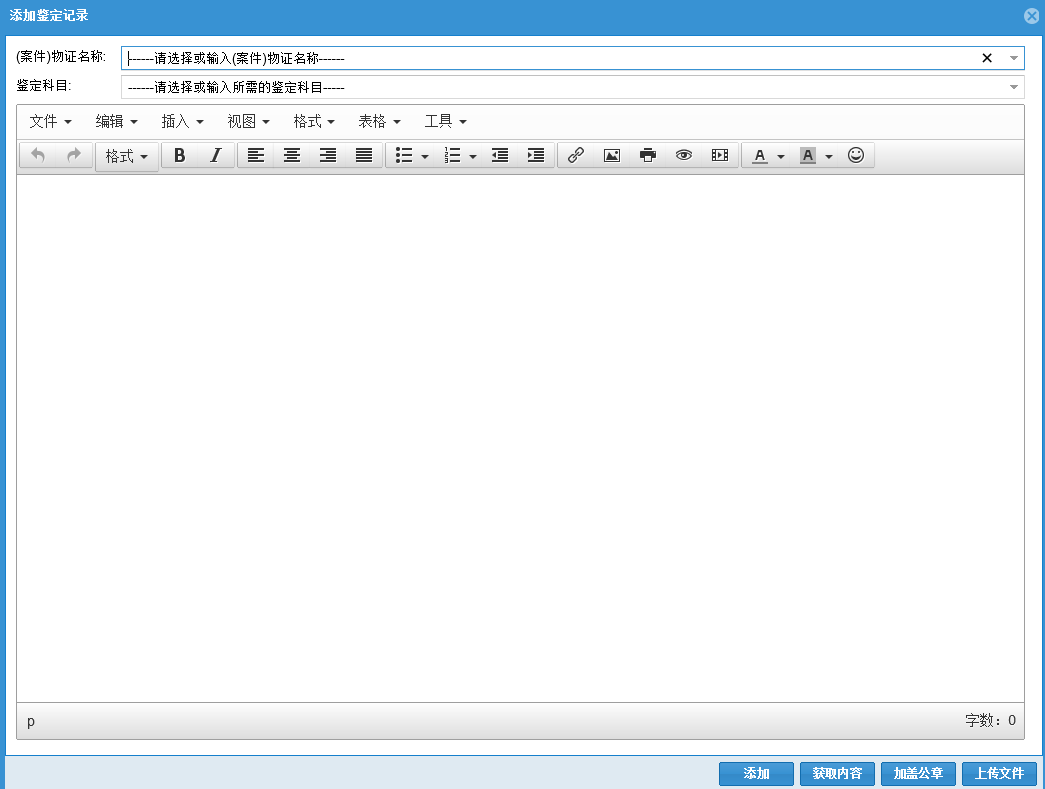
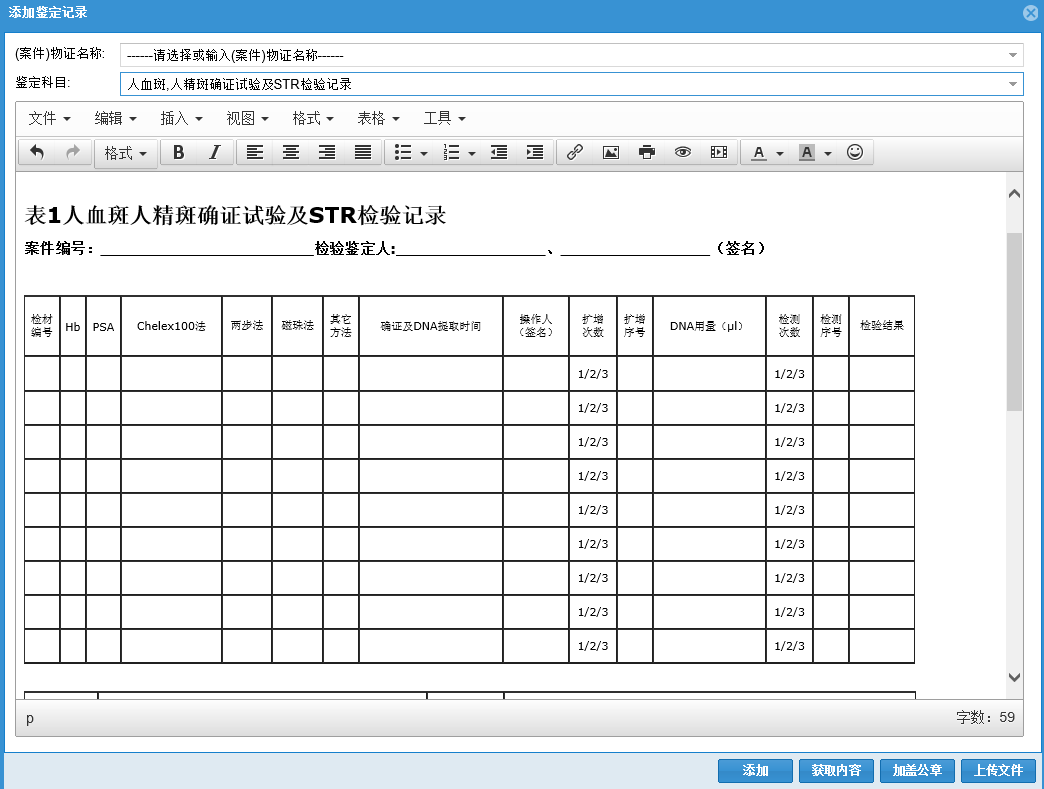
效果图如下o:

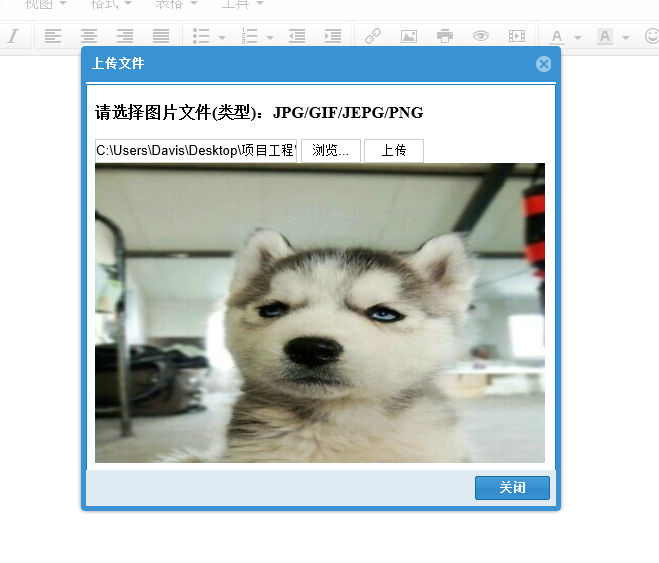
图片上传预览功能
EXTJS中整合tinymce的富文本编辑器,添加上传图片功能的更多相关文章
- Vue CLI 3+tinymce 5富文本编辑器整合
基于Vue CLI 3脚手架搭建的项目整合tinymce 5富文本编辑器,vue cli 2版本及tinymce 4版本参考:https://blog.csdn.net/liub37/article/ ...
- TinyMCE(富文本编辑器)在Asp.Net中的使用方法
TinyMCE(富文本编辑器)在Asp.Net中的使用方法 转至:http://www.cnblogs.com/freeliver54/archive/2013/02/28/2936506.htm ...
- TinyMCE(富文本编辑器)
[转]TinyMCE(富文本编辑器)在Asp.Net中的使用方法 官网演示以及示例代码:https://www.tinymce.com/docs/demo/image-tools/ 转自:http:/ ...
- 【转】TinyMCE(富文本编辑器)
效果预览:http://www.tinymce.com/tryit/full.php [转]TinyMCE(富文本编辑器)在Asp.Net中的使用方法 转自:http://www.cnblogs.co ...
- 在Asp.Net Core中配置使用MarkDown富文本编辑器实现图片上传和截图上传(开源代码.net core3.0)
我们的富文本编辑器不能没有图片上传尤其是截图上传,下面我来教大家怎么实现MarkDown富文本编辑器截图上传和图片上传. 1.配置编辑器到html页 <div id="test-edi ...
- 在Asp.Net或.Net Core中配置使用MarkDown富文本编辑器有开源模板代码(代码是.net core3.0版本)
研究如何使用Markdown你们可能要花好几天才能搞定,但是看我的文章或者下载了源码,你搞定一般在10分钟之内.我先给各位介绍下它: Markdown 是一种轻量级标记语言,它允许人们使用易读易写的纯 ...
- vue-quill-editor富文本编辑器,上传图片自定义为借口上传
vue-quill-editor富文本编辑器,上传图片自定义为借口上传 博客地址:https://blog.csdn.net/lyj2018gyq/article/details/82585194
- bootstrap-wysihtml5 ckeditor 修改富文本编辑器可以上传图片
bootstrap-wysihtml5 ckeditor 修改富文本编辑器可以上传图片 bootstrap-wysihtml5实际使用内核为ckeditor 故这里修改ckeditor即可 ...
- 15、Vue CLI 3+tinymce 5富文本编辑器整合
富文本编辑器里大佬们都说tinymce NB! 插件安装 inymce官方提供了一个vue的组件tinymce-vue 如果有注册或购买过服务的话,直接通过组件配置api-key直接使用,懒的注册或者 ...
随机推荐
- [Python筆記] 將 Pandas 的 Dataframe 寫入 Sqlite3
使用 pandas.io 寫入 Sqlite import sqlite3 as lite from pandas.io import sql import pandas as pd 依照 if_ex ...
- js join()和split()方法、reverse() 方法、sort()方法
############ join()和split()方法 join() 方法用于把数组中的所有元素放入一个字符串. 元素是通过指定的分隔符进行分隔的. 指定分隔符方法join("#&q ...
- axios 里面 then 默认写的function里面没有this,改成箭头函数后就可以用this了
,methods:{ loadJson:function(){ //this.jsonTest = "jjj" this.$http.get('http://localhost:3 ...
- DP || HYSBZ 1207 打鼹鼠
n*n的网格,有m个鼹鼠,t时间会有一只鼹鼠出现在(x,y)点处,如果机器人也在这个点就可以打到鼹鼠 机器人初始位置任意,每秒可以移动一格,问最多打到多少鼹鼠 *解法:f[i]表示前i只鼹鼠打了多少个 ...
- myBatis的binding错误:Invalid bound statement (not found)
org.apache.ibatis.binding.BindingException: Invalid bound statement (not found)错误这个问题我找了好久,终于找到了正确的写 ...
- xshell全局设置配色方案
新建XTerm1.xcs文件,将以下内容黏贴进去,保存退出 [XTerm] text=839496 cyan(bold)=93a1a1 text(bold)=408080 magenta=dd3682 ...
- 牛客noip前集训营(第一场)提高T1
链接:https://www.nowcoder.com/acm/contest/172/A来源:牛客网 题目描述 小N得到了一个非常神奇的序列A.这个序列长度为N,下标从1开始.A的一个子区间对应一个 ...
- POJ-1190-生日蛋糕(深搜,剪枝)
生日蛋糕 Time Limit: 1000MS Memory Limit: 10000K Total Submissions: 23049 Accepted: 8215 Description 7月1 ...
- ZooKeeper运行原理和基本编程接口
什么是ZooKeeper ZooKeeper作为一个分布式的服务框架(与Google Chubby类似),主要用于解决分布式集群中应用系统的一致性问题,它能提供基于类似于文件系统的目录节点树方式的数 ...
- solr中的schema.xml(managed-schema)文件解读
solr 7.2.1版本managed-schema文件示例 <uniqueKey>id</uniqueKey> 唯一键字段,solr对每一个文档都赋予一个唯一标识符字段,避免 ...