
TinyMCE(富文本编辑器)
[转]TinyMCE(富文本编辑器)在Asp.Net中的使用方法
官网演示以及示例代码:https://www.tinymce.com/docs/demo/image-tools/
转自:http://www.cnblogs.com/hahacjh/archive/2010/07/24/1784268.html
TinyMCE 在Asp.Net中的使用方法其实挺简单的,从官方网站下载TinyMCE),然后将里面的jscripts目录拷到你的网站目录
假设你的aspx页面中某一个地方需要用到编辑器,则加入
<asp:TextBox ID=”brand” TextMode=”MultiLine” runat=”server” />
并同时在header里加入:
<script src=”../js/tiny_mce/tiny_mce_src.js” type=”text/javascript”></script>
<script language=”javascript” type=”text/javascript”>
tinyMCE.init({
mode : “textareas”,
theme : “simple”
});
</script>
运行页面,即可以看到一个编辑器出现了,并且你在服务端可以通过brand.Text来获取值(你可能会看到一个出错的提示,这时只需要将.aspx最开始的<%@ Page 里加入ValidateRequest=”false”,即可)
当然,如果你页面中有多个textareas,你可能只希望某一个用编辑器代替,则上面的mode一行改为:
mode : "exact", elements : “对应的ID”
需要其它的用法,可以到官方网站查看
----------------------------------------------------------------中文乱码问题:
在设置好TinyMCE的语言包后,在ASP.net中使用的时候却总是不正常,无法争取读取到语言包内容。仔细研究后发现,原来是因为ASP.net 2.0默认的HTTPResponse输出的编码是utf-8,而非中文gb2312,或是gb18030、HZ所以就会出现设置正确,但是在页面执行的时候却出现错误,不能正确读取语言包的配置的问题。我们可以在Page类的加载过程Load中加入如果设置语句就可以解决这个问题
Response.ContentEncoding = Encoding.GetEncoding("gb2312")
重新编译执行后,就可以正常读取到中文语言资源包中的内容了。
-----------------------------------------------------
相关资源收集:
TinyMCE 中文手册 http://www.inpeck.com/TinyMceManual/
tinymce中几个比较有用的插件: http://joom.org.ru/home/article/14-tinymce-plugin.html
在线编辑器 TinyMCE 3 的简体中文语言包: http://www.metalstar.net/?d=86
tinymce中文字体过小解决方法 http://www.humker.com/2008/03/07/tinymce-chinese-font-size
做成自定义控件:http://www.jonllen.com/jonllen/aspnet/tinymce.aspx
tinymce不管哪个版本,中文的默认字体都是太小了,编辑了保存以后再拿出来还莫名其妙的变的很大。
解决方案:js\themes\advanced\css\editor_content.css中的
body, td, pre {
font-family: Verdana, Arial, Helvetica, sans-serif;
font-size: 12px;
}
10px改为12px就可以了。
Integrating TinyMCE Editor with ASP.NET
转自:http://www.cnblogs.com/zhouxiao/archive/2012/06/25/2560633.html
Introduction
In one of my projects, there was a requirement to embed a WYSIWYG editor. Some of the features that were looked into were:
- Easy to configure
- Open source
- In some cases, user can edit only portion of the pre-rendered text in the editor.
After searching a lot, I came across TinyMCE editor (http://tinymce.moxiecode.com/). But, I had some issues in integrating the same with ASP.NET applications. The following write up provides one of the ways to integrate with TinyMCE.
How To
The following section provides the steps to implement it in ASP.NET.
Step 1: Download the latest version (tinymce_3_3_7.zip) from the following location,http://tinymce.moxiecode.com/download.php. Unzip the downloaded .zip file in one of your local folders.
Step 2: Create an ASP.NET web application and copy the tinymce folder to the web application. The solution explorer would look something like this.
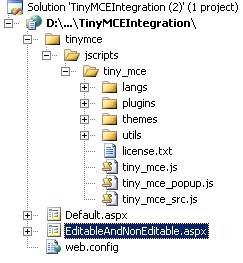
Note: You can remove the examples folder under tinymce folder.
Step 3: Add a reference of tiny_mce.js file to the page in which you would like to integrate the TinyMCE editor.
Include tiny_mce.js file at the top of your file.
 Collapse | Copy Code
<script type="text/javascript" src="tinymce/jscripts/tiny_mce/tiny_mce.js"></script>
Add the following lines of code which initialize all the textarea controls on the WYSIWYG editor type. They are quite customizable, please check the examples section in their web site.
Collapse | Copy Code<script type="text/javascript">
tinyMCE.init({
// General options
mode: "textareas",
theme: "advanced",
plugins: "pagebreak,style,layer,table,save,advhr,advimage,advlink,emotions,iespell,
inlinepopups,insertdatetime,preview,media,searchreplace,print,contextmenu,paste,
directionality,fullscreen,noneditable,visualchars,nonbreaking,xhtmlxtras,template,
wordcount,advlist,autosave",
setup: function(ed) {
ed.onKeyPress.add(
function(ed, evt) {
}
);
},
// Theme options
theme_advanced_buttons1: "save,newdocument,|,bold,italic,underline,strikethrough,|,
justifyleft,justifycenter,justifyright,justifyfull,styleselect,formatselect,
fontselect,fontsizeselect",
theme_advanced_buttons2: "cut,copy,paste,pastetext,pasteword,|,search,replace,|,
bullist,numlist,|,outdent,indent,blockquote,|,undo,redo,|,link,unlink,anchor,
image,cleanup,help,code,|,insertdate,inserttime,preview,|,forecolor,backcolor",
theme_advanced_buttons3: "tablecontrols,|,hr,removeformat,visualaid,|,sub,sup,|,
charmap,emotions,iespell,media,advhr,|,print,|,ltr,rtl,|,fullscreen",
theme_advanced_buttons4: "insertlayer,moveforward,movebackward,absolute,|,
styleprops,|,cite,abbr,acronym,del,ins,attribs,|,visualchars,nonbreaking,
template,pagebreak,restoredraft",
theme_advanced_toolbar_location: "top",
theme_advanced_toolbar_align: "left",
theme_advanced_statusbar_location: "bottom",
theme_advanced_resizing: true,
// Example content CSS (should be your site CSS)
content_css: "css/content.css",
// Drop lists for link/image/media/template dialogs
template_external_list_url: "lists/template_list.js",
external_link_list_url: "lists/link_list.js",
external_image_list_url: "lists/image_list.js",
media_external_list_url: "lists/media_list.js",
// Style formats
style_formats: [
{ title: 'Bold text', inline: 'b' },
{ title: 'Red text', inline: 'span', styles: { color: '#ff0000'} },
{ title: 'Red header', block: 'h1', styles: { color: '#ff0000'} },
{ title: 'Example 1', inline: 'span', classes: 'example1' },
{ title: 'Example 2', inline: 'span', classes: 'example2' },
{ title: 'Table styles' },
{ title: 'Table row 1', selector: 'tr', classes: 'tablerow1' }
],
// Replace values for the template plugin
template_replace_values: {
username: "Some User",
staffid: "991234"
}
});
</script>
Step 4: Add a text area control on to the page.
Collapse | Copy Code<textarea id="elm1" name="elm1" rows="15" cols="80" style="width: 80%" runat="server"></textarea>
Step 5: Execute the Page J and you should able to see the editor embedded in your ASP.NET page.
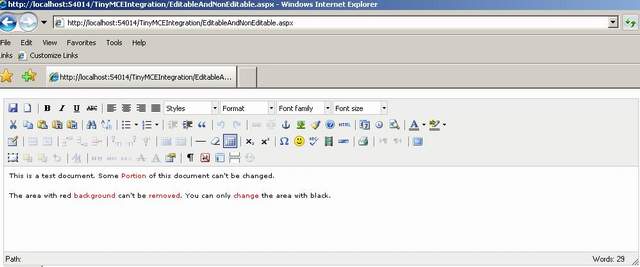
Additional Features
In case you would want to have pre rendered text with some non editable text, use the CSS class mceNonEditablefor the text you would want to make it non editable.
Collapse | Copy Codethis.elm1.Value = "<p>This is a test document. Some <span class='mceNonEditable' style=\"color: #ff0000;\">Portion</span> of this document can't be changed.</p>\r\n<p>The area with red <span class='mceNonEditable' style=\"color: #ff0000;\">background </span> can't be <span class='mceNonEditable' style=\"color: #ff0000;\">removed</span>. You can only <span class='mceNonEditable' style=\"color: #ff0000;\">change </span> the area with black.</p>\r\n<p> </p>";
Where this.elm1 is a textarea control.
Summary
I had difficulties in getting it to work, hence thought this should be useful for people wanting to integrate the TinyMCE editor with their ASP.NET applications.
转自 http://www.codeproject.com/Articles/88142/Integrating-TinyMCE-Editor-with-ASP-NET
TinyMCE(富文本编辑器)的更多相关文章
- 在 Vue 项目中引入 tinymce 富文本编辑器
项目中原本使用的富文本编辑器是 wangEditor,这是一个很轻量.简洁编辑器 但是公司的业务升级,想要一个功能更全面的编辑器,我找了好久,目前常见的编辑器有这些: UEditor:百度前端的开源项 ...
- tinymce 富文本编辑器 编写资料
tinymce官方文档: 粘贴图片插件 博客搬运地址 使用Blob获取图片并二进制显示实例页面 tinymce自动调整插件 是时候掌握一个富文本编辑器了——TinyMCE(1) XMLHttpRequ ...
- vue中引入Tinymce富文本编辑器
最近想在项目上引入一个富文本编辑器,之前引入过summernote,感觉并不太适合vue使用, 然后在网上查了查,vue中使用Tinymce比较适合, 首先,我们在vue项目的components文件 ...
- Vue集成tinymce富文本编辑器并实现本地化指南(2019.11.21最新)
tinymce是一款综合口碑特别好.功能异常强大的富文本编辑器,在某些网站,甚至享有"宇宙最强富文本编辑器"的称号.那么,在Vue项目中如何集成呢?这并不困难,只需要参照官方教程 ...
- Vue tinymce富文本编辑器
tinymce 官方为 vue 项目提供了一个组件 tinymce-vue 一.安装tinymce-vue npm install @tinymce/tinymce-vue -S 二.下载tinymc ...
- Django使用tinymce富文本编辑器
1 - 安装 pip install django-tinymce==2.6.0 2 - 注册app INSTALLED_APPS = ( ... 'tinymce', ) 3 - 在setting中 ...
- tinymce富文本编辑器整合到django
第一步:定义表存图片路径 models.py class AdminIMG(models.Model): filename = models.CharField(max_length=200, ...
- django富文本编辑器
-------------------tinymce富文本编辑器1.下载安装 1.在网站pypi网站搜索并下载"django-tinymce-2.4.0" 2.解压:tar zxv ...
- 前端vue-TinyMCE富文本编辑器表情插件报错解决
最近项目中需要使用文本编辑器,比较了下最终选择了TinyMCE这款富文本编辑器.我安装的是TinyMCE v5但是在使用表情插件的时候,表情一直都出不来,报错信息如下: Uncaught Syntax ...
随机推荐
- Adobe Scout 使用参考说明
Adobe Scout 用于优化 Flash 内容,是一款极为强大的工具,因为它能让您看到 Flash Player 幕后正在发生的事情.但是若明白 Flash Player 为什么做这些事情,您看到 ...
- Oracle导入导出dmp文件
目 录 目 录...3 1 说明...3 2 导出dmp文件...3 3 导入dmp文件...5 3.1 环境准备...5 ...
- unix文件操作函数
1. fopen函数 #include <stdio.h> FILE *fopen(const char *path, const char *mode) 返回:文件顺利打开后,指向该流的 ...
- sqlzoo.net刷题5
List the continents that have a total population of at least 100 million. 这题考察的是使用集聚函数生成表之后,如何过滤 一般我 ...
- f2fs源码分析之文件读写过程
本篇包括三个部分:1)f2fs 文件表示方法: 2)NAT详细介绍:3)f2fs文件读写过程:4) 下面详细阐述f2fs读写的过程. 管理数据位置关键的数据结构是node,node包括三种:inode ...
- [4]Telerik Grid 简单使用方法
1.columns <% Html.Telerik().Grid(Model) .Name("Orders") .Columns(columns => { //绑定列名 ...
- Discuz X3核心文件解析
<?php /** * [Discuz!] (C)2001-2099 Comsenz Inc. * This is NOT a freeware, use is subjec ...
- Got a packet bigger than 'max_allowed_packet' bytes
昨天用导入数据的时候发现有的地方有这个错误.后来才发现我用RPM包装的MYSQL配置文件里面有old_passwords=1去掉就可以了. Got a packet bigger than ‘max_ ...
- python下RSA 加密/解密,签名/验证
基于win7 + python3.4 原文是py2环境,而我的环境是py3,所以对原代码做了修改:decode(), encode() import rsa # 生成密钥 (pubkey, privk ...
- gunzip 和 unzip 解压文件到指定的目录
Linux 常用的压缩命令有 gzip 和 zip,两种压缩包的结尾不同:zip 压缩的后文件是 *.zip ,而 gzip 压缩后的文件 *.gz 相应的解压缩命令则是 gunzip 和 unzi ...