
android test控件
1.Plain Text
输入文本框
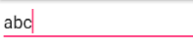
    <EditText

        android:id="@+id/editText"

        android:layout_width="wrap_content"

        android:layout_height="wrap_content"

        android:layout_weight="1"

        android:ems="10"

        android:inputType="textPersonName"

        android:text="Name" />
2.Password
(1)密码框
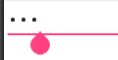
    <EditText

        android:id="@+id/editText3"

        android:layout_width="wrap_content"

        android:layout_height="wrap_content"

        android:layout_weight="1"

        android:ems="10"

        android:inputType="textPassword" />
(2)只能输入数字的密码框
    <EditText

        android:id="@+id/editText"

        android:layout_width="wrap_content"

        android:layout_height="wrap_content"

        android:layout_weight="1"

        android:ems="10"

        android:inputType="numberPassword" />
3.E-mail
??
4.Phone
手机号文本
    <EditText

        android:id="@+id/editText14"

        android:layout_width="wrap_content"

        android:layout_height="wrap_content"

        android:layout_weight="1"

        android:ems="10"

        android:inputType="phone" />
5.Postal Address
6.Multiline Text
多行文本
    <EditText

        android:id="@+id/editText18"

        android:layout_width="wrap_content"

        android:layout_height="wrap_content"

        android:layout_weight="1"

        android:ems="10"

        android:inputType="textMultiLine" />
7.Time
时间文本
    <EditText

        android:id="@+id/editText12"

        android:layout_width="wrap_content"

        android:layout_height="wrap_content"

        android:layout_weight="1"

        android:ems="10"

        android:inputType="time" />
8.Date
日期文本
    <EditText

        android:id="@+id/editText13"

        android:layout_width="wrap_content"

        android:layout_height="wrap_content"

        android:layout_weight="1"

        android:ems="10"

        android:inputType="date" />
9.Number
数字文本
   <EditText

        android:id="@+id/editText15"

        android:layout_width="wrap_content"

        android:layout_height="wrap_content"

        android:layout_weight="1"

        android:ems="10"

        android:inputType="number" />
正负
    <EditText

        android:id="@+id/editText16"

        android:layout_width="wrap_content"

        android:layout_height="wrap_content"

        android:layout_weight="1"

        android:ems="10"

        android:inputType="numberSigned" />
小数
   <EditText

        android:id="@+id/editText17"

        android:layout_width="wrap_content"

        android:layout_height="wrap_content"

        android:layout_weight="1"

        android:ems="10"

        android:inputType="numberDecimal" />
10.AutoComplete TextView
自动提示
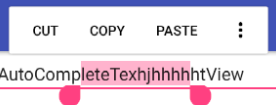
    <AutoCompleteTextView

        android:id="@+id/autoCompleteTextView"

        android:layout_width="wrap_content"

        android:layout_height="wrap_content"

        android:layout_weight="1"

        android:text="AutoCompleteTextView" />
11.MultiAutoComplete TextView
多次提示
二、
1 .是否禁用
            <EditText

                android:id="@+id/etScan"

                android:layout_width="wrap_content"

                android:layout_height="wrap_content"

                android:enabled="false"

                android:focusableInTouchMode="false"/>
    //编辑开关切换

    public void EditBundleOnClick(View view){

      if(mEtScan.isEnabled()){

          mEtScan.setFocusableInTouchMode(false);//是否获得焦点

          mEtScan.setEnabled(false);//是否禁用

      }else {

          mEtScan.setFocusableInTouchMode(true);

          mEtScan.setEnabled(true);

      }

    }
android test控件的更多相关文章
- android 基础控件(EditView、SeekBar等)的属性及使用方法
android提供了大量的UI控件,本文将介绍TextView.ImageView.Button.EditView.ProgressBar.SeekBar.ScrollView.WebView ...
- Android基本控件之Menus
在我们的手机中有很多样式的菜单,比如:我们的短信界面,每条短信,我们长按都会出现一个菜单,还有很多的种类.那么现在,我们就来详细的讨论一下安卓中的菜单 Android的控件中就有这么一个,叫做Menu ...
- Android:控件布局(相对布局)RelativeLayout
RelativeLayout是相对布局控件:以控件之间相对位置或相对父容器位置进行排列. 相对布局常用属性: 子类控件相对子类控件:值是另外一个控件的id android:layout_above-- ...
- Android:控件布局(线性布局)LinearLayout
LinearLayout是线性布局控件:要么横向排布,要么竖向排布 决定性属性:必须有的! android:orientation:vertical (垂直方向) .horizontal(水平方向) ...
- 矩阵, 矩阵 , Android基础控件之ImageView
天下文章大家抄,以下所有内容,有来自copy,有来自查询,亦有自己的总结(目的是总结出自己的东西),所以说原创,不合适,说是转载也不恰当,所以我称之为笔记,可惜没有此分类选项,姑且不要脸一点,选择为原 ...
- Android给控件添加触摸回调
Android给控件添加触摸回调 脑补一个场景,一个页面点击某个按钮会弹出PopupWindow,然后点击PopupWindow以外的任意位置关闭 效果图 实现方法 可以在布局的最外层容器监听触摸事件 ...
- Android 基本控件相关知识整理
Android应用开发的一项重要内容就是界面开发.对于用户来说,不管APP包含的逻辑多么复杂,功能多么强大,如果没有提供友好的图形交互界面,将很难吸引最终用户.作为一个程序员如何才能开发出友好的图形界 ...
- Github上star数超1000的Android列表控件
Android开发中,列表估计是最最常使用到的控件之一了.列表相关的交互如下拉刷新,上拉更多,滑动菜单,拖动排序,滑动菜单,sticky header分组,FAB等等都是十分常见的体验.Github中 ...
- Android:控件布局(相对布局)RelativeLayout(转)
相对布局常用属性: 子类控件相对子类控件:值是另外一个控件的id android:layout_above----------位于给定DI控件之上android:layout_below ------ ...
- 【Android开发日记】之入门篇(十三)——Android的控件解析
Android的控件都派生自android.view.View类,在android.widget包中定义了大量的系统控件供开发者使用,开发者也可以从View类及其子类中,派生出自定义的控件. 一.An ...
随机推荐
- OpenCV2:直方图
一.简介 在一个单通道的灰度图像中,每个像素的值介于0(黑色)~255(白色)之间,灰色图像的直方图有256个条目(或称为容器)
- Java获取2个日期里面的所有月份
public static void main(String[] args) { String t1="2018-08-01"; t1 = t1.replaceAll(" ...
- 洛谷P1000 超级玛丽游戏
这道题很简单,就是原样输出,只不过写起来有点恶心!!! code: #include<stdio.h> int main() { printf( " ********\n&quo ...
- GIMP如何创建layer masks,创建,删除,禁用,复制mask
这次案例是背景替换,采用创建一个新的layer masks: 前期准备好要处理的图片: 1.创建一个新的图层,选择Layer,点击Mask,选择Add Layer Mask: 根据情况选择合适 ...
- sed快速学习
- Java基础知识:集合框架
*本文是最近学习到的知识的记录以及分享,算不上原创. *参考文献见链接. 目录 集合框架 Collection接口 Map接口 集合的工具类 这篇文章只大致回顾一下Java的总体框架. 集合框架 ht ...
- 【ORACLE】调整序列的当前种子值
[ORACLE]调整序列的当前种子值 --必须用SYS用户执行脚本:或具有SYSDBA角色登录: CREATE OR replace ); v_step ):;--步进 tsql ); BEGIN E ...
- Java面试——从JVM角度比较equals和==的区别
1. Java中数据类型分类 1.1 基本数据类型 又称为原始数据类型,byte,short,char,int,long,float,double,boolean,他们之间的比较应该使用(== ...
- 【LeetCode】Remove Nth Node From End of List(删除链表的倒数第N个节点)
这道题是LeetCode里的第19道题. 题目要求: 给定一个链表,删除链表的倒数第 n 个节点,并且返回链表的头结点. 示例: 给定一个链表: 1->2->3->4->5, ...
- [转载] Laya性能优化精选内容整理
第一是性能统计工具,这是LayaAir引擎内置的性能统计工具,在代码加入Laya.Stat.show(); 引擎内置的性能统计工具 打开这个工具后,可以用于观察性能,除了FPS越高越好外,其它的值越低 ...