
三层组网AP上线外接DHCP
一、实验目的
在3-1的基础上增加DHCP的配置方法
二、实验仪器设备及软件
仪器设备:一台AC,四台AP,一台路由充当DHCP服务器
软件:ENSP
三、实验原理
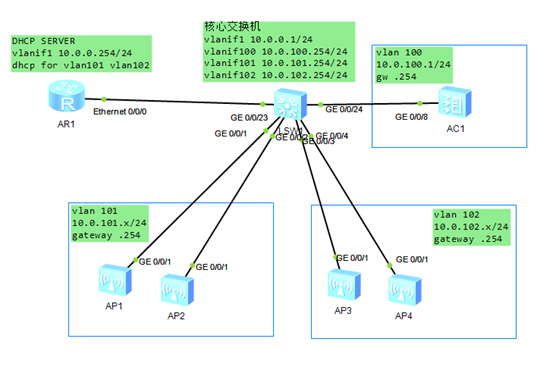
四、 实验内容与步骤
1.三层交换机
<Huawei>sys
Enter system view, return user view with Ctrl+Z.
[Huawei]sysname coreSwitch
[coreSwitch]undo info-center enable
Info: Information center is disabled.
[coreSwitch]vlan batch 100 to 102
Info: This operation may take a few seconds. Please wait for a moment...done.
[coreSwitch]dhcp en
Info: The operation may take a few seconds. Please wait for a moment.done.
[coreSwitch]interface vlanif1
[coreSwitch-Vlanif1]ip add 10.0.0.1 255.255.255.0
[coreSwitch-Vlanif1]interface vlanif100
[coreSwitch-Vlanif100]ip add 10.0.100.254 255.255.255.0
[coreSwitch-Vlanif100]interface vlanif101
[coreSwitch-Vlanif101]ip add 10.0.101.254 255.255.255.0
[coreSwitch-Vlanif101]dhcp select relay
[coreSwitch-Vlanif101]dhcp relay server-ip 10.0.0.254
[coreSwitch-Vlanif101]interface vlanif102
[coreSwitch-Vlanif102]ip add 10.0.102.254 255.255.255.0
[coreSwitch-Vlanif102]dhcp select relay
[coreSwitch-Vlanif102]dhcp relay server-ip 10.0.0.254
[coreSwitch-Vlanif102]interface g0/0/1
[coreSwitch-GigabitEthernet0/0/1]port link-type access
[coreSwitch-GigabitEthernet0/0/1]port default vlan 101
[coreSwitch-GigabitEthernet0/0/1]interface g0/0/2
[coreSwitch-GigabitEthernet0/0/2]port link-type access
[coreSwitch-GigabitEthernet0/0/2]port default vlan 101
[coreSwitch-GigabitEthernet0/0/2]interface g0/0/3
[coreSwitch-GigabitEthernet0/0/3]port link-type access
[coreSwitch-GigabitEthernet0/0/3]port default vlan 102
[coreSwitch-GigabitEthernet0/0/3]interface g0/0/4
[coreSwitch-GigabitEthernet0/0/4]port link-type access
[coreSwitch-GigabitEthernet0/0/4]port default vlan 102
[coreSwitch-GigabitEthernet0/0/4]interface g0/0/24
[coreSwitch-GigabitEthernet0/0/24]port link-type access
[coreSwitch-GigabitEthernet0/0/24]port default vlan 100
2.无线控制AC
<AC6005>sys
Enter system view, return user view with Ctrl+Z.
[AC6005]interface vlanif1
[AC6005-Vlanif1]ip add 10.0.100.1 255.255.255.0
[AC6005-Vlanif1]ip route-static 0.0.0.0 0.0.0.0 10.0.100.254
[AC6005]wlan
[AC6005-wlan-view]wlan ac source interface vlanif1
3.DHCP服务器
<Huawei>sys
Enter system view, return user view with Ctrl+Z.
[Huawei]dhcp en
Info: The operation may take a few seconds. Please wait for a moment.done.
[Huawei]ip pool for101
Info: It's successful to create an IP address pool.
[Huawei-ip-pool-for101]gateway-list 10.0.101.254
[Huawei-ip-pool-for101]network 10.0.101.0 mask 255.255.255.0
[Huawei-ip-pool-for101]dns-list 1.1.1.1
[Huawei-ip-pool-for101]option 43 sub-option 3 ascii 10.0.100.1
[Huawei-ip-pool-for101]ip pool for102
Info: It's successful to create an IP address pool.
[Huawei-ip-pool-for102]gateway-list 10.0.102.254
[Huawei-ip-pool-for102]network 10.0.102.0 mask 255.255.255.0
[Huawei-ip-pool-for102]dns-list 1.1.1.1
[Huawei-ip-pool-for102]option 43 sub-option 3 ascii 10.0.100.1
[Huawei-ip-pool-for102]interface vlanif1
[Huawei-Vlanif1]ip add 10.0.0.254 255.255.255.0
[Huawei-Vlanif1]dhcp select global
[Huawei-Vlanif1]quit
[Huawei]ip route-static 10.0.100.0 255.255.255.0 10.0.0.1
[Huawei]ip route-static 10.0.101.0 255.255.255.0 10.0.0.1
[Huawei]ip route-static 10.0.102.0 255.255.255.0 10.0.0.1
五、实验结果与分析
1. AC上检查ap的上线情况
dis ap all
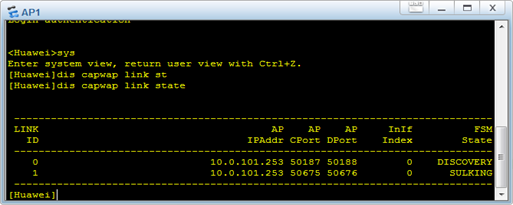
2.Ap上检查与AC的连接情况
dis capwap link state
三层组网AP上线外接DHCP的更多相关文章
- 二层组网AP上线
一.实验目的 1)掌握配置WLAN源接口的命令 2)掌握配置DHCP服务器的命令 3)掌握手工确认AP上线的方法a 二.实验仪器设备及软件 仪器设备:一台AC,四台AP 软件:ENSP 三.实验原理 ...
- 实验报告8 AC+Fit AP组网通过三层网络注册(DHCP Option 43)
实验报告8 课程名称 无线网络与安全技术 实验名称 AC+Fit AP组网通过三层网络注册(DHCP Option 43) 姓名 学号 班级 实 验 目 的 [实验目的] 了解AC+Fit AP跨 ...
- 华为eNSP环境,WLAN简介与组网,AP+AC详细配置
WLAN简单组网一.概述 无线局域网(Wireless Local Area Networks: WLAN)利用无线技术在空中传输数据.话音和视频信号.作为传统布线网络的一种替代方案或延伸,无线 ...
- 无线安全: 通过伪AP进行DHCP+DNS劫持的钓鱼攻击
有了之前学习802.11的数据帧格式.芯片硬件参数学习的基础后,我们接下来继续学习无线安全中黑客是怎样进行流量劫持攻击的 相关学习资料 http://www.freebuf.com/articles/ ...
- AP注册
1.ac发现ap 两种模式:二层发现.三层发现 按ap与ac所处ip网段不同,可以把注册过程分为二层模式和三层模式: 两种模式均通过发送discovery报文进行,二层模式discovery报文仅在同 ...
- WLAN-AC+AP射频一劳永逸的调优方式
AP射频调优组网图 射频调优简介 射频调优的主要功能就是动态调整AP的信道和功率,可以使同一AC管理的各AP的信道和功率保持相对平衡,保证AP工作在最佳状态.WLAN网络中,AP的工作状态会受到周围环 ...
- 服务集与AP的配合
一.实验目的 1)掌握添加无线网络配置 2)掌握配置信道和协议使用并配置在一个天线上同时运行两个服务集,即两个无线网络 二.实验仪器设备及软件 仪器设备:一台AC,两台AP,一台AR,一台LSW 软件 ...
- Openstack Neutron:三层技术和实现
目录 - 1.Neutron 三层技术简介 - 2.集中式router - 1.在节点上安装L3 agent - 2.配置外部网络 - 3.通过CLI或者Horizon 来创建路由 - 4.连接租户网 ...
- 胖AP(1602i)与苹果设备之间的问题总结
问题现象: 苹果设备(5GHz)连接不稳定,表现为时断时续,或者加入无线的时候一直加入不进去. 有些2.4GHz设备会在几个AP之间相互跳. 分析: 1. 先说苹果设备,它既支持2.4G 也支持5G, ...
随机推荐
- three.js 元素跟随物体效果
需求: 1.实现元素跟随指定物体位置进行位置变化 实现方案: 1--- Sprite 精灵 2 --- cavans 画图后创建模型贴图 3 --- CSS2DRenderer渲染方式 4 --- ...
- 浅聊Linux的五种IO模型
在日常 Coding 中,多多少少都会接触到网络 IO,就会想要深入了解一下.看了很多文章,总是云里雾里的感觉,直到读了<UNIX网络编程 卷1:套接字联网API>中的介绍后,才豁然开朗. ...
- vivo全球商城-营销价格监控方案的探索
一.背景 现在日常官网商城的运营中有一定概率出现以下两个问题: 1)优惠信息未对齐 官网商城促销优惠的类型越来越多,能影响最终用户实付价的优惠就有抢购.满减.优惠券.代金券等.实际业务操作中存在不同促 ...
- 牛客练习赛79E-小G的数学难题【dp,单调队列】
正题 题目链接:https://ac.nowcoder.com/acm/contest/11169/E 题目大意 给出\(n\)个三元组\((a_i,b_i,c_i)\). 要求选出一个集合\(S\) ...
- WPF进阶技巧和实战03-控件(5-列表、树、网格02)
数据模板 样式提供了基本的格式化能力,但是不管如何修改ListBoxItem,他都不能够展示功能更强大的元素组合,因为了每个ListBoxItem只支持单个绑定字段(通过DisplayMemberPa ...
- ASP.NET Core 学习笔记 第二篇 依赖注入
前言 ASP.NET Core 应用在启动过程中会依赖各种组件提供服务,而这些组件会以接口的形式标准化,这些组件这就是我们所说的服务,ASP.NET Core框架建立在一个底层的依赖注入框架之上,它使 ...
- MySQL表空间回收的正确姿势
不知道大家有没有遇到这样的一种情况,线上业务在MySQL表上做增删改查操作,随着时间的推移,表里面的数据越来越多,表数据文件越来越大,数据库占用的空间自然也逐渐增长 为了缩小磁盘上表数据文件占用的空间 ...
- Phalcon多模块如何实现连接不同数据库 《Phalcon入坑指南系列 五》
本系列目录 一.Phalcon在Windows上安装 <Phalcon入坑指南系列 一> 二.Phalcon入坑必须知道的功能<Phalcon入坑指南系列 二> 三.Phalc ...
- 1. JVM核心类加载器及类加载的全过程
运行环境: 下面说明一下我的运行环境.我是在mac上操作的. 先找到mac的java地址. 从~/.bash_profile中可以看到 java的home目录是: /Library/Java/Java ...
- MySQL MVCC原理深入探索
一.MVCC的由来 二.MVCC的实际应用 RR级别场景 RC级别场景 三.MVCC的实现 3.1 多版本的数据从哪里来--Undo Log 3.1.1 插入操作对应的undo log 3.1.2 删 ...