
实验7:基于REST API的SDN北向应用实践
一、实验目的
1.能够编写程序调用OpenDaylight REST API实现特定网络功能;
2.能够编写程序调用Ryu REST API实现特定网络功能。
二、实验环境
下载虚拟机软件Oracle VisualBox或VMware;
在虚拟机中安装Ubuntu 20.04 Desktop amd64,并完整安装Mininet、OpenDaylight(Carbon版本)、Postman和Ryu;
三、实验基本要求
1.OpenDaylight
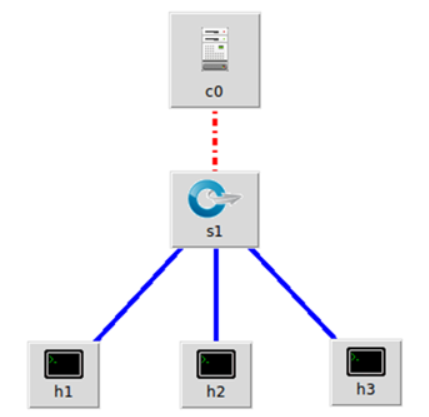
(1) 利用Mininet平台搭建下图所示网络拓扑,并连接OpenDaylight
(2) 编写Python程序,调用OpenDaylight的北向接口下发指令删除s1上的流表数据。
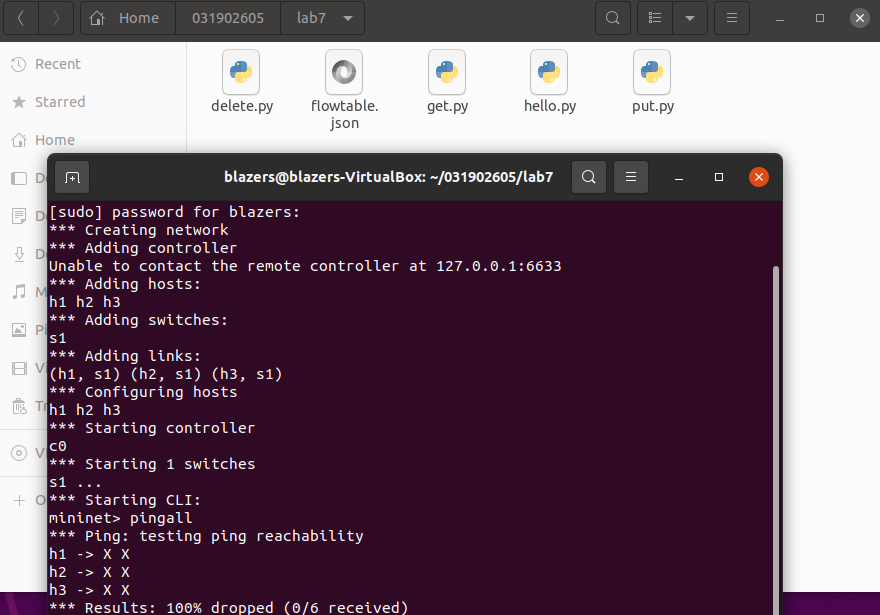
- delete.py
#!/usr/bin/python

import requests

from requests.auth import HTTPBasicAuth

if __name__ == "__main__":

    url = 'http://127.0.0.1:8181/restconf/config/opendaylight-inventory:nodes/node/openflow:1/'

    headers = {'Content-Type': 'application/json'}

    res = requests.delete(url, headers=headers, auth=HTTPBasicAuth('admin', 'admin'))

    print (res.content)
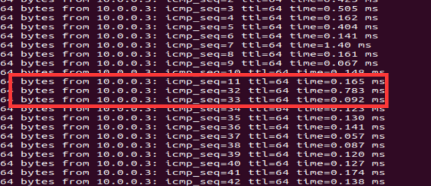
(3) 编写Python程序,调用OpenDaylight的北向接口下发硬超时流表,实现拓扑内主机h1和h3网络中断20s。
- put.py
#!/usr/bin/python

import requests

from requests.auth import HTTPBasicAuth

if __name__ == "__main__":

    url = 'http://127.0.0.1:8181/restconf/config/opendaylight-inventory:nodes/node/openflow:1/flow-node-inventory:table/0/flow/1'

    with open("./flowtable.json") as f:

        jstr = f.read()

    headers = {'Content-Type': 'application/json'}

    res = requests.put(url, jstr, headers=headers, auth=HTTPBasicAuth('admin', 'admin'))

    print (res.content)
- flowtable.json
{

  "flow": [

    {

      "id": "1",

      "match": {

        "in-port": "1",

        "ethernet-match": {

          "ethernet-type": {

            "type": "0x0800"

          }

        },

        "ipv4-destination": "10.0.0.3/32"

      },

      "instructions": {

        "instruction": [

          {

            "order": "0",

            "apply-actions": {

              "action": [

                {

                  "order": "0",

                  "drop-action": {}

                }

              ]

            }

          }

        ]

      },

      "flow-name": "flow1",

      "priority": "65535",

      "hard-timeout": "20",

      "cookie": "2",

      "table_id": "0"

    }

  ]

}
(4) 编写Python程序,调用OpenDaylight的北向接口获取s1上活动的流表数。
- get.py
#!/usr/bin/python

import requests

from requests.auth import HTTPBasicAuth

if __name__ == "__main__":

    url = 'http://127.0.0.1:8181/restconf/operational/opendaylight-inventory:nodes/node/openflow:1/flow-node-inventory:table/0/opendaylight-flow-table-statistics:flow-table-statistics'

    headers = {'Content-Type': 'application/json'}

    res = requests.get(url,headers=headers, auth=HTTPBasicAuth('admin', 'admin'))

    print (res.content)
Ryu操作
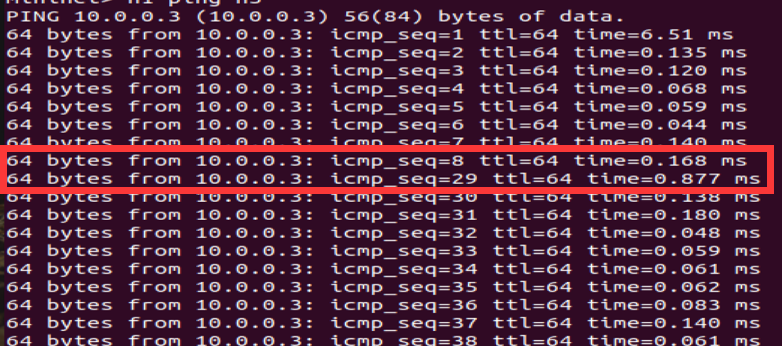
(1) 编写Python程序,调用Ryu的北向接口,实现上述OpenDaylight实验拓扑上相同的硬超时流表下发。
- put1.py
import requests

from requests.auth import HTTPBasicAuth

def http_post(url,jstr):

    url= url

    headers = {'Content-Type':'application/json'}

    resp = requests.post(url,jstr,headers=headers)

    return resp

if __name__ == "__main__":

    url='http://127.0.0.1:8080/stats/flowentry/add'

    with open('flowtable1.json') as f:

        jstr = f.read()

    resp = http_post(url,jstr)

    print (resp.content)
- flowtable1.json
{

    "dpid": 1,

    "cookie": 1,

    "cookie_mask": 1,

    "table_id": 0,

    "hard_timeout": 20,

    "priority": 65535,

    "flags": 1,

    "match":{

        "in_port":1

    },

    "actions":[

        {

            "type":"OUTPUT",

            "port": 2

        }

    ]

}
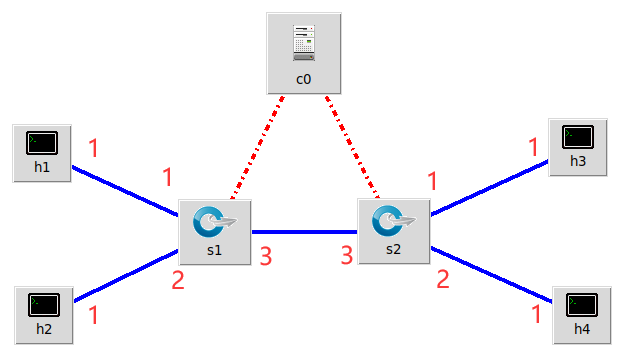
(2) 利用Mininet平台搭建下图所示网络拓扑,要求支持OpenFlow 1.3协议,主机名、交换机名以及端口对应正确。拓扑生成后需连接Ryu,且Ryu应能够提供REST API服务。
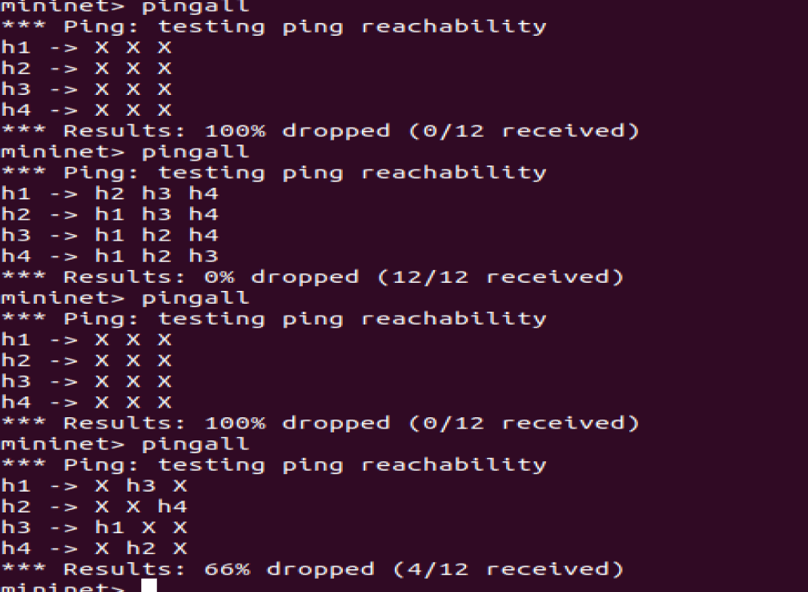
(3) 整理一个Shell脚本,参考Ryu REST API的文档,利用curl命令,实现和实验2相同的VLAN。
| VLAN_ID | Hosts |
|---|---|
| 0 | h1 h3 |
| 1 | h2 h4 |
- shell脚本
curl -X POST -d '{

    "dpid": 1,

    "priority": 1,

    "match":{

        "in_port": 1

    },

    "actions":[

        {

            "type": "PUSH_VLAN",

            "ethertype": 33024

        },

        {

            "type": "SET_FIELD",

            "field": "vlan_vid",

            "value": 4096

        },

        {

            "type": "OUTPUT",

            "port": 3

        }

    ]

 }' http://localhost:8080/stats/flowentry/add

 curl -X POST -d '{

    "dpid": 1,

    "priority": 1,

    "match":{

        "in_port": 2

    },

    "actions":[

        {

            "type": "PUSH_VLAN",

            "ethertype": 33024

        },

        {

            "type": "SET_FIELD",

            "field": "vlan_vid",

            "value": 4097

        },

        {

            "type": "OUTPUT",

            "port": 3

        }

    ]

 }' http://localhost:8080/stats/flowentry/add

 curl -X POST -d '{

    "dpid": 1,

    "priority": 1,

    "match":{

        "vlan_vid": 0

    },

    "actions":[

        {

            "type": "POP_VLAN",

            "ethertype": 33024

        },

        {

            "type": "OUTPUT",

            "port": 1

        }

    ]

 }' http://localhost:8080/stats/flowentry/add

 curl -X POST -d '{

    "dpid": 1,

    "priority": 1,

    "match":{

        "vlan_vid": 1

    },

    "actions":[

        {

            "type": "POP_VLAN",

            "ethertype": 33024

        },

        {

            "type": "OUTPUT",

            "port": 2

        }

    ]

 }' http://localhost:8080/stats/flowentry/add

 curl -X POST -d '{

    "dpid": 2,

    "priority": 1,

    "match":{

        "in_port": 1

    },

    "actions":[

        {

            "type": "PUSH_VLAN",

            "ethertype": 33024

        },

        {

            "type": "SET_FIELD",

            "field": "vlan_vid",

            "value": 4096

        },

        {

            "type": "OUTPUT",

            "port": 3

        }

    ]

 }' http://localhost:8080/stats/flowentry/add

 curl -X POST -d '{

    "dpid": 2,

    "priority": 1,

    "match":{

        "in_port": 2

    },

    "actions":[

        {

            "type": "PUSH_VLAN",

            "ethertype": 33024

        },

        {

            "type": "SET_FIELD",

            "field": "vlan_vid",

            "value": 4097

        },

        {

            "type": "OUTPUT",

            "port": 3

        }

    ]

 }' http://localhost:8080/stats/flowentry/add

 curl -X POST -d '{

    "dpid": 2,

    "priority": 1,

    "match":{

        "vlan_vid": 0

    },

    "actions":[

        {

            "type": "POP_VLAN",

            "ethertype": 33024

        },

        {

            "type": "OUTPUT",

            "port": 1

        }

    ]

 }' http://localhost:8080/stats/flowentry/add

 curl -X POST -d '{

    "dpid": 2,

    "priority": 1,

    "match":{

        "vlan_vid": 1

    },

    "actions":[

        {

            "type": "POP_VLAN",

            "ethertype": 33024

        },

        {

            "type": "OUTPUT",

            "port": 2

        }

    ]

 }' http://localhost:8080/stats/flowentry/add
四、实验进阶要求
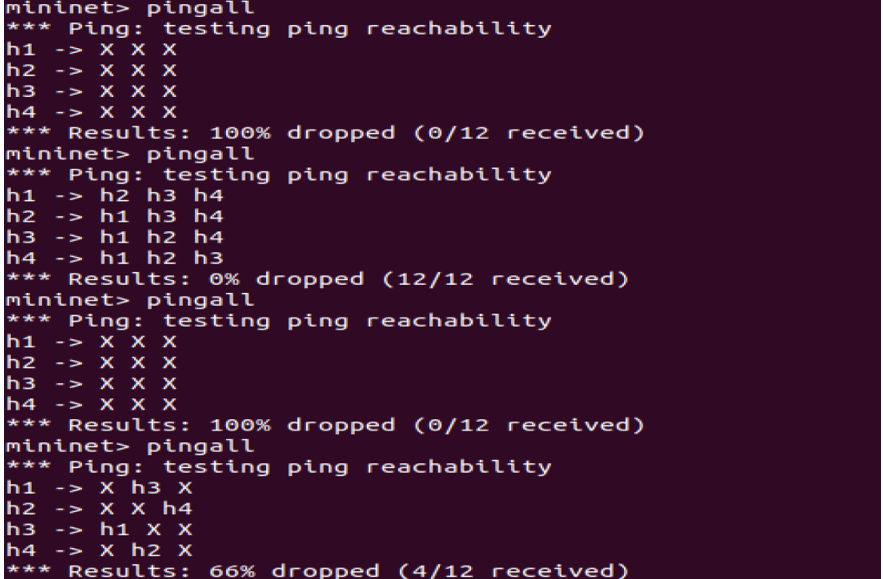
编程实现基本要求第2部分Ryu(3)中的VLAN划分。
删除流表
  curl -X DELETE http://localhost:8080/stats/flowentry/clear/1

  curl -X DELETE http://localhost:8080/stats/flowentry/clear/2
 #!/usr/bin/python

      import json

      import requests

      if __name__ == "__main__":

          url = 'http://127.0.0.1:8080/stats/flowentry/add'

          headers = {'Content-Type': 'application/json'}

          flow1 = {

              "dpid": 1,

              "priority": 1,

              "match":{

                  "in_port": 1

              },

              "actions":[

                  {

                      "type": "PUSH_VLAN",     # Push a new VLAN tag if a input frame is non-VLAN-tagged

                      "ethertype": 33024       # Ethertype 0x8100(=33024): IEEE 802.1Q VLAN-tagged frame

                  },

                  {

                      "type": "SET_FIELD",

                      "field": "vlan_vid",     # Set VLAN ID

                      "value": 4096            # Describe sum of vlan_id(e.g. 6) | OFPVID_PRESENT(0x1000=4096)

                  },

                  {

                      "type": "OUTPUT",

                      "port": 3

                  }

              ]

          }

          flow2 = {

              "dpid": 1,

              "priority": 1,

              "match":{

                  "in_port": 2

              },

              "actions":[

                  {

                      "type": "PUSH_VLAN",     # Push a new VLAN tag if a input frame is non-VLAN-tagged

                      "ethertype": 33024       # Ethertype 0x8100(=33024): IEEE 802.1Q VLAN-tagged frame

                  },

                  {

                      "type": "SET_FIELD",

                      "field": "vlan_vid",     # Set VLAN ID

                      "value": 4097            # Describe sum of vlan_id(e.g. 6) | OFPVID_PRESENT(0x1000=4096)

                  },

                  {

                      "type": "OUTPUT",

                      "port": 3

                  }

              ]

          }

          flow3 = {

              "dpid": 1,

              "priority": 1,

              "match":{

                  "vlan_vid": 0

              },

              "actions":[

                  {

                      "type": "POP_VLAN",     # Push a new VLAN tag if a input frame is non-VLAN-tagged

                      "ethertype": 33024       # Ethertype 0x8100(=33024): IEEE 802.1Q VLAN-tagged frame

                  },

                  {

                      "type": "OUTPUT",

                      "port": 1

                  }

              ]

          }

          flow4 = {

              "dpid": 1,

              "priority": 1,

              "match": {

                  "vlan_vid": 1

              },

              "actions": [

                  {

                      "type": "POP_VLAN",  # Push a new VLAN tag if a input frame is non-VLAN-tagged

                      "ethertype": 33024  # Ethertype 0x8100(=33024): IEEE 802.1Q VLAN-tagged frame

                  },

                  {

                      "type": "OUTPUT",

                      "port": 2

                  }

              ]

          }

          flow5 = {

              "dpid": 2,

              "priority": 1,

              "match": {

                  "in_port": 1

              },

              "actions": [

                  {

                      "type": "PUSH_VLAN",  # Push a new VLAN tag if a input frame is non-VLAN-tagged

                      "ethertype": 33024  # Ethertype 0x8100(=33024): IEEE 802.1Q VLAN-tagged frame

                  },

                  {

                      "type": "SET_FIELD",

                      "field": "vlan_vid",  # Set VLAN ID

                      "value": 4096  # Describe sum of vlan_id(e.g. 6) | OFPVID_PRESENT(0x1000=4096)

                  },

                  {

                      "type": "OUTPUT",

                      "port": 3

                  }

              ]

          }

          flow6 = {

              "dpid": 2,

              "priority": 1,

              "match": {

                  "in_port": 2

              },

              "actions": [

                  {

                      "type": "PUSH_VLAN",  # Push a new VLAN tag if a input frame is non-VLAN-tagged

                      "ethertype": 33024  # Ethertype 0x8100(=33024): IEEE 802.1Q VLAN-tagged frame

                  },

                  {

                      "type": "SET_FIELD",

                      "field": "vlan_vid",  # Set VLAN ID

                      "value": 4097  # Describe sum of vlan_id(e.g. 6) | OFPVID_PRESENT(0x1000=4096)

                  },

                  {

                      "type": "OUTPUT",

                      "port": 3

                  }

              ]

          }

          flow7 = {

              "dpid": 2,

              "priority": 1,

              "match": {

                  "vlan_vid": 0

              },

              "actions": [

                  {

                      "type": "POP_VLAN",  # Push a new VLAN tag if a input frame is non-VLAN-tagged

                      "ethertype": 33024  # Ethertype 0x8100(=33024): IEEE 802.1Q VLAN-tagged frame

                  },

                  {

                      "type": "OUTPUT",

                      "port": 1

                  }

              ]

          }

          flow8 = {

              "dpid": 2,

              "priority": 1,

              "match": {

                  "vlan_vid": 0

              },

              "actions": [

                  {

                      "type": "POP_VLAN",  # Push a new VLAN tag if a input frame is non-VLAN-tagged

                      "ethertype": 33024  # Ethertype 0x8100(=33024): IEEE 802.1Q VLAN-tagged frame

                  },

                  {

                      "type": "OUTPUT",

                      "port": 1

                  }

              ]

          }

          res1 = requests.post(url, json.dumps(flow1), headers=headers)

          res2 = requests.post(url, json.dumps(flow2), headers=headers)

          res3 = requests.post(url, json.dumps(flow3), headers=headers)

          res4 = requests.post(url, json.dumps(flow4), headers=headers)

          res5 = requests.post(url, json.dumps(flow5), headers=headers)

          res6 = requests.post(url, json.dumps(flow6), headers=headers)

          res7 = requests.post(url, json.dumps(flow7), headers=headers)

          res8 = requests.post(url, json.dumps(flow8), headers=headers)
五、个人心得
- 这次作业有点难了,留的挺好,下次不许留了
 (皮一下,嘿嘿嘿,无恶意)
 - ODL和Ryu的一些操作指令忘得一干二净了,问题不大。。。。。。翻阅了以前的实验指导复习了一遍
- 自从虚拟机重新装了之后,这个pingall总是连不上我也不清楚是怎么回事,要是运行起来了,就什么也不要碰不管他是怎么运行的,再打开可能就用不了了
- 建议做完每次实验之后把流表删除干净,会影响下次实验
- PS:cur忘记下载了。。。。。。问了同学才发现。。。。
实验7:基于REST API的SDN北向应用实践的更多相关文章
- Angular SPA基于Ocelot API网关与IdentityServer4的身份认证与授权(二)
上文已经介绍了Identity Service的实现过程.今天我们继续,实现一个简单的Weather API和一个基于Ocelot的API网关. 回顾 <Angular SPA基于Ocelot ...
- 实验6、Flask API使用示例和拓展
实验介绍 1. 实验内容 Flask 提供了多种API拓展,本节我们主要学习基于RESTful的Flask应用程序设计 2. 实验要点 学习和掌握多种RESTful的设计模式 3.实验环境 Cento ...
- Atitit 游戏的通常流程 attilax 总结 基于cocos2d api
Atitit 游戏的通常流程 attilax 总结 基于cocos2d api 加载音效1 加载页面1 添加精灵1 设置随机位置2 移动2 垃圾gc2 点击evt2 爆炸效果3 定时生成精灵3 加载音 ...
- 你也可以玩转Skype -- 基于Skype API开发外壳程序入门
原文:你也可以玩转Skype -- 基于Skype API开发外壳程序入门 Skype是目前这个星球上最厉害的IM+VOIP软件,Skype现在已经改变了全球2.8亿人的生活方式.你,值得拥有! :) ...
- 基于 Aliexpress API 的小程序 : 批量 Copy 产品到不同的店铺
第一个基于 Aliexpress API 的小程序 : 批量 Copy 产品到不同的店铺 还没来得及用 API 重写软件, 先写个小程序来缓解一下手工压力: 批量Copy 产品到不同的店铺. 开网店 ...
- 基于V2EX API的nodejs组件.
今天又学习到了新的知(zi)识(shi),来给自己做个笔录,也算在这酷热的天气里给自己写了一篇降温的‘膏药’,话就讲这么多了 ,start off...... 首先 ,依赖选择: /**设置为严格模式 ...
- 实验:基于http的yum源
实验:基于http的yum源 selinux,firewalld已经关闭',系统为CentOS7 repodata所在的目录就是yum源 下面介绍了如何把本地光盘通过httpd服务器变成yum源:多个 ...
- windows下使用pycharm开发基于ansible api的python程序
Window下python安装ansible,基于ansible api开发python程序 在windows下使用pycharm开发基于ansible api的python程序时,发现ansible ...
- FluentAspects -- 基于 Fluent API 的 Aop
FluentAspects -- 基于 Fluent API 的 Aop Intro 上次我们做了一个简单的 AOP 实现示例,但是实现起来主要是基于 Attribute 来做的,对于代码的侵入性太强 ...
随机推荐
- 【Azure API 管理】APIM 配置Validate-JWT策略,验证RS256非对称(公钥/私钥)加密的Token
问题描述 在APIM中配置对传入的Token进行预验证,确保传入后端被保护的API的Authorization信息正确有效,可以使用validate-jwt策略.validate-jwt 策略强制要求 ...
- UVA 506 System Dependencies(模拟 烂题)
https://vjudge.net/problem/UVA-506 题目是给出了五种指令,DEPEND.INSTALL.REMOVE.LIST.END,操作的格式及功能如下: DEPEND item ...
- oracle 基础SQL语句 版本5.7.29
一.表与用户介绍 oracle安装完成后默认会有很多用户,大致分为2类用户:一类是必需的帐户,一类是存储各种应用的帐户,默认密码如下: oracle自带的也会有很多默认表存在: 二.创建用户.创建表空 ...
- linux 修改文件名称的三中方法
一:rename "old.html" "oldd.HTML" *html参数.有什么.改为什么 ,目标文件: 二 : #!/bin/sh Dirname=&q ...
- python 建站教程
主端:安装nginx uwsgi django pymysql mysql安装mysql到http://repo.mysql.com/里面找 mysql57-community-release-el7 ...
- python3.7发送邮件带附件
代码: 1 # -*- coding: utf-8 -*- 2 3 import smtplib, ssl 4 from email.mime.text import MIMEText 5 from ...
- CF1039D-You Are Given a Tree【根号分治,贪心】
正题 题目链接:https://www.luogu.com.cn/problem/CF1039D 题目大意 给出\(n\)个点的一棵树,然后对于\(k\in[1,n]\)求每次使用一条长度为\(k\) ...
- 2017年第二届广东省强网杯线上赛WEB:Musee de X writeup(模板注入漏洞)
目录 解题思路 总结 解题思路 拿到手上,有四个页面 首先按照题目要求执行,尝试注册一个名为admin的账户 这种情况,路径都给出来了,很可能就是目录遍历或者文件上传了 回到初始界面,点击链接here ...
- 基于ZooKeeper,Spring设计实现的参数系统
一.简介 基于ZooKeeper服务端.ZooKeeper Java客户端以及Spring框架设计的用于系统内部进行参数维护的系统. 二.设计背景 在我们日常开发的系统内部,开发过程中最常见的一项工作 ...
- javaweb 入门
java web 我们首先来看一下两种网络服务的常用架构. C/S([Client/Server])架构 B/S架构 (Browser/Server) (这是重点) 程序完全部署在服务器上,用户通过浏 ...