
实验7:基于REST API的SDN北向应用实践
一、实验目的
1.能够编写程序调用OpenDaylight REST API实现特定网络功能;
2.能够编写程序调用Ryu REST API实现特定网络功能。
二、实验环境
下载虚拟机软件Oracle VisualBox或VMware;
在虚拟机中安装Ubuntu 20.04 Desktop amd64,并完整安装Mininet、OpenDaylight(Carbon版本)、Postman和Ryu;
三、实验基本要求
1.OpenDaylight
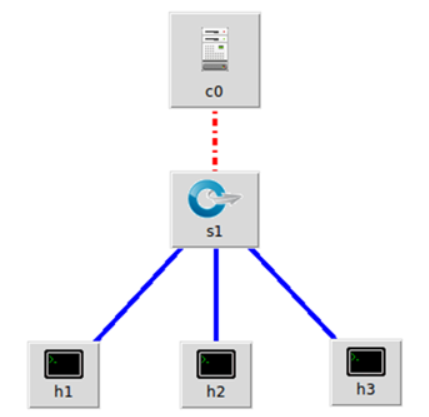
(1) 利用Mininet平台搭建下图所示网络拓扑,并连接OpenDaylight
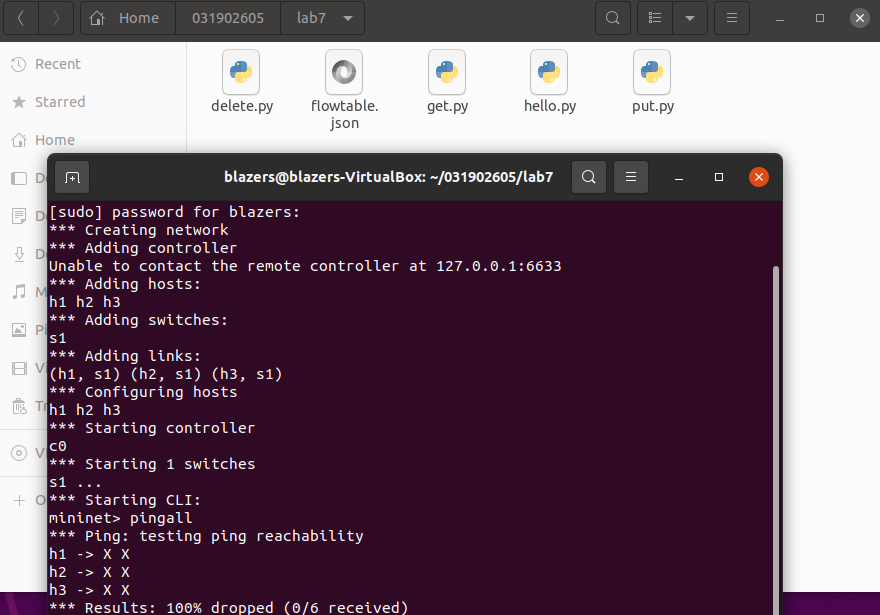
(2) 编写Python程序,调用OpenDaylight的北向接口下发指令删除s1上的流表数据。
- delete.py
#!/usr/bin/python

import requests

from requests.auth import HTTPBasicAuth

if __name__ == "__main__":

    url = 'http://127.0.0.1:8181/restconf/config/opendaylight-inventory:nodes/node/openflow:1/'

    headers = {'Content-Type': 'application/json'}

    res = requests.delete(url, headers=headers, auth=HTTPBasicAuth('admin', 'admin'))

    print (res.content)
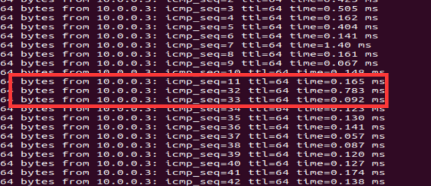
(3) 编写Python程序,调用OpenDaylight的北向接口下发硬超时流表,实现拓扑内主机h1和h3网络中断20s。
- put.py
#!/usr/bin/python

import requests

from requests.auth import HTTPBasicAuth

if __name__ == "__main__":

    url = 'http://127.0.0.1:8181/restconf/config/opendaylight-inventory:nodes/node/openflow:1/flow-node-inventory:table/0/flow/1'

    with open("./flowtable.json") as f:

        jstr = f.read()

    headers = {'Content-Type': 'application/json'}

    res = requests.put(url, jstr, headers=headers, auth=HTTPBasicAuth('admin', 'admin'))

    print (res.content)
- flowtable.json
{

  "flow": [

    {

      "id": "1",

      "match": {

        "in-port": "1",

        "ethernet-match": {

          "ethernet-type": {

            "type": "0x0800"

          }

        },

        "ipv4-destination": "10.0.0.3/32"

      },

      "instructions": {

        "instruction": [

          {

            "order": "0",

            "apply-actions": {

              "action": [

                {

                  "order": "0",

                  "drop-action": {}

                }

              ]

            }

          }

        ]

      },

      "flow-name": "flow1",

      "priority": "65535",

      "hard-timeout": "20",

      "cookie": "2",

      "table_id": "0"

    }

  ]

}
(4) 编写Python程序,调用OpenDaylight的北向接口获取s1上活动的流表数。
- get.py
#!/usr/bin/python

import requests

from requests.auth import HTTPBasicAuth

if __name__ == "__main__":

    url = 'http://127.0.0.1:8181/restconf/operational/opendaylight-inventory:nodes/node/openflow:1/flow-node-inventory:table/0/opendaylight-flow-table-statistics:flow-table-statistics'

    headers = {'Content-Type': 'application/json'}

    res = requests.get(url,headers=headers, auth=HTTPBasicAuth('admin', 'admin'))

    print (res.content)
Ryu操作
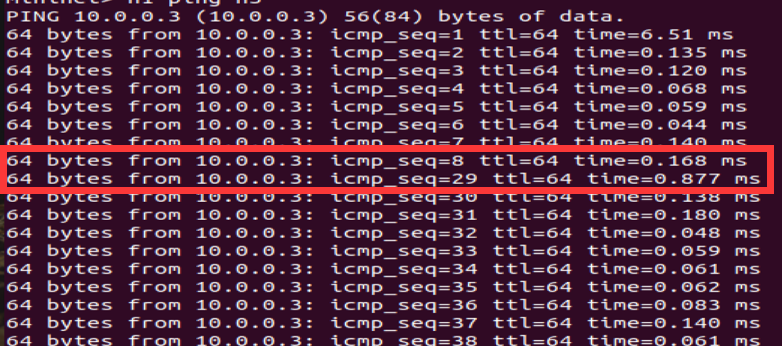
(1) 编写Python程序,调用Ryu的北向接口,实现上述OpenDaylight实验拓扑上相同的硬超时流表下发。
- put1.py
import requests

from requests.auth import HTTPBasicAuth

def http_post(url,jstr):

    url= url

    headers = {'Content-Type':'application/json'}

    resp = requests.post(url,jstr,headers=headers)

    return resp

if __name__ == "__main__":

    url='http://127.0.0.1:8080/stats/flowentry/add'

    with open('flowtable1.json') as f:

        jstr = f.read()

    resp = http_post(url,jstr)

    print (resp.content)
- flowtable1.json
{

    "dpid": 1,

    "cookie": 1,

    "cookie_mask": 1,

    "table_id": 0,

    "hard_timeout": 20,

    "priority": 65535,

    "flags": 1,

    "match":{

        "in_port":1

    },

    "actions":[

        {

            "type":"OUTPUT",

            "port": 2

        }

    ]

}
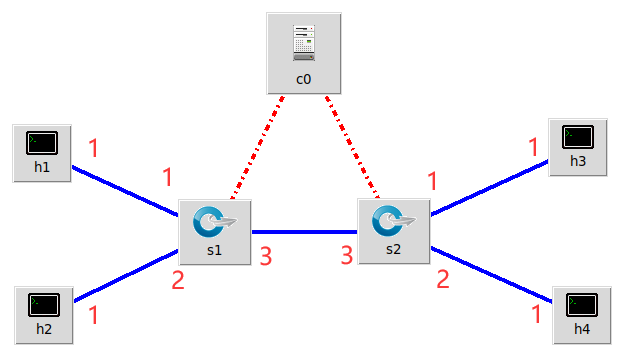
(2) 利用Mininet平台搭建下图所示网络拓扑,要求支持OpenFlow 1.3协议,主机名、交换机名以及端口对应正确。拓扑生成后需连接Ryu,且Ryu应能够提供REST API服务。
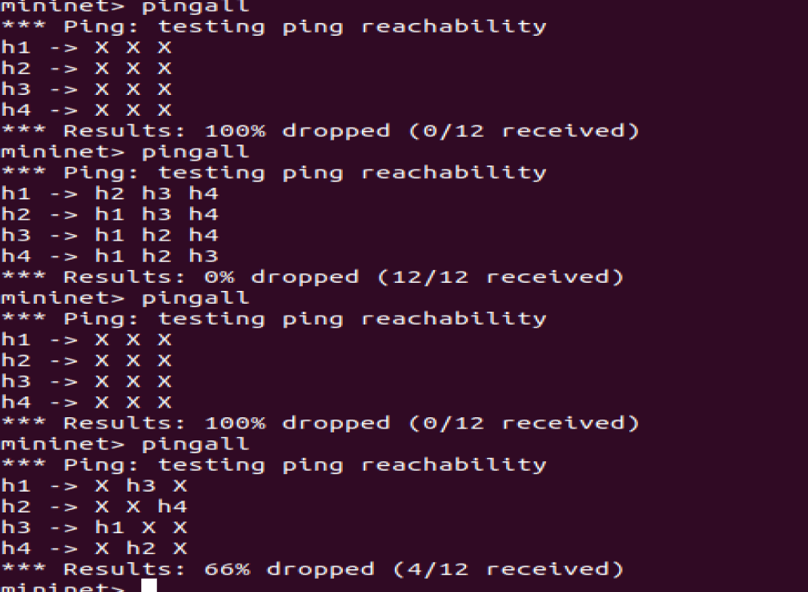
(3) 整理一个Shell脚本,参考Ryu REST API的文档,利用curl命令,实现和实验2相同的VLAN。
| VLAN_ID | Hosts |
|---|---|
| 0 | h1 h3 |
| 1 | h2 h4 |
- shell脚本
curl -X POST -d '{

    "dpid": 1,

    "priority": 1,

    "match":{

        "in_port": 1

    },

    "actions":[

        {

            "type": "PUSH_VLAN",

            "ethertype": 33024

        },

        {

            "type": "SET_FIELD",

            "field": "vlan_vid",

            "value": 4096

        },

        {

            "type": "OUTPUT",

            "port": 3

        }

    ]

 }' http://localhost:8080/stats/flowentry/add

 curl -X POST -d '{

    "dpid": 1,

    "priority": 1,

    "match":{

        "in_port": 2

    },

    "actions":[

        {

            "type": "PUSH_VLAN",

            "ethertype": 33024

        },

        {

            "type": "SET_FIELD",

            "field": "vlan_vid",

            "value": 4097

        },

        {

            "type": "OUTPUT",

            "port": 3

        }

    ]

 }' http://localhost:8080/stats/flowentry/add

 curl -X POST -d '{

    "dpid": 1,

    "priority": 1,

    "match":{

        "vlan_vid": 0

    },

    "actions":[

        {

            "type": "POP_VLAN",

            "ethertype": 33024

        },

        {

            "type": "OUTPUT",

            "port": 1

        }

    ]

 }' http://localhost:8080/stats/flowentry/add

 curl -X POST -d '{

    "dpid": 1,

    "priority": 1,

    "match":{

        "vlan_vid": 1

    },

    "actions":[

        {

            "type": "POP_VLAN",

            "ethertype": 33024

        },

        {

            "type": "OUTPUT",

            "port": 2

        }

    ]

 }' http://localhost:8080/stats/flowentry/add

 curl -X POST -d '{

    "dpid": 2,

    "priority": 1,

    "match":{

        "in_port": 1

    },

    "actions":[

        {

            "type": "PUSH_VLAN",

            "ethertype": 33024

        },

        {

            "type": "SET_FIELD",

            "field": "vlan_vid",

            "value": 4096

        },

        {

            "type": "OUTPUT",

            "port": 3

        }

    ]

 }' http://localhost:8080/stats/flowentry/add

 curl -X POST -d '{

    "dpid": 2,

    "priority": 1,

    "match":{

        "in_port": 2

    },

    "actions":[

        {

            "type": "PUSH_VLAN",

            "ethertype": 33024

        },

        {

            "type": "SET_FIELD",

            "field": "vlan_vid",

            "value": 4097

        },

        {

            "type": "OUTPUT",

            "port": 3

        }

    ]

 }' http://localhost:8080/stats/flowentry/add

 curl -X POST -d '{

    "dpid": 2,

    "priority": 1,

    "match":{

        "vlan_vid": 0

    },

    "actions":[

        {

            "type": "POP_VLAN",

            "ethertype": 33024

        },

        {

            "type": "OUTPUT",

            "port": 1

        }

    ]

 }' http://localhost:8080/stats/flowentry/add

 curl -X POST -d '{

    "dpid": 2,

    "priority": 1,

    "match":{

        "vlan_vid": 1

    },

    "actions":[

        {

            "type": "POP_VLAN",

            "ethertype": 33024

        },

        {

            "type": "OUTPUT",

            "port": 2

        }

    ]

 }' http://localhost:8080/stats/flowentry/add
四、实验进阶要求
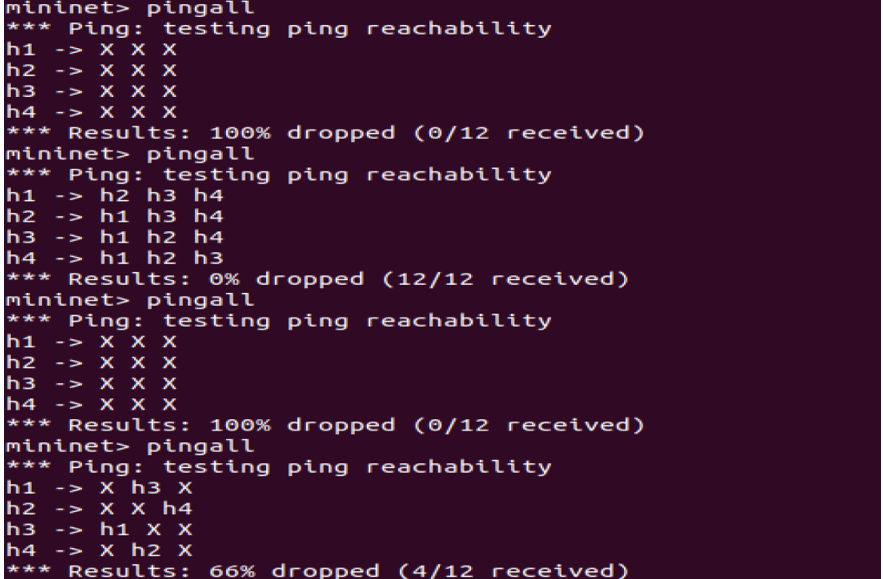
编程实现基本要求第2部分Ryu(3)中的VLAN划分。
删除流表
  curl -X DELETE http://localhost:8080/stats/flowentry/clear/1

  curl -X DELETE http://localhost:8080/stats/flowentry/clear/2
 #!/usr/bin/python

      import json

      import requests

      if __name__ == "__main__":

          url = 'http://127.0.0.1:8080/stats/flowentry/add'

          headers = {'Content-Type': 'application/json'}

          flow1 = {

              "dpid": 1,

              "priority": 1,

              "match":{

                  "in_port": 1

              },

              "actions":[

                  {

                      "type": "PUSH_VLAN",     # Push a new VLAN tag if a input frame is non-VLAN-tagged

                      "ethertype": 33024       # Ethertype 0x8100(=33024): IEEE 802.1Q VLAN-tagged frame

                  },

                  {

                      "type": "SET_FIELD",

                      "field": "vlan_vid",     # Set VLAN ID

                      "value": 4096            # Describe sum of vlan_id(e.g. 6) | OFPVID_PRESENT(0x1000=4096)

                  },

                  {

                      "type": "OUTPUT",

                      "port": 3

                  }

              ]

          }

          flow2 = {

              "dpid": 1,

              "priority": 1,

              "match":{

                  "in_port": 2

              },

              "actions":[

                  {

                      "type": "PUSH_VLAN",     # Push a new VLAN tag if a input frame is non-VLAN-tagged

                      "ethertype": 33024       # Ethertype 0x8100(=33024): IEEE 802.1Q VLAN-tagged frame

                  },

                  {

                      "type": "SET_FIELD",

                      "field": "vlan_vid",     # Set VLAN ID

                      "value": 4097            # Describe sum of vlan_id(e.g. 6) | OFPVID_PRESENT(0x1000=4096)

                  },

                  {

                      "type": "OUTPUT",

                      "port": 3

                  }

              ]

          }

          flow3 = {

              "dpid": 1,

              "priority": 1,

              "match":{

                  "vlan_vid": 0

              },

              "actions":[

                  {

                      "type": "POP_VLAN",     # Push a new VLAN tag if a input frame is non-VLAN-tagged

                      "ethertype": 33024       # Ethertype 0x8100(=33024): IEEE 802.1Q VLAN-tagged frame

                  },

                  {

                      "type": "OUTPUT",

                      "port": 1

                  }

              ]

          }

          flow4 = {

              "dpid": 1,

              "priority": 1,

              "match": {

                  "vlan_vid": 1

              },

              "actions": [

                  {

                      "type": "POP_VLAN",  # Push a new VLAN tag if a input frame is non-VLAN-tagged

                      "ethertype": 33024  # Ethertype 0x8100(=33024): IEEE 802.1Q VLAN-tagged frame

                  },

                  {

                      "type": "OUTPUT",

                      "port": 2

                  }

              ]

          }

          flow5 = {

              "dpid": 2,

              "priority": 1,

              "match": {

                  "in_port": 1

              },

              "actions": [

                  {

                      "type": "PUSH_VLAN",  # Push a new VLAN tag if a input frame is non-VLAN-tagged

                      "ethertype": 33024  # Ethertype 0x8100(=33024): IEEE 802.1Q VLAN-tagged frame

                  },

                  {

                      "type": "SET_FIELD",

                      "field": "vlan_vid",  # Set VLAN ID

                      "value": 4096  # Describe sum of vlan_id(e.g. 6) | OFPVID_PRESENT(0x1000=4096)

                  },

                  {

                      "type": "OUTPUT",

                      "port": 3

                  }

              ]

          }

          flow6 = {

              "dpid": 2,

              "priority": 1,

              "match": {

                  "in_port": 2

              },

              "actions": [

                  {

                      "type": "PUSH_VLAN",  # Push a new VLAN tag if a input frame is non-VLAN-tagged

                      "ethertype": 33024  # Ethertype 0x8100(=33024): IEEE 802.1Q VLAN-tagged frame

                  },

                  {

                      "type": "SET_FIELD",

                      "field": "vlan_vid",  # Set VLAN ID

                      "value": 4097  # Describe sum of vlan_id(e.g. 6) | OFPVID_PRESENT(0x1000=4096)

                  },

                  {

                      "type": "OUTPUT",

                      "port": 3

                  }

              ]

          }

          flow7 = {

              "dpid": 2,

              "priority": 1,

              "match": {

                  "vlan_vid": 0

              },

              "actions": [

                  {

                      "type": "POP_VLAN",  # Push a new VLAN tag if a input frame is non-VLAN-tagged

                      "ethertype": 33024  # Ethertype 0x8100(=33024): IEEE 802.1Q VLAN-tagged frame

                  },

                  {

                      "type": "OUTPUT",

                      "port": 1

                  }

              ]

          }

          flow8 = {

              "dpid": 2,

              "priority": 1,

              "match": {

                  "vlan_vid": 0

              },

              "actions": [

                  {

                      "type": "POP_VLAN",  # Push a new VLAN tag if a input frame is non-VLAN-tagged

                      "ethertype": 33024  # Ethertype 0x8100(=33024): IEEE 802.1Q VLAN-tagged frame

                  },

                  {

                      "type": "OUTPUT",

                      "port": 1

                  }

              ]

          }

          res1 = requests.post(url, json.dumps(flow1), headers=headers)

          res2 = requests.post(url, json.dumps(flow2), headers=headers)

          res3 = requests.post(url, json.dumps(flow3), headers=headers)

          res4 = requests.post(url, json.dumps(flow4), headers=headers)

          res5 = requests.post(url, json.dumps(flow5), headers=headers)

          res6 = requests.post(url, json.dumps(flow6), headers=headers)

          res7 = requests.post(url, json.dumps(flow7), headers=headers)

          res8 = requests.post(url, json.dumps(flow8), headers=headers)
五、个人心得
- 这次作业有点难了,留的挺好,下次不许留了
 (皮一下,嘿嘿嘿,无恶意)
 - ODL和Ryu的一些操作指令忘得一干二净了,问题不大。。。。。。翻阅了以前的实验指导复习了一遍
- 自从虚拟机重新装了之后,这个pingall总是连不上我也不清楚是怎么回事,要是运行起来了,就什么也不要碰不管他是怎么运行的,再打开可能就用不了了
- 建议做完每次实验之后把流表删除干净,会影响下次实验
- PS:cur忘记下载了。。。。。。问了同学才发现。。。。
实验7:基于REST API的SDN北向应用实践的更多相关文章
- Angular SPA基于Ocelot API网关与IdentityServer4的身份认证与授权(二)
上文已经介绍了Identity Service的实现过程.今天我们继续,实现一个简单的Weather API和一个基于Ocelot的API网关. 回顾 <Angular SPA基于Ocelot ...
- 实验6、Flask API使用示例和拓展
实验介绍 1. 实验内容 Flask 提供了多种API拓展,本节我们主要学习基于RESTful的Flask应用程序设计 2. 实验要点 学习和掌握多种RESTful的设计模式 3.实验环境 Cento ...
- Atitit 游戏的通常流程 attilax 总结 基于cocos2d api
Atitit 游戏的通常流程 attilax 总结 基于cocos2d api 加载音效1 加载页面1 添加精灵1 设置随机位置2 移动2 垃圾gc2 点击evt2 爆炸效果3 定时生成精灵3 加载音 ...
- 你也可以玩转Skype -- 基于Skype API开发外壳程序入门
原文:你也可以玩转Skype -- 基于Skype API开发外壳程序入门 Skype是目前这个星球上最厉害的IM+VOIP软件,Skype现在已经改变了全球2.8亿人的生活方式.你,值得拥有! :) ...
- 基于 Aliexpress API 的小程序 : 批量 Copy 产品到不同的店铺
第一个基于 Aliexpress API 的小程序 : 批量 Copy 产品到不同的店铺 还没来得及用 API 重写软件, 先写个小程序来缓解一下手工压力: 批量Copy 产品到不同的店铺. 开网店 ...
- 基于V2EX API的nodejs组件.
今天又学习到了新的知(zi)识(shi),来给自己做个笔录,也算在这酷热的天气里给自己写了一篇降温的‘膏药’,话就讲这么多了 ,start off...... 首先 ,依赖选择: /**设置为严格模式 ...
- 实验:基于http的yum源
实验:基于http的yum源 selinux,firewalld已经关闭',系统为CentOS7 repodata所在的目录就是yum源 下面介绍了如何把本地光盘通过httpd服务器变成yum源:多个 ...
- windows下使用pycharm开发基于ansible api的python程序
Window下python安装ansible,基于ansible api开发python程序 在windows下使用pycharm开发基于ansible api的python程序时,发现ansible ...
- FluentAspects -- 基于 Fluent API 的 Aop
FluentAspects -- 基于 Fluent API 的 Aop Intro 上次我们做了一个简单的 AOP 实现示例,但是实现起来主要是基于 Attribute 来做的,对于代码的侵入性太强 ...
随机推荐
- 【第二篇】- Git 安装配置之Spring Cloud直播商城 b2b2c电子商务技术总结
Git 安装配置 在使用Git前我们需要先安装 Git.Git 目前支持 Linux/Unix.Solaris.Mac和 Windows 平台上运行. Git 各平台安装包下载地址为:http://g ...
- 有关类朋友圈设计(3) -- 数据库设计&现有技术&流程设计
在写之前,先说说当前的系统架构吧 spring cloud + zuul + eureka + oauth2 + redis + rabbitMq 这个系统是由我搭建的,当时采用的springClou ...
- 驱动IO模型-select
新人学习,欢迎指正 部分select.c代码 应用层 select(maxfd+1,&rfds,NULL,NULL,NULL); -------------------(系统调用)------ ...
- java中避免集合死链调用
目录 1. 前言 2. 场景 3. 环境 3.1 开发环境准备 3.2 数据准备 3.2.1 Mysql数据库表及数据 3.2.2 redis库数据 4. 解决方式 5.完整代码 5.1Model 5 ...
- javascript 实现php str_pad
* 查看php.net官方手册 string str_pad ( string $input , int $pad_length [, string $pad_string = " &quo ...
- maven项目环境变量配置及创建(一)
Maven是基于JAVA平台的一款编译.测试.打包部署及运行的构建工具 1:首先需要下载安装JDK 2:安装Eclipse 3:下载maven包(https://maven.apache.org/do ...
- django forms的常用命令及方法(二)
根据别人网上发布,个人爱好收集 1.创建Form类 from django.forms import Form from django.forms import widgets from django ...
- python简单操作excel
python操作excel 写入excel # 写入excel import xlwt # 创建xls对象 wb = xlwt.Workbook() # 新增两个表单页(sheet1) sh1 = w ...
- 在 ASP.NET Core 中自动启用 CAP 事务
本篇文章旨在描述如何在 ASP.NET Core项目中并以一种简便的方式启用CAP事务,因为在我们的示例中都是直接演示比较直观的方式,没有进行封装,有些初学者同学不太会,找到问我如何封装,本篇文章主要 ...
- java 从零开始手写 RPC (04) -序列化
序列化 java 从零开始手写 RPC (01) 基于 socket 实现 java 从零开始手写 RPC (02)-netty4 实现客户端和服务端 java 从零开始手写 RPC (03) 如何实 ...