
SpringBoot-Thymeleaf模板引擎
模板引擎,我们其实大家听到很多,其实jsp就是一个模板引擎,还有用的比较多的freemarker,包括SpringBoot给我们推荐的Thymeleaf,模板引擎有非常多,但再多的模板引擎,他们的思想都是一样的,什么样一个思想呢我们来看一下这张图
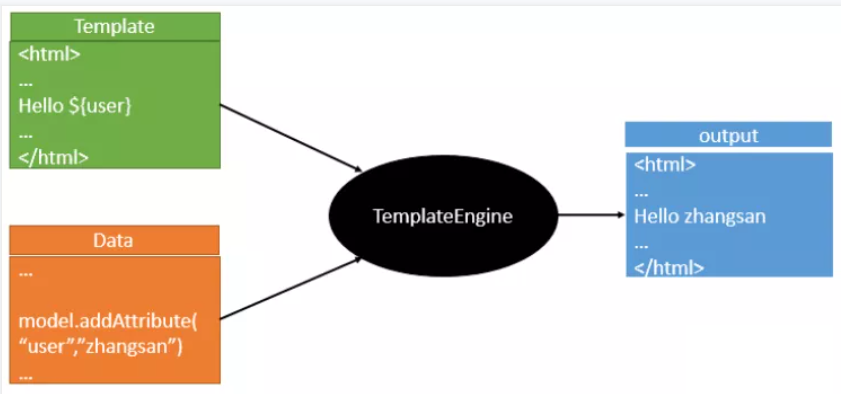
也就是说模板引擎是一个将数据和模板对应结合起来生成浏览器可显示的静态页面的组件。
不管是jsp还是其他模板引擎,都是这个思想。只不过呢,就是说不同模板引擎之间,他们可能这个语法有点不一样。其他的我就不介绍了,我主要来介绍一下SpringBoot给我们推荐的Thymeleaf模板引擎,这模板引擎呢,是一个高级语言的模板引擎,他的这个语法更简单。而且呢,功能更强大。
引入Thymeleaf
Thymeleaf 官网:https://www.thymeleaf.org/
Thymeleaf 在Github 的主页:https://github.com/thymeleaf/thymeleaf
Spring官方文档:找到对应的版本
https://docs.spring.io/spring-boot/docs/2.2.5.RELEASE/reference/htmlsingle/#using-boot-starter
找到对应的pom依赖:可以适当点进源码看下本来的包!
<!--thymeleaf-->

<dependency>

    <groupId>org.springframework.boot</groupId>

    <artifactId>spring-boot-starter-thymeleaf</artifactId>

</dependency>
Thymeleaf分析
要怎么使用呢,按照SpringBoot的自动配置原理看一下我们这个Thymeleaf的自动配置规则,再按照那个规则,我们进行使用。
我们去找一下Thymeleaf的自动配置类:ThymeleafProperties
@ConfigurationProperties(

    prefix = "spring.thymeleaf"

)

public class ThymeleafProperties {

    private static final Charset DEFAULT_ENCODING;

    public static final String DEFAULT_PREFIX = "classpath:/templates/";

    public static final String DEFAULT_SUFFIX = ".html";

    private boolean checkTemplate = true;

    private boolean checkTemplateLocation = true;

    private String prefix = "classpath:/templates/";

    private String suffix = ".html";

    private String mode = "HTML";

    private Charset encoding;

}
我们可以在其中看到默认的前缀和后缀!
我们只需要把我们的html页面放在类路径下的templates下,thymeleaf就可以帮我们自动渲染了。
使用thymeleaf什么都不需要配置,只需要将他放在指定的文件夹下即可!
测试
1、编写一个Controller
@Controller

public class ThmlfController {

    @RequestMapping("/t1")

    public String test1(){

        //classpath:/templates/test.html

        return "test";

    }

}
页面:
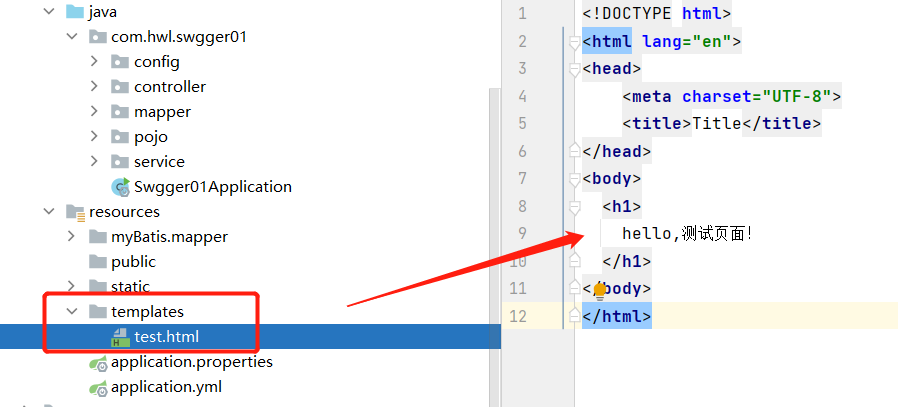
访问

Thymeleaf 语法学习
参考官网文档,Thymeleaf 官网:https://www.thymeleaf.org/
我们要使用thymeleaf,需要在html文件中导入命名空间的约束,方便提示。
xmlns:th="http://www.thymeleaf.org"
<!DOCTYPE html>

<html lang="en" xmlns:th="http://www.thymeleaf.org">

<head>

    <meta charset="UTF-8">

    <title>Title</title>

</head>

<body>

  <h1>

    hello,测试页面!

  </h1>

</body>

</html>
接受后台返回的消息:
在Controller中原来的方法添加一个Model后添加信息带回:
@Controller

public class ThmlfController {

    @RequestMapping("/t1")

    public String test1( Model model ){

        model.addAttribute("mes","后台消息");

        //classpath:/templates/test.html

        return "test";

    }

}
页面:
  <!--th:text就是将div中的内容设置为它指定的值-->

  <div th:text="${msg}"></div>
${...}:获取变量值
th:each 遍历
SpringBoot-Thymeleaf模板引擎的更多相关文章
- (二)SpringBoot基础篇- 静态资源的访问及Thymeleaf模板引擎的使用
一.描述 在应用系统开发的过程中,不可避免的需要使用静态资源(浏览器看的懂,他可以有变量,例:HTML页面,css样式文件,文本,属性文件,图片等): 并且SpringBoot内置了Thymeleaf ...
- 【Springboot】Springboot整合Thymeleaf模板引擎
Thymeleaf Thymeleaf是跟Velocity.FreeMarker类似的模板引擎,它可以完全替代JSP,相较与其他的模板引擎,它主要有以下几个特点: 1. Thymeleaf在有网络和无 ...
- SpringBoot使用thymeleaf模板引擎
(1).添加pom依赖 <dependency> <groupId>org.springframework.boot</groupId> <artifactI ...
- SpringBoot入门篇--使用Thymeleaf模板引擎进行页面的渲染
在做WEB开发的时候,我们不可避免的就是在前端页面之间进行跳转,中间进行数据的查询等等操作.我们在使用SpringBoot之前包括我在内其实大部分都是用的是JSP页面,可以说使用的已经很熟悉.但是我们 ...
- SpringBoot:2.SpringBoot整合Thymeleaf模板引擎渲染web视图
在Web开发过程中,Spring Boot可以通过@RestController来返回json数据,那如何渲染Web页面?Spring Boot提供了多种默认渲染html的模板引擎,主要有以下几种: ...
- 九、SpringBoot集成Thymeleaf模板引擎
Thymeleaf咋读!??? 呵呵,是不是一脸懵逼...哥用我的大学四级英文知识告诉你吧:[θaimlif]. 啥玩意?不会音标?...那你就这样叫它吧:“赛母李府”,大部分中国人是听不出破绽的.. ...
- springboot:Java模板引擎Thymeleaf介绍
Thymeleaf是一款用于渲染XML/XHTML/HTML5内容的模板引擎.类似JSP,Velocity,FreeMaker等,它也可以轻易的与Spring MVC等Web框架进行集成作为Web应用 ...
- 三、thymeleaf模板引擎构建前台html, 后台使用 ModelAndView 和 Model 模型
项目源码:https://github.com/y369q369/springBoot.git -> thymeleaf 私聊QQ: 1486866853 1.pom.xml中 ...
- Thymeleaf模板引擎的初步使用
在springboot中,推荐使用的模板引擎是Thymeleaf模板引擎,它提供了完美的Spring MVC的支持.下面就简单的介绍一下Thymeleaf模板引擎的使用. 在controller层中, ...
- spring boot: thymeleaf模板引擎使用
spring boot: thymeleaf模板引擎使用 在pom.xml加入thymeleaf模板依赖 <!-- 添加thymeleaf的依赖 --> <dependency> ...
随机推荐
- OpenCV 生成矩形mask
生成mask的一种操作 cv::Mat mask = cv::Mat::zeros(300, 300, CV_8UC1); mask(cv::Rect(100,150,100, 50)) = 255; ...
- 分布式协调组件Zookeeper之 选举机制与ZAB协议
Zookeeper简介: Zookeeper是什么: Zookeeper 是⼀个分布式协调服务的开源框架. 主要⽤来解决分布式集群中应⽤系统的⼀致性问题, 例如怎样避免同时操作同⼀数据造成脏读的问题. ...
- MySQL-SQL基础-子查询
#子查询-某些情况下,当进行查询的时候,需要的条件是另外一个select语句的结果,这个时候就要用到子查询.用于子查询的关键字主要包括: in.not in.=.!=.exists.not exist ...
- netty系列之:搭建自己的下载文件服务器
目录 简介 文件的content-type 客户端缓存文件 其他HTTP中常用的处理 文件内容展示处理 文件传输进度 总结 简介 上一篇文章我们学习了如何在netty中搭建一个HTTP服务器,讨论了如 ...
- GoLang设计模式3 - 抽象工厂模式
之前我们介绍了工厂设计模式,现在我们再看一下抽象工厂设计模式.抽象工程模式顾名思义就是对工厂模式的一层抽象,也是创建型模式的一种,通常用来创建一组存在相关性的对象. UML类图大致如下: 类图比较复杂 ...
- SQL语句之高级使用
1.select top select top 用于规定要返回的数据的数目 注意:并非所有的数据库系统都支持 SELECT TOP 语句. MySQL 支持 LIMIT 语句来选取指定的条数数据, ...
- Java基础之类加载器
Java类加载器是用户程序和JVM虚拟机之间的桥梁,在Java程序中起了至关重要的作用,理解它有利于我们写出更优雅的程序.本文首先介绍了Java虚拟机加载程序的过程,简述了Java类加载器的加载方式( ...
- Python - 执行cmd命令
python操作cmd 我们通常可以使用os模块的命令进行执行cmd 方法一:os.system os.system(执行的命令) # 源码 def system(*args, **kwargs): ...
- adb 常用命令大全(6)- 模拟按键输入
语法格式 input [<source>] <command> [<arg>...] 物理键 # 电源键 adb shell input keyevent 26 # ...
- C#中的文本到语音
本演示说明了如何使用c#.net Windows Forms应用程序中的system.speech库将文本转换为语音.Microsoft .NET框架提供System.Speech.Synthesis ...