
SpringBoot-Thymeleaf模板引擎
模板引擎,我们其实大家听到很多,其实jsp就是一个模板引擎,还有用的比较多的freemarker,包括SpringBoot给我们推荐的Thymeleaf,模板引擎有非常多,但再多的模板引擎,他们的思想都是一样的,什么样一个思想呢我们来看一下这张图
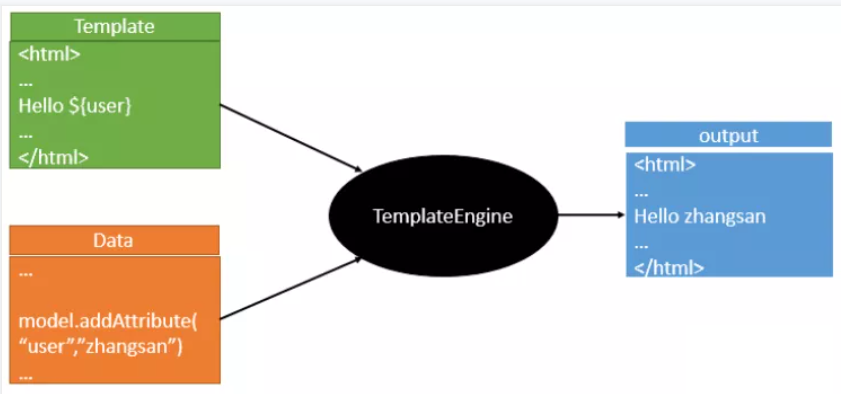
也就是说模板引擎是一个将数据和模板对应结合起来生成浏览器可显示的静态页面的组件。
不管是jsp还是其他模板引擎,都是这个思想。只不过呢,就是说不同模板引擎之间,他们可能这个语法有点不一样。其他的我就不介绍了,我主要来介绍一下SpringBoot给我们推荐的Thymeleaf模板引擎,这模板引擎呢,是一个高级语言的模板引擎,他的这个语法更简单。而且呢,功能更强大。
引入Thymeleaf
Thymeleaf 官网:https://www.thymeleaf.org/
Thymeleaf 在Github 的主页:https://github.com/thymeleaf/thymeleaf
Spring官方文档:找到对应的版本
https://docs.spring.io/spring-boot/docs/2.2.5.RELEASE/reference/htmlsingle/#using-boot-starter
找到对应的pom依赖:可以适当点进源码看下本来的包!
<!--thymeleaf-->

<dependency>

    <groupId>org.springframework.boot</groupId>

    <artifactId>spring-boot-starter-thymeleaf</artifactId>

</dependency>
Thymeleaf分析
要怎么使用呢,按照SpringBoot的自动配置原理看一下我们这个Thymeleaf的自动配置规则,再按照那个规则,我们进行使用。
我们去找一下Thymeleaf的自动配置类:ThymeleafProperties
@ConfigurationProperties(

    prefix = "spring.thymeleaf"

)

public class ThymeleafProperties {

    private static final Charset DEFAULT_ENCODING;

    public static final String DEFAULT_PREFIX = "classpath:/templates/";

    public static final String DEFAULT_SUFFIX = ".html";

    private boolean checkTemplate = true;

    private boolean checkTemplateLocation = true;

    private String prefix = "classpath:/templates/";

    private String suffix = ".html";

    private String mode = "HTML";

    private Charset encoding;

}
我们可以在其中看到默认的前缀和后缀!
我们只需要把我们的html页面放在类路径下的templates下,thymeleaf就可以帮我们自动渲染了。
使用thymeleaf什么都不需要配置,只需要将他放在指定的文件夹下即可!
测试
1、编写一个Controller
@Controller

public class ThmlfController {

    @RequestMapping("/t1")

    public String test1(){

        //classpath:/templates/test.html

        return "test";

    }

}
页面:
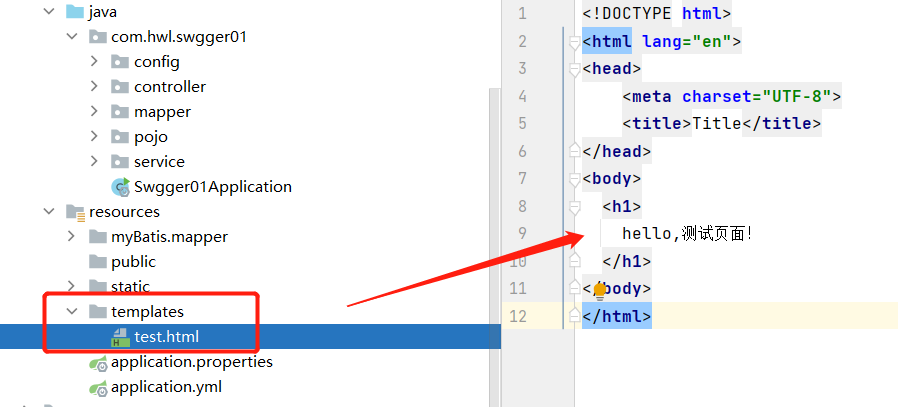
访问

Thymeleaf 语法学习
参考官网文档,Thymeleaf 官网:https://www.thymeleaf.org/
我们要使用thymeleaf,需要在html文件中导入命名空间的约束,方便提示。
xmlns:th="http://www.thymeleaf.org"
<!DOCTYPE html>

<html lang="en" xmlns:th="http://www.thymeleaf.org">

<head>

    <meta charset="UTF-8">

    <title>Title</title>

</head>

<body>

  <h1>

    hello,测试页面!

  </h1>

</body>

</html>
接受后台返回的消息:
在Controller中原来的方法添加一个Model后添加信息带回:
@Controller

public class ThmlfController {

    @RequestMapping("/t1")

    public String test1( Model model ){

        model.addAttribute("mes","后台消息");

        //classpath:/templates/test.html

        return "test";

    }

}
页面:
  <!--th:text就是将div中的内容设置为它指定的值-->

  <div th:text="${msg}"></div>
${...}:获取变量值
th:each 遍历
SpringBoot-Thymeleaf模板引擎的更多相关文章
- (二)SpringBoot基础篇- 静态资源的访问及Thymeleaf模板引擎的使用
一.描述 在应用系统开发的过程中,不可避免的需要使用静态资源(浏览器看的懂,他可以有变量,例:HTML页面,css样式文件,文本,属性文件,图片等): 并且SpringBoot内置了Thymeleaf ...
- 【Springboot】Springboot整合Thymeleaf模板引擎
Thymeleaf Thymeleaf是跟Velocity.FreeMarker类似的模板引擎,它可以完全替代JSP,相较与其他的模板引擎,它主要有以下几个特点: 1. Thymeleaf在有网络和无 ...
- SpringBoot使用thymeleaf模板引擎
(1).添加pom依赖 <dependency> <groupId>org.springframework.boot</groupId> <artifactI ...
- SpringBoot入门篇--使用Thymeleaf模板引擎进行页面的渲染
在做WEB开发的时候,我们不可避免的就是在前端页面之间进行跳转,中间进行数据的查询等等操作.我们在使用SpringBoot之前包括我在内其实大部分都是用的是JSP页面,可以说使用的已经很熟悉.但是我们 ...
- SpringBoot:2.SpringBoot整合Thymeleaf模板引擎渲染web视图
在Web开发过程中,Spring Boot可以通过@RestController来返回json数据,那如何渲染Web页面?Spring Boot提供了多种默认渲染html的模板引擎,主要有以下几种: ...
- 九、SpringBoot集成Thymeleaf模板引擎
Thymeleaf咋读!??? 呵呵,是不是一脸懵逼...哥用我的大学四级英文知识告诉你吧:[θaimlif]. 啥玩意?不会音标?...那你就这样叫它吧:“赛母李府”,大部分中国人是听不出破绽的.. ...
- springboot:Java模板引擎Thymeleaf介绍
Thymeleaf是一款用于渲染XML/XHTML/HTML5内容的模板引擎.类似JSP,Velocity,FreeMaker等,它也可以轻易的与Spring MVC等Web框架进行集成作为Web应用 ...
- 三、thymeleaf模板引擎构建前台html, 后台使用 ModelAndView 和 Model 模型
项目源码:https://github.com/y369q369/springBoot.git -> thymeleaf 私聊QQ: 1486866853 1.pom.xml中 ...
- Thymeleaf模板引擎的初步使用
在springboot中,推荐使用的模板引擎是Thymeleaf模板引擎,它提供了完美的Spring MVC的支持.下面就简单的介绍一下Thymeleaf模板引擎的使用. 在controller层中, ...
- spring boot: thymeleaf模板引擎使用
spring boot: thymeleaf模板引擎使用 在pom.xml加入thymeleaf模板依赖 <!-- 添加thymeleaf的依赖 --> <dependency> ...
随机推荐
- ES6对象扩展——扩展运算符
1.复制对象:使用扩展运算符复制对象时是浅拷贝 //复制对象:使用扩展运算符复制对象时是浅拷贝 const obj1 = { a:1, b:2, d:{ aa:1, bb:2 } } const ob ...
- MySQL-存储引擎-1
一.MySQL存储引擎 mysql> create table country( -> country_id smallint unsigned not null auto_increme ...
- 【详细、开箱即用】.NET企业微信回调配置(数据回调URL和指令回调URL验证)
前言: 前段时间因为公司业务需求,需要将微信小程序与企业微信对接通,也就是把小程序绑定到对应的企业微信账号下,在该企业微信的用户可以将该小程序绑定到工作台中,然后可以在工作台中打开该小程序并授权.不过 ...
- Mybatis源码解析4——SqlSession
上一篇文章中,我们介绍了 SqlSessionFactory 的创建过程,忘记了的,可以回顾一下,或者看下下面这张图也行. 接下来,可乐讲给大家介绍 Mybatis 中另一个重量级嘉宾--SqlSes ...
- Python - pip-review 库
使用 pip-review 库(推荐) 安装库 pip install pip-review 检查是否有需要更新的包 > pip-review scikit-learn==0.23.2 is a ...
- Winform EF CodeFist方式连接数据库
直接生成ado.net 实体数据模型挺方便的,但只有一步步的手写代码才能更好的理解EF,在学习asp.net core过程中手写代码已经明白了怎么回事,但实现过程有些麻烦不知道如何记录,但Winfor ...
- 如何高效掌控K8s资源变化?K8s Informer实现机制浅析
作者 王成,腾讯云研发工程师,Kubernetes contributor,从事数据库产品容器化.资源管控等工作,关注 Kubernetes.Go.云原生领域. 概述 进入 K8s 的世界,会发现有很 ...
- 生产环境部署高可用Rancher
环境准备: IP hostname role 192.168.200.150 nginx LB 192.168.200.151 master01-151 docker-ce/rke/helm/kube ...
- final关键字在PHP中的使用
final关键字的使用非常简单,在PHP中的最主要作用是定义不可重写的方法.什么叫不可重写的方法呢?就是子类继承后也不能重新再定义这个同名的方法. class A { final function t ...
- Java基础系列(21)- dowhile循环
do-while循环 对于while语句而言,如果不满足条件,则不能进入循环.但有时候我们需要即使不满足条件,也至少执行一次 do-while循环和while循环相似,不同的是,do-while循环至 ...