
自动化测试: Selenium 自动登录授权,再 Requests 请求内容
Selenium 自动登录网站、截图及 Requests 抓取登录后的网页内容。一起了解下吧。
- Selenium: 支持 Web 浏览器自动化的一系列工具和库的综合项目。
- Requests: 唯一的一个非转基因的 Python HTTP 库,人类可以安全享用。

为什么选择 Selenium 实现自动登录?
Selenium 实现,相当于模拟用户手动打开浏览器、进行登录的过程。
相比直接 HTTP 请求登录,有几个好处:
- 避免登录窗口的复杂情况(iframe, ajax 等),省得分析细节。
- 用 Selenium 实现,依照用户操作流程即可。
- 避免模拟 Headers 、记录 Cookies 等 HTTP 完成登录的细节。
- 用 Selenium 实现,依赖浏览器自身功能即可。
- 利于实现加载等待、发现特殊情况(登录验证等),加进一步逻辑。
另外,自动登录等过程的可视化,给外行看挺让人感觉高端的。
为什么选择 Requests 抓取网页内容?
抓取登录后的某些内容,而非爬取网站, Requests 够用、好用。
1) 准备 Selenium
基础环境: Python 3.7.4 (anaconda3-2019.10)
pip 安装 Selenium :
pip install selenium
获取 Selenium 版本信息:
$ python

Python 3.7.4 (default, Aug 13 2019, 15:17:50)

[Clang 4.0.1 (tags/RELEASE_401/final)] :: Anaconda, Inc. on darwin

Type "help", "copyright", "credits" or "license" for more information.

>>> import selenium

>>> print('Selenium version is {}'.format(selenium.__version__))

Selenium version is 3.141.0
2) 准备浏览器及其驱动
下载 Google Chrome 浏览器并安装:
https://www.google.com/chrome/
下载 Chromium/Chrome WebDriver:
https://chromedriver.storage.googleapis.com/index.html
然后,将 WebDriver 路径加入到 PATH ,例如:
# macOS, Linux

export PATH=$PATH:/opt/WebDriver/bin >> ~/.profile

# Windows

setx /m path "%path%;C:\WebDriver\bin\"
3) Go coding!
读取登录配置
登录信息是私密的,我们从 json 配置读取:
# load config

import json

from types import SimpleNamespace as Namespace

secret_file = 'secrets/douban.json'

# {

#   "url": {

#     "login": "https://www.douban.com/",

#     "target": "https://www.douban.com/mine/"

#   },

#   "account": {

#     "username": "username",

#     "password": "password"

#   }

# }

with open(secret_file, 'r', encoding='utf-8') as f:

  config = json.load(f, object_hook=lambda d: Namespace(**d))

login_url = config.url.login

target_url = config.url.target

username = config.account.username

password = config.account.password
Selenium 自动登录
以 Chrome WebDriver 实现,登录测试站点为「豆瓣」。
打开登录页面,自动输入用户名、密码,进行登录:
# automated testing

from selenium import webdriver

# Chrome Start

opt = webdriver.ChromeOptions()

driver = webdriver.Chrome(options=opt)

# Chrome opens with “Data;” with selenium

#   https://stackoverflow.com/questions/37159684/chrome-opens-with-data-with-selenium

# Chrome End

# driver.implicitly_wait(5)

from selenium.common.exceptions import TimeoutException

from selenium.webdriver.common.by import By

from selenium.webdriver.support.ui import WebDriverWait

from selenium.webdriver.support import expected_conditions as EC

wait = WebDriverWait(driver, 5)

print('open login page ...')

driver.get(login_url)

driver.switch_to.frame(driver.find_elements_by_tag_name("iframe")[0])

driver.find_element_by_css_selector('li.account-tab-account').click()

driver.find_element_by_name('username').send_keys(username)

driver.find_element_by_name('password').send_keys(password)

driver.find_element_by_css_selector('.account-form .btn').click()

try:

  wait.until(EC.presence_of_element_located((By.ID, "content")))

except TimeoutException:

  driver.quit()

  sys.exit('open login page timeout')
如果用 IE 浏览器,如下:
# Ie Start

# Selenium Click is not working with IE11 in Windows 10

#   https://github.com/SeleniumHQ/selenium/issues/4292

opt = webdriver.IeOptions()

opt.ensure_clean_session = True

opt.ignore_protected_mode_settings = True

opt.ignore_zoom_level = True

opt.initial_browser_url = login_url

opt.native_events = False

opt.persistent_hover = True

opt.require_window_focus = True

driver = webdriver.Ie(options = opt)

# Ie End
如果设定更多功能,可以:
cap = opt.to_capabilities()

cap['acceptInsecureCerts'] = True

cap['javascriptEnabled'] = True
打开目标页面,进行截图
print('open target page ...')

driver.get(target_url)

try:

  wait.until(EC.presence_of_element_located((By.ID, "board")))

except TimeoutException:

  driver.quit()

  sys.exit('open target page timeout')

# save screenshot

driver.save_screenshot('target.png')

print('saved to target.png')
Requests 复刻 Cookies ,请求 HTML
# save html

import requests

requests_session = requests.Session()

selenium_user_agent = driver.execute_script("return navigator.userAgent;")

requests_session.headers.update({"user-agent": selenium_user_agent})

for cookie in driver.get_cookies():

  requests_session.cookies.set(cookie['name'], cookie['value'], domain=cookie['domain'])

# driver.delete_all_cookies()

driver.quit()

resp = requests_session.get(target_url)

resp.encoding = resp.apparent_encoding

# resp.encoding = 'utf-8'

print('status_code = {0}'.format(resp.status_code))

with open('target.html', 'w+') as fout:

  fout.write(resp.text)

print('saved to target.html')
4) 运行测试
可以临时将 WebDriver 路径加入到 PATH :
# macOS, Linux

export PATH=$(pwd)/drivers:$PATH

# Windows

set PATH=%cd%\drivers;%PATH%
运行 Python 脚本,输出信息如下:
$ python douban.py

Selenium version is 3.141.0

--------------------------------------------------------------------------------

open login page ...

open target page ...

saved to target.png

status_code = 200

saved to target.html
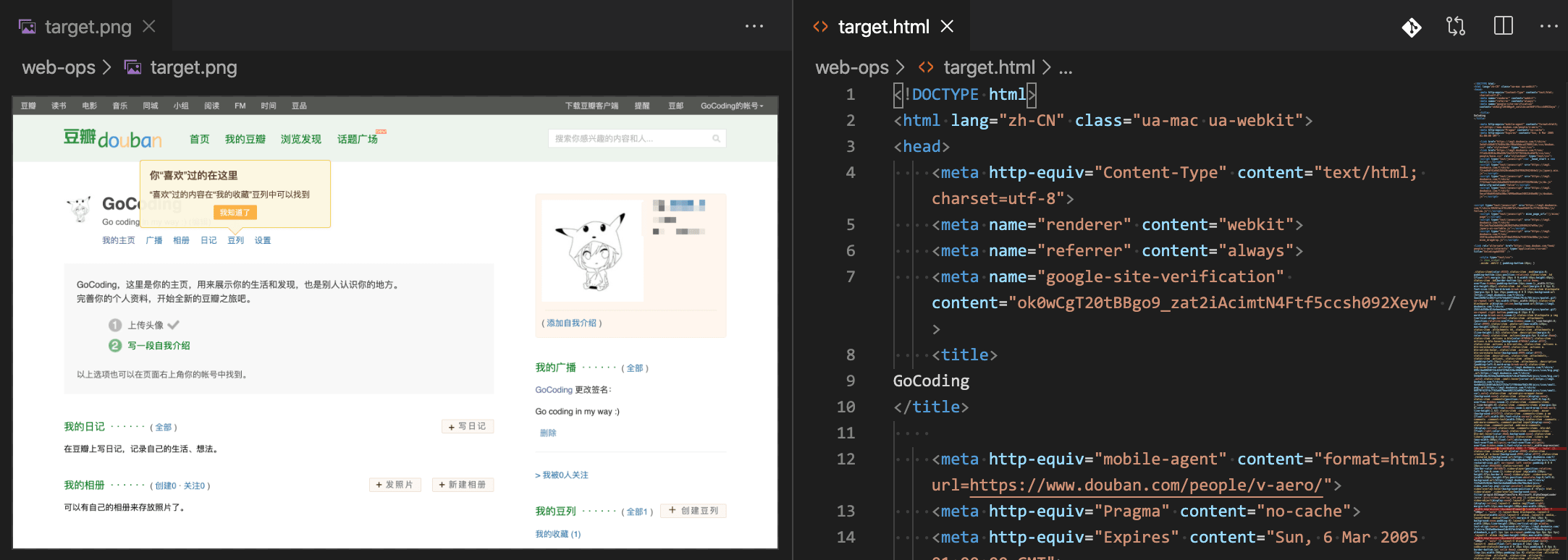
截图 target.png, HTML 内容 target.html ,结果如下:
结语
登录过程如果遇到验证呢?
- 滑动验证,可以 Selenium 模拟
- 滑动距离,图像梯度算法可判断
- 图文验证,可以 Python AI 库识别
参考
本文代码 Gist 地址:
https://gist.github.com/ikuokuo/1160862c154d550900fb80110828c94c
- Selenium:
https://www.selenium.dev/documentation/en/ - WebDriver:
https://www.selenium.dev/documentation/en/webdriver/driver_requirements/#quick-reference - requests:
https://requests.readthedocs.io/en/latest/ - requestium:
https://github.com/tryolabs/requestium - Selenium Requests:
https://github.com/cryzed/Selenium-Requests
自动化测试: Selenium 自动登录授权,再 Requests 请求内容的更多相关文章
- MY_使用selenium自动登录126/163邮箱并发送邮件
转自:https://www.cnblogs.com/yin-tao/p/7244082.html 我使用的是python2.7.13+selenium ps:几天之前,我曾多次尝试写这段代码,但是在 ...
- [Python爬虫] Selenium实现自动登录163邮箱和Locating Elements介绍
前三篇文章介绍了安装过程和通过Selenium实现访问Firefox浏览器并自动搜索"Eastmount"关键字及截图的功能.而这篇文章主要简单介绍如何实现自动登录163邮箱,同时 ...
- C#网页自动登录和提交POST信息的多种方法(转)
网页自动登录和提交POST信息的核心就是分析网页的源代码(HTML),在C#中,可以用来提取网页HTML的组件比较多,常用的用WebBrowser.WebClient.HttpWebRequest这三 ...
- Linux图形界面从登录列表中隐藏用户和开机自动登录
从GDM-GNOME显示管理器:“ GNOME显示管理器(GDM)是一个管理图形显示服务器并处理图形用户登录的程序.” 显示管理器为X Window System和Wayland用户提供图形登录提示. ...
- 4 使用Selenium模拟登录csdn,取出cookie信息,再用requests.session访问个人中心(保持登录状态)
代码: # -*- coding: utf-8 -*- """ Created on Fri Jul 13 16:13:52 2018 @author: a " ...
- 结合pychrom与selenium实现页面自动登录
缘起 一直在浏览器里用Katalon插件录制一些常用的流程,以减少重复操作,也就自然而然想自己搞搞自动化测试,但无奈登录一关跨不过去,就无法串起来.(不想让开发添加万能验证码的功能)首先想到的是识别验 ...
- C#_自动化测试1_模拟post,get_12306火车票网站自动登录工具
还记得2011年春运,12306火车票预订网站经常崩溃无法登录吗. 今天我们就开发一个12306网站自动登录软件. 帮助您轻松订票 通过前两篇博客Fiddler教程和HTTP协议详解,我们了解了Web ...
- 类似818tu.co微信小说分销系统设计之多公众号网页授权自动登录源码
/** 转载请保留原地址以及版权声明,请勿恶意修改 * 作者:杨浩瑞 QQ:1420213383 独立博客:http://www.yxxrui.cn * [后台]http://xiaoshuo. ...
- 基于Requests和BeautifulSoup实现“自动登录”
基于Requests和BeautifulSoup实现“自动登录”实例 自动登录抽屉新热榜 #!/usr/bin/env python # -*- coding:utf-8 -*- import req ...
随机推荐
- Java——Spring超详细总结
Spring概述 一.简化Java开发 Spring为了降低Java开发的复杂性,采用了以下四种策略 基于POJO的轻量级和最小侵入性编程: 通过依赖注入和面向接口实现松耦合: 基于切面和惯例进行声明 ...
- Java——Java自动装箱和拆箱
一.什么是自动装箱和拆箱: 我们知道java为8种基本类型分别提供了对应的包装类型,在Java SE5之前,如果要生成一个数值为10的Integer对象,必须这样进行: Integer i=new I ...
- oracle常用字符函数
字符函数: concat:(字符连接函数) --字符连接 select concat('con','cat') from dual; select 'co'||'nc'||'at' from dual ...
- 动态代理学习(二)JDK动态代理源码分析
上篇文章我们学习了如何自己实现一个动态代理,这篇文章我们从源码角度来分析下JDK的动态代理 先看一个Demo: public class MyInvocationHandler implements ...
- 【Spark】通过SparkStreaming实现从socket接受数据,并进行简单的单词计数
文章目录 步骤 一.创建maven工程并导入jar包 二.安装并启动生产者 三.开发SparkStreaming代码 四.查看结果 步骤 一.创建maven工程并导入jar包 <properti ...
- JAVA知识总结(二):封装
时隔近一年,我突然想起来这个文章还没有发完,所以就继续开始写.也不知道自己上次写到哪里了,不管了这里从面向对象的三个特性说起. 类和对象 在这之前,我们先了解什么是对象,已经什么是面向对象?对象:万物 ...
- Mysql常用sql语句(16)- inner join 内连接
测试必备的Mysql常用sql语句系列 https://www.cnblogs.com/poloyy/category/1683347.html 前言 利用条件表达式来消除交叉连接(cross joi ...
- 【poj 2406】Power Strings 后缀数组DC3模板 【连续重复子串】
Power Strings 题意 给出一个字符串s,求s最多由几个相同的字符串重复而成(最小循环节的重复次数) 思路 之前学习KMP的时候做过. 我的思路是:枚举字符串的长度,对于当前长度k,判断\( ...
- [hdu3486]rmq+枚举优化
题意:给n个数,求最小的段数,使得每一段的最大值之和大于给定的k.每一段的长度相等,最后若干个丢掉. 思路:从小到大枚举段数,如果能o(1)时间求出每一段的和,那么总复杂度是O(n(1+1/2+1/3 ...
- 7、会话框添加查看get与post请求类型
前言 在使用fiddler抓包的时候,查看请求类型get和post每次只有点开该请求,在Inspectors才能查看get和post请求,不太方便.于是可以在会话框直接添加请求方式. 一.添加会话框菜 ...