
Java远程调用Linux脚本
参考:http://blog.csdn.net/xiao_jun_0820/article/details/26254813
http://blog.csdn.net/a19881029/article/details/20000775
 package shell;

 import java.io.IOException;

 import java.io.InputStream;

 import java.nio.charset.Charset;

 import ch.ethz.ssh2.Connection;

 import ch.ethz.ssh2.Session;

 public class RemoteShellTool {

     private Connection conn;

     private String ipAddr;

     private String charset = Charset.defaultCharset().toString();

     private String userName;

     private String password;

     public RemoteShellTool(String ipAddr, String userName, String password, String charset) {

         this.ipAddr = ipAddr;

         this.userName = userName;

         this.password = password;

         if (charset != null) {

             this.charset = charset;

         }

     }

     public boolean login() throws IOException {

         conn = new Connection(ipAddr);

         conn.connect(); // 连接

         return conn.authenticateWithPassword(userName, password); // 认证

     }

     public String exec(String cmds) {

         InputStream in = null;

         String result = "";

         try {

             if (this.login()) {

                 Session session = conn.openSession(); // 打开一个会话

                 session.execCommand(cmds);

                 in = session.getStdout();

                 result = this.processStdout(in, this.charset);

                 session.close();

                 conn.close();

             }

         } catch (IOException e1) {

             e1.printStackTrace();

         }

         return result;

     }

     public String processStdout(InputStream in, String charset) {

         byte[] buf = new byte[1024];

         StringBuffer sb = new StringBuffer();

         try {

             while (in.read(buf) != -1) {

                 sb.append(new String(buf, charset));

             }

         } catch (IOException e) {

             e.printStackTrace();

         }

         return sb.toString();

     }

     /**

      * @param args

      */

     public static void main(String[] args) {

         RemoteShellTool tool = new RemoteShellTool("192.168.134.128", "root", "root", "utf-8");

 //        String result = tool.exec("./test.sh xiaojun");

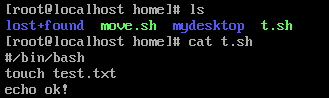
         String result = tool.exec("cd /home;./t.sh");

         System.out.println(result);

     }

 }

Java远程调用Linux脚本的更多相关文章
- java远程调用linux的命令或者脚本
转载自:http://eksliang.iteye.com/blog/2105862 Java通过SSH2协议执行远程Shell脚本(ganymed-ssh2-build210.jar) 使用步骤如下 ...
- JAVA远程执行Shell脚本类
1.java远程执行shell脚本类 package com.test.common.utility; import java.io.IOException; import java.io.Input ...
- 使用Runtime.getRuntime().exec()在java中调用python脚本
举例有一个Python脚本叫test.py,现在想要在Java里调用这个脚本.假定这个test.py里面使用了拓展的包,使得pythoninterpreter之类内嵌的编译器无法使用,那么只能采用ja ...
- Java代码调用Shell脚本并传入参数实现DB2数据库表导出到文件
本文通过Java代码调用Shell脚本并传入参数实现DB2数据库表导出到文件,代码如下: import java.io.File; import java.io.IOException; import ...
- Java实践-远程调用Shell脚本并获取输出信息
1.添加依赖 <dependency> <groupId>ch.ethz.ganymed</groupId> <artifactId>ganymed-s ...
- Shell 脚本 —— java 代码远程调用shell脚本重启 tomcat
个人博客网:https://wushaopei.github.io/ (你想要这里多有) 1.创建maven 工程 maven 依赖: <dependency> <grou ...
- 用java代码调用shell脚本执行sqoop将hive表中数据导出到mysql
1:创建shell脚本 touch sqoop_options.sh chmod 777 sqoop_options.sh 编辑文件 特地将执行map的个数设置为变量 测试 可以java代码传参数 ...
- linux下的shell命令的编写,以及java怎样调用linux的shell命令(java怎样获取linux上的网卡的ip信息)
程序猿都非常懒,你懂的! 近期在开发中,须要用到server的ip和mac信息.可是server是架设在linux系统上的,对于多网口,在获取ip时就产生了非常大的问题.以下是在windows系统上, ...
- java中调用js脚本
JDK1.6加入了对Script(JSR223)的支持.这是一个脚本框架,提供了让脚本语言来访问Java内部的方法.你可以在运行的时候找到脚本引擎,然后调用这个引擎去执行脚本.这个脚本API允许你为脚 ...
随机推荐
- 修改element-ui里table中悬浮框中三角号的颜色及透明度设置
.el-tooltip__popper,.el-tooltip__popper.is-dark{background:rgba(0,0,0,0.6) !important;} .el-tooltip_ ...
- 腾讯云Windows2016数据中文版环境搭建
最近忙活了好几天,在腾讯云上买了台服务器,系统是Windows2016数据中文版,用于个人的学习,下面说一下整个流程吧. 遇到的问题: 一开始是按照腾讯云的指南文档去搞环境配置的,但它上面都是以Win ...
- 【剑指Offer】面试题18. 删除链表的节点
题目 给定单向链表的头指针和一个要删除的节点的值,定义一个函数删除该节点. 返回删除后的链表的头节点. 注意:此题对比原题有改动 示例 1: 输入: head = [4,5,1,9], val = 5 ...
- C++ opencv 数字识别
#include "cv.h" #include "highgui.h" #include "cxcore.h" #include < ...
- Arduino - Nano针脚分配时需要注意的事项
0.1为Rx.Tx 针脚,这两个针脚一般作为串口使用,非串口设备尽量不占用该针脚.2.3为中断口,分别对应中断0.中断1,需要中断功能的设备,必须接入此.2-13.A0-A5,共18个针脚,都可以作为 ...
- 干货|微软远程桌面服务蠕虫漏洞(CVE-2019-1182)分析
2019年8月,微软发布了一套针对远程桌面服务的修复程序,其中包括两个关键的远程执行代码(RCE)漏洞,CVE-2019-1181和CVE-2019-1182.与之前修复的"BlueKeep ...
- flink和spark Streaming中的Back Pressure
Spark Streaming的back pressure 在讲flink的back pressure之前,我们先讲讲Spark Streaming的back pressure.Spark Strea ...
- H5调微信/支付宝
(1)微信支付:前端点击按钮==>请求接口(后台的接口,把订单号什么玩意传过去)==>后台自己***去请求微信支付接口(什么微信需要的任何参数和前端无关,都交给后台自己弄吧)==>微 ...
- 【转】centos7轻松搭建文件服务器
1.安装apache服务器 yum install httpd 2:启动httpd服务 service httpd start 3:查看httpd服务器的版本 4:修改访问端口和文件路径,以防端口冲突 ...
- POJ - 2718 Smallest Difference(全排列)
题意:将n个数字分成两组,两组分别组成一个数字,问两个数字的最小差值.要求,当组内数字个数多于1个时,组成的数字不允许有前导0.(2<=n<=10,每个数字范围是0~9) 分析: 1.枚举 ...