
android 入门 001 (界面布局)
学android 首先学会怎么布局界面,我开始是学.net的,因工作需要学习一下安卓,外行写的不好,请多多见谅指教 。这一篇文章然我们来学习一下四种布局吧!
RelativeLayout(相对布局) 、LinearLayout(线性布局) 、TableLayout(表格布局) 、FrameLayout(帧布局)
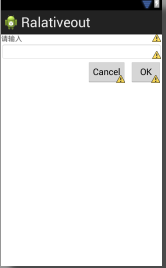
1、RelativeLayout
<RelativeLayout xmlns:android="http://schemas.android.com/apk/res/android"

    xmlns:tools="http://schemas.android.com/tools"

    android:layout_width="fill_parent"

    android:layout_height="match_parent"

    >

    <TextView

        android:id="@+id/lable"

        android:layout_width="fill_parent"

        android:layout_height="wrap_content"

        android:text="请输入" />

    <EditText

         android:id="@+id/txt"

        android:layout_width="fill_parent"

        android:layout_height="wrap_content"

         android:background="@android:drawable/editbox_background"

         android:layout_below="@id/lable"

        />

    <Button

        android:id="@+id/OK"

        android:layout_width="wrap_content"

        android:layout_height="wrap_content"

        android:layout_below="@id/txt"

        android:text="OK"

        android:layout_alignParentRight="true"

        android:layout_marginLeft="10px"

        />

         />

    <Button

        android:id="@+id/Cancel"

        android:layout_width="wrap_content"

        android:layout_height="wrap_content"

        android:layout_toLeftOf="@id/OK"

         android:layout_alignTop="@id/OK"

        android:text="Cancel"

        />

</RelativeLayout>
2、LinearLayout
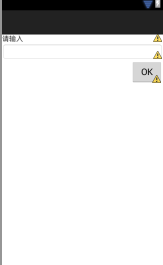
<LinearLayout xmlns:android="http://schemas.android.com/apk/res/android"

    xmlns:tools="http://schemas.android.com/tools"

    android:layout_width="fill_parent"

    android:layout_height="fill_parent"

     android:orientation="vertical"

    >

    <TextView

        android:id="@+id/lable"

        android:layout_width="fill_parent"

        android:layout_height="wrap_content"

        android:text="请输入" />

    <EditText

         android:id="@+id/txt"

        android:layout_width="fill_parent"

        android:layout_height="wrap_content"

         android:background="@android:drawable/editbox_background"

         android:layout_below="@id/lable"

        />

    <Button

        android:id="@+id/OK"

        android:layout_width="wrap_content"

        android:layout_height="wrap_content"

        android:layout_below="@id/txt"

        android:text="OK"

       android:layout_gravity="right"

        />

         />

</LinearLayout>
3、TableLayout
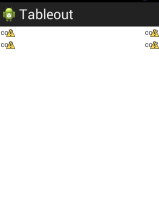
<TableLayout xmlns:android="http://schemas.android.com/apk/res/android"

    android:layout_width="fill_parent"

    android:layout_height="fill_parent"

    android:stretchColumns="1"

    >

   <TableRow >

       <TextView

           android:text="col1"

           android:padding="3dip"

           />

        <TextView

           android:text="col2"

           android:padding="3dip"

           android:gravity="right"

           />

   </TableRow>

    <TableRow >

       <TextView

           android:text="col1"

           android:padding="3dp"

           />

        <TextView

           android:text="col2"

           android:padding="3dp"

           android:gravity="right"

           />

   </TableRow>

</TableLayout>
4、FrameLayout
<FrameLayout xmlns:android="http://schemas.android.com/apk/res/android"

    xmlns:tools="http://schemas.android.com/tools"

    android:layout_width="fill_parent"

    android:layout_height="fill_parent"

    >

     <ImageView

         android:layout_height="fill_parent"

         android:layout_width="fill_parent"

         android:src="@drawable/movie"

         />

     <ImageView

         android:layout_height="wrap_content"

         android:layout_width="wrap_content"

         android:src="@drawable/play"

          android:layout_gravity="center"

         />

</FrameLayout>


android 入门 001 (界面布局)的更多相关文章
- Android 你知道界面布局嵌套多少层之后会Crash吗
我们先放一张Hierarchy Viewer的图:(模拟器Android4.4) 看到数字6了吗,那个RelativeLayout是MainActivity的根ViewGroup, 而在Relativ ...
- Android实现入门界面布局
Android实现入门界面布局 开发工具:Andorid Studio 1.3 运行环境:Android 4.4 KitKat 代码实现 首先是常量的定义,安卓中固定字符串应该定义在常量中. stri ...
- Android入门(十):界面的布局方式及其实际应用
关于Android界面布局,网上已经有了很多非常不错的学习资料,在这里我也不班门弄斧了,推荐两篇我认为写的不错的教程,然后再重点讲一下几种布局方式的实际应用. 教程链接:①http://www.cnb ...
- Android基础-系统架构分析,环境搭建,下载Android Studio,AndroidDevTools,Git使用教程,Github入门,界面设计介绍
系统架构分析 Android体系结构 安卓结构有四大层,五个部分,Android分四层为: 应用层(Applications),应用框架层(Application Framework),系统运行层(L ...
- 【详细】Android入门到放弃篇-YES OR NO-》各种UI组件,布局管理器,单元Activity
问:达叔,你放弃了吗? 答:不,放弃是不可能的,丢了Android,你会心疼吗?如果别人把你丢掉,你是痛苦呢?还是痛苦呢?~ 引导语 有人说,爱上一个人是痛苦的,有人说,喜欢一个人是幸福的. 人与人之 ...
- 2013 duilib入门简明教程 -- 界面布局(9)
上一个教程实现的标题栏代码中,并没有看到处理自适应窗口大小的代码,但是窗口大小变化后,按钮的位置会跟着变化,这是因为我们将按钮放到了HorizontalLayout.VerticalLayou ...
- Android界面布局基本知识简述
Android手机操作系统在模拟器中进行相关的编写,可以帮助我们实现各种功能需求.尤其是在界面的操作方面显得更为突出.在这里我们就可以对Android界面布局的相关操作来对这方面的知识进行一个深入的了 ...
- Android基础总结(3)——UI界面布局
Android的UI设计有好几种界面程序编写方式.大体上可分为两大类:一类是利用可视化工具来进行,允许你进行拖拽控件来进行布局:还有一类是编写xml文档来进行布局.这两种方法可以相互转换. 1.常见的 ...
- [Android 性能优化系列]降低你的界面布局层次结构的一部分
大家假设喜欢我的博客,请关注一下我的微博,请点击这里(http://weibo.com/kifile),谢谢 转载请标明出处(http://blog.csdn.net/kifile),再次感谢 原文地 ...
随机推荐
- C++之路起航——标准模板库(list)
list(链表):http://baike.baidu.com/link?url=gkVdBlHEzy6ssrgT5Iy2wze4jl37ka1G45TRpUHrQSYFZQg2HimtUCePV0t ...
- 杭电ACM分类
杭电ACM分类: 1001 整数求和 水题1002 C语言实验题——两个数比较 水题1003 1.2.3.4.5... 简单题1004 渊子赛马 排序+贪心的方法归并1005 Hero In Maze ...
- SparkSQL基础应用(1.3.1)
一.概述 从1.3版本开始Spark SQL不再是测试版本,之前使用的SchemaRDD重命名为DataFrame,统一了Java和ScalaAPI. SparkSQL是Spark框架中处理结构化数据 ...
- 13---Net基础加强
更新中,敬请期待............ 作业-复习 程序集1 程序集2 反射1 反射2 反射3 反射4-记事本插件1 反射5-记事本插件2
- springmvcの神总结のreadme
********李守宏springmvc******** 3.== --\springmvc一个controller实现多个方法 ----\继承MultiActionController ----\配 ...
- 夺命雷公狗ThinkPHP项目之----企业网站19之网站配置信息的修改
我们这个其实也是很简单的,思路是直接将提交过来的cf_id 改成我们自己定义好的 “1” 即可,因为1配置只能有一个,所以永久都是该id 为1的: 先来完成我们的控制器,代码如下所示: public ...
- zw版【转发·台湾nvp系列Delphi例程】HALCON CropPart
zw版[转发·台湾nvp系列Delphi例程]HALCON CropPart procedure TForm1.Button1Click(Sender: TObject);var ho_Egypt1 ...
- 【crunch bang】 增加“菜单项”
[右键菜单]->[Settings]->[Openbox]->[GUI Menu Editor] 挑选合适的位置,增加[菜单项],编辑内容.
- json_encode注意
PHP5.2或以上的版本把json_encode作为内置函数来用,但只支持utf-8编码的字符,否则中文就会出现乱码或者空值.解决办法如下: 1.保证在使用JSON处理的时候字符是以UTF8编码的.具 ...
- java IO复习笔记
1. IO是什么? Input Output Java的核心库java.io提供了全面的IO接口.包括:文件读写.标准设备输出等.Java中IO是以流为基础进行输入输出的,所有数据被串行化写入输出流, ...