
PCL点云库:对点云进行变换(Using a matrix to transform a point cloud)
点云数据可以用ASCII码的形式存储在PCD文件中(关于该格式的描述可以参考链接:The PCD (Point Cloud Data) file format)。为了生成三维点云数据,在excel中用rand()函数生成200行0-1的小数,ABC三列分别代表空间点的xyz坐标。

# .PCD v.7 - Point Cloud Data file format

VERSION .7

FIELDS x y z

SIZE 4 4 4

TYPE F F F

COUNT 1 1 1

WIDTH 200

HEIGHT 1

VIEWPOINT 0 0 0 1 0 0 0

POINTS 200

DATA ascii

0.88071666    0.369209703    0.062937221

0.06418104    0.579762553    0.221359779

...

...

0.640053058    0.480279041    0.843647334

0.245554712    0.825770496    0.626442137
进行点云的变换主要用到的函数是pcl::transformPointCloud,函数原型为:
void pcl::transformPointCloud(const pcl::PointCloud< PointT > & cloud_in,
pcl::PointCloud< PointT > & cloud_out,
const Eigen::Matrix4f & transform )
参数中cloud_in为源点云,cloud_out为变换后的点云,transform为变换矩阵。下面的代码对源点云绕Z轴旋转45°,然后沿X轴平移了2.5个单位:
#include <iostream>

#include <pcl/io/pcd_io.h>

#include <pcl/point_cloud.h>

#include <pcl/common/transforms.h>                  //allows us to use pcl::transformPointCloud function

#include <pcl/visualization/pcl_visualizer.h>

// This is the main function

int main (int argc, char** argv)

{

    //creates a PointCloud<PointXYZ> boost shared pointer and initializes it.

    pcl::PointCloud<pcl::PointXYZ>::Ptr source_cloud (new pcl::PointCloud<pcl::PointXYZ> ());

    // Load PCD file

    if (pcl::io::loadPCDFile<pcl::PointXYZ> ("sample.pcd", *source_cloud) == -)

    {

        PCL_ERROR ("Couldn't read file sample.pcd \n");

        return (-);

    }

    /* Reminder: how transformation matrices work :

           |-------> This column is the translation

    | 1 0 0 x |  \

    | 0 1 0 y |   }-> The identity 3x3 matrix (no rotation) on the left

    | 0 0 1 z |  /

    | 0 0 0 1 |    -> We do not use this line (and it has to stay 0,0,0,1)

    METHOD #1: Using a Matrix4f

    This is the "manual" method, perfect to understand but error prone !

    */

    Eigen::Matrix4f transform_1 = Eigen::Matrix4f::Identity();

    // Define a rotation matrix (see https://en.wikipedia.org/wiki/Rotation_matrix)

    // Here we defined a 45° (PI/4) rotation around the Z axis and a translation on the X axis.

    float theta = M_PI/; // The angle of rotation in radians

    transform_1 (,) = cos (theta);

    transform_1 (,) = -sin(theta);

    transform_1 (,) = sin (theta);

    transform_1 (,) = cos (theta);

    //    (row, column)

    // Define a translation of 2.5 meters on the x axis.

    transform_1 (,) = 2.5;

    // Print the transformation

    printf ("Method #1: using a Matrix4f\n");

    std::cout << transform_1 << std::endl;

    // Executing the transformation

    pcl::PointCloud<pcl::PointXYZ>::Ptr transformed_cloud (new pcl::PointCloud<pcl::PointXYZ> ());

    /*

    void pcl::transformPointCloud(const pcl::PointCloud< PointT > & cloud_in,

                                    pcl::PointCloud< PointT > &  cloud_out,

                                    const Eigen::Matrix4f &  transform  )

    */

    // Apply an affine transform defined by an Eigen Transform.

    pcl::transformPointCloud (*source_cloud, *transformed_cloud, transform_1);

    // Visualization

    printf(  "\nPoint cloud colors :  white  = original point cloud\n"

      "                        red  = transformed point cloud\n");

    pcl::visualization::PCLVisualizer viewer ("Matrix transformation example");

    // Define R,G,B colors for the point cloud

    pcl::visualization::PointCloudColorHandlerCustom<pcl::PointXYZ> source_cloud_color_handler (source_cloud, , , );

    // We add the point cloud to the viewer and pass the color handler

    viewer.addPointCloud (source_cloud, source_cloud_color_handler, "original_cloud");

    pcl::visualization::PointCloudColorHandlerCustom<pcl::PointXYZ> transformed_cloud_color_handler (transformed_cloud, , , ); // Red

    viewer.addPointCloud (transformed_cloud, transformed_cloud_color_handler, "transformed_cloud");

    viewer.addCoordinateSystem (1.0, );  //Adds 3D axes describing a coordinate system to screen at 0,0,0.

    viewer.setBackgroundColor(0.05, 0.05, 0.05, ); // Setting background to a dark grey

    viewer.setPointCloudRenderingProperties (pcl::visualization::PCL_VISUALIZER_POINT_SIZE, , "original_cloud");

    viewer.setPointCloudRenderingProperties (pcl::visualization::PCL_VISUALIZER_POINT_SIZE, , "transformed_cloud");

    //viewer.setPosition(800, 400); // Setting visualiser window position

    while (!viewer.wasStopped ()) { // Display the visualiser until 'q' key is pressed

    viewer.spinOnce ();

    }

  return ;

}
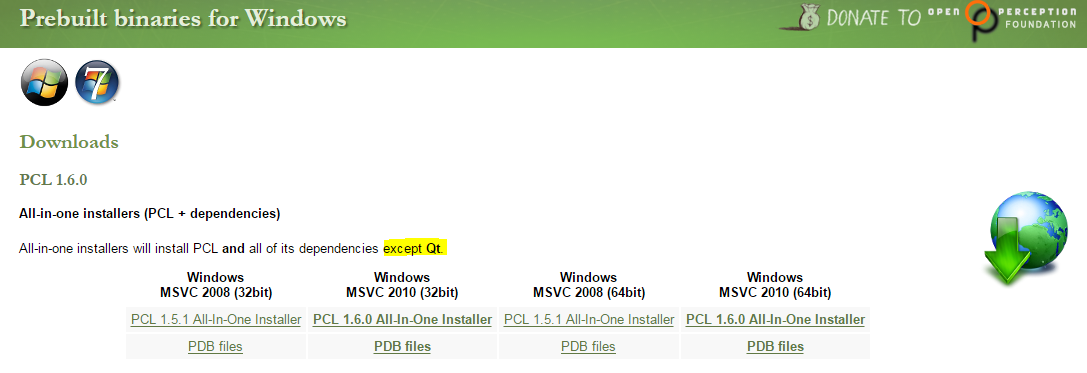
在PCL官网下载All-in-one installers,由于使用的是Win7 32位系统,因此选择了Windows MSVC 2010 (32bit)进行安装,这个All-in-one的安装程序会同时安装除QT外的一些第三方依赖库,比如boost、Eigen、VTK、OpenNI等。
安装好之后如果是自己在VS2010中配置工程属性,将会很麻烦,可以参考Using PCL in your own project。下面通过Cmake来自动生成VS2010的项目。首先创建一个CMakeLists.txt文件(注意其中PCL的版本)。如果编译软件使用了外部库,事先并不知道它的头文件和链接库的位置。得在编译命令中加上包含它们的查找路径。CMake使用find_package命令来解决这个问题。
cmake_minimum_required(VERSION 2.6 FATAL_ERROR)

project(pcl-matrix_transform)

find_package(PCL 1.6 REQUIRED)

include_directories(${PCL_INCLUDE_DIRS})

link_directories(${PCL_LIBRARY_DIRS})

add_definitions(${PCL_DEFINITIONS})

add_executable (matrix_transform matrix_transform.cpp)

target_link_libraries (matrix_transform ${PCL_LIBRARIES})
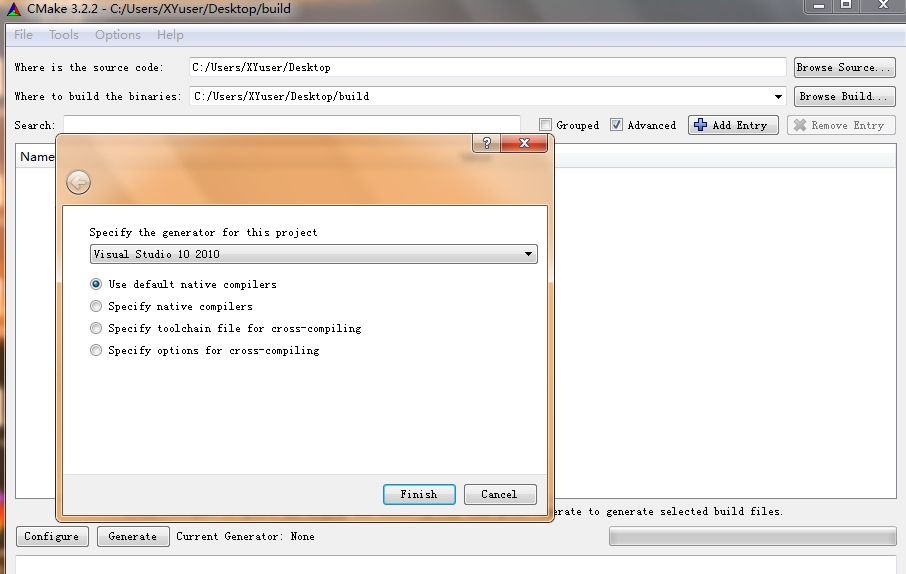
然后使用CMake的GUI程序来生成工程文件。Where is the source code栏选择源代码所在路径,这里代码放在桌面上;Where to build the binaries栏选择生成文件所在的路径,默认在桌面上的build文件夹中。点击Configure之后会弹出对话框,选择Visual Studio 2010,最后点击生成按钮,将会在build文件夹中生成VS2010的工程文件。
在编译之前需要注意一点,由于All-in-one的安装程序没有安装QT(需要单独安装),需要在工程属性的附加依赖项中删掉QT的lib(这个程序中暂时也没有用到QT相关的东西),否则会出现编译错误。最后运行程序,结果如下图所示。其中红色的点云为变换后的。

参考:
Using a matrix to transform a point cloud
http://pointclouds.org/documentation/tutorials/matrix_transform.php#matrix-transform
The PCD (Point Cloud Data) file format
http://pointclouds.org/documentation/tutorials/pcd_file_format.php#pcd-file-format
Reading Point Cloud data from PCD files
http://pointclouds.org/documentation/tutorials/reading_pcd.php#reading-pcd
PCL学习笔记(1):pcl1.6.0+vs2010环境配置以及第一个pcl程序
http://www.voidcn.com/blog/chentravelling/article/p-3487308.html
PCL点云库:对点云进行变换(Using a matrix to transform a point cloud)的更多相关文章
- 配置点云库PCL时遇到的问题
配置PCL基本参照PCL中国官网教程 http://www.pclcn.org/study/shownews.php?lang=cn&id=34 配置点云库时遇到的问题(基于win8 64位, ...
- PCL点云库:ICP算法
ICP(Iterative Closest Point迭代最近点)算法是一种点集对点集配准方法.在VTK.PCL.MRPT.MeshLab等C++库或软件中都有实现,可以参见维基百科中的ICP Alg ...
- 点云库PCL学习
1. 点云的提取 点云的获取:RGBD获取 点云的获取:图像匹配获取(通过摄影测量提取点云数据) 点云的获取:三维激光扫描仪 2. PCL简介 PCL是Point Cloud Library的简称,是 ...
- PCL点云库中的坐标系(CoordinateSystem)
博客转载自:https://blog.csdn.net/qq_33624918/article/details/80488590 引言 世上本没有坐标系,用的人多了,便定义了坐标系统用来定位.地理坐标 ...
- Windows下安装PCL点云库
原文链接:http://blog.csdn.net/u012337034/article/details/38270109 简介: 在Windows下安装PCL点云库的方法大概有两种: ...
- Windows 8 64位系统 在VS2010 32位软件上 搭建 PCL点云库 开发环境
Windows 8 64位系统 在VS2010 32位软件上 搭建 PCL点云库 开发环境 下载PCL For windows 软件包 到这个网站下载PCL-All-In-One Installer: ...
- ViCANdo新版本发布(PART1) | 点云库(PCL)集成
激光雷达 随着智能驾驶技术的发展,激光雷达迅速的进入工程师的视野,不管是机械式.MEMS还是纯固态激光雷达,本质上都是以一定的速度扫描照射区域,在此过程中激光雷达不断的发出激光并接收反 ...
- python利用pybind11调用PCL点云库
2019年7月9日14:31:13 完成了一个简单的小例子,python生成点云数据,利用pybind11传给PCL显示. ubuntu 16.04 + Anaconda3 python3.6 + ...
- PCL点云库(Point Cloud Library)简介
博客转载自:http://www.pclcn.org/study/shownews.php?lang=cn&id=29 什么是PCL PCL(Point Cloud Library)是在吸收了 ...
随机推荐
- SLC、MLC和TLC三者的区别
SLC=Single-LevelCell,即1bit/cell,速度快寿命长,价格超贵(约MLC3倍以上的价格),约10万次擦写寿命 MLC=Multi-LevelCell,即2bit/cell,速度 ...
- JavaScript获取后台C#变量以及调用后台方法
http://www.educity.cn/develop/495493.html 有时需要在JavaScript中获取后台变量的值,来判断JavaScript的执行逻辑,或者需要调用C#后台方法获取 ...
- 一个容易被忽略的ReportingService超时问题
我们在使用Sql Server Reporting Service开发报表的时候,经常会遇到报表超时的问题,报表超时的原因有很多,也有很多地方可以设置报表的超时时间,比如在报表中的数据源(dataso ...
- 锋利的JQuery(三)
事件冒泡: 解决方式: 1.使用事件对象:$("element").bind("click",function(event){}); 这个事件对象只有事件处理函 ...
- 关于jQuery的bind()\trigger()\triggerHandler()
1.bind() 事件绑定. 多个事件会链式累加,而不会覆盖. 即 $("div").bind("click",funtion(){alert("te ...
- mybatis 相关总结
1. Mybatis的<where><foreach><set>等标签详解:http://blog.csdn.net/zenson_g/article/detail ...
- Mac下使用Automator实现隐藏和显示
本文使用Makdown编辑 通常系统中打开一个文件有好多种方法,编辑也是.例如你要打开OmniGraffle来画个图(suppose you are working on the Mac OS X) ...
- visio 由于形状保护和/或图层属性设置不能进行编辑
方式一.菜单栏 --> 格式 --> 保护 方式二.用鼠标右键单击组件, 格式 --> 保护 . 转自:http://blog.163.com/chen_dawn/blog/stat ...
- 安装centos7.1 32bit时,没有可用的网络设备的解决方法
安装的系统镜像文件:CentOS-7-i386-LiveGNOME-1511.iso 虚拟机版本: 问题: 原因: 原先我在这里选择的时候,以为自己安装的不是64位的,所以没有选择centos 64, ...
- SQL-表链接
查询两张表中相匹配的数据显示,不匹配的忽略 1.简单表连接 select * from 表1,表2 where 表1.字段=表2.字段 2.内链接 select * from 表1 inner joi ...