
CentOS 安装 Harbor的简单过程(仅使用http 未使用https)
1. 下载离线安装包
在线安装 99% 会失败, 建议还是使用离线安装包
下载地址
https://github.com/vmware/harbor/releases
20180719 时最新版本的get地址为:
https://storage.googleapis.com/harbor-releases/harbor-offline-installer-v1.5.2-rc1.tgz
需要翻墙 建议使用百度云盘下载
安装包较大

2. 安装docker 以及安装 docker-composet
docker 不再重复
docker-compose 直接下载 二进制文件 放到 /usr/bin (随便一个path路径包含的即可)
然后增加执行权限
chmod +x /usr/bin/docker-compose
验证执行命令无问题

修改 docker的配置文件
vim /etc/docker/daemon.json

{

"registry-mirrors": ["http://a7d80d83.m.daocloud.io"],

"insecure-registries":["CentOS75:8081", "127.0.0.1:8081","10.24.101.99:81","10.24.101.99:8081"]

}

增加:

"insecure-registries":["CentOS75:8081", "127.0.0.1:8081","10.24.101.99:81","10.24.101.99:8081"]
3. copy离线安装文件到 linux机器 并且解压缩包
cd 到harbor目录。 将下面最大的gz 包使用 gzip -d 的命令解压缩出来
然后docker load -i 的方式将 vm harbor相关的镜像导入
导入的镜像主要有:
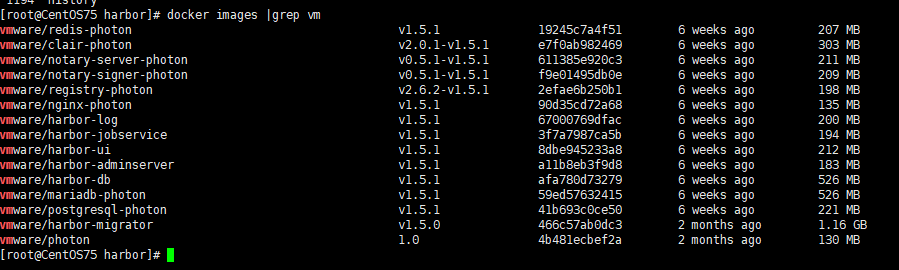
4. 还是在当前harbor目录 修改harbor的配置文件
vim harbor.cnf

修改点:

hostname=10.24.101.99:

##如果修改了默认端口 这个地方需要同步也修改一下 避免 docker login 失败 我昨天就登录失败了很久.

## Configuration file of Harbor

#This attribute is for migrator to detect the version of the .cfg file, DO NOT MODIFY!

_version = 1.5.

#The IP address or hostname to access admin UI and registry service.

#DO NOT use localhost or 127.0.0.1, because Harbor needs to be accessed by external clients.

hostname = 10.24.101.99:

默认密码

##The initial password of Harbor admin, only works for the first time when Harbor starts.

#It has no effect after the first launch of Harbor.

#Change the admin password from UI after launching Harbor.

harbor_admin_password = Harbor12345

其他密码

#The address of the Harbor database. Only need to change when using external db.

db_host = mysql

#The password for the root user of Harbor DB. Change this before any production use.

db_password = root123

#The port of Harbor database host

db_port =

#The user name of Harbor database

db_user = root

##### End of Harbor DB configuration#######

#The redis server address. Only needed in HA installation.

#address:port[,weight,password,db_index]

redis_url = redis:
5. 修改docker-compose.yml 文件 将端口号与 上一步的配置文件中的端口号一致起来

6. 还是在当前目录执行命令
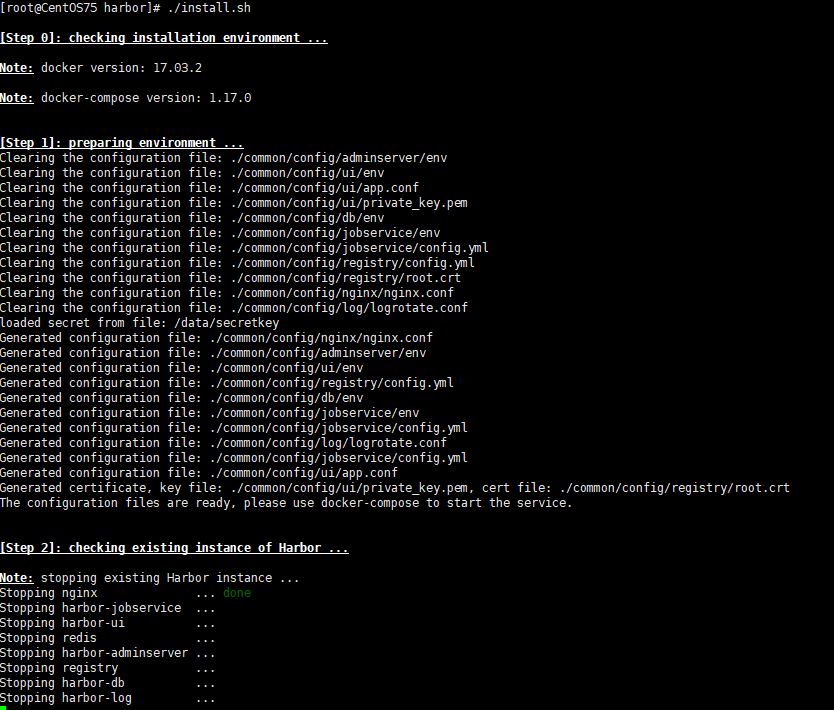
./install.sh
我这边已经有了 nginx 和registry 命令的container 了 所以报错
需要需改 docker-compose文件 或者是 修改 容器的名字 简单点就是rename 容器的名字即可
docker rename registry registry2

docker rename nginx    nginx2
继续执行 会提示 正常 然后这是 重复安装时的界面
安装完成时的提示
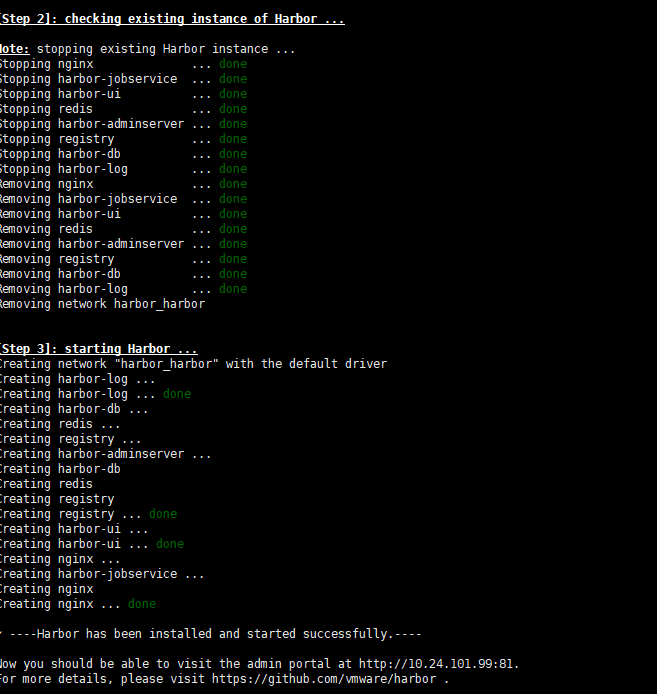
注意提示信息
? ----Harbor has been installed and started successfully.----

Now you should be able to visit the admin portal at http://10.24.101.99:81.

For more details, please visit https://github.com/vmware/harbor .
安装完成形成很多container
如图示 我这个版本有8个容器在运行

7. 进行docker login
docker login 10.24.101.99:
用户密码 就是 上文中配置文件里面的
admin:Harbor12345

8. docker tag和docker push
简单命令
docker tag hello-world 10.24.101.99:/library/hello-world:

docker push 10.24.101.99:/library/hello-world:

9. 网页端进行查看
登录地址与docker login的地址完全一致.

输入 admin和more密码登录
查看镜像标签日志等
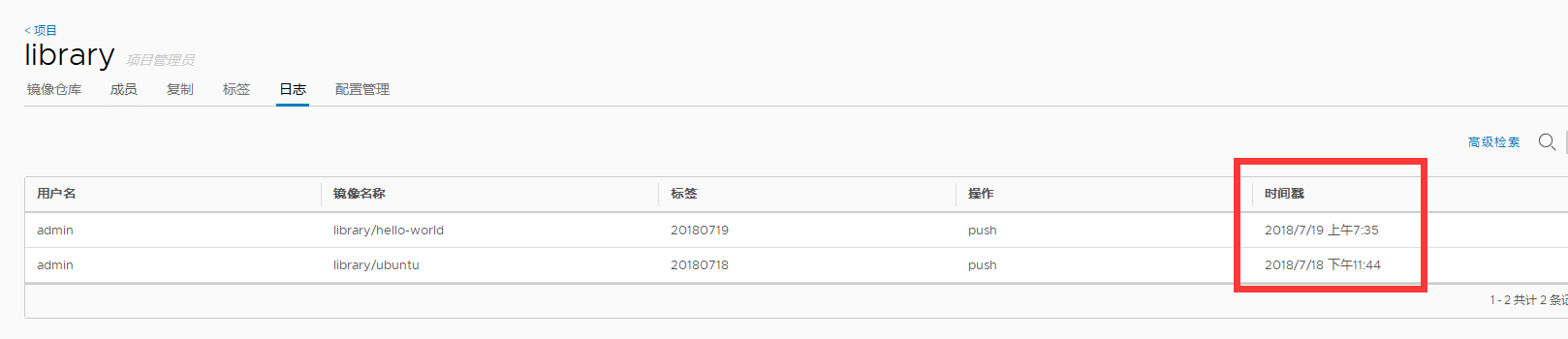
10 https 还有 高可用等以后有时间在研究. 验证重复 install.sh 也不会降之前 push的镜像删除掉 非常好用 比直接用regsitry 还简单. mark一下 继续学习.
CentOS 安装 Harbor的简单过程(仅使用http 未使用https)的更多相关文章
- centos 安装 和 linux 简单命令
1. centos 安装 参照:https://www.cnblogs.com/tiger666/articles/10259102.html 安装过程注意点: 1. 安装过程中的选择安装Basic ...
- CentOS安装Harbor
CentOS版本:7.4 Harbor版本:1.5.0 Docker版本:1.12.6 Docker Compose版本:1.21.2 一.安装Harbor(http方式,80端口) 1.安装Dock ...
- CentOS安装Node.js简单教程
记录一下自己安装过程 先安装gcc-c++编译环境和openssl 代码如下 复制代码 yum install gcc-c++ openssl-devel wget http://nodejs.or ...
- centos 安装 crontab 和 简单的使用教程
crontab是一个非常好用的定时执行任务的程序.以下是操作方式 1. 安装 cron 的 主程序 : yum -y install vixie-cron 2. 安装 cron 守护进程的表格的程序 ...
- 阿里云centos安装ftp与svn过程
1.下载xshell或者secureCRT 2.登录centos或者服务器 3.安装vsftpd [root@xxx]# yum install vsftpd //安装vsftpd [root@xxx ...
- 银河麒麟v4.0.2 安装gscloud的简单过程
1. 本来想用 tar包安装 redis 结果总是报错, 提示需要make test 但是我已经make test 了 所以还是使用 apt-get来安装. 2. 方式 apt-get update ...
- centos安装python3.7.0过程记录
参考自这里,整理出以下步骤. 一.下载python3.7.0包地址:https://www.python.org/ftp/python/3.7.0/Python-3.7.0.tgz 二.安装 登陆Li ...
- 安装oracle 11g详细过程仅供参考
- Centos 安装dhcp及简单配置
install yum -y install dhcp file /etc/dhcp/dhcpd.conf eg:-------------------------------- ddns-updat ...
随机推荐
- tusen 刷题
//1.single number和变体 //2.lru lfu 3.给一个正整数集合,求一个和最大且能被3整除的子集.Follow up: 如果集合里有正有负 4.leetcode200-numbe ...
- Storm 运行例子
1.建立Java工程 使用idea,添加lib库,拷贝storm中lib到工程中 2.拷贝wordcount代码 下载src包,解压找到 apache-storm-0.9.4-src\apache-s ...
- PySide图形界面开发(一)
一.为什么要使用PySide? PySide由Qt的官方团队--Nokia Qt进行维护,集成了Qt和Python的优势.一个PySide程序员只需要使用简单的Python语言就能够发挥Qt的所有功能 ...
- 20155211 Exp4 恶意代码分析
20155211 Exp4 恶意代码分析 实践目标 1 监控你自己系统的运行状态,看有没有可疑的程序在运行. 2 是分析一个恶意软件,就分析Exp2或Exp3中生成后门软件:分析工具尽量使用原生指令或 ...
- mfc CListBox
通过ID操作对象 CListBox(列表框)控件 CListBox类常用成员 CListBox插入数据 CListBox删除数据 CListBox运用示例 一.CListBox类常用成员 CListB ...
- 几种flash存储芯片的用途和分类
1.IIC EEPROM------容量小,采用的是IIC通信协议:用于在掉电时,存系统配置参数,比如屏幕亮度等.常用芯片型号有 AT24C02.FM24C02.CAT24C02等,其常见的封装多为D ...
- pt-online-schema-change的实现原理
pt-online-schema-change用于MySQL的在线DDL. 下面结合官方文档和general log来分析其实现原理. 测试表 mysql> show create table ...
- 【分享】20个非常有用的Java程序片段
福利来啦!!! 刚看到的一篇好东东,分享给大家,这些代码留着哦,以后会用得着的... 原文地址:http://developer.51cto.com/art/201306/398347.htm 1. ...
- Linux环境下使用n更新node版本失败的原因与解决
Linux环境为CentOS 6.5 64位,阿里云低配服务器...学生优惠,然而下个月即将过期,真是个悲伤的故事 很久之前就安装了node,但是一直没有进行过升级,近日因为将部分异步代码更新为采用原 ...
- 通用shellcode
所有 win_32 程序都会加载 ntdll.dll 和 kernel32.dll 这两个最基础的动态链接库.如果想要 在 win_32 平台下定位 kernel32.dll 中的 API 地址,可以 ...