
[Unity插件]Lua行为树(三):组合节点Sequence
Sequence的继承关系如下:
Sequence->Composite->ParentTask->Task
上一篇已经实现了简单版本的ParentTask和Task(基于Behavior Designer的源码),那么接下来看下Composite和Sequence。
1.Composite:表明该节点是组合节点,无特殊作用。
2.Sequence:
成员:
currentChildIndex:当前运行的子节点索引
executionStatus:当前运行的子节点状态
方法:
CanExecute:当有可运行的子节点并且子节点不返回失败时,返回true
OnChildExecuted:当一个子节点运行完后调用,将当前索引指向下一个节点,同时更新当前运行的子节点状态
OnEnd:Sequence运行结束时调用,重置变量
 namespace BehaviorDesigner.Runtime.Tasks

 {

     [TaskDescription("The sequence task is similar to an \"and\" operation. It will return failure as soon as one of its child tasks return failure. " +

                      "If a child task returns success then it will sequentially run the next task. If all child tasks return success then it will return success.")]

     [HelpURL("http://www.opsive.com/assets/BehaviorDesigner/documentation.php?id=25")]

     [TaskIcon("{SkinColor}SequenceIcon.png")]

     public class Sequence : Composite

     {

         // The index of the child that is currently running or is about to run.

         private int currentChildIndex = ;

         // The task status of the last child ran.

         private TaskStatus executionStatus = TaskStatus.Inactive;

         public override int CurrentChildIndex()

         {

             return currentChildIndex;

         }

         public override bool CanExecute()

         {

             // We can continue to execuate as long as we have children that haven't been executed and no child has returned failure.

             return currentChildIndex < children.Count && executionStatus != TaskStatus.Failure;

         }

         public override void OnChildExecuted(TaskStatus childStatus)

         {

             // Increase the child index and update the execution status after a child has finished running.

             currentChildIndex++;

             executionStatus = childStatus;

         }

         public override void OnConditionalAbort(int childIndex)

         {

             // Set the current child index to the index that caused the abort

             currentChildIndex = childIndex;

             executionStatus = TaskStatus.Inactive;

         }

         public override void OnEnd()

         {

             // All of the children have run. Reset the variables back to their starting values.

             executionStatus = TaskStatus.Inactive;

             currentChildIndex = ;

         }

     }

 }
当然,因为Behavior Designer源码的代码量比较多,所以不可能完全地实现一个Lua版本的BD,不过可以参考里面的一些设计思想去实现一套行为树。
以Sequence节点为例:
1.如果当前节点返回Failure,则Sequence返回Failure,结束执行Sequence
2.如果当前节点返回Running,则Sequence返回Running,下一帧继续执行当前节点
3.如果当前节点返回Success,那么Sequence将会执行下一个节点,这里会出现两种做法,一是Sequence返回Running,等下一帧再执行下一节点;二是在同一帧下继续执行。这里我采用的是第二种,因为在早期的AI中,逻辑都是在Update中进行的,也就是逻辑都在同一帧中,因此我觉得放在同一帧中执行效率会高一些。
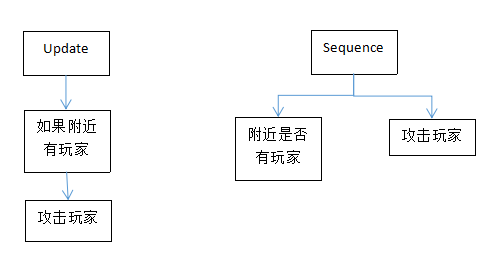
代码如下:
BTParentTask.lua
 BTParentTask = BTTask:New();

 local this = BTParentTask;

 function this:New()

     local o = {};

     setmetatable(o, self);

     self.__index = self;

     o.currentChildIndex = ;  --当前运行到第几个子节点

     o.currentChildTask = nil; --当前运行的子节点

     o.childTasks = {};        --子节点列表

     return o;

 end

 function this:AddChild(task)

     local index = #self.childTasks + ;

     task.index = index;

     task.layer = self.layer + ;

     task.parent = self;

     task.root = self.root;

     self.childTasks[index] = task;

 end

 --是否有子节点

 function this:HasChild()

     if (#self.childTasks > ) then

         return true;

     else

         return false;

     end

 end

 --获取下一个要执行的子节点

 function this:GetNextChild()

     if (#self.childTasks >= (self.currentChildIndex + )) then

         self.currentChildIndex = self.currentChildIndex + ;

         return self.childTasks[self.currentChildIndex];

     end

     return nil;

 end

 --重置

 function this:Reset()

     self.currentChildIndex = ;

     self.currentChildTask = nil;

 end
BTSequence.lua
 BTSequence = BTComposite:New();

 local this = BTSequence;

 function this:New()

     local o = {};

     setmetatable(o, self);

     self.__index = self;

     o.executionStatus = BTTaskStatus.Inactive;

     return o;

 end

 function this:OnUpdate()

     if (not self:HasChild()) then

         return BTTaskStatus.Failure;

     end

     if (not self.currentChildTask) then

         self.currentChildTask = self:GetNextChild();

         if (not self.currentChildTask) then

             return BTTaskStatus.Failure;

         end

     end

     while (self.currentChildTask) do

         self.executionStatus = self.currentChildTask:OnUpdate();

         if (self.executionStatus == BTTaskStatus.Failure) then --结束

             self:Reset();

             return BTTaskStatus.Failure;

         elseif (self.executionStatus == BTTaskStatus.Running) then --下一帧继续执行

             return BTTaskStatus.Running;

         else --继续执行下一节点

             self.currentChildTask = self:GetNextChild();

         end

     end

     --所有节点执行完毕

     self.executionStatus = BTTaskStatus.Success;

     self:Reset();

     return BTTaskStatus.Success;

 end
TestBehaviorTree.lua
 TestBehaviorTree = BTBehaviorTree:New();

 local this = TestBehaviorTree;

 function this:New()

     local o = {};

     setmetatable(o, self);

     self.__index = self;

     this:Init();

     return o;

 end

 function this:Init()

     local sequence = BTSequence:New();

     local log = BTLog:New("hello world!");

     local log2 = BTLog:New("This is a test");

     sequence:AddChild(log);

     sequence:AddChild(log2);

     this:PushTask(sequence);

 end
打印如下:

[Unity插件]Lua行为树(三):组合节点Sequence的更多相关文章
- [Unity插件]Lua行为树(十三):装饰节点完善
之前介绍了组合节点中三大常用的节点:BTSequence.BTSelector和BTParallel,一般来说,这三种就够用了,可以满足很多的需求. 接下来可以完善一下装饰节点,增加几种新的节点. 1 ...
- [Unity插件]Lua行为树(七):行为树嵌套
在上一篇的基础上,可以测试下行为树的嵌套,所谓的行为树嵌套,就是在一棵行为树下的某一个分支,接入另一棵行为树. 以下面这棵行为树为例: TestBehaviorTree2.lua TestBehavi ...
- [Unity插件]Lua行为树(六):打印树结构
经过前面的文章,已经把行为树中的四种基本类型节点介绍了下.接下来可以整理一下,打印一下整棵行为树.注意点如下: 1.可以把BTBehaviorTree也当作一种节点,这样就可以方便地进行行为树嵌套了 ...
- [Unity插件]Lua行为树(二):树结构
参考链接:https://blog.csdn.net/u012740992/article/details/79366251 在行为树中,有四种最基本的节点,其继承结构如下: Action->T ...
- [Unity插件]Lua行为树(十一):组合节点Parallel
Parallel节点类似Sequence节点,不同在于Parallel会每帧执行所有的节点.当所有节点返回成功时返回成功,当其中一个节点返回失败时,返回失败并且结束所有的子节点运行. 例如说,给Seq ...
- [Unity插件]Lua行为树(五):装饰节点Repeater
Repeater:重复执行子节点,直到一定次数 特点如下: 1.执行次数可以是无限循环,也可以是固定次数 2.一般来说,子节点的执行返回状态不会影响Repeater节点,但可以设置当子节点返回失败时, ...
- [Unity插件]Lua行为树(四):条件节点和行为节点
条件节点和行为节点,这两种节点本身的设计比较简单,项目中编写行为树节点一般就是扩展这两种节点,而Decorator和Composite节点只需要使用内置的就足够了. 它们的继承关系如下: Condit ...
- [Unity插件]Lua行为树(十):通用行为和通用条件节点
在行为树中,需要扩展的主要是行为节点和条件节点.一般来说,每当要创建一个节点时,就要新建一个节点文件.而对于一些简单的行为节点和条件节点,为了去掉新建文件的过程,可以写一个通用版本的行为节点和条件节点 ...
- [Unity插件]Lua行为树(九):条件节点调整
先看一下之前的条件节点是怎么设计的: BTConditional.lua BTConditional = BTTask:New(); local this = BTConditional; this. ...
随机推荐
- iOS-微信分享多张图片(UIActivityViewController多图分享和多图分享失败)
前言 微信分享到朋友圈,可分享的类型有:文字类型.图片类型.音乐类型.视频类型和网页类型,但是我们在做图片分享的时候发现微信给的API只能分享一张图片,达不到一些APP的需求,而产品汪或者Boss想要 ...
- UML类图快速入门篇
1.关联 1.1双向关联: C1-C2:指双方都知道对方的存在,都可以调用对方的公共属性和方法. 在GOF的设计模式书上是这样描述的:虽然在分析阶段这种关系是适用的,但我们觉得它对于描述设计模式内的类 ...
- 跟着未名学Office - 熟练使用WORD
目录 第一章.Word之编辑篇. 1 第一节 页面布局... 1 第二节 格式编辑... 1 第三节 表.图.域... 5 第四节 审阅.保护... 7 第五节 *插入对像... 9 第二章.Word ...
- jquery zTree异步搜索的例子--搜叶子节点
参考博客:https://www.cnblogs.com/henuyuxiang/p/6677397.html 前台代码 <%@ page language="java" c ...
- springboot(运行原理参考借鉴)
什么是springboot答:Spring Boot makes it easy to create stand-alone, production-grade Spring based Applic ...
- spring 如何决定使用jdk动态代理和cglib(转)
Spring1.2: 将事务代理工厂[TransactionProxyFactoryBean] 或 自动代理拦截器[BeanNameAutoProxyCreator] 的 proxyTargetCla ...
- spring cglib实现嵌套方法拦截
使用spring 的拦截器对方法进行拦截,不管是动态代理,还是cglib, 只能拦截到被代理对象的调用方法,对于被调用方法里再调用同一对象里的其他方法就无法拦截到,就是我们说的嵌套拦截,之前文章里提及 ...
- centos7搭建Gitlab服务器
虚拟机配置信息 内存最好大于或等于4G,之前用2G内存搭建,访问出现502报错信息 不考虑selinux和防火墙问题 搭建之前最好关掉selinux和防火墙 临时调增selinux和关闭防火墙 下载G ...
- ORM多表操作之创建关联表及添加表记录
创建关联表 关于表关系的几个结论 (1)一旦确立表关系是一对多:建立一对多关系----在多对应的表中创建关联字段. (2)一旦确立表关系是多对多:建立多对多关系----创建第三张关系表----id和两 ...
- [UE4]制作视野图标
一.在PhotoShop中新建一个64px*64px,背景色为透明的文档 二.填充“图层1”为白色 三.添加蒙版图层,并将前景色设置为黑色 四.将“图层1”选择45°,并往上拖放至如图位置 五.选择渐 ...