
react-native中的style
在 React Native 中,你并不需要学习什么特殊的语法来定义样式。我们仍然是使用 JavaScript 来写样式。
所有的核心组件都接受名为style的属性。这些样式名基本上是遵循了 web 上的 CSS 的命名,
只是按照 JS 的语法要求使用了驼峰命名法,例如将background-color改为backgroundColor。
style属性可以是一个普通的 JavaScript 对象。这是最简单的用法,因而在示例代码中很常见。
你还可以传入一个数组——在数组中位置居后的样式对象比居前的优先级更高,
这样你可以间接实现样式的继承。

import React, { Component } from 'react';

import { AppRegistry, StyleSheet, Text, View } from 'react-native';

export default class LotsOfStyles extends Component {

  render() {

    return (

      <View>

        <Text style={styles.red}>just red</Text>

        <Text style={styles.bigBlue}>just bigBlue</Text>

        <Text style={[styles.bigBlue, styles.red]}>bigBlue, then red</Text>

        <Text style={[styles.red, styles.bigBlue]}>red, then bigBlue</Text>

      </View>

    );

  }

}

const styles = StyleSheet.create({

  bigBlue: {

    color: 'blue',

    fontWeight: 'bold',

    fontSize: 30,

  },

  red: {

    color: 'red',

  },

});
指定宽高
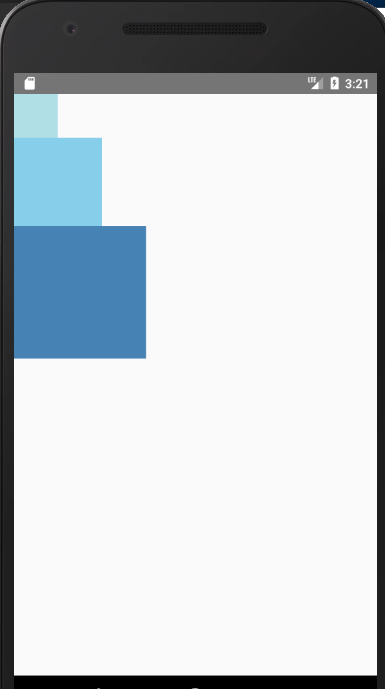
最简单的给组件设定尺寸的方式就是在样式中指定固定的width和height。
React Native 中的尺寸都是无单位的,表示的是与设备像素密度无关的逻辑像素点。
import React, { Component } from 'react';

import { AppRegistry, View } from 'react-native';

export default class FixedDimensionsBasics extends Component {

  render() {

    return (

      <View>

        <View style={{width: 50, height: 50, backgroundColor: 'powderblue'}} />

        <View style={{width: 100, height: 100, backgroundColor: 'skyblue'}} />

        <View style={{width: 150, height: 150, backgroundColor: 'steelblue'}} />

      </View>

    );

  }

}
弹性(Flex)宽高
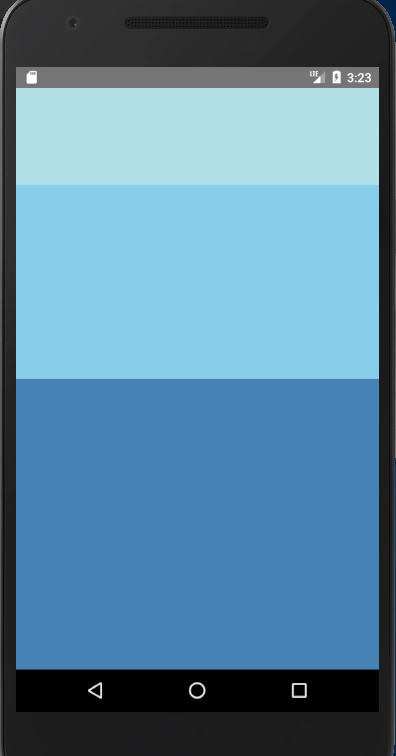
在组件样式中使用flex可以使其在可利用的空间中动态地扩张或收缩。一般而言我们会使用flex:1来指定某
个组件扩张以撑满所有剩余的空间。如果有多个并列的子组件使用了flex:1,则这些子组件会平分父容器中
剩余的空间。如果这些并列的子组件的flex值不一样,则谁的值更大,谁占据剩余空间的比例就更大
(即占据剩余空间的比等于并列组件间flex值的比)。
值得注意的事情是:
组件能够撑满剩余空间的前提是其父容器的尺寸不为零。如果父容器既没有固定的width和height,
也没有设定flex,则父容器的尺寸为零。其子组件如果使用了flex,也是无法显示的。
import React, { Component } from 'react';

import { AppRegistry, View } from 'react-native';

export default class FlexDirectionBasics extends Component {

  render() {

    return (

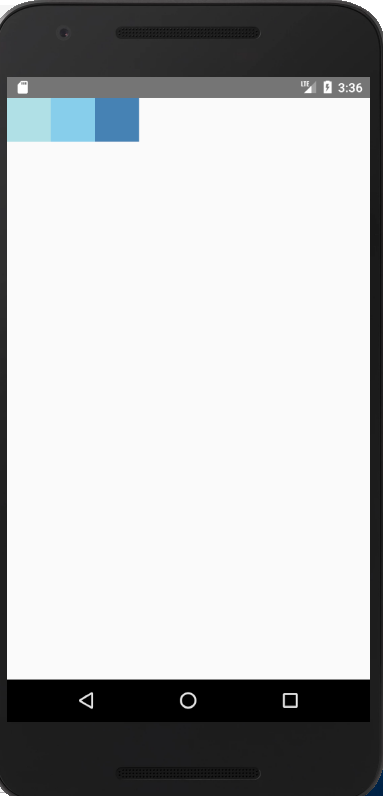
        <View style={{flex: 1, flexDirection: 'row'}}>

          <View style={{width: 50, height: 50, backgroundColor: 'powderblue'}} />

          <View style={{width: 50, height: 50, backgroundColor: 'skyblue'}} />

          <View style={{width: 50, height: 50, backgroundColor: 'steelblue'}} />

        </View>

      )

   }

}
使用Flexbox布局
我们在 React Native 中使用 flexbox 规则来指定某个组件的子元素的布局。Flexbox 可以在不同屏幕尺寸上提供一致的布局结构。
一般来说,使用flexDirection、alignItems和 justifyContent三个样式属性就已经能满足大多数布局需求。
React Native 中的 Flexbox 的工作原理和 web 上的 CSS 基本一致,当然也存在少许差异。
首先是默认值不同:flexDirection的默认值是column而不是row,而flex也只能指定一个数字值。
Flex Direction
在组件的style中指定flexDirection可以决定布局的主轴。子元素是应该沿着水平轴(row)方向排列,
还是沿着竖直轴(column)方向排列呢?默认值是竖直轴(column)方向。
Justify Content
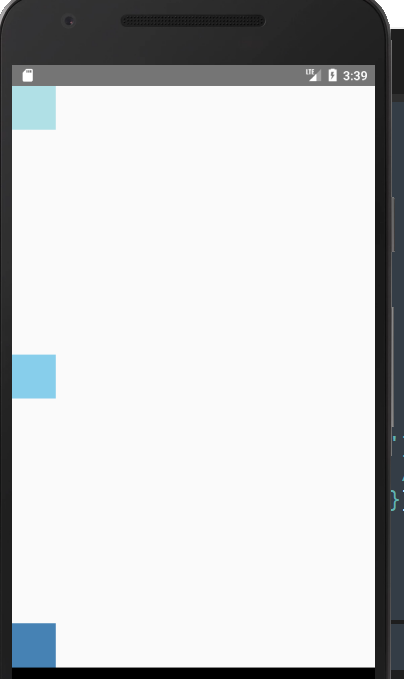
在组件的 style 中指定justifyContent可以决定其子元素沿着主轴的排列方式。子元素是应该靠近主
轴的起始端还是末尾段分布呢?亦或应该均匀分布?对应的这些可选项有:flex-start、center、flex-end、
space-around、space-between以及space-evenly。
import React, { Component } from 'react';

import { AppRegistry, View } from 'react-native';

export default class JustifyContentBasics extends Component {

  render() {

    return (

      // 尝试把`justifyContent`改为`center`看看

      // 尝试把`flexDirection`改为`row`看看

      <View style={{

        flex: 1,

        flexDirection: 'column',

        justifyContent: 'space-between',

      }}>

        <View style={{width: 50, height: 50, backgroundColor: 'powderblue'}} />

        <View style={{width: 50, height: 50, backgroundColor: 'skyblue'}} />

        <View style={{width: 50, height: 50, backgroundColor: 'steelblue'}} />

      </View>

    );

  }

};
Align Items
在组件的 style 中指定alignItems可以决定其子元素沿着次轴(与主轴垂直的轴,比如若主轴方向为row,则次轴方向为column)
的排列方式。子元素是应该靠近次轴的起始端还是末尾段分布呢?亦或应该均匀分布?
对应的这些可选项有:flex-start、center、flex-end以及stretch。
注意:要使stretch选项生效的话,子元素在次轴方向上不能有固定的尺寸。
以下面的代码为例:只有将子元素样式中的width: 50去掉之后,alignItems: 'stretch'才能生效。
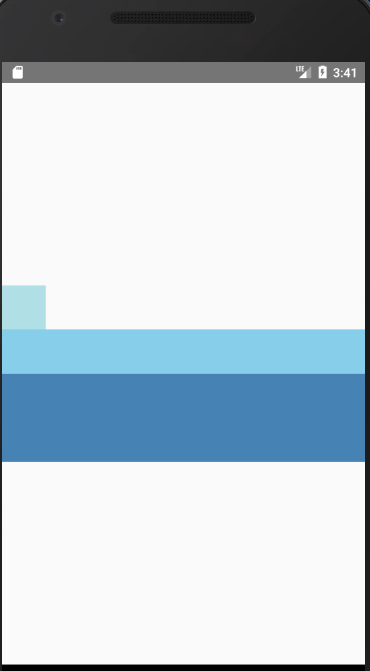
import React, { Component } from 'react';

import { AppRegistry, View } from 'react-native';

export default class AlignItemsBasics extends Component {

  render() {

    return (

      // 尝试把`alignItems`改为`flex-start`看看

      // 尝试把`justifyContent`改为`flex-end`看看

      // 尝试把`flexDirection`改为`row`看看

      <View style={{

        flex: 1,

        flexDirection: 'column',

        justifyContent: 'center',

        alignItems: 'stretch',

      }}>

        <View style={{width: 50, height: 50, backgroundColor: 'powderblue'}} />

        <View style={{height: 50, backgroundColor: 'skyblue'}} />

        <View style={{height: 100, backgroundColor: 'steelblue'}} />

      </View>

    );

  }

};
本质就是flex布局
更多布局知识见这篇文档:https://reactnative.cn/docs/layout-props/
react-native中的style的更多相关文章
- React Native 中 CSS 的使用
首先声明,此文原作者为黎 跃春 React Native中CSS 内联样式 对象样式 使用Stylesheet.Create 样式拼接 导出样式对象 下面的代码是index.ios.js中的代码: / ...
- React Native中的网络请求fetch和简单封装
React Native中的网络请求fetch使用方法最为简单,但却可以实现大多数的网络请求,需要了解更多的可以访问: https://segmentfault.com/a/1190000003810 ...
- [转] 「指尖上的魔法」 - 谈谈 React Native 中的手势
http://gold.xitu.io/entry/55fa202960b28497519db23f React-Native是一款由Facebook开发并开源的框架,主要卖点是使用JavaScrip ...
- react native中使用echarts
开发平台:mac pro node版本:v8.11.2 npm版本:6.4.1 react-native版本:0.57.8 native-echarts版本:^0.5.0 目标平台:android端收 ...
- 在React Native中,使用fetch网络请求 实现get 和 post
//在React Native中,使用fetch实现网络请求 /* fetch 是一个封装程度更高的网络API, 使用了Promise * Promise 是异步编程的一种解决方案 * Promise ...
- react native中state和ref的使用
react native中state和ref的使用 因props是只读的,页面中需要交互的情况我们就需要用到state. 一.如何使用state 1:初始化state 第一种方式: construct ...
- React Native中加载指示器组件ActivityIndicator使用方法
这里讲一下React Native中的一个组件——ActivityIndicator,这是一个加载指示器,俗称菊花,很常见的,效果如下所示: 可以看到图中有两个加载指示器,一大一小,这是尺寸不是我设置 ...
- 在 React Native 中使用 Redux 架构
前言 Redux 架构是 Flux 架构的一个变形,相对于 Flux,Redux 的复杂性相对较低,而且最为巧妙的是 React 应用可以看成由一个根组件连接着许多大大小小的组件的应用,Redux 也 ...
- React Native中组件的props和state
一.组件的属性(props)和状态(state) 1.属性(props) 它是组件的不可变属性(组件自己不可以自己修改props). 组件自身定义了一组props作为对外提供的接口,展示一个组件时只需 ...
- [RN] React Native 中使用 stickyHeaderIndices 实现 ScrollView 的吸顶效果
React Native中,ScrollView组件可以使用 stickyHeaderIndices 轻松实现 sticky 效果. 例如下面代码中: <ScrollView showsVert ...
随机推荐
- socket基础编程-2
client端: import socket while True: client=socket.socket(socket.ANET,socket.SOCK_STREAM) client.conne ...
- WPF中元素拖拽的两个实例
今天结合之前做过的一些拖拽的例子来对这个方面进行一些总结,这里主要用两个例子来说明在WPF中如何使用拖拽进行操作,元素拖拽是一个常见的操作,第一个拖拽的例子是将ListBox中的子元素拖拽到ListV ...
- vs code的快捷方式
https://blog.csdn.net/qq_41308027/article/details/83178526
- Java多线程之实现Runnable接口
package org.study2.javabase.ThreadsDemo.runnable; /** * @Auther:GongXingRui * @Date:2018/9/18 * @Des ...
- 三种bean创建方式
- Keepalived+LVS高可用负载均衡集群
概述 Keepalived是专门针对LVS设计的一款强大的辅助工具,主要用来提供故障切换(Failover)和健康检查(HeathChecking)功能——判断LVS负载调度器.节点服务器的可用性,及 ...
- 洛谷P2918 [USACO08NOV]买干草(一道完全背包模板题)
题目链接 很明显的一道完全背包板子题,做法也很简单,就是要注意 这里你可以买比所需多的干草,只要达到数量就行了 状态转移方程:dp[j]=min(dp[j],dp[j-m[i]]+c[i]) 代码如下 ...
- 洛谷P1360 [USACO07MAR]黄金阵容均衡题解
题目 不得不说这个题非常毒瘤. 简化题意 这个题的暴力还是非常好想的,完全可以过\(50\%\)的数据.但是\(100\%\)就很难想了. 因为数据很大,所以我们需要用\(O(\sqrt n)\)的时 ...
- CODEFORCES掉RATING记 #1
时间:2017.7.16晚 比赛:Educational Codeforces Round 25 比赛开始前去睡觉了...开始后5min才起来 一进去就点开AB,B先加载好,就先做了B.读完题后发现是 ...
- Win10报错0x800f0906
在安装适用于Linux的Windows子系统(Beta)的时候,有选中开发人员模式这一步设置->更新和安全->针对开发人员->选中开发人员模式 如果报错0x800f0906 那是因为 ...