
【第二十七章】 springboot + zipkin(brave-okhttp实现)
本文截取自:http://blog.csdn.net/liaokailin/article/details/52077620
一、前提
1、zipkin基本知识:附8 zipkin
2、启动zipkin server:
2.1、在官网下载服务jar,http://zipkin.io/pages/quickstart.html,之后使用命令启动服务jar即可。
nohup java -jar zipkin-server-1.5.1-exec.jar &
之后,查看与该jar同目录下的nohup.out日志文件,发现其实该jar也是由springboot打成的,且内置的tomcat的启动端口是9411,如下:

2.2、打开浏览器,http://ip:9411/(host为服务启动的host)。
二、代码实现
1、service1
1.1、pom.xml
<dependency>
            <groupId>io.zipkin.brave</groupId>
            <artifactId>brave-core</artifactId>
            <version>3.9.0</version>
        </dependency>
        <dependency>
            <groupId>io.zipkin.brave</groupId>
            <artifactId>brave-spancollector-http</artifactId>
            <version>3.9.0</version>
        </dependency>
        <dependency>
            <groupId>io.zipkin.brave</groupId>
            <artifactId>brave-web-servlet-filter</artifactId>
            <version>3.9.0</version>
        </dependency>
        <dependency>
            <groupId>io.zipkin.brave</groupId>
            <artifactId>brave-okhttp</artifactId>
            <version>3.9.0</version>
        </dependency>
1.2、ZipkinConfig
package com.xxx.service1.zipkin;

import org.springframework.context.annotation.Bean;
import org.springframework.context.annotation.Configuration;

import com.github.kristofa.brave.Brave;
import com.github.kristofa.brave.EmptySpanCollectorMetricsHandler;
import com.github.kristofa.brave.Sampler;
import com.github.kristofa.brave.SpanCollector;
import com.github.kristofa.brave.http.DefaultSpanNameProvider;
import com.github.kristofa.brave.http.HttpSpanCollector;
import com.github.kristofa.brave.okhttp.BraveOkHttpRequestResponseInterceptor;
import com.github.kristofa.brave.servlet.BraveServletFilter;

import okhttp3.OkHttpClient;

/**
 * zipkin配置
 */
@Configuration
public class ZipkinConfig {

    @Bean
    public SpanCollector spanCollector() {
        HttpSpanCollector.Config spanConfig = HttpSpanCollector.Config.builder()
                                              .compressionEnabled(false)//默认false,span在transport之前是否会被gzipped。
                                              .connectTimeout(5000)//5s,默认10s
                                              .flushInterval(1)//1s
                                              .readTimeout(6000)//5s,默认60s
                                              .build();
        return HttpSpanCollector.create("http://ip:9411",
                                        spanConfig,
                                        new EmptySpanCollectorMetricsHandler());
    }

    @Bean
    public Brave brave(SpanCollector spanCollector) {
        Brave.Builder builder = new Brave.Builder("service1");//指定serviceName
        builder.spanCollector(spanCollector);
        builder.traceSampler(Sampler.create(1));//采集率
        return builder.build();
    }

    @Bean
    public BraveServletFilter braveServletFilter(Brave brave) {
        /**
         * 设置sr、ss拦截器
         */
        return new BraveServletFilter(brave.serverRequestInterceptor(),
                                      brave.serverResponseInterceptor(),
                                      new DefaultSpanNameProvider());
    }

    @Bean
    public OkHttpClient okHttpClient(Brave brave){
        /**
         * 设置cs、cr拦截器
         */
        return new OkHttpClient.Builder()
                   .addInterceptor(new BraveOkHttpRequestResponseInterceptor(brave.clientRequestInterceptor(),
                                                                             brave.clientResponseInterceptor(),
                                                                             new DefaultSpanNameProvider()))
                   .build();
    }

}
说明:
- HttpSpanCollector:span信息收集器
- Brave:基本实例,注意传入的参数是serviceName
- BraveServletFilter:设置sr(server receive),ss(server send)拦截器
- OkHttpClient:构建client实例,添加拦截器,设置cs(client send),cr(client receive)拦截器
1.3、ZipkinBraveController
package com.xxx.service1.zipkin;

import org.springframework.beans.factory.annotation.Autowired;
import org.springframework.web.bind.annotation.RequestMapping;
import org.springframework.web.bind.annotation.RestController;

import io.swagger.annotations.Api;
import io.swagger.annotations.ApiOperation;
import okhttp3.OkHttpClient;
import okhttp3.Request;
import okhttp3.Response;

@Api("zipkin brave api")
@RestController
@RequestMapping("/zipkin/brave/service1")
public class ZipkinBraveController {

    @Autowired
    private OkHttpClient okHttpClient;

    @ApiOperation("trace第一步")
    @RequestMapping("/test1")
    public String myboot() throws Exception {
        Thread.sleep(100);//100ms
        Request request = new Request.Builder().url("http://localhost:8032/zipkin/brave/service2/test2").build();
        /*
         * 1、执行execute()的前后,会执行相应的拦截器(cs,cr)
         * 2、请求在被调用方执行的前后,也会执行相应的拦截器(sr,ss)
         */
        Response response = okHttpClient.newCall(request).execute();
        return response.body().string();
    }

}
1.4、application.properties
server.port=8031
2、service2
2.1、pom.xml、ZipkinConfig与service1相似,config部分需要换掉serviceName为"service2"
2.2、controller
package com.xxx.service2.zipkin;

import org.springframework.beans.factory.annotation.Autowired;
import org.springframework.web.bind.annotation.RequestMapping;
import org.springframework.web.bind.annotation.RequestMethod;
import org.springframework.web.bind.annotation.RestController;

import io.swagger.annotations.Api;
import io.swagger.annotations.ApiOperation;
import okhttp3.OkHttpClient;
import okhttp3.Request;
import okhttp3.Response;

@Api("zipkin brave api")
@RestController
@RequestMapping("/zipkin/brave/service2")
public class ZipkinBraveController {

    @Autowired
    private OkHttpClient okHttpClient;

    @ApiOperation("trace第二步")
    @RequestMapping(value="/test2",method=RequestMethod.GET)
    public String myboot() throws Exception {
        Thread.sleep(200);//100ms
        Request request3 = new Request.Builder().url("http://localhost:8033/zipkin/brave/service3/test3").build();
        Response response3 = okHttpClient.newCall(request3).execute();
        String response3Str = response3.body().string();

        Request request4 = new Request.Builder().url("http://localhost:8034/zipkin/brave/service4/test4").build();
        Response response4 = okHttpClient.newCall(request4).execute();
        String response4Str = response4.body().string();

        return response3Str + "-" +response4Str;
    }

}
2.3、application.properties
server.port=8032
3、service3
3.1、pom.xml、ZipkinConfig与service1相似,config部分需要换掉serviceName为"service3"
3.2、controller
package com.xxx.service3.zipkin;

import org.springframework.web.bind.annotation.RequestMapping;
import org.springframework.web.bind.annotation.RequestMethod;
import org.springframework.web.bind.annotation.RestController;

import io.swagger.annotations.Api;
import io.swagger.annotations.ApiOperation;

@Api("zipkin brave api")
@RestController
@RequestMapping("/zipkin/brave/service3")
public class ZipkinBraveController {

    @ApiOperation("trace第三步")
    @RequestMapping(value="/test3",method=RequestMethod.GET)
    public String myboot() throws Exception {
        Thread.sleep(300);//100ms
        return "service3";
    }

}
3.3、application.properties
server.port=8033
4、service4
4.1、pom.xml、ZipkinConfig与service1相似,config部分需要换掉serviceName为"service4"
4.2、controller
package com.xxx.service4.zipkin;

import org.springframework.web.bind.annotation.RequestMapping;
import org.springframework.web.bind.annotation.RequestMethod;
import org.springframework.web.bind.annotation.RestController;

import io.swagger.annotations.Api;
import io.swagger.annotations.ApiOperation;

@Api("zipkin brave api")
@RestController
@RequestMapping("/zipkin/brave/service4")
public class ZipkinBraveController {

    @ApiOperation("trace第4步")
    @RequestMapping(value = "/test4", method = RequestMethod.GET)
    public String myboot() throws Exception {
        Thread.sleep(400);//100ms
        return "service4";
    }

}
4.3、application.properties
server.port=8034
三、测试
swagger访问localhost:8031/zipkin/brave/service1/test1,之后查看zipkin webUI即可。
结果:
1、查看调用依赖:
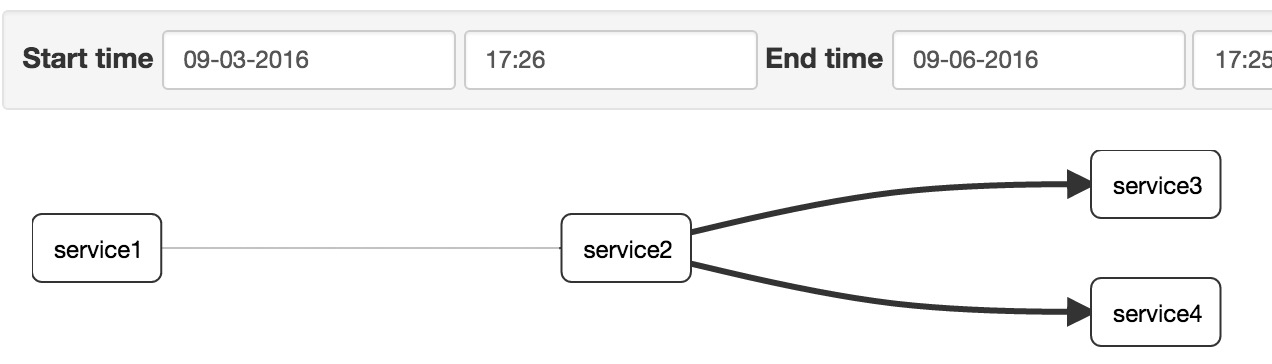
2、查看调用时间对比

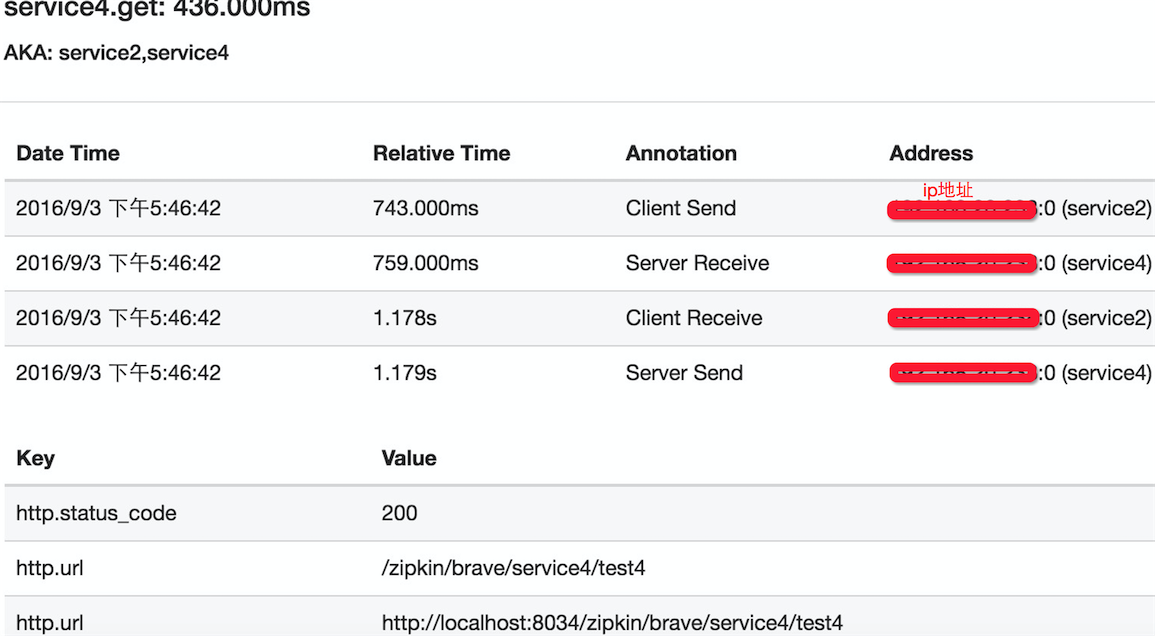
点击第4个span,查看调用详情:
【第二十七章】 springboot + zipkin(brave-okhttp实现)的更多相关文章
- 第二十七章 springboot + zipkin(brave-okhttp实现)
本文截取自:http://blog.csdn.net/liaokailin/article/details/52077620 一.前提 1.zipkin基本知识:附8 zipkin 2.启动zipki ...
- 第二十八章 springboot + zipkin(brave定制-AsyncHttpClient)
brave本身没有对AsyncHttpClient提供类似于brave-okhttp的ClientRequestInterceptor和ClientResponseInterceptor,所以需要我们 ...
- 第二十九章 springboot + zipkin + mysql
zipkin的数据存储可以存在4个地方: 内存(仅用于测试,数据不会持久化,zipkin-server关掉,数据就没有了) 这也是之前使用的 mysql 可能是最熟悉的方式 es Cassandra ...
- 《Linux命令行与shell脚本编程大全》 第二十七章 学习笔记
第二十七章:shell脚本编程进阶 监测系统统计数据 系统快照报告 1.运行时间 uptime命令会提供以下基本信息: 当前时间 系统运行的天数,小时数,分钟数 当前登录到系统的用户数 1分钟,5分钟 ...
- Gradle 1.12用户指南翻译——第二十七章. Ear 插件
其他章节的翻译请参见: http://blog.csdn.net/column/details/gradle-translation.html 翻译项目请关注Github上的地址: https://g ...
- “全栈2019”Java多线程第二十七章:Lock获取lock/释放unlock锁
难度 初级 学习时间 10分钟 适合人群 零基础 开发语言 Java 开发环境 JDK v11 IntelliJ IDEA v2018.3 文章原文链接 "全栈2019"Java多 ...
- “全栈2019”Java第二十七章:流程控制语句中循环语句for
难度 初级 学习时间 10分钟 适合人群 零基础 开发语言 Java 开发环境 JDK v11 IntelliJ IDEA v2018.3 文章原文链接 "全栈2019"Java第 ...
- SpringBoot | 第二十七章:监控管理之Actuator使用
前言 随着我们服务越来越多,部署的环境也越来越繁多时,由于各服务都部署在不同的机器上,每当出现问题或者异常时,想快速进行问题的定位就变的麻烦了.所以,本章节开始,开始讲解SpringBoot的监控相关 ...
- 第三十七章 springboot+docker(手动部署)
一.下载centos镜像 docker pull hub.c.163.com/library/centos:latest docker tag containId centos:7 docker ru ...
随机推荐
- MyEclipse如何安装egi插件及如何将github项目引入MyEclipse中
一.如何查看MyEclipse版本及Eclipse版本号 查看MyEclipse版本号:MyEclipse主界面的菜单栏的最左边“help”—>选择“About MyEclipse Enterp ...
- JS模块化编程(五)---按照AMD规范扩展全局对象
采用AMD规范 具体来说,就是模块必须采用特定的define()函数来定义;如果一个模块不依赖其他模块,那么可以直接定义在define()函数中; 以扩展全局对象Date为例: define(func ...
- CentOS工作内容(三)配置网络IP地址
CentOS工作内容(三)配置网络IP地址 用到的快捷键 tab 自动补齐(有不知道的吗) ctrl+a 移动到当前行的开头(a ahead) ctrl+u 删除(剪切)此处至开始所有内容 vim 末 ...
- MyEclipse中jquery.js文件报missing semicolon的错误解决
myeclipse的验证问题不影响jquery的应用,如果看着别扭,解决办法如下:选中你想去掉的js文件:右键选择 MyEclipse-->Exclude From Validation :然后 ...
- vue.js常用的
<input v-model.number="age" type="number"> //自动将用户的输入值转为数值类型 <input v-m ...
- SQL 1
SQL 教程 SQL 是用于访问和处理数据库的标准的计算机语言. 在本教程中,您将学到如何使用 SQL 访问和处理数据系统中的数据,这类数据库包括:MySQL.SQL Server.Access.Or ...
- ppt插入声音
1:点击插入>音频>文件中的音频 2:插入成功后,会出现一个声音的图表 3:对播放格式进行设置,设置循环播放等. 4:双击对声音进行编辑 ,会出现右边的各个组件, 5:点击下拉框>效 ...
- 启动rabbitmq,提示ERROR: node with name "rabbit" already running on "localhost"
➜ ~ rabbitmq-server ERROR: node with name "rabbit" already running on "localhost" ...
- [LeetCode] 785. Is Graph Bipartite?_Medium tag: DFS, BFS
Given an undirected graph, return true if and only if it is bipartite. Recall that a graph is bipart ...
- numpy中loadtxt 的用法
numpy中有两个函数可以用来读取文件,主要是txt文件, 下面主要来介绍这两个函数的用法 第一个是loadtxt, 其一般用法为 numpy.loadtxt(fname, dtype=, comme ...