
ASP.NET学习笔记(3)——用户增删改查(三层)
说明(2017-10-6 11:21:58):
1. 十一放假在家也没写几行代码,本来还想着利用假期把asp.net看完,结果天天喝酒睡觉,回去的票也没买到,惨。。
2. 断断续续的把用户信息的页面写完了,用了三层的方法,之前一直也没记下来,忘了的时候,每次都是从视频里找,这次好歹也要写下来,方便以后抄。
3. 希望十月份能把asp.net学完,然后看传说中的MVC。
代码:
1. 结构图
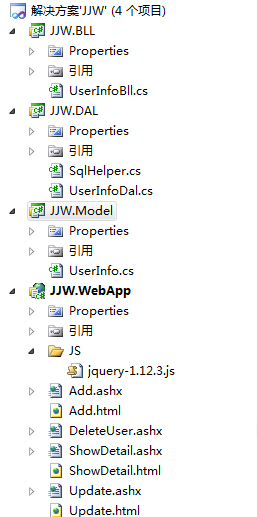
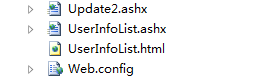
2. 建立三个类库,一个空web应用程序。DAL引Model,BLL引DAL和Model,WebApp引Model和BLL,反正各种引用。

3. Model里建一个UserInfo类,里面是用户字段和属性。
UserInfo.cs
 using System;

 using System.Collections.Generic;

 using System.Linq;

 using System.Text;

 namespace JJW.Model

 {

     public class UserInfo

     {

         public int ID { get; set; }

         public string UserName { get; set; }

         public string PassWord { get; set; }

     }

 }
4. DAL里有两个类,一个SqlHelper类,里面有两个方法GetTable和ExecuteNonQuery,GetTable负责查询,ExecuteNonQuery负责增删改。另一个UserInfoDal类,里面调用SqlHelper类,细化了增删改查的方法。三层里最重要的就是这个DAL层了。
SqlHelper.cs
 using System;

 using System.Collections.Generic;

 using System.Linq;

 using System.Text;

 using System.Configuration;

 using System.Data;

 using System.Data.SqlClient;

 namespace JJW.DAL

 {

     public static class SqlHelper

     {

         private static readonly string conStr = ConfigurationManager.ConnectionStrings["conStr"].ConnectionString;

         public static DataTable GetTable(string sql, CommandType type, params SqlParameter[] ps)

         {

             using (SqlConnection con = new SqlConnection(conStr))

             {

                 using (SqlDataAdapter sda = new SqlDataAdapter(sql, con))

                 {

                     DataTable dt = new DataTable();

                     sda.SelectCommand.CommandType = type;

                     if (ps != null)

                     {

                         sda.SelectCommand.Parameters.AddRange(ps);

                     }

                     sda.Fill(dt);

                     return dt;

                 }

             }

         }

         public static int ExecuteNonQuery(string sql, CommandType type, params SqlParameter[] ps)

         {

             using (SqlConnection con = new SqlConnection(conStr))

             {

                 using (SqlCommand cmd = new SqlCommand(sql, con))

                 {

                     cmd.CommandType = type;

                     if (ps != null)

                     {

                         cmd.Parameters.AddRange(ps);

                     }

                     con.Open();

                     return cmd.ExecuteNonQuery();

                 }

             }

         }

     }

 }
UserInfoDal.cs
 using System;

 using System.Collections.Generic;

 using System.Linq;

 using System.Text;

 using JJW.Model;

 using System.Data;

 using System.Data.SqlClient;

 namespace JJW.DAL

 {

     public class UserInfoDal

     {

         /// <summary>

         /// 返回列表

         /// </summary>

         /// <returns></returns>

         public List<UserInfo> GetEntity()

         {

             string sql = "SELECT * FROM userInfo";

             DataTable dt = SqlHelper.GetTable(sql, CommandType.Text);

             List<UserInfo> list = new List<UserInfo>();

             if (dt.Rows.Count > )

             {

                 foreach (DataRow dr in dt.Rows)

                 {

                     UserInfo userInfo = new UserInfo();

                     LoadEntity(userInfo, dr);

                     list.Add(userInfo);

                 }

             }

             return list;

         }

         /// <summary>

         /// 将表转为属性

         /// </summary>

         /// <param name="userInfo"></param>

         /// <param name="dr"></param>

         private void LoadEntity(UserInfo userInfo, DataRow dr)

         {

             userInfo.ID = Convert.ToInt32(dr["id"]);

             userInfo.UserName = dr["userName"] != DBNull.Value ? dr["userName"].ToString() : string.Empty;

             userInfo.PassWord = dr["passWord"] != DBNull.Value ? dr["passWord"].ToString() : string.Empty;

         }

         /// <summary>

         /// 删除

         /// </summary>

         /// <param name="id"></param>

         /// <returns></returns>

         public int DeleteEntity(int id)

         {

             string sql = "DELETE FROM userInfo WHERE id = @id";

             return SqlHelper.ExecuteNonQuery(sql, CommandType.Text, new SqlParameter("@id", id));

         }

         /// <summary>

         /// 插入

         /// </summary>

         /// <param name="userName"></param>

         /// <param name="passWord"></param>

         /// <returns></returns>

         public int InsertEntity(UserInfo userInfo)

         {

             string sql = "INSERT INTO userInfo(userName,passWord) VALUES(@userName,@passWord)";

             return SqlHelper.ExecuteNonQuery(sql, CommandType.Text, new SqlParameter[]{

                 new SqlParameter("@userName",userInfo.UserName),new SqlParameter("@passWord",userInfo.PassWord)

             });

         }

         /// <summary>

         /// 修改

         /// </summary>

         /// <param name="userName"></param>

         /// <param name="passWord"></param>

         /// <param name="id"></param>

         /// <returns></returns>

         public int UpdateEntity(UserInfo userInfo)

         {

             string sql = "UPDATE userInfo SET userName=@userName, passWord=@passWord WHERE id=@id";

             SqlParameter[] ps = {new SqlParameter("@userName",SqlDbType.NVarChar,),new SqlParameter("@passWord",SqlDbType.NVarChar,),new SqlParameter("@id",SqlDbType.Int,) };

             return SqlHelper.ExecuteNonQuery(sql, CommandType.Text, new SqlParameter[]{

                 new SqlParameter("@userName",userInfo.UserName),new SqlParameter("@passWord",userInfo.PassWord),new SqlParameter("@id",userInfo.ID)

             });

         }

         /// <summary>

         /// 详细

         /// </summary>

         /// <param name="id"></param>

         /// <returns></returns>

         public UserInfo ShowDetail(int id)

         {

             string sql = "SELECT * FROM userInfo WHERE id = @id";

             DataTable dt = SqlHelper.GetTable(sql, CommandType.Text, new SqlParameter("@id", id));

             UserInfo userInfo = new UserInfo();

             if (dt.Rows.Count > )

             {

                 LoadEntity(userInfo, dt.Rows[]);

             }

             return userInfo;

         }

     }

 }
5. BLL层,里面就是把DAL层里的每个方法返回一个值,感觉BLL层没什么用,可能就是DAL层和UI层之间的一个桥梁吧,避免DAL层直接暴露在UI层里。BLL层里只有一个方法UserInfoBll。
UserInfoBll.cs
 using System;

 using System.Collections.Generic;

 using System.Linq;

 using System.Text;

 using JJW.Model;

 namespace JJW.BLL

 {

     public class UserInfoBll

     {

         DAL.UserInfoDal UserInfoDal = new DAL.UserInfoDal();

         public List<UserInfo> GetEntity()

         {

             return UserInfoDal.GetEntity();

         }

         public int DeleteEntity(int id)

         {

             return UserInfoDal.DeleteEntity(id);

         }

         public int InsertEntity(UserInfo userInfo)

         {

             return UserInfoDal.InsertEntity(userInfo);

         }

         public int UpdateEntity(UserInfo userInfo)

         {

             return UserInfoDal.UpdateEntity(userInfo);

         }

         public UserInfo ShowDetail(int id)

         {

             return UserInfoDal.ShowDetail(id);

         }

     }

 }
6. 最后的UI层,也就是WebApp。里面就是增删改查的页面,目前用的都是ashx一般处理程序,后面可能会改成aspx。
首先是web.config设置,这里面有两套登录设置,一个是本地,一个是用户名。
 <?xml version="1.0" encoding="utf-8"?>

 <!--

   有关如何配置 ASP.NET 应用程序的详细消息,请访问

   http://go.microsoft.com/fwlink/?LinkId=169433

   -->

 <configuration>

   <system.web>

     <compilation debug="true" targetFramework="4.0" />

   </system.web>

   <connectionStrings>

     <!--<add connectionString="data source=.;initial catalog=jjwdb;integrated security=true;" name="conStr"/>-->

     <add connectionString="server=.;uid=sa;pwd=123;database=jjwdb;" name="conStr"/>

   </connectionStrings>

 </configuration>
后面是一堆页面,虽然网上粘很繁琐,但为了以后抄的方便,没办法啊。。而且为了不漏下,按字母顺序粘了。
Add.ashx
 using System;

 using System.Collections.Generic;

 using System.Linq;

 using System.Web;

 using JJW.Model;

 namespace JJW.WebApp

 {

     /// <summary>

     /// Add 的摘要说明

     /// </summary>

     public class Add : IHttpHandler

     {

         public void ProcessRequest(HttpContext context)

         {

             context.Response.ContentType = "text/html";

             UserInfo userInfo = new UserInfo();

             userInfo.UserName = context.Request["userName"];

             userInfo.PassWord = context.Request["passWord"];

             BLL.UserInfoBll UserInfoBll = new BLL.UserInfoBll();

             UserInfoBll.InsertEntity(userInfo);

             context.Response.Redirect("UserInfoList.ashx");

         }

         public bool IsReusable

         {

             get

             {

                 return false;

             }

         }

     }

 }
Add.html
 <!DOCTYPE html PUBLIC "-//W3C//DTD XHTML 1.0 Transitional//EN" "http://www.w3.org/TR/xhtml1/DTD/xhtml1-transitional.dtd">

 <html xmlns="http://www.w3.org/1999/xhtml">

 <head>

     <title></title>

 </head>

 <body>

     <form action="Add.ashx" method="post">

     <table border="">

         <tr>

             <td>用户名</td>

             <td><input type="text" name="userName"/></td>

         </tr>

         <tr>

             <td>密码</td>

             <td><input type="text" name="passWord"/></td>

         </tr>

         <tr>

             <td colspan=""><input type="submit" value="提交"/></td>

         </tr>

     </table>

     </form>

 </body>

 </html>
DeleteUser.ashx
 using System;

 using System.Collections.Generic;

 using System.Linq;

 using System.Web;

 namespace JJW.WebApp

 {

     /// <summary>

     /// DeleteUser 的摘要说明

     /// </summary>

     public class DeleteUser : IHttpHandler

     {

         public void ProcessRequest(HttpContext context)

         {

             context.Response.ContentType = "text/html";

             int id = Convert.ToInt32(context.Request["id"]);

             BLL.UserInfoBll UserInfoBll = new BLL.UserInfoBll();

             UserInfoBll.DeleteEntity(id);

             context.Response.Redirect("UserInfoList.ashx");

         }

         public bool IsReusable

         {

             get

             {

                 return false;

             }

         }

     }

 }
ShowDetail.ashx
 using System;

 using System.Collections.Generic;

 using System.Linq;

 using System.Web;

 using System.IO;

 using JJW.Model;

 namespace JJW.WebApp

 {

     /// <summary>

     /// ShowDetail 的摘要说明

     /// </summary>

     public class ShowDetail : IHttpHandler

     {

         public void ProcessRequest(HttpContext context)

         {

             context.Response.ContentType = "text/html";

             string filePath = context.Request.MapPath("ShowDetail.html");

             string fileContent = File.ReadAllText(filePath);

             int id = Convert.ToInt32(context.Request["id"]);

             BLL.UserInfoBll UserInfoBll = new BLL.UserInfoBll();

             UserInfo userInfo = UserInfoBll.ShowDetail(id);

             fileContent = fileContent.Replace("$id", userInfo.ID.ToString()).Replace("$userName", userInfo.UserName).Replace("$passWord", userInfo.PassWord);

             context.Response.Write(fileContent);

         }

         public bool IsReusable

         {

             get

             {

                 return false;

             }

         }

     }

 }
ShowDetail.html
 <!DOCTYPE html PUBLIC "-//W3C//DTD XHTML 1.0 Transitional//EN" "http://www.w3.org/TR/xhtml1/DTD/xhtml1-transitional.dtd">

 <html xmlns="http://www.w3.org/1999/xhtml">

 <head>

     <title></title>

 </head>

 <body>

     <table border="">

         <tr>

             <td>ID</td>

             <td>$id</td>

         </tr>

         <tr>

             <td>用户名</td>

             <td>$userName</td>

         </tr>

         <tr>

             <td>密码</td>

             <td>$passWord</td>

         </tr>

     </table>

 </body>

 </html>
Update.ashx
 using System;

 using System.Collections.Generic;

 using System.Linq;

 using System.Web;

 using JJW.Model;

 using System.IO;

 namespace JJW.WebApp

 {

     /// <summary>

     /// Update 的摘要说明

     /// </summary>

     public class Update : IHttpHandler

     {

         public void ProcessRequest(HttpContext context)

         {

             context.Response.ContentType = "text/html";

             int id;

             if (int.TryParse((context.Request["id"]), out id))

             {

                 BLL.UserInfoBll UserInfoBll = new BLL.UserInfoBll();

                 UserInfo userInfo = UserInfoBll.ShowDetail(id);

                 //userInfo.UserName = context.Request["userName"];

                 //userInfo.PassWord = context.Request["passWord"];

                 //UserInfoBll.UpdateEntity(userInfo);

                 string filePath = context.Request.MapPath("Update.html");

                 string fileContent = File.ReadAllText(filePath);

                 fileContent = fileContent.Replace("$userName", userInfo.UserName).Replace("$passWord", userInfo.PassWord).Replace("$id",userInfo.ID.ToString());

                 context.Response.Write(fileContent);

                 //context.Response.Redirect("UserInfoList.ashx");

             }

         }

         public bool IsReusable

         {

             get

             {

                 return false;

             }

         }

     }

 }
Update.html
 <!DOCTYPE html PUBLIC "-//W3C//DTD XHTML 1.0 Transitional//EN" "http://www.w3.org/TR/xhtml1/DTD/xhtml1-transitional.dtd">

 <html xmlns="http://www.w3.org/1999/xhtml">

 <head>

     <title></title>

 </head>

 <body>

     <form action="Update2.ashx" method="post">

     <input type="hidden" name="id" value="$id" />

     <table>

         <tr>

             <td>

                 用户名

             </td>

             <td>

                 <input type="text" name="userName" value="$userName" />

             </td>

         </tr>

         <tr>

             <td>

                 密码

             </td>

             <td>

                 <input type="text" name="passWord" value="$passWord" />

             </td>

         </tr>

         <tr>

             <td colspan="">

                 <input type="submit" value="提交" />

             </td>

         </tr>

     </table>

     </form>

 </body>

 </html>
Update2.ashx
 using System;

 using System.Collections.Generic;

 using System.Linq;

 using System.Web;

 using JJW.Model;

 namespace JJW.WebApp

 {

     /// <summary>

     /// Update2 的摘要说明

     /// </summary>

     public class Update2 : IHttpHandler

     {

         public void ProcessRequest(HttpContext context)

         {

             context.Response.ContentType = "text/html";

             UserInfo userInfo = new UserInfo();

             userInfo.ID = Convert.ToInt32(context.Request["id"]);

             userInfo.UserName = context.Request["userName"].ToString();

             userInfo.PassWord = context.Request["passWord"].ToString();

             BLL.UserInfoBll UserInfoBll = new BLL.UserInfoBll();

             UserInfoBll.UpdateEntity(userInfo);

             context.Response.Redirect("UserInfoList.ashx");

         }

         public bool IsReusable

         {

             get

             {

                 return false;

             }

         }

     }

 }
UserInfoList.ashx
 using System;

 using System.Collections.Generic;

 using System.Linq;

 using System.Web;

 using System.IO;

 using JJW.Model;

 using System.Text;

 namespace JJW.WebApp

 {

     /// <summary>

     /// UserInfoList 的摘要说明

     /// </summary>

     public class UserInfoList : IHttpHandler

     {

         public void ProcessRequest(HttpContext context)

         {

             context.Response.ContentType = "text/html";

             string filePath = context.Request.MapPath("UserInfoList.html");

             string fileContent = File.ReadAllText(filePath);

             BLL.UserInfoBll UserInfoBll = new BLL.UserInfoBll();

             List<UserInfo> list = UserInfoBll.GetEntity();

             StringBuilder sb = new StringBuilder();

             foreach (UserInfo userInfo in list)

             {

                 sb.AppendFormat("<tr><td>{0}</td><td>{1}</td><td>{2}</td><td><a href='Update.ashx?id={0}'>修改</a></td><td><a href='DeleteUser.ashx?id={0}'>删除</a></td><td><a href='ShowDetail.ashx?id={0}'>详细</a></td></tr>", userInfo.ID, userInfo.UserName, userInfo.PassWord);

             }

             fileContent = fileContent.Replace("$tbody", sb.ToString());

             context.Response.Write(fileContent);

         }

         public bool IsReusable

         {

             get

             {

                 return false;

             }

         }

     }

 }
UserInfoLIst.html
 <!DOCTYPE html PUBLIC "-//W3C//DTD XHTML 1.0 Transitional//EN" "http://www.w3.org/TR/xhtml1/DTD/xhtml1-transitional.dtd">

 <html xmlns="http://www.w3.org/1999/xhtml">

 <head>

     <title></title>

 </head>

 <body>

     <h1>用户表</h1>

     <a href ="Add.html">添加用户</a>

     <table border="">

         <tr>

             <th>

                 ID

             </th>

             <th>

                 用户名

             </th>

             <th>

                 密码

             </th>

             <th>

                 修改

             </th>

             <th>

                 删除

             </th>

             <th>

                 详细

             </th>

         </tr>

         $tbody

     </table>

 </body>

 </html>
运行结果:

总结:
至今没有一天之内完整的写一遍,其实需要每天都练习的,里面有很多细节,特别是DAL层里的数据库操作,再次许愿,十月份能把asp.net部分学习完!嘻嘻(#^.^#)
ASP.NET学习笔记(3)——用户增删改查(三层)的更多相关文章
- EF学习笔记-1 EF增删改查
首次接触Entity FrameWork,就感觉非常棒.它节省了我们以前写SQL语句的过程,同时也让我们更加的理解面向对象的编程思想.最近学习了EF的增删改查的过程,下面给大家分享使用EF对增删改查时 ...
- HTML5+ 学习笔记3 storage.增删改查
//插入N条数据 function setItemFun( id ) { //循环插入100调数据 var dataNum = new Number(id); for ( var i=0; i< ...
- 【JAVAWEB学习笔记】20_增删改查
今天主要是利用三层架构操作数据库进行增删查改操作. 主要是编写代码为主. 附图: 前台和后台 商品的展示 修改商品
- Python学习笔记-列表的增删改查
- [学习笔记] Oracle基础增删改查用法
查询 select *|列名|表达式 from 表名 where 条件 order by 列名 select t.* from STUDENT.STUINFO t where t.stuname = ...
- python学习之-成员信息增删改查
python学习之-成员信息增删改查 主要实现了成员信息的增加,修改,查询,和删除功能,写着玩玩,在写的过程中,遇到的问题,旧新成员信息数据的合并,手机号和邮箱的验证,#!/usr/bin/env p ...
- 前端使用AngularJS的$resource,后端ASP.NET Web API,实现增删改查
AngularJS中的$resource服务相比$http服务更适合与RESTful服务进行交互.本篇后端使用ASP.NET Web API, 前端使用$resource,实现增删改查. 本系列包括: ...
- 使用HttpClient对ASP.NET Web API服务实现增删改查
本篇体验使用HttpClient对ASP.NET Web API服务实现增删改查. 创建ASP.NET Web API项目 新建项目,选择"ASP.NET MVC 4 Web应用程序&quo ...
- 第二百七十六节,MySQL数据库,【显示、创建、选定、删除数据库】,【用户管理、对用户增删改查以及授权】
MySQL数据库,[显示.创建.选定.删除数据库],[用户管理.对用户增删改查以及授权] 1.显示数据库 SHOW DATABASES;显示数据库 SHOW DATABASES; mysql - 用户 ...
- 用户增删改查 django生命周期 数据库操作
一 django生命周期 1 浏览器输入一个请求(get/post)2 响应到django程序中3 执行到url,url通过请求的地址匹配到不同的视图函数4 执行对应的视图函数,此过程可以查询数据库, ...
随机推荐
- jQuery UI API - 可拖拽小部件(Draggable Widget)(转)
所属类别 交互(Interactions) 用法 描述:允许使用鼠标移动元素. 版本新增:1.0 依赖: UI 核心(UI Core) 部件库(Widget Factory) 鼠标交互(Mouse I ...
- 关于varchar(max), nvarchar(max)和varbinary(max)
在MS SQL2005及以上的版本中,加入大值数据类型(varchar(max).nvarchar(max).varbinary(max) ).大值数据类型最多可以存储2^30-1个字节的数据.这几个 ...
- Linux查看当前网卡流量
sar(system activity reporter) sar通过cron定时调用执行收集和记录信息,默认是10分钟执行一次. # more /etc/cron.d/sysstat # Run s ...
- HTML5应用程序缓存实现离线Web网页或应用
HTML5应用程序缓存和浏览器缓存的区别.(有些)浏览器会主动保存自己的缓存文件以加快网站加载速度.但是要实现浏览器缓存必须要满足一个前提,那就是网络必须要保持连接.如果网络没有连接,即使浏览器启用了 ...
- python 安装配置(windows)
在 Windows 上, 安装 Python 有两种选择. ActiveState 制作了一个 Windows 上的 Python 安装程序称为 ActivePython, 它包含了一个完整的 Pyt ...
- mongodb MongoDB 聚合 group(转)
MongoDB 聚合 MongoDB中聚合(aggregate)主要用于处理数据(诸如统计平均值,求和等),并返回计算后的数据结果.有点类似sql语句中的 count(*). 基本语法为:db.col ...
- unity, unity默认的Arial字体在编译出的h5版本中不显示
unity默认的Arial字体在编译出的h5版本中不显示.改用自己的字体可显示.
- java类加载,简单认识
java类加载,简单认识 在第一次创建一个类的对象或者第一次调用一个类的静态属性和方法的时候,会发生类加载 类加载期间,如果发现有静态属性,就给对应的静态属性分配内存空间,并赋值 这个过程完成之后,今 ...
- SQL Server 2008开启sa账户以及如何用JDBC进行连接
做实验需要用Java与SQL Server连接,因为使用的 SQL 2008 Express Edition 是基于 Visual Studio2010 安装包安装时一起安装的,所以为了方便数据库的操 ...
- Eclipse 不能build, pom文件上面有叉叉 解决办法
Error message: [html] view plaincopy execution not covered by lifecycle configuration: org.apache. ...