from:http://lulu1101.blog.51cto.com/4455468/817954
ipsec在企业网中的应用(IKE野蛮模式)
案例:
本实验采用华为三台F100防火墙,和一台s3526交换机,实现ipsec野蛮模式下的vpn通道的建立。Fw1是总部,实现fw1可以与fw2的内部网络互访,fw1和fw3的内部网络互访。fw2和fw3通过DHCP服务器动态获取地址。
拓扑图:

配置:
fw1 的配置:
配置ip和默认路由:
# firewall zone trust
# add interface Ethernet 0/4
# quit
# firewall zone untrust
# add interface Ethernet 0/1
# quit
# int e0/4
# ip add 192.168.1.1 24
# int e0/1
# ip add 192.168.10.200 24
# quit
# ip route-static 0.0.0.0 0.0.0.0 192.168.10.1
配置两个访问控制列表:
# acl number 3000
# rule permit ip source 192.168.1.0 0.0.0.255 destination 192.168.2.0 0.0.0.255
# rule deny ip source any destination any
# quit
# acl number 3001
# rule permit ip source 192.168.1.0 0.0.0.255 destination 192.168.3.0 0.0.0.255
# rule deny ip source any destination any
# quit
配置安全提议:
# ipsec proposal tran1 //创建名为tran1的安全协议
# encapsulation-mode tunnel //报文封装形式采用隧道模式
# transform esp-new //安全协议采用esp协议
选择加密算法和认证算法:
# esp-new encryption-algorithm des
# esp-new authentication-algorithm md5
# quit
# ipsec proposal tran2 //创建名为tran2的安全协议
# encapsulation-mode tunnel //报文封装形式采用隧道模式
# transform esp-new //安全协议采用esp协议
选择加密算法和认证算法:
# esp-new encryption-algorithm des
# esp-new authentication-algorithm md5
# quit
# ike local-name fw1 //配置IKE协商时的本地ID
创建IKE Peer并进入IKE Peer视图:
# ike peer peer1
# exchange-mode aggressive //配置IKE协商方式为野蛮模式
# pre-shard-key simple 1234 //配置预共享密钥
# local-address 192.168.10.200 //配置本机地址
# id-type name //配置对端ID类型
# remote-name fw2 //配置对端名称
# quit
创建IKE Peer:
# ike peer peer2 //创建IKE Peer
# exchange-mode aggressive //配置IKE协商方式为野蛮模式
# pre-shard-key simple abcd //配置预共享密钥
# local-address 192.168.10.200 //配置本机地址
# id-type name //配置对端ID类型
# remote-name fw3 //配置对端名称
# quit
创建一条安全策略,协商方式为动态方式
# ipsec poli policy 10 isakmp
# proposal tran1 //引用安全提议
# security acl 3000 //引用访问列表
# ike-peer peer1
# quit
创建安全策略,协商方式为动态方式
# ipsec poli policy 20 isakmp
# proposal tran2 //引用安全提议
# security acl 3001 //引用访问列表
# ike-peer peer1
# quit
在接口上应用安全策略组:
# int e0/1
# ipsec policy policy
###################################
fw2 的配置:
配置ip和默认路由:
# firewall zone trust
# add interface Ethernet 0/4
# quit
# firewall zone untrust
# add interface Ethernet 0/1
# quit
# int e0/4
# ip add 192.168.2.1 24
# int e0/1
# ip address dhcp-alloc //配置dhcp动态获取地址
# quit
# ip route-static 0.0.0.0 0.0.0.0 192.168.20.1
配置两个访问控制列表:
# acl number 3000
# rule permit ip source 192.168.2.0 0.0.0.255 destination 192.168.1.0 0.0.0.255
# rule deny ip source any destination any
# quit
配置安全提议:
# ipsec proposal tran1 //创建名为tran1的安全协议
# encapsulation-mode tunnel //报文封装形式采用隧道模式
# transform esp-new //安全协议采用esp协议
选择加密算法和认证算法:
# esp-new encryption-algorithm des
# esp-new authentication-algorithm md5
# quit
# ike local-name fw2 //配置IKE协商时的本地ID
创建IKE Peer并进入IKE Peer视图:
# ike peer peer1
# exchange-mode aggressive //配置IKE协商方式为野蛮模式
# pre-shard-key simple 1234 //配置预共享密钥
# id-type name //配置对端ID类型
# remote-name fw1 //配置对端名称
# remote-address 192.168.10.200 //配置对端地址
# quit
创建一条安全策略,协商方式为动态方式
# ipsec poli policy 10 isakmp
# proposal tran1 //引用安全提议
# security acl 3000 //引用访问列表
# ike-peer peer1
# quit
在接口上应用安全策略组:
# int e0/1
# ipsec policy policy
#################################
fw3 的配置:
配置ip和默认路由:
# firewall zone trust
# add interface Ethernet 0/4
# quit
# firewall zone untrust
# add interface Ethernet 0/1
# quit
# int e0/4
# ip add 192.168.3.1 24
# int e0/1
# ip address dhcp-alloc //配置dhcp动态获取地址
# quit
# ip route-static 0.0.0.0 0.0.0.0 192.168.30.1
配置两个访问控制列表:
# acl number 3000
# rule permit ip source 192.168.3.0 0.0.0.255 destination 192.168.1.0 0.0.0.255
# rule deny ip source any destination any
# quit
配置安全提议:
# ipsec proposal tran2 //创建名为tran1的安全协议
# encapsulation-mode tunnel //报文封装形式采用隧道模式
# transform esp-new //安全协议采用esp协议
选择加密算法和认证算法:
# esp-new encryption-algorithm des
# esp-new authentication-algorithm md5
# quit
# ike local-name fw3 //配置IKE协商时的本地ID
创建IKE Peer并进入IKE Peer视图:
# ike peer peer2
# exchange-mode aggressive //配置IKE协商方式为野蛮模式
# pre-shard-key simple abcd //配置预共享密钥
# id-type name //配置对端ID类型
# remote-address 192.168.10.200 //配置对端地址
# remote-name fw1 //配置对端名称
# quit
创建一条安全策略,协商方式为动态方式
# ipsec poli policy 20 isakmp
# proposal tran2 //引用安全提议
# security acl 3001 //引用访问列表
# ike-peer peer2
# quit
在接口上应用安全策略组:
# int e0/1
# ipsec policy policy
########################
Switch12 的配置:
划分三个vlan,并加入接口:
# vlan 10
# port e1/0/1
# vlan 20
# port e1/0/5
# vlan 30
# port e1/0/3
分别为vlan 10、20、30配置地址:
# interface vlan-interface 10
# ip add 192.168.10.1 255.255.255.0
# interface vlan-interface 20
# ip add 192.168.20.1 255.255.255.0
# interface vlan-interface 30
# ip add 192.168.30.1 255.255.255.0
配置dhcp服务:
# dhcp server ip-pool fw2
# network 192.168.20.0 mask 255.255.255.0
# quit
# dhcp server ip-pool fw3
# network 192.168.30.0 mask 255.255.255.0
# quit
# dhcp server enable
测试:
查看fw2 fw3的e/1端口获得地址信息以及dhcp服务器分配出的地址信息:
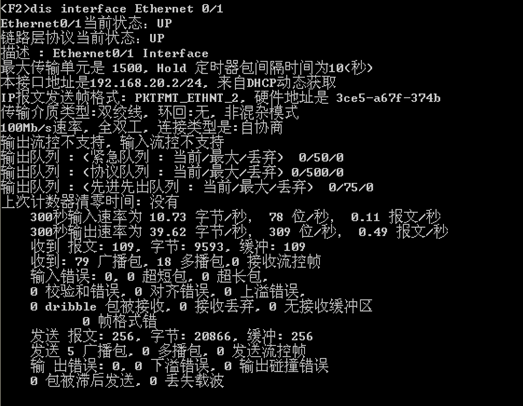
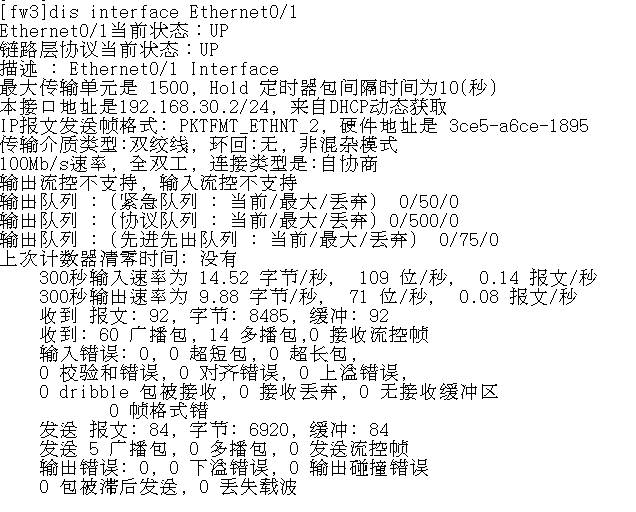

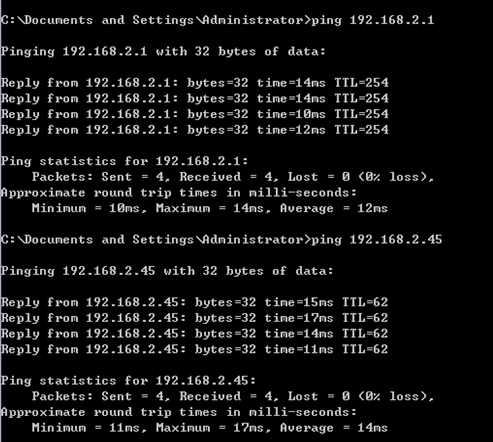
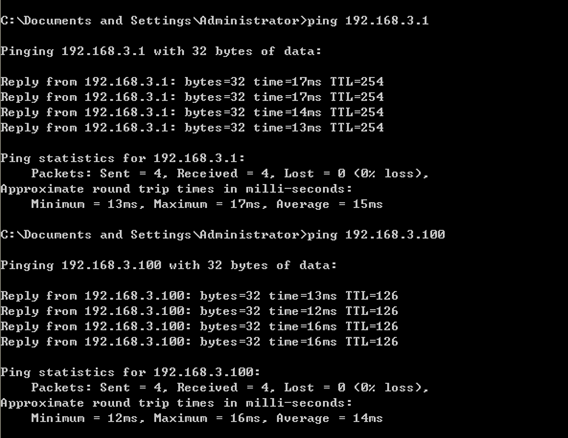
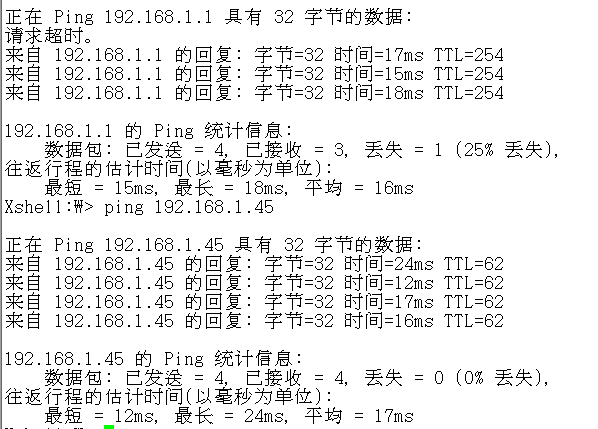
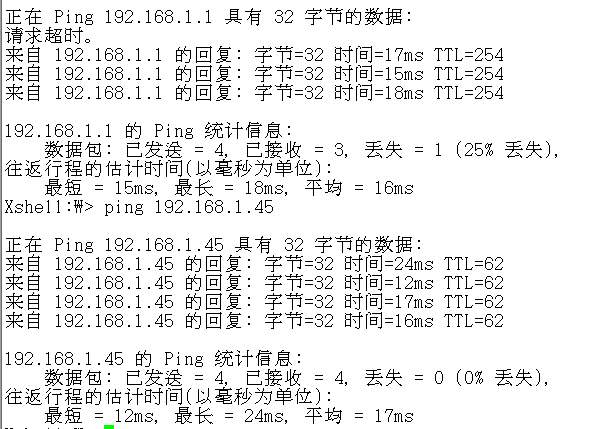
1.0网段的pc分别访问2.0和3.0网段的pc:
2.0访问1.0:
3.0访问1.0:
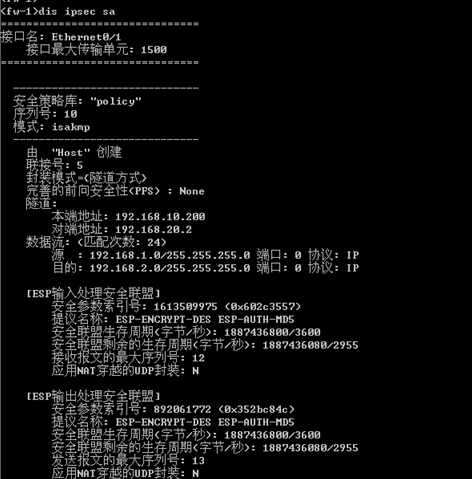
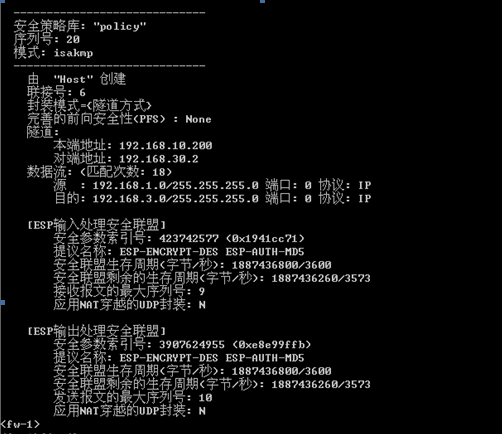
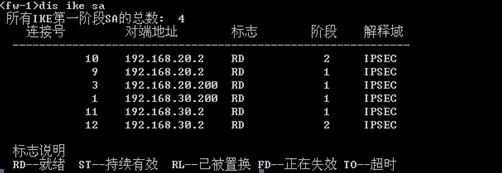
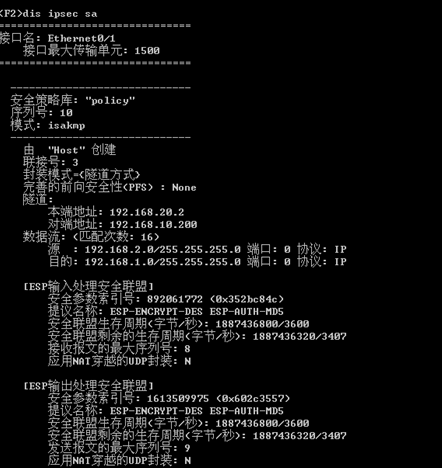
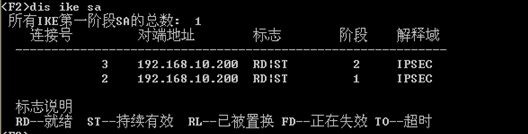
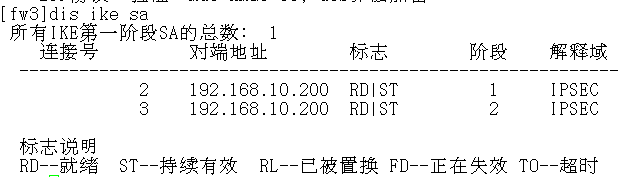
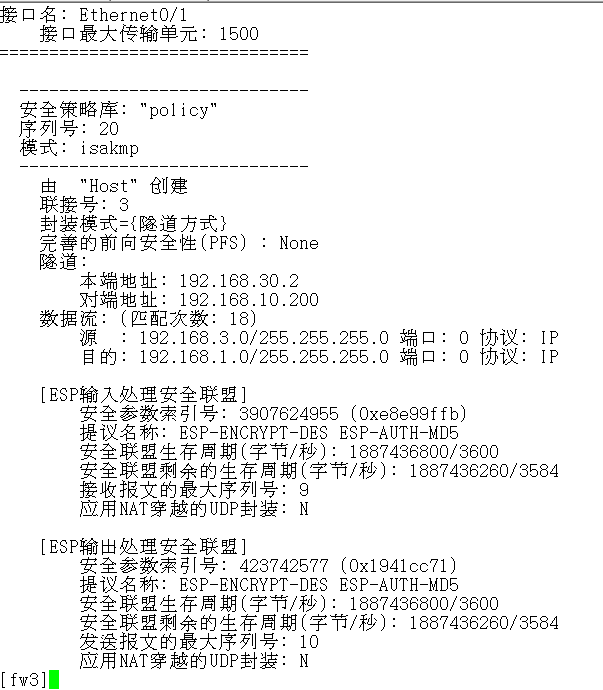
此时可以查看它们之间建立的安全联盟信息:
fw1:
fw2:
fw3:
- 在WildFly中运行多个standalone模式的实例
WildFly作为一款优秀的EJB容器,其前身为JBoss AS.JBoss作为一款开源的应用服务器,被广泛的应用在各种项目当中.假设我们现在有这样一个项目,他是以standalone的模式运行在 ...
- VMware Workstation虚拟机中的Linux通过NAT模式共享上网配置教程
VMware Workstation虚拟机中的Linux通过NAT模式共享上网配置教程 在VMware Workstation虚拟机下面,Linux虚机要上网,一般是桥接模式,但我自己的电脑上网的环境 ...
- 内存中 OLTP - 常见的工作负荷模式和迁移注意事项(三)
----------------------------我是分割线------------------------------- 本文翻译自微软白皮书<In-Memory OLTP – Comm ...
- 内存中 OLTP - 常见的工作负荷模式和迁移注意事项(二)
----------------------------我是分割线------------------------------- 本文翻译自微软白皮书<In-Memory OLTP – Comm ...
- 内存中 OLTP - 常见的工作负荷模式和迁移注意事项(一)
----------------------------我是分割线------------------------------- 本文翻译自微软白皮书<In-Memory OLTP – Comm ...
- Activity中的四种启动模式
在Android中每个界面都是一个Activity,切换界面操作其实是多个不同Activity之间的实例化操作.在Android中Activity的启动模式决定了Activity的启动运行方式. An ...
- CDC不同模式在ODI中体现系列之一 同步模式
CDC不同模式在ODI中体现系列之一 同步模式 Oracle Database Change Data Capture feature 变化数据捕获是一个通称,是用来描述捕捉增量变化应用到数据存储.随 ...
- 详解 Java 中的三种代理模式
代理模式 代理(Proxy)是一种设计模式,提供了对目标对象另外的访问方式;即通过代理对象访问目标对象.这样做的好处是:可以在目标对象实现的基础上,增强额外的功能操作,即扩展目标对象的功能. 这里使用 ...
- 协议中UART的两种模式 【转】
转自:http://wjf88223.blog.163.com/blog/static/3516800120104179327286/ ^^…… 协议栈中UART有两种模式:1.中断2.DMA 对于这 ...
随机推荐
- centos下配置sftp且限制用户访问目录
SFTP在Linux下是一个很方便很安全的文件传输工具,我常常用它在Linux服务器上替代传统的ftp来传输文件.众所周知SFTP账号是基于SSH账号的,默认情况下访问服务器的权限很大,下面的教程就是 ...
- 基于ARM的模拟器
ARM的ARMulator: ARMulator 是一个在 ARM 公司推出的集成开发环境 ADS (ARM Developer Suite)中提供的指令集模拟器.它与运行在通用计算机(通常是x86体 ...
- ERROR in index.web.js from UglifyJs
使用weexpack构建weex应用时,npm run serve一直报这个错误 ERROR in index.web.js from UglifyJs Unexpected token: name ...
- mongoDB开发规范
mongoDB库的设计 mongodb数据库命名规范:db_xxxx 禁止使用任何 " _ "(下划线)外的特殊字符 禁止使用数字打头的库名 数据库名最多为 64字符 mongoD ...
- Android 自定义 ListView 显示网络上 JSON 格式歌曲列表
本文内容 环境 项目结构 演示自定义 ListView 显示网络上 JSON 歌曲列表 参考资料 本文最开始看的是一个国人翻译的文章,没有源代码可下载,根据文中提供的代码片段,自己新建的项目(比较可恶 ...
- Office办公 如何设置WPS的默认背景大小
设计-页面设置,然后修改宽度和高度 因为我们只是需要背景跟平面差不多大(不同屏幕比如宽屏的就比较长),修改宽度和高度的时候注意文字之类的也会被拉伸缩放,所以自己改了之后看效果,比如我100,50的 ...
- Android 之 assets目录和raw目录
Android 中存在assets目录和raw目录,它们既有相似之处又有所不同.一.共同点: 目录下的资源会被原封不动的拷贝到APK中,而不会像其它资源文件那样被编译成二进制的形式. 二.区别 1.最 ...
- JAVA中JDBC连接Mysql数据库简单测试
一.引用库 maven库:mysql:mysql-connector-java:6.0.6 二.SDK环境 JAVA JDK10 三.测试代码 package com.mysql.mysqlconne ...
- directive完成UI渲染后执行JS
ui-view有相应的$viewContentLoaded http://blog.csdn.net/xinshangshangxin/article/details/44700813 ng-repe ...
- Angularjs乱记
http://www.cnblogs.com/floor/p/6652313.html 在指令中使用filter DI规则 AngularJS注入规则 数据绑定 http://www.cnblogs. ...
