
android实操--练习2
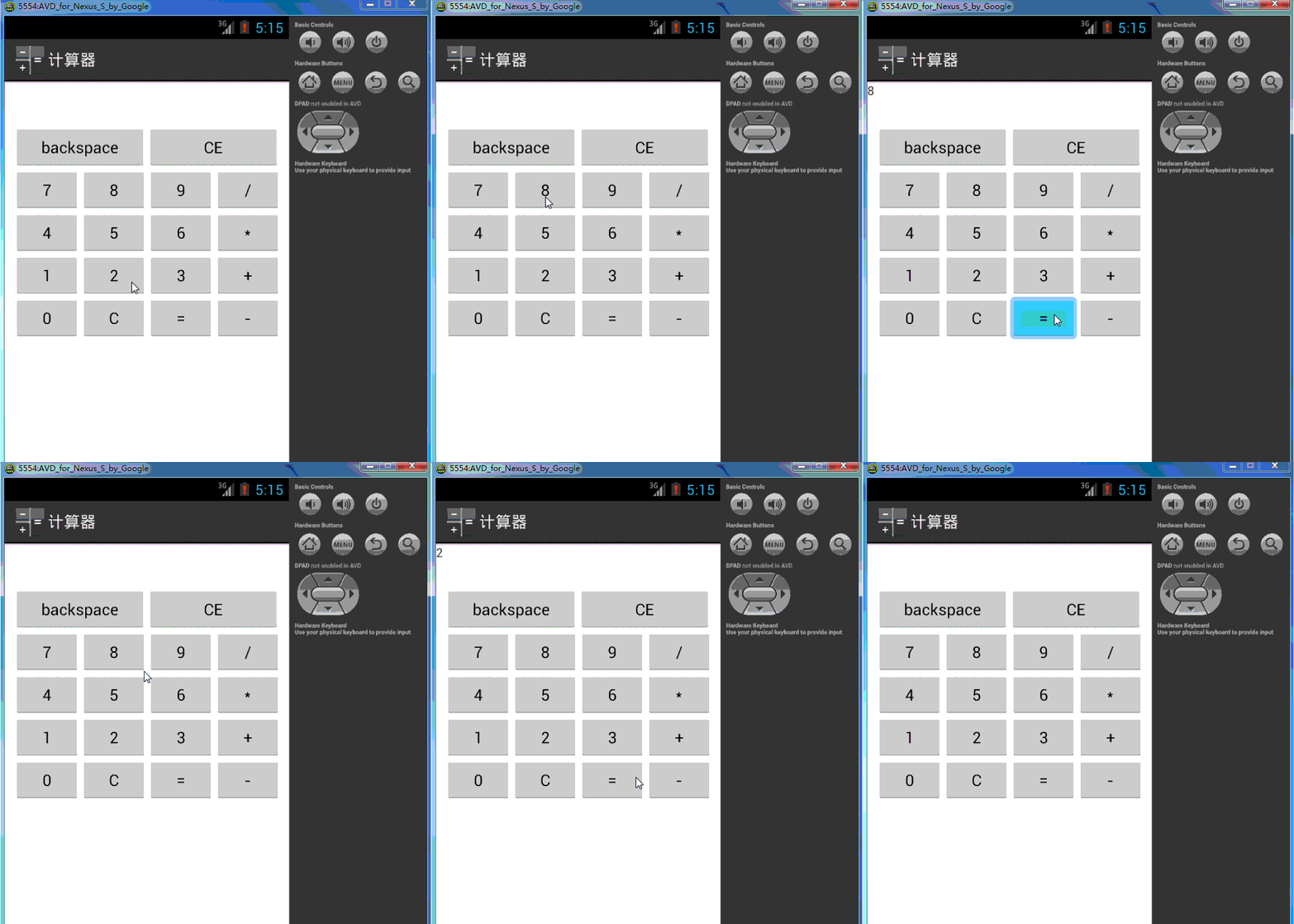
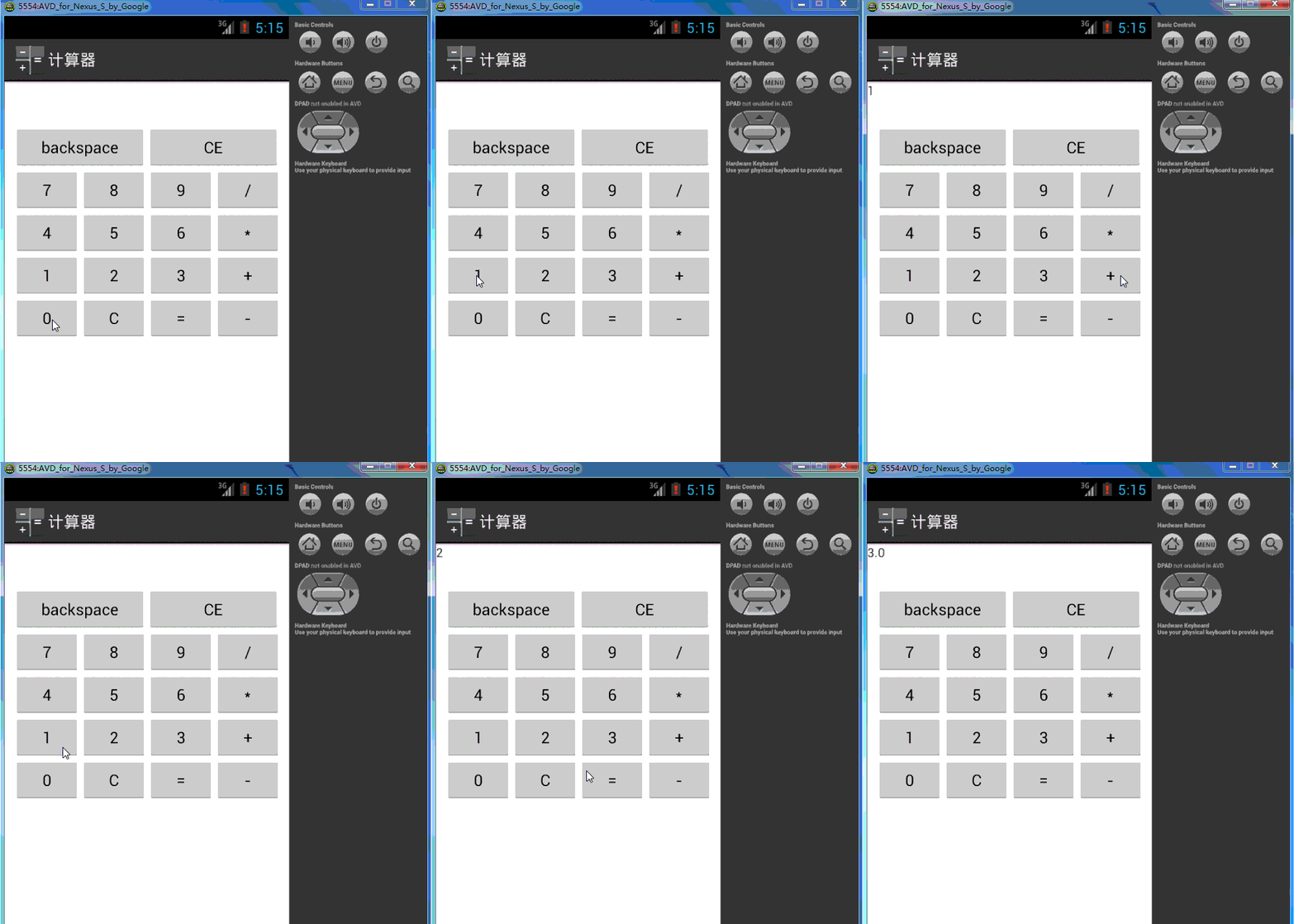
练习2是实现一个计算器的功能;可以加减乘除;可以倒退,可以清空文本。
下面是效果展示:
-----------------------布局-------------------------------
<?xml version="1.0" encoding="utf-8"?>
<LinearLayout xmlns:android="http://schemas.android.com/apk/res/android"
android:layout_width="match_parent"
android:layout_height="match_parent"
android:orientation="vertical" >
<LinearLayout android:layout_width="fill_parent"
android:layout_height="wrap_content">
<TextView
android:id="@+id/tvResult"
android:layout_width="fill_parent"
android:layout_height="wrap_content"
android:height="50dp"
android:text="@string/tvResult"
/>
</LinearLayout>
<LinearLayout android:layout_width="fill_parent"
android:layout_height="wrap_content">
<Button
android:id="@+id/btnBackspace"
android:layout_width="wrap_content"
android:layout_height="wrap_content"
android:width="150dp"
android:layout_marginLeft="10dp"
android:text="@string/btnbackspace"/>
<Button
android:id="@+id/btnCE"
android:layout_width="wrap_content"
android:layout_height="wrap_content"
android:width="150dp"
android:text="@string/btnCE"/>
</LinearLayout>
<LinearLayout android:layout_width="fill_parent"
android:layout_height="wrap_content">
<Button
android:id="@+id/btn7"
android:layout_width="wrap_content"
android:layout_height="wrap_content"
android:layout_marginLeft="10dp"
android:width="75dp"
android:text="@string/btn7"/>
<Button
android:id="@+id/btn8"
android:layout_width="wrap_content"
android:layout_height="wrap_content"
android:width="75dp"
android:text="@string/btn8"/>
<Button
android:id="@+id/btn9"
android:layout_width="wrap_content"
android:layout_height="wrap_content"
android:width="75dp"
android:text="@string/btn9"/>
<Button
android:id="@+id/btnDiv"
android:layout_width="wrap_content"
android:layout_height="wrap_content"
android:width="75dp"
android:text="@string/btnDiv"/>
</LinearLayout>
<LinearLayout android:layout_width="fill_parent"
android:layout_height="wrap_content">
<Button
android:id="@+id/btn4"
android:layout_width="wrap_content"
android:layout_height="wrap_content"
android:layout_marginLeft="10dp"
android:width="75dp"
android:text="@string/btn4"/>
<Button
android:id="@+id/btn5"
android:layout_width="wrap_content"
android:layout_height="wrap_content"
android:width="75dp"
android:text="@string/btn5"/>
<Button
android:id="@+id/btn6"
android:layout_width="wrap_content"
android:layout_height="wrap_content"
android:width="75dp"
android:text="@string/btn6"/>
<Button
android:id="@+id/btnMul"
android:layout_width="wrap_content"
android:layout_height="wrap_content"
android:width="75dp"
android:text="@string/btnMul"/>
</LinearLayout>
<LinearLayout android:layout_width="fill_parent"
android:layout_height="wrap_content">
<Button
android:id="@+id/btn1"
android:layout_width="wrap_content"
android:layout_height="wrap_content"
android:layout_marginLeft="10dp"
android:width="75dp"
android:text="@string/btn1"/>
<Button
android:id="@+id/btn2"
android:layout_width="wrap_content"
android:layout_height="wrap_content"
android:width="75dp"
android:text="@string/btn2"/>
<Button
android:id="@+id/btn3"
android:layout_width="wrap_content"
android:layout_height="wrap_content"
android:width="75dp"
android:text="@string/btn3"/>
<Button
android:id="@+id/btnAdd"
android:layout_width="wrap_content"
android:layout_height="wrap_content"
android:width="75dp"
android:text="@string/btnAdd"/>
</LinearLayout>
<LinearLayout android:layout_width="fill_parent"
android:layout_height="wrap_content">
<Button
android:id="@+id/btn0"
android:layout_width="wrap_content"
android:layout_height="wrap_content"
android:layout_marginLeft="10dp"
android:width="75dp"
android:text="@string/btn0"/>
<Button
android:id="@+id/btnC"
android:layout_width="wrap_content"
android:layout_height="wrap_content"
android:width="75dp"
android:text="@string/btnC"/>
<Button
android:id="@+id/btnEqu"
android:layout_width="wrap_content"
android:layout_height="wrap_content"
android:width="75dp"
android:text="@string/btnEqu"/>
<Button
android:id="@+id/btnSub"
android:layout_width="wrap_content"
android:layout_height="wrap_content"
android:width="75dp"
android:text="@string/btnSub"/>
</LinearLayout>
</LinearLayout>
-----------------------功能-------------------------------
package com.example.week2;
import android.os.Bundle;
import android.view.View;
import android.view.View.OnClickListener;
import android.widget.Button;
import android.widget.TextView;
import android.app.Activity;
public class MainActivity extends Activity implements OnClickListener{
//声明一些控件
Button btn0=null;
Button btn1=null;
Button btn2=null;
Button btn3=null;
Button btn4=null;
Button btn5=null;
Button btn6=null;
Button btn7=null;
Button btn8=null;
Button btn9=null;
Button btnBackspace=null;
Button btnCE=null;
Button btnC=null;
Button btnAdd=null;
Button btnSub=null;
Button btnMul=null;
Button btnDiv=null;
Button btnEqu=null;
TextView tvResult=null;
//声明两个参数。接收tvResult前后的值
double num1=0,num2=0;
double Result=0;//计算结果
int op=0;//判断操作数,
boolean isClickEqu=false;//判断是否按了“=”按钮
@Override
protected void onCreate(Bundle savedInstanceState) {
super.onCreate(savedInstanceState);
setContentView(R.layout.main);
//从布局文件中获取控件,
btn0=(Button)findViewById(R.id.btn0);
btn1=(Button)findViewById(R.id.btn1);
btn2=(Button)findViewById(R.id.btn2);
btn3=(Button)findViewById(R.id.btn3);
btn4=(Button)findViewById(R.id.btn4);
btn5=(Button)findViewById(R.id.btn5);
btn6=(Button)findViewById(R.id.btn6);
btn7=(Button)findViewById(R.id.btn7);
btn8=(Button)findViewById(R.id.btn8);
btn9=(Button)findViewById(R.id.btn9);
btnBackspace=(Button)findViewById(R.id.btnBackspace);
btnCE=(Button)findViewById(R.id.btnCE);
btnC=(Button)findViewById(R.id.btnC);
btnEqu=(Button)findViewById(R.id.btnEqu);
btnAdd=(Button)findViewById(R.id.btnAdd);
btnSub=(Button)findViewById(R.id.btnSub);
btnMul=(Button)findViewById(R.id.btnMul);
btnDiv=(Button)findViewById(R.id.btnDiv);
tvResult=(TextView)findViewById(R.id.tvResult);
//添加监听\
btnBackspace.setOnClickListener(this);
btnCE.setOnClickListener(this);
btn0.setOnClickListener(this);
btn1.setOnClickListener(this);
btn2.setOnClickListener(this);
btn3.setOnClickListener(this);
btn4.setOnClickListener(this);
btn5.setOnClickListener(this);
btn6.setOnClickListener(this);
btn7.setOnClickListener(this);
btn8.setOnClickListener(this);
btn9.setOnClickListener(this);
btnAdd.setOnClickListener(this);
btnSub.setOnClickListener(this);
btnMul.setOnClickListener(this);
btnDiv.setOnClickListener(this);
btnEqu.setOnClickListener(this);
}
@Override
public void onClick(View v) {
switch (v.getId()) {
//btnBackspace和CE--------------------
case R.id.btnBackspace:
String myStr=tvResult.getText().toString();
try {
tvResult.setText(myStr.substring(0, myStr.length()-1));
} catch (Exception e) {
tvResult.setText("");
}
break;
case R.id.btnCE:
tvResult.setText(null);
break;
//btn0--9---------------------------
case R.id.btn0:
if(isClickEqu)
{
tvResult.setText(null);
isClickEqu=false;
}
String myString=tvResult.getText().toString();
myString+="0";
tvResult.setText(myString);
break;
case R.id.btn1:
if(isClickEqu)
{
tvResult.setText(null);
isClickEqu=false;
}
String myString1=tvResult.getText().toString();
myString1+="1";
tvResult.setText(myString1);
break;
case R.id.btn2:
if(isClickEqu)
{
tvResult.setText(null);
isClickEqu=false;
}
String myString2=tvResult.getText().toString();
myString2+="2";
tvResult.setText(myString2);
break;
case R.id.btn3:
if(isClickEqu)
{
tvResult.setText(null);
isClickEqu=false;
}
String myString3=tvResult.getText().toString();
myString3+="3";
tvResult.setText(myString3);
break;
case R.id.btn4:
if(isClickEqu)
{
tvResult.setText(null);
isClickEqu=false;
}
String myString4=tvResult.getText().toString();
myString4+="4";
tvResult.setText(myString4);
break;
case R.id.btn5:
if(isClickEqu)
{
tvResult.setText(null);
isClickEqu=false;
}
String myString5=tvResult.getText().toString();
myString5+="5";
tvResult.setText(myString5);
break;
case R.id.btn6:
if(isClickEqu)
{
tvResult.setText(null);
isClickEqu=false;
}
String myString6=tvResult.getText().toString();
myString6+="6";
tvResult.setText(myString6);
break;
case R.id.btn7:
if(isClickEqu)
{
tvResult.setText(null);
isClickEqu=false;
}
String myString7=tvResult.getText().toString();
myString7+="7";
tvResult.setText(myString7);
break;
case R.id.btn8:
if(isClickEqu)
{
tvResult.setText(null);
isClickEqu=false;
}
String myString8=tvResult.getText().toString();
myString8+="8";
tvResult.setText(myString8);
break;
case R.id.btn9:
if(isClickEqu)
{
tvResult.setText(null);
isClickEqu=false;
}
String myString9=tvResult.getText().toString();
myString9+="9";
tvResult.setText(myString9);
break;
//btn+-*/=--------------------------------
case R.id.btnAdd:
String myStringAdd=tvResult.getText().toString();
if(myStringAdd.equals(null))
{
return;
}
num1=Double.valueOf(myStringAdd);
tvResult.setText(null);
op=1;
isClickEqu=false;
break;
case R.id.btnSub:
String myStringSub=tvResult.getText().toString();
if(myStringSub.equals(null))
{
return;
}
num1=Double.valueOf(myStringSub);
tvResult.setText(null);
op=2;
isClickEqu=false;
break;
case R.id.btnMul:
String myStringMul=tvResult.getText().toString();
if(myStringMul.equals(null))
{
return;
}
num1=Double.valueOf(myStringMul);
tvResult.setText(null);
op=3;
isClickEqu=false;
break;
case R.id.btnDiv:
String myStringDiv=tvResult.getText().toString();
if(myStringDiv.equals(null))
{
return;
}
num1=Double.valueOf(myStringDiv);
tvResult.setText(null);
op=4;
isClickEqu=false;
break;
case R.id.btnEqu:
String myStringEqu=tvResult.getText().toString();
if(myStringEqu.equals(null))
{
return;
}
num2=Double.valueOf(myStringEqu);
tvResult.setText(null);
switch (op) {
case 0:
Result=num2;
break;
case 1:
Result=num1+num2;
break;
case 2:
Result=num1-num2;
break;
case 3:
Result=num1*num2;
break;
case 4:
Result=num1/num2;
break;
default:
Result=0;
break;
}
tvResult.setText(String.valueOf(Result));
isClickEqu=true;
break;
default:
break;
}
}
}
下载
android实操--练习2的更多相关文章
- android实操--练习1
这两天有空,打算把一些文档整理一下,快要考试了,找一些简单的例子来做做,重温安卓的知识. 下面是第一个练习: 实现很简单,下面我们来看看: 首先新建一个安卓项目Demo1 接着是界面的布局(包括act ...
- Appium常用Api实操
本文是基于python语言在android上实操的,仅记录(忽略排版~~~) 会不时更新的: from appium import webdriver from selenium.webdriver. ...
- ABP入门系列(1)——学习Abp框架之实操演练
作为.Net工地搬砖长工一名,一直致力于挖坑(Bug)填坑(Debug),但技术却不见长进.也曾热情于新技术的学习,憧憬过成为技术大拿.从前端到后端,从bootstrap到javascript,从py ...
- 号外号外:9月13号《Speed-BI云平台案例实操--十分钟做报表》开讲了
引言:如何快速分析纷繁复杂的数据?如何快速做出老板满意的报表?如何快速将Speed-BI云平台运用到实际场景中? 本课程将通过各行各业案例背景,将Speed-BI云平台运用到实际场景中 ...
- Mysql MHA(GTID)配置(实操)
实现环境 centos6.7 MYSQL5.6.36 主:192.168.1.191 从1:192.168.1.145 从2:192.168.1.146 监测:放在从2上 192.168.1.146 ...
- Selenium之unittest测试框架详谈及实操
申明:本文是基于python3.x及selenium3.x. unittest,也可以称为PyUnit,可以用来创建全面的测试套件,可以用于单元自动化测试(模块).功能自动化测试(UI)等等. 官方文 ...
- unittest测试框架详谈及实操(二)
类级别的setUp()方法与tearDown()方法 在实操(一)的例子中,通过setUp()方法为每个测试方法都创建了一个Chrome实例,并且在每个测试方法执行结束后要关闭实例.是不是觉得有个多余 ...
- Android实训案例(九)——答题系统的思绪,自己设计一个题库的体验,一个思路清晰的答题软件制作过程
Android实训案例(九)--答题系统的思绪,自己设计一个题库的体验,一个思路清晰的答题软件制作过程 项目也是偷师的,决心研究一下数据库.所以写的还是很详细的,各位看官,耐着性子看完,实现结果不重要 ...
- Android实训案例(八)——单机五子棋游戏,自定义棋盘,线条,棋子,游戏逻辑,游戏状态存储,再来一局
Android实训案例(八)--单机五子棋游戏,自定义棋盘,线条,棋子,游戏逻辑,游戏状态存储,再来一局 阿法狗让围棋突然就被热议了,鸿洋大神也顺势出了篇五子棋单机游戏的视频,我看到了就像膜拜膜拜,就 ...
随机推荐
- Laya 图集动画
参考: 图集动画运用 一.准备素材 从爱给网找到几个素材 二.使用Laya的图集工具 菜单栏选择工具->图集打包工具,然后选择序列图所在的文件夹 生成了个.rec...说好的.atlas呢... ...
- C# 未能加载文件或程序集“xxx”或它的某一个依赖项。参数错误。(异常来自 HRESULT:0x80070057 (E_INVALIDARG))
错误信息: 因为电脑突然蓝屏,然后重启,再运行项目,报了这个错. 解决方案: 环境是:VS2012+Win7 通过网上查找, 4.0 删除 C:\Windows\Microsoft.NET\Frame ...
- ToStringBuilder类
文章来源:http://blog.csdn.net/zhaowen25/article/details/39521899 apache的commons-lang3的工具包里有一个ToStringBui ...
- 【转】javascript和html中unicode编码和字符转义的详解
不是十分理解unicode和html转义的情况下,可能会误用,所以下面会对它们再做比较容易理解的解释: 1.html中的转义:在html中如果遇到转义字符(如“ ”),不管你的页面字符编码是utf-8 ...
- 9.13Django ORM那些事
2018-9-13 14:23:22 ORM那些事 参考 : https://www.cnblogs.com/liwenzhou/p/8660826.html 今天的都是ORM的查询 更详细进阶了! ...
- python----并发编程之IO模型
一:IO模型介绍 同步(synchronous) IO和异步(asynchronous) IO,阻塞(blocking) IO和非阻塞(non-blocking)IO分别是什么,到底有什么区别?这个 ...
- parameter/argument
根据网上一些资料,对parameter和argument的区别,做如下的简单说明.1. parameter是指函数定义中参数,而argument指的是函数调用时的实际参数.2. 简略描述为:param ...
- Python的全局和局部变量
global1 = " def o(): #global global1; global1=2; print(global1) def p(): print(global1) if __na ...
- 数据恢复:如何恢复Linux中意外删除的Oracle和MySQL数据库
今天有客户的数据库意外被删除了整个目录中的数据文件,操作系统级别的删除,然而幸运的是这个数据库没有崩溃,仍然处于 open 状态的时候,客户就发现了问题,求助到我们,最终完整地恢复了所有数据文件. 在 ...
- 【Python算法】遍历(Traversal)、深度优先(DFS)、广度优先(BFS)
图结构: 非常强大的结构化思维(或数学)模型.如果您能用图的处理方式来规范化某个问题,即使这个问题本身看上去并不像个图问题,也能使您离解决问题更进一步. 在众多图算法中,我们常会用到一种非常实用的思维 ...