
OAuth2认证和授权:ResourceOwnerPassword认证
ResourceOwnerPassword在 ClientCredentials认证上新增了用户名和密码

但通过RequestPasswordTokenAsync获取不到refresh_token,不知道为什么
using IdentityModel;

using IdentityModel.Client;

using Newtonsoft.Json.Linq;

using System;

using System.Net.Http;

using System.Text;

namespace PassWord

{

    /// <summary>

    /// 客户端模式,请求授权服务器获取token,请求资源服务器获取资源

    /// 依赖包:IdentityModel

    /// </summary>

    class Program

    {

        static void Main(string[] args)

        {

            string Authority = "http://localhost:5003";

            string ApiResurce = "http://localhost:5002/";

            var tokenCliet = new HttpClient()

            {

                BaseAddress = new Uri(ApiResurce)

            };

            /*

             这样做的目的是:

             资源服务器会去授权服务器认证,所以在客户端可以先判断下授权服务器是否挂了

             */

            DiscoveryCache _cache = new DiscoveryCache(Authority);

            var disco1 = _cache.GetAsync().Result;

            if (disco1.IsError) throw new Exception(disco1.Error);

            //或者

            var disco = tokenCliet.GetDiscoveryDocumentAsync(Authority).Result;

            if (disco.IsError) throw new Exception(disco.Error);

            var response = tokenCliet.RequestPasswordTokenAsync(new PasswordTokenRequest

            {

                Address = disco.TokenEndpoint,

                ClientId = "userinfo_pwd",

                ClientSecret = "secret",

                //GrantType = "password",

                UserName = "cnblogs",

                Password = "",

                Scope = "apiInfo.read_full"

            }).Result;

            if (response.IsError) throw new Exception(response.Error);

            var token = response.AccessToken;

            //把token,Decode

            if (response.AccessToken.Contains("."))

            {

                //Console.WriteLine("\nAccess Token (decoded):");

                Console.ForegroundColor = ConsoleColor.Green;

                Console.WriteLine("\nAccess Token (decoded):");

                Console.ResetColor();

                var parts = response.AccessToken.Split('.');

                var header = parts[];

                var claims = parts[];

                Console.WriteLine(JObject.Parse(Encoding.UTF8.GetString(Base64Url.Decode(header))));

                Console.WriteLine(JObject.Parse(Encoding.UTF8.GetString(Base64Url.Decode(claims))));

            }

            //设置请求的Token

            tokenCliet.SetBearerToken(token);

            //请求并返回字符串

            var apiResource1 = tokenCliet.GetStringAsync("identity").Result;

            var userinfo = tokenCliet.GetStringAsync("identity/userinfo").Result;

            var j = JObject.Parse(userinfo);

            //或者

            var getVal = tokenCliet.GetAsync("api/values").Result;

            if (getVal.IsSuccessStatusCode)

            {

                Console.WriteLine(getVal.Content.ReadAsStringAsync().Result);

            }

            Console.ReadLine();

        }

    }

}
但自己写一个请求方式,是可以获取到的
HttpClientHepler帮助类,参考网上
  public class HttpClientHepler

    {

        string _url;

        public string Url

        {

            get

            {

                return _url;

            }

            set

            {

                _url = value;

            }

        }

        public HttpClientHepler(string url)

        {

            Url = url;

        }

        public async Task GetAsync(string queryString, Action<HttpRequestHeaders> addHeader,

            Action<string> okAction = null,

            Action<HttpResponseMessage> faultAction = null, Action<Exception> exAction = null)

        {

            using (HttpClient client = new HttpClient())

            {

                addHeader(client.DefaultRequestHeaders);

                using (HttpResponseMessage response = await client.GetAsync(Url + "?" + queryString))

                {

                    try

                    {

                        if (response.IsSuccessStatusCode)

                        {

                            okAction(await response.Content.ReadAsStringAsync());

                        }

                        else

                        {

                            faultAction?.Invoke(response);

                        }

                    }

                    catch (Exception ex)

                    {

                        exAction?.Invoke(ex);

                    }

                }

            }

        }

        public async Task PostAsync(string queryString, string content, Action<HttpContentHeaders> addHeader,

            Action<string> okAction = null,

            Action<HttpResponseMessage> faultAction = null, Action<Exception> exAction = null)

        {

            using (HttpClient client = new HttpClient())

            {

                using (HttpContent httpContent = new StringContent(content))

                {

                    addHeader(httpContent.Headers);

                    using (HttpResponseMessage response = await client.PostAsync(Url + "?" + queryString, httpContent))

                    {

                        try

                        {

                            if (response.IsSuccessStatusCode)

                            {

                                okAction(await response.Content.ReadAsStringAsync());

                            }

                            else

                            {

                                faultAction?.Invoke(response);

                            }

                        }

                        catch (Exception ex)

                        {

                            exAction?.Invoke(ex);

                        }

                    }

                }

            }

        }

    }
黄色标记部分是新增代码,运行获取成功
   static void Main(string[] args)

        {

            string Authority = "http://localhost:5003";

            string ApiResurce = "http://localhost:5002/";

            var tokenCliet = new HttpClient()

            {

                BaseAddress = new Uri(ApiResurce)

            };

            /*

             这样做的目的是:

             资源服务器会去授权服务器认证,所以在客户端可以先判断下授权服务器是否挂了

             */

            DiscoveryCache _cache = new DiscoveryCache(Authority);

            var disco1 = _cache.GetAsync().Result;

            if (disco1.IsError) throw new Exception(disco1.Error);

            //或者

            var disco = tokenCliet.GetDiscoveryDocumentAsync(Authority).Result;

            if (disco.IsError) throw new Exception(disco.Error);

            //获取token

            var AccessToken = "";

            var RefreshToken = "";

            //通过code获取AccessToken

            var client1 = new HttpClientHepler(disco.TokenEndpoint);

            client1.PostAsync(null,

                "client_id=userinfo_pwd" +

                "&client_secret=secret" +

                "&grant_type=password" +

                "&username=cnblogs" +

                "&password=123",

                hd => hd.ContentType = new System.Net.Http.Headers.MediaTypeHeaderValue("application/x-www-form-urlencoded"),

                rtnVal =>

                {

                    var jsonVal = JsonConvert.DeserializeObject<dynamic>(rtnVal);

                    AccessToken = jsonVal.access_token;

                    RefreshToken = jsonVal.refresh_token;

                }).Wait();

            //用RefreshToken 刷新AccessToken

            var responseToken = tokenCliet.RequestRefreshTokenAsync(new RefreshTokenRequest

            {

                Address = disco.TokenEndpoint,

                ClientId = "userinfo_pwd",

                ClientSecret = "secret",

                RefreshToken = RefreshToken

            }).Result;

            var response = tokenCliet.RequestPasswordTokenAsync(new PasswordTokenRequest

            {

                Address = disco.TokenEndpoint,

                ClientId = "userinfo_pwd",

                ClientSecret = "secret",

                //GrantType = "password",

                UserName = "cnblogs",

                Password = "",

                Scope = "apiInfo.read_full"

            }).Result;

            if (response.IsError) throw new Exception(response.Error);

            var token = response.AccessToken;

            //把token,Decode

            if (response.AccessToken.Contains("."))

            {

                //Console.WriteLine("\nAccess Token (decoded):");

                Console.ForegroundColor = ConsoleColor.Green;

                Console.WriteLine("\nAccess Token (decoded):");

                Console.ResetColor();

                var parts = response.AccessToken.Split('.');

                var header = parts[];

                var claims = parts[];

                Console.WriteLine(JObject.Parse(Encoding.UTF8.GetString(Base64Url.Decode(header))));

                Console.WriteLine(JObject.Parse(Encoding.UTF8.GetString(Base64Url.Decode(claims))));

            }

            //设置请求的Token

            tokenCliet.SetBearerToken(token);

            //请求并返回字符串

            var apiResource1 = tokenCliet.GetStringAsync("identity").Result;

            var userinfo = tokenCliet.GetStringAsync("identity/userinfo").Result;

            var j = JObject.Parse(userinfo);

            //或者

            var getVal = tokenCliet.GetAsync("api/values").Result;

            if (getVal.IsSuccessStatusCode)

            {

                Console.WriteLine(getVal.Content.ReadAsStringAsync().Result);

            }

            Console.ReadLine();

        }
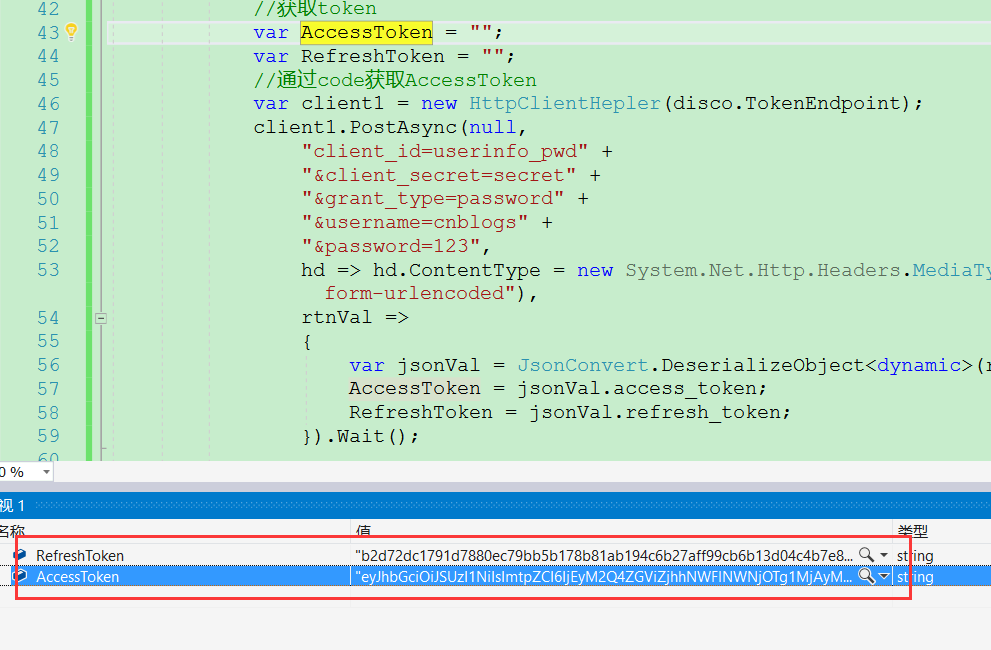
用RefreshToken刷新也成功

OAuth2认证和授权:ResourceOwnerPassword认证的更多相关文章
- keycloak~账号密码认证和授权码认证
用户名密码登录 POST /auth/realms/demo/protocol/openid-connect/token 请求体 x-www-form-urlencoded grant_type:pa ...
- ASP.NET Core WebAPI中使用JWT Bearer认证和授权
目录 为什么是 JWT Bearer 什么是 JWT JWT 的优缺点 在 WebAPI 中使用 JWT 认证 刷新 Token 使用授权 简单授权 基于固定角色的授权 基于策略的授权 自定义策略授权 ...
- OAuth2.0认证和授权原理
什么是OAuth授权? 一.什么是OAuth协议 OAuth(开放授权)是一个开放标准. 允许第三方网站在用户授权的前提下访问在用户在服务商那里存储的各种信息. 而这种授权无需将用户提供用户名和密 ...
- [转载] OAuth2.0认证和授权原理
转载自http://www.tuicool.com/articles/qqeuE3 什么是OAuth授权? 一.什么是OAuth协议 OAuth(开放授权)是一个开放标准,允许第三方网站在用户授权的前 ...
- 一步步搭建最简单oauth2.0认证和授权
oauth2.0 最早接触这个概念是在做微信订阅号开发.当时还被深深的绕进去,关于oauth2.0的解释网上有好多,而且都讲解的比较详细,下面给大家价格参考资料. http://owin.org/ h ...
- OAuth2认证和授权:AuthorizationCode认证
前面的OAuth2认证,里面的授权服务器都是用的identityserver4搭建的 ids4没有之前一般都是Owin搭建授权服务器,博客园有很多 ids4出来后,一般都是用ids4来做认证和授权了, ...
- OAuth2认证和授权:ClientCredentials认证
1:创建授权服务器项目:AuthorizationServer,添加包:IdentityServer4 2:创建资源服务器项目:ResourcesServer,添加包:IdentityServer4. ...
- OAuth2.0认证和授权以及单点登录
https://www.cnblogs.com/shizhiyi/p/7754721.html OAuth2.0认证和授权机制讲解 2017-10-30 15:33 by shizhiyi, 2273 ...
- OAuth2认证和授权入门
OAuth2四种授权方式 四种授权方式 OAuth 2.0定义了四种授权方式. 密码模式(resource owner password credentials) 授权码模式(authorizatio ...
随机推荐
- 【Unity】通用的Debugger日志模块
模块代码整理自 http://gad.qq.com/lore/catalog/10007 Debugger类.提供打印日志的静态方法. using System; using System.IO; n ...
- ubuntu 使用旧式Gnome风格的菜单
sudo apt-add-repository ppa:diesch/testing sudo apt-get update sudo apt-get install classicmenu-indi ...
- Sword libcurl回调函数相关知识
libcurl响应回调函数说明 libcurl在默认情况下,回调里面会将数据分段的返回,不会一下子将发送端的数据全部塞到回调函数里面, 经过源码分析回调函数和curl_easy_perform是在 ...
- matlab将矩阵数据归一化到[0,255]
matlab将矩阵数据归一化到[0,255] function OutImg = Normalize(InImg) ymax=255;ymin=0; xmax = max(max(InImg) ...
- Android 8 蓝牙 扫描流程
记录android 8 蓝牙扫描设备的流程 src/com/android/settings/bluetooth/BluetoothSettings.java @Override protected ...
- C++中常用的std标准容器
从c++11标准以来,c++中std定义的几种容器的效率非常高,优化的非常好,完全没有必要自己去定义类似的数据结构.了解使用它们,可以满足90%的日常编程需要.该篇文章基于c++11标准,从用户角度来 ...
- 树莓派apache2.4源码包安装
1.安装apr-1.6.3.tar.gz apr-util-1.6.1.tar.bz2 httpd-2.4.34.tar.gz (源码包下载centos7的就行,树莓派版本官方debian) 2.问题 ...
- linux下的抓包工具tcpdump
1.由netstat查看网络情况,引出的TCP建立连接.终止连接过程,以及TCP状态分析: 2.Soap=XML+HTTP引出的HTTP协议分析: 3.Soap(Simple Object Acces ...
- iOS 裁剪View指定的角裁剪
在开发中碰到view的左上角和右上角需要裁剪,具体实现方法如下: UIBezierPath *maskPath = [UIBezierPath bezierPathWithRoundedRect:se ...
- DBeaver连接MySQL 8.0显示"Unable to load authentication plugin 'caching_sha2_password'."错误的问题
下载MySQL绿色版本mysql-8.0.12-winx64,手动安装完成后.使用DBeaver连接提示"Unable to load authentication plugin 'cach ...