
使用Mybatis-Generator自动生成Dao、Model、Mapping
Mybatis属于半自动ORM,在使用这个框架中,工作量最大的就是书写Mapping的映射文件,由于手动书写很容易出错,我们可以利用Mybatis-Generator来帮我们自动生成文件。
1、相关文件
关于Mybatis-Generator的下载可以到这个地址:https://github.com/mybatis/generator/releases
由于我使用的是Mysql数据库,这里需要再准备一个连接mysql数据库的驱动jar包
以下是相关文件截图:
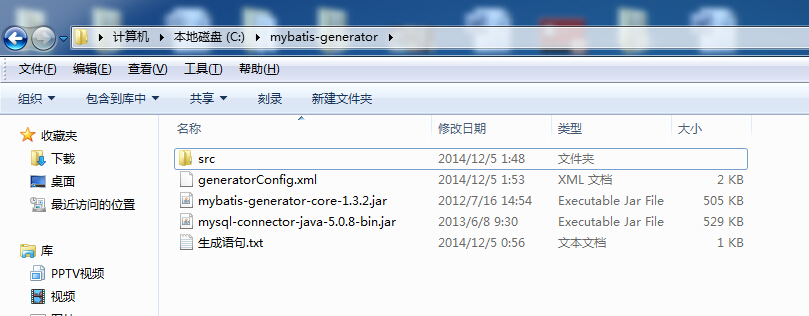
和Hibernate逆向生成一样,这里也需要一个配置文件:
generatorConfig.xml
<?xml version="1.0" encoding="UTF-8"?>

<!DOCTYPE generatorConfiguration

  PUBLIC "-//mybatis.org//DTD MyBatis Generator Configuration 1.0//EN"

  "http://mybatis.org/dtd/mybatis-generator-config_1_0.dtd">

<generatorConfiguration>

    <!--数据库驱动-->

    <classPathEntry    location="mysql-connector-java-5.0.8-bin.jar"/>

    <context id="DB2Tables"    targetRuntime="MyBatis3">

        <commentGenerator>

            <property name="suppressDate" value="true"/>

            <property name="suppressAllComments" value="true"/>

        </commentGenerator>

        <!--数据库链接地址账号密码-->

        <jdbcConnection driverClass="com.mysql.jdbc.Driver" connectionURL="jdbc:mysql://localhost/mymessages" userId="root" password="root">

        </jdbcConnection>

        <javaTypeResolver>

            <property name="forceBigDecimals" value="false"/>

        </javaTypeResolver>

        <!--生成Model类存放位置-->

        <javaModelGenerator targetPackage="lcw.model" targetProject="src">

            <property name="enableSubPackages" value="true"/>

            <property name="trimStrings" value="true"/>

        </javaModelGenerator>

        <!--生成映射文件存放位置-->

        <sqlMapGenerator targetPackage="lcw.mapping" targetProject="src">

            <property name="enableSubPackages" value="true"/>

        </sqlMapGenerator>

        <!--生成Dao类存放位置-->

        <javaClientGenerator type="XMLMAPPER" targetPackage="lcw.dao" targetProject="src">

            <property name="enableSubPackages" value="true"/>

        </javaClientGenerator>

        <!--生成对应表及类名-->

        <table tableName="message" domainObjectName="Messgae" enableCountByExample="false" enableUpdateByExample="false" enableDeleteByExample="false" enableSelectByExample="false" selectByExampleQueryId="false"></table>

    </context>

</generatorConfiguration>
需要修改文件配置的地方我都已经把注释标注出来了,这里的相关路径(如数据库驱动包,生成对应的相关文件位置可以自定义)不能带有中文。
上面配置文件中的:
<table tableName="message" domainObjectName="Messgae" enableCountByExample="false" enableUpdateByExample="false" enableDeleteByExample="false" enableSelectByExample="false" selectByExampleQueryId="false">

<!-- 表示跟数据库表中的字段保持一致 -->

<property name="useActualColumnNames" value="true"/>

</table>
tableName和domainObjectName为必选项,分别代表数据库表名和生成的实体类名,其余的可以自定义去选择(一般情况下均为false)。
生成语句文件:
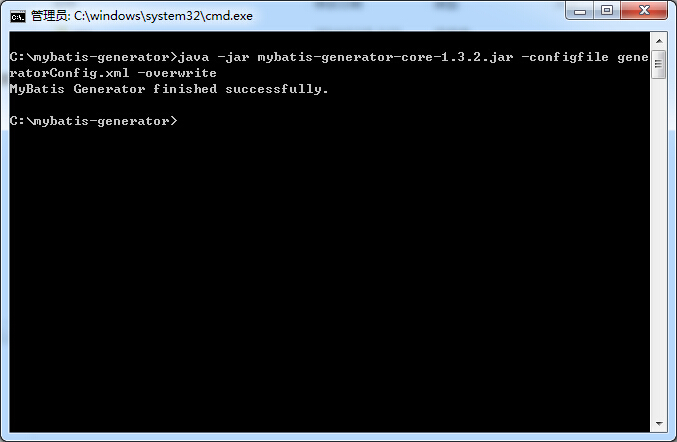
java -jar mybatis-generator-core-1.3.2.jar -configfile generatorConfig.xml -overwrite
2、使用方法
在该目录按住Shift键,右键鼠标选择"在此处打开命令窗口",复制粘贴生成语句的文件代码即可。
看下效果图:
首先这个是我的数据库表:

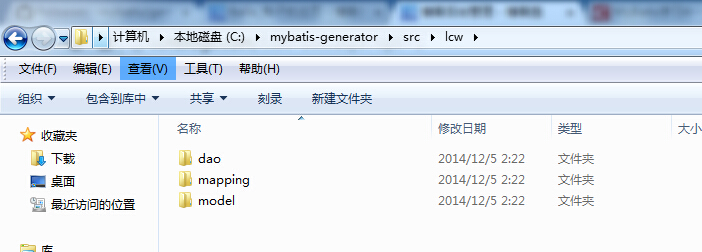
生成相关代码:
Message.java
package lcw.model;

public class Messgae {

    private Integer id;

    private String title;

    private String describe;

    private String content;

    public Integer getId() {

        return id;

    }

    public void setId(Integer id) {

        this.id = id;

    }

    public String getTitle() {

        return title;

    }

    public void setTitle(String title) {

        this.title = title == null ? null : title.trim();

    }

    public String getDescribe() {

        return describe;

    }

    public void setDescribe(String describe) {

        this.describe = describe == null ? null : describe.trim();

    }

    public String getContent() {

        return content;

    }

    public void setContent(String content) {

        this.content = content == null ? null : content.trim();

    }

}
MessgaeMapper.xml
<?xml version="1.0" encoding="UTF-8" ?>

<!DOCTYPE mapper PUBLIC "-//mybatis.org//DTD Mapper 3.0//EN" "http://mybatis.org/dtd/mybatis-3-mapper.dtd" >

<mapper namespace="lcw.dao.MessgaeMapper" >

  <resultMap id="BaseResultMap" type="lcw.model.Messgae" >

    <id column="id" property="id" jdbcType="INTEGER" />

    <result column="title" property="title" jdbcType="VARCHAR" />

    <result column="describe" property="describe" jdbcType="VARCHAR" />

    <result column="content" property="content" jdbcType="VARCHAR" />

  </resultMap>

  <sql id="Base_Column_List" >

    id, title, describe, content

  </sql>

  <select id="selectByPrimaryKey" resultMap="BaseResultMap" parameterType="java.lang.Integer" >

    select

    <include refid="Base_Column_List" />

    from message

    where id = #{id,jdbcType=INTEGER}

  </select>

  <delete id="deleteByPrimaryKey" parameterType="java.lang.Integer" >

    delete from message

    where id = #{id,jdbcType=INTEGER}

  </delete>

  <insert id="insert" parameterType="lcw.model.Messgae" >

    insert into message (id, title, describe,

      content)

    values (#{id,jdbcType=INTEGER}, #{title,jdbcType=VARCHAR}, #{describe,jdbcType=VARCHAR},

      #{content,jdbcType=VARCHAR})

  </insert>

  <insert id="insertSelective" parameterType="lcw.model.Messgae" >

    insert into message

    <trim prefix="(" suffix=")" suffixOverrides="," >

      <if test="id != null" >

        id,

      </if>

      <if test="title != null" >

        title,

      </if>

      <if test="describe != null" >

        describe,

      </if>

      <if test="content != null" >

        content,

      </if>

    </trim>

    <trim prefix="values (" suffix=")" suffixOverrides="," >

      <if test="id != null" >

        #{id,jdbcType=INTEGER},

      </if>

      <if test="title != null" >

        #{title,jdbcType=VARCHAR},

      </if>

      <if test="describe != null" >

        #{describe,jdbcType=VARCHAR},

      </if>

      <if test="content != null" >

        #{content,jdbcType=VARCHAR},

      </if>

    </trim>

  </insert>

  <update id="updateByPrimaryKeySelective" parameterType="lcw.model.Messgae" >

    update message

    <set >

      <if test="title != null" >

        title = #{title,jdbcType=VARCHAR},

      </if>

      <if test="describe != null" >

        describe = #{describe,jdbcType=VARCHAR},

      </if>

      <if test="content != null" >

        content = #{content,jdbcType=VARCHAR},

      </if>

    </set>

    where id = #{id,jdbcType=INTEGER}

  </update>

  <update id="updateByPrimaryKey" parameterType="lcw.model.Messgae" >

    update message

    set title = #{title,jdbcType=VARCHAR},

      describe = #{describe,jdbcType=VARCHAR},

      content = #{content,jdbcType=VARCHAR}

    where id = #{id,jdbcType=INTEGER}

  </update>

</mapper>
MessgaeMapper.java
package lcw.dao;

import lcw.model.Messgae;

public interface MessgaeMapper {

    int deleteByPrimaryKey(Integer id);

    int insert(Messgae record);

    int insertSelective(Messgae record);

    Messgae selectByPrimaryKey(Integer id);

    int updateByPrimaryKeySelective(Messgae record);

    int updateByPrimaryKey(Messgae record);

}
本文转自:http://www.cnblogs.com/lichenwei/p/4145696.html
使用Mybatis-Generator自动生成Dao、Model、Mapping的更多相关文章
- 【Java MyBatis Generator】使用generator自动生成Dao,Mapping和实体文件
具体请参照: http://blog.csdn.net/fengshizty/article/details/43086833 按照上面博客地址,下载Generator的依赖包: 如下是我的配置文件: ...
- mybatis generator 自动生成dao层映射代码
资源: doc url :http://www.mybatis.org/generator/ download:https://github.com/mybatis/generator/release ...
- IDEA Maven Mybatis generator 自动生成代码
IDEA Maven Mybatis generator 自动生成代码 一.安装配置maven以及在Idea中配置maven 安装过程步骤可以看上面的博文,里面介绍得很详细. 二.建数据表 DROP ...
- 使用Mybatis Generator自动生成Mybatis相关代码
本文将简要介绍怎样利用Mybatis Generator自动生成Mybatis的相关代码: 一.构建一个环境: 1. 首先创建一个表: CREATE TABLE pet (name VARCHAR(2 ...
- SpringBoot 添加mybatis generator 自动生成代码插件
自动生成数据层代码,提高开发效率 1.pom添加插件,并指定配置文件路径 <!-- mybatis generator 自动生成代码插件 --> <plugin> <gr ...
- idea中mybatis generator自动生成代码配置 数据库是sqlserver
好长时间没有写博客了,最近公司要用java语言,开始学习java,属于初学者,今天主要记录一下mybatis generator自动生成代码,首先在如下图的目录中新建两个文件,如下图 generato ...
- SpringBoot入门篇--整合mybatis+generator自动生成代码+druid连接池+PageHelper分页插件
原文链接 我们这一篇博客讲的是如何整合Springboot和Mybatis框架,然后使用generator自动生成mapper,pojo等文件.然后再使用阿里巴巴提供的开源连接池druid,这个连接池 ...
- IDEA Maven Mybatis generator 自动生成代码(实例讲解)(转)
IDEA Maven Mybatis generator 自动生成代码(实例讲解) MyBatis Generator • 简称MBG,是一个专门为MyBatis框架使用者定制的代码生成器,可以快速的 ...
- Mybatis generator自动生成mybatis配置和类信息
自动生成代码方式两种: 1.命令形式生成代码,详细讲解每一个配置参数. 2.Eclipse利用插件形式生成代码. 安装插件方式: eclipse插件安装地址:http://mybatis.google ...
- 使用MyBatis Generator自动生成MyBatis的代码
这两天需要用到MyBatis的代码自动生成的功能,由于MyBatis属于一种半自动的ORM框架,所以主要的工作就是配置Mapping映射文件,但是由于手写映射文件很容易出错,所以可利用MyBatis生 ...
随机推荐
- 在Android中调用USB摄像头
在网上找了很长时间,网上的资料基本都是说用外国人写的库,但实际上这个库的案例都是不能直接用的(因为权限问题),并不适合学习. 之后偶然发现有国人把这个库重新封装了,并且有源代码以及中文教程: http ...
- MySQL连接缓慢,打开缓慢原因
问题状况:最近由于服务器变换了网段,导致IP地址变换,变化后使用MySQL客户端连接MySQL服务器和在客户端中打开表的速度非常慢(无论表的大小),甚至连接超时,但是直接登录到服务器在本地连接MySQ ...
- Linux启动或禁止SSH用户及IP的登录,只允许密钥验证登录模式
启动或禁止SSH用户登录 一般情况下,在使用Linux操作系统都不会去机房来操作机器,都是使用一些第三方的工具来操作. 比如使用SSH Secure File Transfer Client工具来传输 ...
- 初窥Java--1(下载JADK,搭建环境变量)
window系统安装java 首先我们需要下载java开发工具包JDK,下载地址:http://www.oracle.com/technetwork/java/javase/downloads/ind ...
- ajax请求json中的数据
在这里不多说,直接可以运行代码看效果: 代码: <!DOCTYPE html> <html lang="en"> <head> <meta ...
- 初学JDBC的一些总结(二)
一.简单介绍PreparedStatement 和Statement的区别: PreparedStatement是用来执行SQL查询语句的API之一,Java提供了 Statement.Prepare ...
- Codeforces Round #423 (Div. 2, rated, based on VK Cup Finals) D. High Load 构造
D. High Load 题目连接: http://codeforces.com/contest/828/problem/D Description Arkady needs your help ag ...
- linux之软连接,硬连接篇
作业四: 1) 建立/etc/passwd的软连接文件,放在/tmp目录下 [root@localhost 桌面]# ln -s /etc/passwd/a.txt /tmp/aa.txt 2) 建立 ...
- OPC_Data Access Automation Interface Standard V2.02
文库地址: https://wenku.baidu.com/view/a70d1ad4b14e852458fb57da.html
- Sublime_分屏显示