
使用Mybatis-Generator自动生成Dao、Model、Mapping
Mybatis属于半自动ORM,在使用这个框架中,工作量最大的就是书写Mapping的映射文件,由于手动书写很容易出错,我们可以利用Mybatis-Generator来帮我们自动生成文件。
1、相关文件
关于Mybatis-Generator的下载可以到这个地址:https://github.com/mybatis/generator/releases
由于我使用的是Mysql数据库,这里需要再准备一个连接mysql数据库的驱动jar包
以下是相关文件截图:
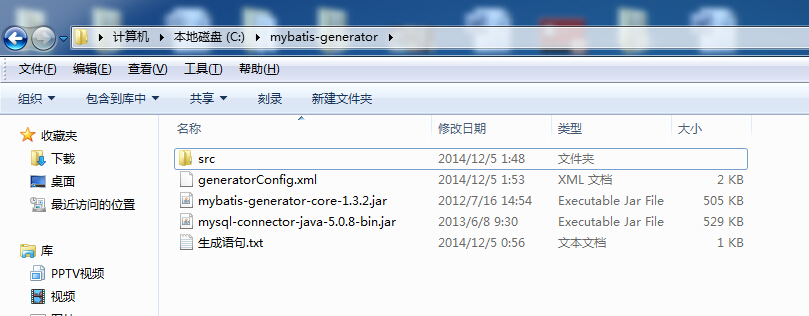
和Hibernate逆向生成一样,这里也需要一个配置文件:
generatorConfig.xml
<?xml version="1.0" encoding="UTF-8"?>

<!DOCTYPE generatorConfiguration

  PUBLIC "-//mybatis.org//DTD MyBatis Generator Configuration 1.0//EN"

  "http://mybatis.org/dtd/mybatis-generator-config_1_0.dtd">

<generatorConfiguration>

    <!--数据库驱动-->

    <classPathEntry    location="mysql-connector-java-5.0.8-bin.jar"/>

    <context id="DB2Tables"    targetRuntime="MyBatis3">

        <commentGenerator>

            <property name="suppressDate" value="true"/>

            <property name="suppressAllComments" value="true"/>

        </commentGenerator>

        <!--数据库链接地址账号密码-->

        <jdbcConnection driverClass="com.mysql.jdbc.Driver" connectionURL="jdbc:mysql://localhost/mymessages" userId="root" password="root">

        </jdbcConnection>

        <javaTypeResolver>

            <property name="forceBigDecimals" value="false"/>

        </javaTypeResolver>

        <!--生成Model类存放位置-->

        <javaModelGenerator targetPackage="lcw.model" targetProject="src">

            <property name="enableSubPackages" value="true"/>

            <property name="trimStrings" value="true"/>

        </javaModelGenerator>

        <!--生成映射文件存放位置-->

        <sqlMapGenerator targetPackage="lcw.mapping" targetProject="src">

            <property name="enableSubPackages" value="true"/>

        </sqlMapGenerator>

        <!--生成Dao类存放位置-->

        <javaClientGenerator type="XMLMAPPER" targetPackage="lcw.dao" targetProject="src">

            <property name="enableSubPackages" value="true"/>

        </javaClientGenerator>

        <!--生成对应表及类名-->

        <table tableName="message" domainObjectName="Messgae" enableCountByExample="false" enableUpdateByExample="false" enableDeleteByExample="false" enableSelectByExample="false" selectByExampleQueryId="false"></table>

    </context>

</generatorConfiguration>
需要修改文件配置的地方我都已经把注释标注出来了,这里的相关路径(如数据库驱动包,生成对应的相关文件位置可以自定义)不能带有中文。
上面配置文件中的:
<table tableName="message" domainObjectName="Messgae" enableCountByExample="false" enableUpdateByExample="false" enableDeleteByExample="false" enableSelectByExample="false" selectByExampleQueryId="false">

<!-- 表示跟数据库表中的字段保持一致 -->

<property name="useActualColumnNames" value="true"/>

</table>
tableName和domainObjectName为必选项,分别代表数据库表名和生成的实体类名,其余的可以自定义去选择(一般情况下均为false)。
生成语句文件:
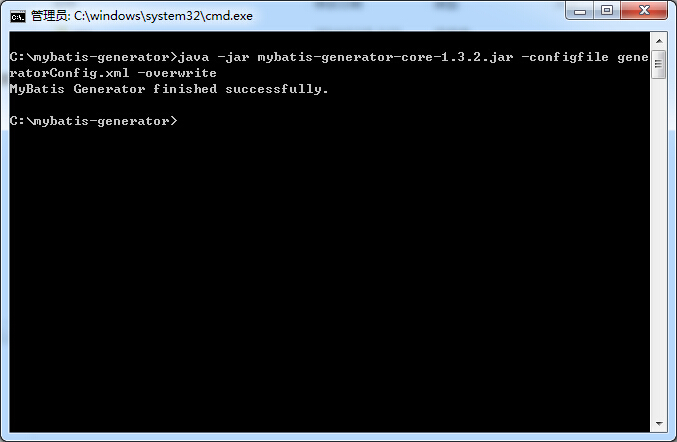
java -jar mybatis-generator-core-1.3.2.jar -configfile generatorConfig.xml -overwrite
2、使用方法
在该目录按住Shift键,右键鼠标选择"在此处打开命令窗口",复制粘贴生成语句的文件代码即可。
看下效果图:
首先这个是我的数据库表:

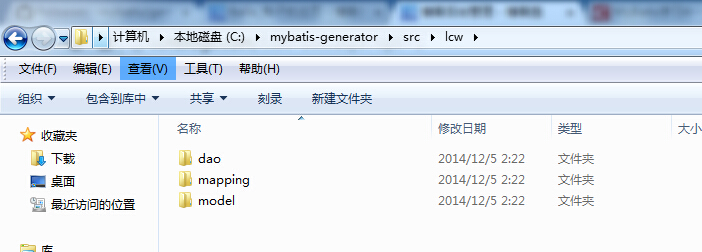
生成相关代码:
Message.java
package lcw.model;

public class Messgae {

    private Integer id;

    private String title;

    private String describe;

    private String content;

    public Integer getId() {

        return id;

    }

    public void setId(Integer id) {

        this.id = id;

    }

    public String getTitle() {

        return title;

    }

    public void setTitle(String title) {

        this.title = title == null ? null : title.trim();

    }

    public String getDescribe() {

        return describe;

    }

    public void setDescribe(String describe) {

        this.describe = describe == null ? null : describe.trim();

    }

    public String getContent() {

        return content;

    }

    public void setContent(String content) {

        this.content = content == null ? null : content.trim();

    }

}
MessgaeMapper.xml
<?xml version="1.0" encoding="UTF-8" ?>

<!DOCTYPE mapper PUBLIC "-//mybatis.org//DTD Mapper 3.0//EN" "http://mybatis.org/dtd/mybatis-3-mapper.dtd" >

<mapper namespace="lcw.dao.MessgaeMapper" >

  <resultMap id="BaseResultMap" type="lcw.model.Messgae" >

    <id column="id" property="id" jdbcType="INTEGER" />

    <result column="title" property="title" jdbcType="VARCHAR" />

    <result column="describe" property="describe" jdbcType="VARCHAR" />

    <result column="content" property="content" jdbcType="VARCHAR" />

  </resultMap>

  <sql id="Base_Column_List" >

    id, title, describe, content

  </sql>

  <select id="selectByPrimaryKey" resultMap="BaseResultMap" parameterType="java.lang.Integer" >

    select

    <include refid="Base_Column_List" />

    from message

    where id = #{id,jdbcType=INTEGER}

  </select>

  <delete id="deleteByPrimaryKey" parameterType="java.lang.Integer" >

    delete from message

    where id = #{id,jdbcType=INTEGER}

  </delete>

  <insert id="insert" parameterType="lcw.model.Messgae" >

    insert into message (id, title, describe,

      content)

    values (#{id,jdbcType=INTEGER}, #{title,jdbcType=VARCHAR}, #{describe,jdbcType=VARCHAR},

      #{content,jdbcType=VARCHAR})

  </insert>

  <insert id="insertSelective" parameterType="lcw.model.Messgae" >

    insert into message

    <trim prefix="(" suffix=")" suffixOverrides="," >

      <if test="id != null" >

        id,

      </if>

      <if test="title != null" >

        title,

      </if>

      <if test="describe != null" >

        describe,

      </if>

      <if test="content != null" >

        content,

      </if>

    </trim>

    <trim prefix="values (" suffix=")" suffixOverrides="," >

      <if test="id != null" >

        #{id,jdbcType=INTEGER},

      </if>

      <if test="title != null" >

        #{title,jdbcType=VARCHAR},

      </if>

      <if test="describe != null" >

        #{describe,jdbcType=VARCHAR},

      </if>

      <if test="content != null" >

        #{content,jdbcType=VARCHAR},

      </if>

    </trim>

  </insert>

  <update id="updateByPrimaryKeySelective" parameterType="lcw.model.Messgae" >

    update message

    <set >

      <if test="title != null" >

        title = #{title,jdbcType=VARCHAR},

      </if>

      <if test="describe != null" >

        describe = #{describe,jdbcType=VARCHAR},

      </if>

      <if test="content != null" >

        content = #{content,jdbcType=VARCHAR},

      </if>

    </set>

    where id = #{id,jdbcType=INTEGER}

  </update>

  <update id="updateByPrimaryKey" parameterType="lcw.model.Messgae" >

    update message

    set title = #{title,jdbcType=VARCHAR},

      describe = #{describe,jdbcType=VARCHAR},

      content = #{content,jdbcType=VARCHAR}

    where id = #{id,jdbcType=INTEGER}

  </update>

</mapper>
MessgaeMapper.java
package lcw.dao;

import lcw.model.Messgae;

public interface MessgaeMapper {

    int deleteByPrimaryKey(Integer id);

    int insert(Messgae record);

    int insertSelective(Messgae record);

    Messgae selectByPrimaryKey(Integer id);

    int updateByPrimaryKeySelective(Messgae record);

    int updateByPrimaryKey(Messgae record);

}
本文转自:http://www.cnblogs.com/lichenwei/p/4145696.html
使用Mybatis-Generator自动生成Dao、Model、Mapping的更多相关文章
- 【Java MyBatis Generator】使用generator自动生成Dao,Mapping和实体文件
具体请参照: http://blog.csdn.net/fengshizty/article/details/43086833 按照上面博客地址,下载Generator的依赖包: 如下是我的配置文件: ...
- mybatis generator 自动生成dao层映射代码
资源: doc url :http://www.mybatis.org/generator/ download:https://github.com/mybatis/generator/release ...
- IDEA Maven Mybatis generator 自动生成代码
IDEA Maven Mybatis generator 自动生成代码 一.安装配置maven以及在Idea中配置maven 安装过程步骤可以看上面的博文,里面介绍得很详细. 二.建数据表 DROP ...
- 使用Mybatis Generator自动生成Mybatis相关代码
本文将简要介绍怎样利用Mybatis Generator自动生成Mybatis的相关代码: 一.构建一个环境: 1. 首先创建一个表: CREATE TABLE pet (name VARCHAR(2 ...
- SpringBoot 添加mybatis generator 自动生成代码插件
自动生成数据层代码,提高开发效率 1.pom添加插件,并指定配置文件路径 <!-- mybatis generator 自动生成代码插件 --> <plugin> <gr ...
- idea中mybatis generator自动生成代码配置 数据库是sqlserver
好长时间没有写博客了,最近公司要用java语言,开始学习java,属于初学者,今天主要记录一下mybatis generator自动生成代码,首先在如下图的目录中新建两个文件,如下图 generato ...
- SpringBoot入门篇--整合mybatis+generator自动生成代码+druid连接池+PageHelper分页插件
原文链接 我们这一篇博客讲的是如何整合Springboot和Mybatis框架,然后使用generator自动生成mapper,pojo等文件.然后再使用阿里巴巴提供的开源连接池druid,这个连接池 ...
- IDEA Maven Mybatis generator 自动生成代码(实例讲解)(转)
IDEA Maven Mybatis generator 自动生成代码(实例讲解) MyBatis Generator • 简称MBG,是一个专门为MyBatis框架使用者定制的代码生成器,可以快速的 ...
- Mybatis generator自动生成mybatis配置和类信息
自动生成代码方式两种: 1.命令形式生成代码,详细讲解每一个配置参数. 2.Eclipse利用插件形式生成代码. 安装插件方式: eclipse插件安装地址:http://mybatis.google ...
- 使用MyBatis Generator自动生成MyBatis的代码
这两天需要用到MyBatis的代码自动生成的功能,由于MyBatis属于一种半自动的ORM框架,所以主要的工作就是配置Mapping映射文件,但是由于手写映射文件很容易出错,所以可利用MyBatis生 ...
随机推荐
- Linux基础操作整理
1,目录操作 1.1创建目录 1.1.1使用 mkdir 命令创建目录:mkdir $HOME/testFolder 1.2切换目录 1.2.1使用 cd 命令切换目录:cd $HOME/testFo ...
- 潭州课堂25班:Ph201805201 django 项目 第三十六课 后台文章管理(课堂笔记)
get 请求, 1,获取文章标签 , 2,拿到前台传来的值, 3,根据前台传来的值在数据库中查询 4.,返回数据到前台,渲染, 分页算法 : 在 utils 下创建 paginator_script ...
- [NOIP2018]摆渡车
Description: 有 n 名同学要乘坐摆渡车从人大附中前往人民大学,第 i位同学在第 t 分钟去 等车.只有一辆摆渡车在工作,但摆渡车容量可以视为无限大.摆渡车从人大附中出发. 把车上的同学送 ...
- Yii2 baisic版gii的使用和分页
一.Gii 的使用 1.配置 gii 的位置: 在 config/web.php 里面: if (YII_ENV_DEV) { $config['bootstrap'][] = 'gii'; $con ...
- Java爬取校内论坛新帖
Java爬取校内论坛新帖 为了保持消息灵通,博主没事会上上校内论坛看看新帖,作为爬虫爱好者,博主萌生了写个爬虫自动下载的想法. 嗯,这次就选Java. 第三方库准备 Jsoup Jsoup是一款比较好 ...
- JS_高程6.面向对象的程序设计(1)理解对象
js的数据属性:P139(1)[[Configurable]](2)[[Enumerable]](3)[[Writable]](4)[[Value]] 使用Object.definerPropert( ...
- Vue(二十二)vuex小案例(官网计数案例整合)
1.使用 vue-cli 创建项目(具体操作可以参考前面的文章) ... 2.下载 vuex - npm install vuex -S 3.将 vuex 添加到项目中 (1)在项目中创建store文 ...
- delphi button 实现下拉列表
unit Unit1; interface uses Windows, Messages, SysUtils, Variants, Classes, Graphics, Controls, Forms ...
- too much recursion(太多递归)Uncaught RangeError: Maximum call stack size exceeded BootstrapValidator报错
在BootstrapValidator中已默认遵守Bootstrap规则,form里的每个输入项目必需包含在类为form-group的标签里,否则BootstrapValidator中定义的field ...
- java-算法-排列组合
package com.qinghuainvest.utils.algorithm; import java.util.ArrayList; import java.util.Arrays; impo ...