
pytest文档13-allure2生成html报告(史上最详细)
前言
allure是一个report框架,支持java的Junit/testng等框架,当然也可以支持python的pytest框架,也可以集成到Jenkins上展示高大上的报告界面。
环境准备
- 1.python3.6
- 2.windows环境
- 3.pycharm
- 4.pytest-allure-adaptor
- 5.allure2.7.0
- 6.java1.8
** 作者:上海-悠悠 QQ交流群:588402570**
pytest-allure-adaptor下载
pip安装pytest-allure-adaptor,github地址https://github.com/allure-framework/allure-pytest
pip3 install pytest-allure-adaptor
生成xml报告
pytest -s -q --alluredir report
如果不指定路径,默认在当前目录下新建一个report目录,当然也可以指定路径
pytest -s -q --alluredir 指定report路径
执行完之后打开report文件夹,会自动生成xml格式的报告
安装 Command Tool
allure的版本目前有2个,从github上看,allure1不再被支持,请考虑使用allure2 https://github.com/allure-framework/allure2替代
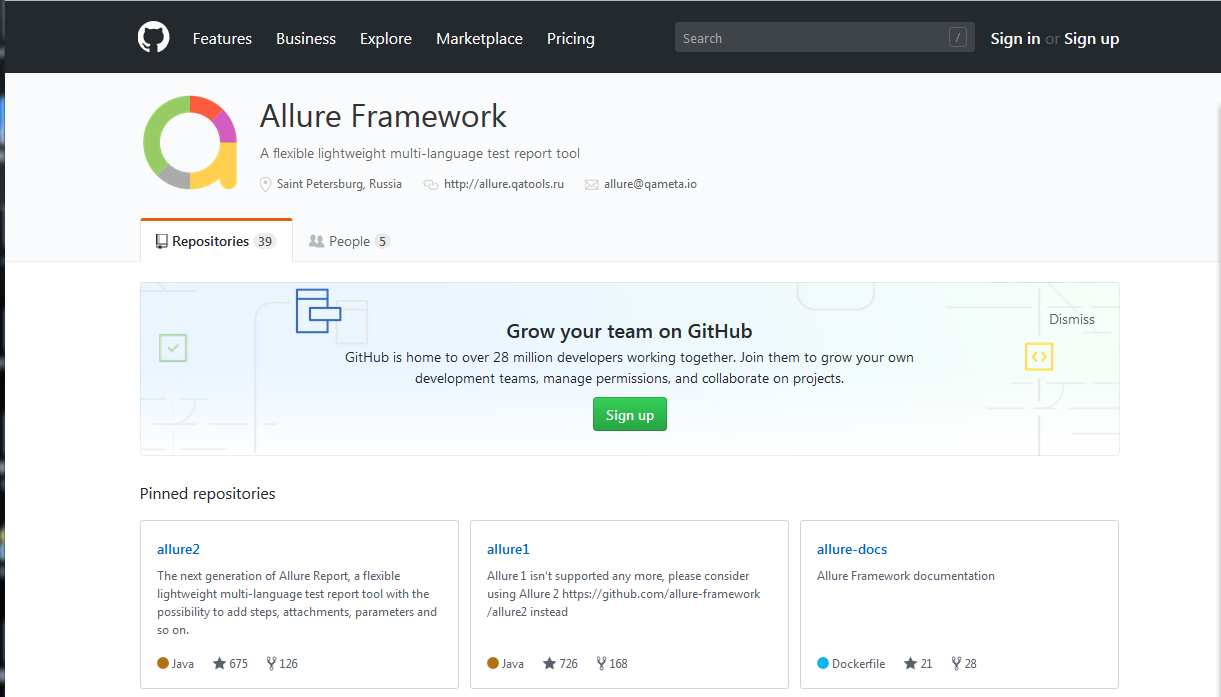
allure-commandline releases版本https://github.com/allure-framework/allure2/releases
下载最新的Download allure2.7.0版本

[下载Download allure2.7.0 地址:https://dl.bintray.com/qameta/generic/io/qameta/allure/allure/2.7.0/allure-2.7.0.zip]
(https://dl.bintray.com/qameta/generic/io/qameta/allure/allure/2.7.0/allure-2.7.0.zip)
下载好之后,解压到运行pytest的目录下
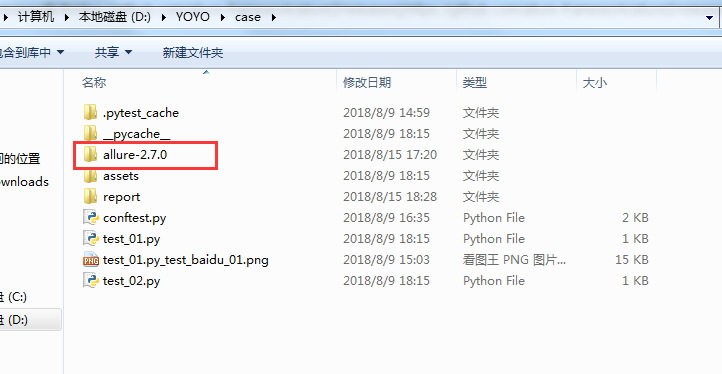
打开\allure-2.7.0\bin文件夹,会看到allure.bat文件,讲此路径设置为系统环境变量path下,这样cmd任意目录都能执行了
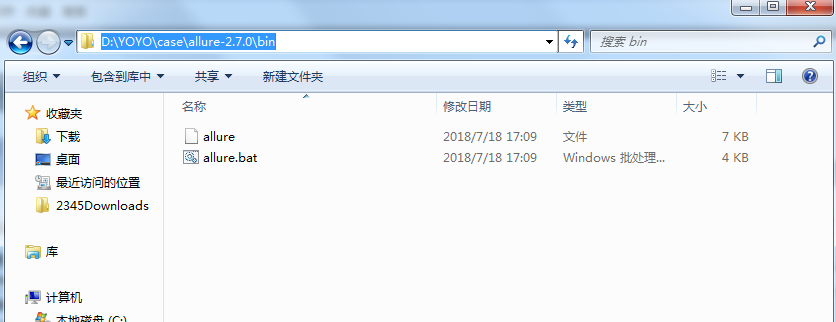
比如我的路径:D:\YOYO\case\allure-2.7.0\bin
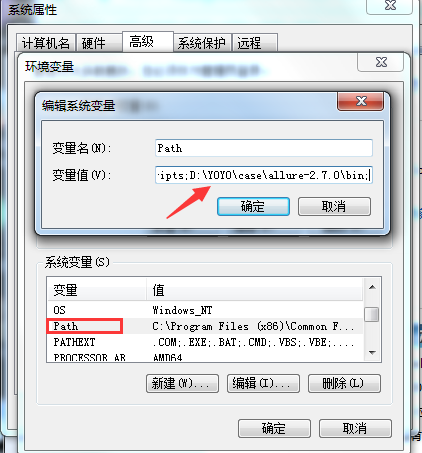
运行allure2
前面pytest -s -q --alluredir 这一步已经生产了xml格式的报告,放到了report目录下,接着执行以下命令格式
allure generate directory-with-results/ -o directory-with-report
directory-with-results是alluredir生成的xml目录,directory-with-report是最终生成html的目录
allure.bat已经加到环境变量了,所以可以用相对路径去生成html报告
allure generate report/ -o report/html
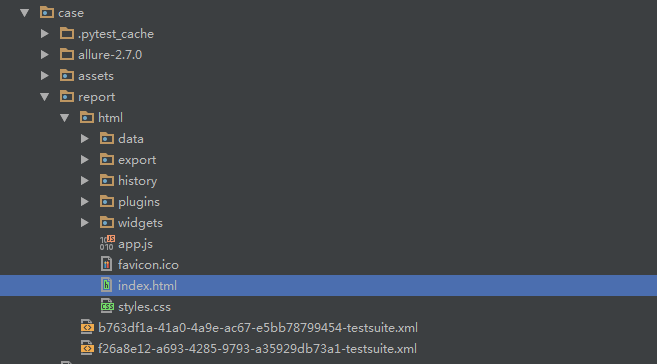
执行完之后目录结构如下:
打开报告
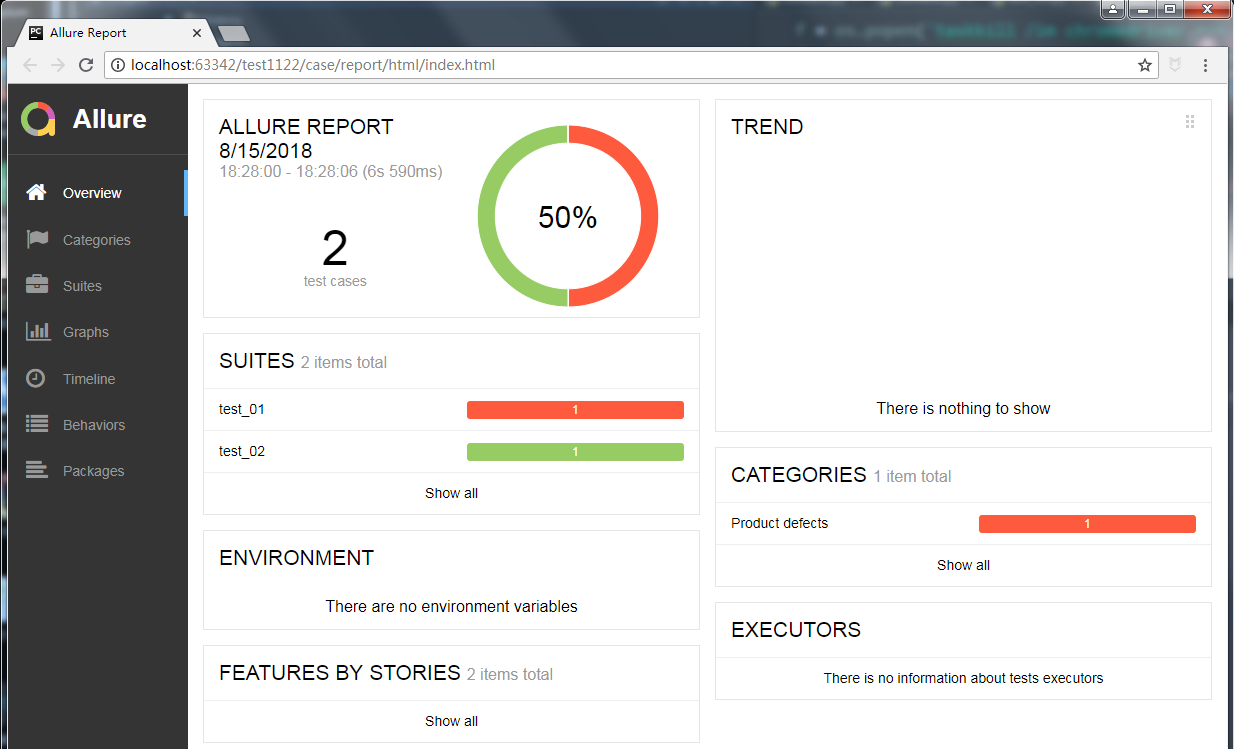
直接找到report/html打开index.html会显示一个空的报告,这里用pycharm去打开

打开后报告展示
依赖java环境
之前用的jdk1.7版本,执行allure时候报错:Unsupported major.minor VERSION 51.0
由于allure2是java开发的,需要依赖java环境,解决办法:jdk版本用1.8就可以了
---------------------------------pytest结合selenium自动化完整版-------------------------
全书购买地址 https://yuedu.baidu.com/ebook/902224ab27fff705cc1755270722192e4536582b
作者:上海-悠悠 QQ交流群:874033608
也可以关注下我的个人公众号:yoyoketang

pytest文档13-allure2生成html报告(史上最详细)的更多相关文章
- pytest十六:allure2 生成 html 报告
allure 是一个 report 框架,支持 java 的 Junit/testng 等框架,当然也可以支持 python 的 pytest 框架,也可以集成到 Jenkins 上展示高大上的报告界 ...
- pytest文档7-pytest-html生成html报告
前言 pytest-HTML是一个插件,pytest用于生成测试结果的HTML报告.兼容Python 2.7,3.6 pytest-html 1.github上源码地址[https://github. ...
- pytest文档3-pycharm运行pytest
前言 上一篇pytest文档2-用例运行规则已经介绍了如何在cmd执行pytest用例,平常我们写代码在pycharm比较多 写完用例之后,需要调试看看,是不是能正常运行,如果每次跑去cmd执行,太麻 ...
- pytest文档8-参数化(parametrize)结合allure.title()生成不同标题报告
参数化parametrize 先看一个简单的pytest参数化案例演示test_a.py # test_a.py import pytest import allure def login(usern ...
- pytest 11 allure2生成html报告
allure是一个report框架,支持java的Junit/testng等框架,当然也可以支持python的pytest框架,也可以集成到Jenkins上展示高大上的报告界面. 环境准备 1.pyt ...
- pytest文档20-pytest-html报告优化(添加Description)
前言 pytest-html测试报告默认是不展示用例描述Description内容,之前用unittest生成的报告是可以展示用例的描述,也就是test开头的用例下三个引号里面的注释(docstrin ...
- pytest文档21-pytest-html报告优化(nodeid中文显示[\u6350\u52a9\u6211\u4eec]问题解决)
前言 pytest-html报告中当用到参数化时候,获取用例的nodeid里面有中文时候,会显示[\u6350\u52a9\u6211\u4eec]这种编码(再次声明,这个不叫乱码,这是unicode ...
- pytest文档1-环境准备与入门
前言 首先说下为什么要学pytest,在此之前相信大家已经掌握了python里面的unittest单元测试框架,那再学一个框架肯定是需要学习时间成本的. 刚开始我的内心是拒绝的,我想我用unittes ...
- pytest文档29-allure-pytest(最新最全,保证能搞成功!)
前言 之前写了个pytest的allure相关的教程,只是停留在环境搭建完成,后续一直没用,小编一直不喜欢这种花里胡哨的报告. 没办法,领导就喜欢这种,小伙伴们也喜欢,所以还是得把allure用起来, ...
随机推荐
- python全栈开发 * 11知识点汇总 * 1806011
一.函数名的运⽤, 第⼀类对象 函数名是⼀个变量, 但它是⼀个特殊的变量, 与括号配合可以执⾏函数的变量 1. 函数名的内存地址def func(fn): print(fn)print(func) # ...
- redash学习记录
一.简介 一款开源的 BI 工具Redash 二.参考资料 一款开源的 BI 工具Redash 浅析数据查询与可视化工具--Redash
- GIS优秀博客以及网址收藏,持续更新
1.gislaozhang arcpy,模型构建器,arcpro 地址:https://blog.csdn.net/gislaozhang?t=1 2.雾语 arcpy,模型构建器,arcg ...
- Elegance and familiarity are orthogonal.
作者:xiaodan zhuang链接:https://www.zhihu.com/question/21446061/answer/18421931 1.Clojure能够吸引人的很重要一点是它是J ...
- webpack项目搭建
1.新建一个文件目录,命令行进入当前目录,输入npm init 创建package.json文件 2.安装项目依赖webpack模块: npm install webpack --save-dev 3 ...
- python发送html格式的邮件
python发邮件 #!/usr/bin/python # -*- coding: UTF-8 -*- import smtplib from email.mime.text import MIMET ...
- Mac下搭建solr搜索引擎与PHP扩展开发(上)
首先需要安装jdk,前往 https://www.oracle.com/technetwork/java/javase/downloads/jdk12-downloads-5295953.html 自 ...
- 一、iOS开发环境搭建
前置条件 1. 必要:一台装有Mac OS X操作系统的电脑:经济允许的话可以买一部Mac book:否则的话,可以试试黑苹果或虚拟机. 2.必要:一个有可用的Apple ID:免费,在Apple的官 ...
- 使用rander() 将后台的数据传递到前台界面显示出来
1.创建templates文件夹 2.在该文件夹内创建html界面a.html 3.views.py: def a(request): love='iloveyou' return render(re ...
- shell中输出日期的一个函数
开始 function T () { date '+%F %T.%N' } 结束