
React Context(一):隐式传递数据
一 Context概述
Context provides a way to pass data through the component tree without having to pass props down manually at every level.
Context 提供了一个无需为每层组件手动添加 props,就能在组件树间进行数据传递的方法。
二 项目结构
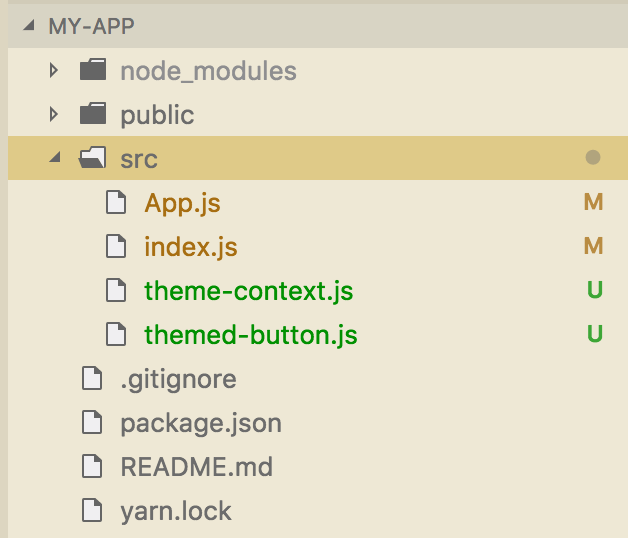
三 代码
1 theme-context.js
import React from 'react';

// 主题数据

export const themes = {

    gray: {

        background: 'gray',

    },

    gold: {

        background: 'gold',

    },

};

// 创建上下文对象,参数将作为上下文对象的默认值

export const ThemeContext = React.createContext(

    themes.gray // default value

);
2 themed-button.js
import React from 'react';

import { ThemeContext } from './theme-context';

class ThemedButton extends React.Component {

    // props默认是空对象{}。

    // context默认是空对象{}。绑定上下文对象后,创建组件时,会传入上下文对象的值(就近原则)。

    constructor(props,context){

        super(props)

        console.log(arguments)

    }

    render() {

        let props = this.props;

        let theme = this.context;

        return (

            <button

                {...props}

                style={{...theme}} />

        )

    }

}

// 组件类绑定上下文对象后,组件对象的context属性才能使用上下文对象的值(就近原则)。

ThemedButton.contextType = ThemeContext;

export default ThemedButton;
3 app.js
import React, { Fragment } from 'react';

import { ThemeContext, themes } from './theme-context';

import ThemedButton from './themed-button';

// An intermediate component that uses the ThemedButton

// 工具栏组件(中间件)

function Toolbar(props) {

  return (

    <ThemedButton onClick={props.changeTheme}>

      改变上下文对象

    </ThemedButton>

  );

}

class App extends React.Component {

  constructor(props) {

    super(props);

    this.state = {

      theme: themes.gray

    };

    this.toggleTheme = () => {

      this.setState(state => ({

        theme: state.theme === themes.gray ? themes.gold : themes.gray

      }));

    }

  }

  render() {

    return (

      <Fragment>

        {/* 在Provider中,使用Provider提供的值 */}

        <ThemeContext.Provider value={this.state.theme}>

          <Toolbar changeTheme={this.toggleTheme} />

        </ThemeContext.Provider>

        {/* 不在Provider中,使用默认值 */}

        <section>

          <ThemedButton />

        </section>

      </Fragment>

    );

  }

}

export default App;
4 index.js
import React from 'react';

import ReactDOM from 'react-dom';

import App from './App';

ReactDOM.render(<App />, document.getElementById('root'));
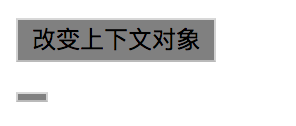
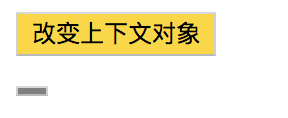
四 运行效果
1 初始化
2 点击按钮
React Context(一):隐式传递数据的更多相关文章
- React之使用Context跨组件树传递数据
--------------------------------- 讲解一 原文:https://blog.csdn.net/xuxiaoping1989/article/details/78480 ...
- react 基础语法复习3- 数据传递 & 数据变化(props&&state)
react当中的数据传递是通过 props以及 state来实现的 props <Header name="kugeliu" /> Header组件当中有个name属性 ...
- React中的Context——从父组件传递数据
简介:在React中,数据可以以流的形式自上而下的传递,每当你使用一个组件的时候,你可以看到组件的props属性会自上而下的传递.但是,在某些情况下,我们不想通过父组件的props属性一级一级的往下传 ...
- JavaScript 数据类型转换(显式与隐式)
一.数据类型 JS中有5中简单数据类型(也称为基本数据类型):Undefined.Null.Boolean.Number.String.还有一种复杂数据类型------Object,Object本质是 ...
- Spring接收数据,传递数据
Spring接收数据,传递数据 前提配置 POM <dependency> <groupId>org.springframework</groupId> < ...
- Scala 学习之路(十三)—— 隐式转换和隐式参数
一.隐式转换 1.1 使用隐式转换 隐式转换指的是以implicit关键字声明带有单个参数的转换函数,它将值从一种类型转换为另一种类型,以便使用之前类型所没有的功能.示例如下: // 普通人 clas ...
- Scala 系列(十三)—— 隐式转换和隐式参数
一.隐式转换 1.1 使用隐式转换 隐式转换指的是以implicit关键字声明带有单个参数的转换函数,它将值从一种类型转换为另一种类型,以便使用之前类型所没有的功能.示例如下: // 普通人 clas ...
- java this 隐式参数
第37级 this 是隐式参数, 类的方法调用时,会系统自动传递一个this的参数给方法.(这个参数是隐式传递的) 所以在方法里可以使用this这个参数. this在方法中表示对象. this(参数列 ...
- dubbo之隐式参数
隐式参数 可以通过 RpcContext 上的 setAttachment 和 getAttachment 在服务消费方和提供方之间进行参数的隐式传递. 在服务消费方端设置隐式参数 setAttach ...
随机推荐
- 国内优秀MVC开源框架jfinal简介
JFinal简介 JFinal 项目开发始于2011年初,作者詹波(James Zhan)曾任搜格信息技术有限公司Java架构师,北京信息管理科学研究所CTO,现任微格网际(北京)科技有限公司联合创始 ...
- python3 访问百度返回压缩格式
import urllib, urllib.request, urllib.parse import random import zlib import re import os, time Save ...
- Delphi XE5 Android 调用手机震动
uses Androidapi.JNI.Os, Androidapi.JNIBridge; function GetVibratorArray(const AIntArr: array of Int6 ...
- jenkins中如何实现执行脚本时的变量共享
1.主要是利用EnvInject Plugin插件,所以要首先安装插件,安装好后如下图: 2.然后在“增加构建步骤”中,插入一个“Execute Python script” 代码我用的python3 ...
- 阿里四不像Fourinone
阿里四不像——分布式核心技术框架 Fourinone https://blog.csdn.net/shero_zsmj/article/details/52277194
- 廖雪峰Java7处理日期和时间-2Data和Calendar-1Date
计算机中如何存储和表示日期和时间 Epoch Time:从1970年1月1日零点(格林威治时区/GMT+00:00)到现在经历的秒数,也叫timestamp, 例如: 秒级: * 北京 2016-11 ...
- base64图片内容下载转为图片保存
网页中的base64图片内容下载后,利用PIL转为图片保存 from skimage.io import imread from PIL import Image from cStringIO imp ...
- Python装饰器的调用过程
在Python学习的过程中,装饰器是比较难理解的一个应用.本人也在学习期间也遇到很多坑,现将装饰器的基本调用过程总结一下. 首先,装饰器用到了“闭包”,而“闭包”是学习装饰器的基础,所以在讲装饰器之前 ...
- Program type already present: android.support.v4.widget.EdgeEffectCompat
1.确保所有依赖包的 implementation 'com.android.support:appcompat-v7:25.4.0'是一样的 2.确保最外层的build.gradle中增加如下代码: ...
- winfrom
WINFORM(winform) windows窗体应用程序(.NET Framework4,版本太高了不好,选中Visual c#) 客户端应用程序的特点是:所见即所得,就是说,编辑的什么样,启动之 ...