
第十四章 Java常用类
| 14、常用类 | |
| 14.1 字符串相关的类 | 1课时 |
| 14.2 JDK 8之前时间日期API | 1课时 |
| 14.3 JDK8中新时间日期API | 1课时 |
| 14.4 JDK8中的Optional类 | 1课时 |
| 14.5 Math类 | 1课时 |
| 14.6 BigInteger 类与BigDecimal类 | 1课时 |
##14-1 字符串相关的类
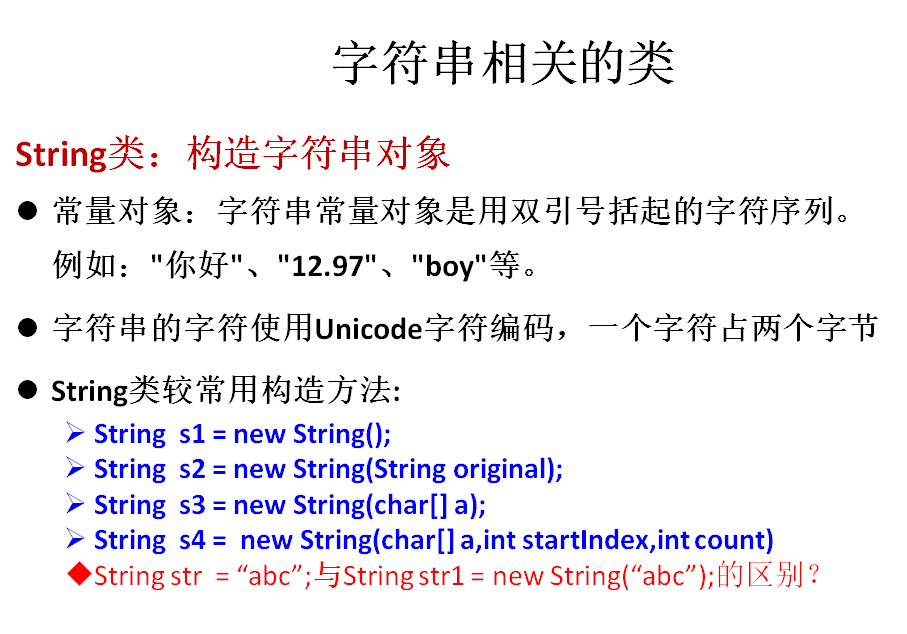
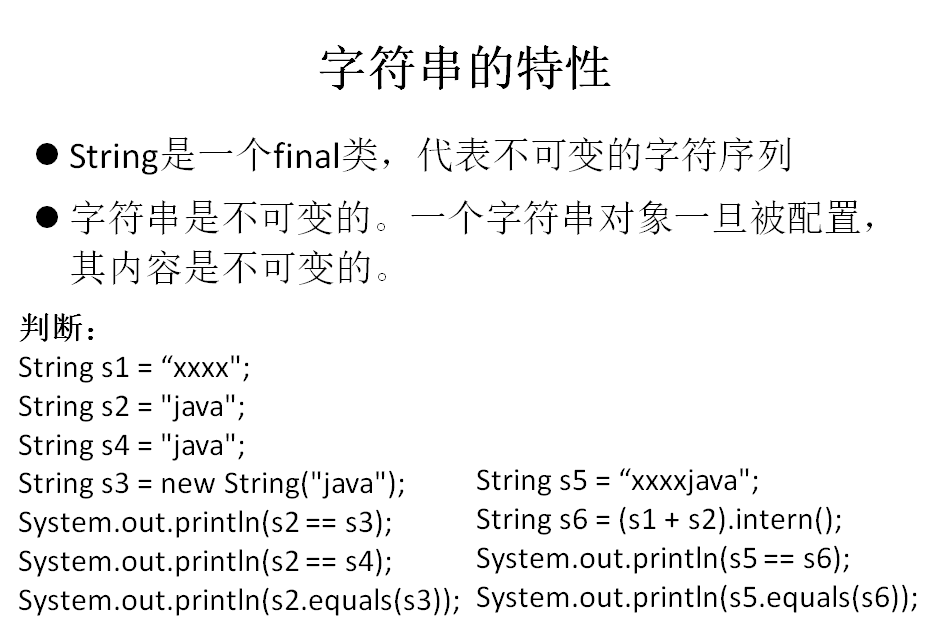


案例
public class Person {

	String name;

	int age;

	public Person(String name, int age) {

		super();

		this.name = name;

		this.age = age;

	}

}
import java.util.concurrent.SynchronousQueue;
import org.junit.Test;

public class StringTest {

	@Test

	public void test4(){

		String s1 = "javaEE";

		String s2 = "hadoop";

		String s3 = "javaEEhadoop";

		String s4 = "javaEE" + "hadoop";

		//s5 - s8 :凡是声明为变量做连接运算的,都需要重新开辟空间。

		String s5 = s1 + "hadoop";

		String s6 = "javaEE" + s2;

		String s7 = s1 + s2;

		System.out.println(s3 == s4);//true

		System.out.println(s3 == s5);//false

		System.out.println(s3 == s6);//false

		System.out.println(s3 == s7);//false

		System.out.println(s5 == s6);//false

		System.out.println(s5 == s7);//false

		System.out.println(s6 == s7);//false

		String s8 = s1 + "hadoop";

		System.out.println(s5 == s8);//false

		//intern():得到的字符串对象以后,通过调用intern(),判断现有的字符串常量池中是否已经存在了当前内容

		//的字符串。如果存在,则直接引用现成的字符串。

		String s9 = s6.intern();

		System.out.println(s3 == s9);//true

	}

	//一个小问题

	@Test

	public void test3(){

		String s1 = null;

		s1 = "";

		s1 += "hello";

		System.out.println(s1);//nullhello --->hello

	}

	/**

	 * String:代表着不可变的字符序列。

	 *

	 * 1.String类的声明

	 * public final class String implements java.io.Serializable, Comparable<String>, CharSequence

	 * ①String声明为final,不可被继承。

	 * ②实现Serializable:表明String可序列化。浏览器/客户端<--->服务器端     进程1<---->进程2

	 *    "{name=Tom,age=12}"    JSON:本质就是String

	 * ③String重写了hashCode()/equals():常常将Map的key声明为String型。

	 * ④实现Comparable接口:String可以比较大小。

	 * ⑤实现CharSequence接口:String的底层声明了char[] value数组。

	 *

	 * 2.如何理解String的不可变性:

	 * ①向现有的字符串后添加新的字符串,必须声明新的字符串空间

	 * ②将现有的字符串替换为新的字符串,必须声明新的字符串空间

	 * ③只替换现有字符串中的指定某个字符,也必须声明新的字符串空间

	 */

	@Test

	public void test2(){

		String s1 = "javaEE";

		String s2 = "javaEE";

		System.out.println(s1 == s2);

		s1 += "hadoop";

		System.out.println(s1);

		System.out.println(s2);

		System.out.println("**********************");

		String s3 = "beijing";

		String s4 = "beijing";

		s3 = "shanghai";

		System.out.println(s3);//shanghai

		System.out.println(s4);//beijing

		System.out.println("**********************");

		String s5 = "hello";

		String s6 = s5.replace('l', 't');

		System.out.println(s6);//hetto

		System.out.println(s5);//hello

	}

	/**

	 * String:字符串

	 *

	 *

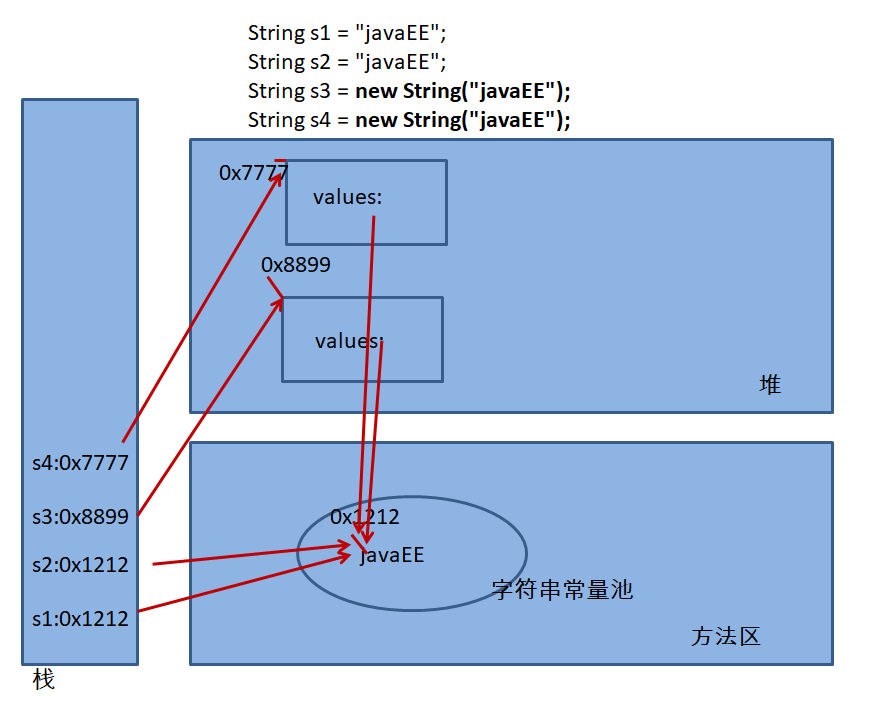
	 * 1.字符串声明的数据,会存储在字符串常量池中。第一次声明时,需要创建相应的字符串。之后,如果声明的变量,其

	 *  值与之前存在的字符串内容相同,则直接引用现成的字符串。

	 *

	 * 2.面试题:String s3 = new String("javaEE");创建的对象,在内存中生成了几个对象?

	 */

	@Test

	public void test1(){

		String s1 = "javaEE";

		String s2 = "javaEE";

		String s3 = new String("javaEE");

		String s4 = new String("javaEE");

		System.out.println(s1 == s2);//true

		System.out.println(s1 == s3);//false

		System.out.println(s1 == s4);//false

		System.out.println(s3 == s4);//false

		//判断:

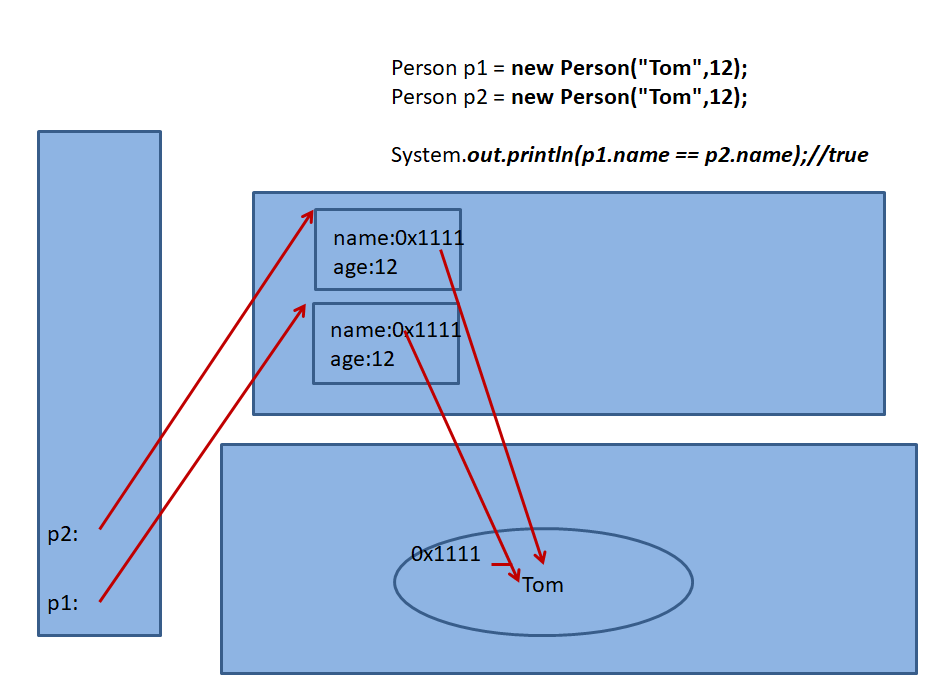
		Person p1 = new Person("Tom",12);

		Person p2 = new Person("Tom",12);

		System.out.println(p1.name == p2.name);//true

		System.out.println(p1.name == "Tom");//true

	}

}
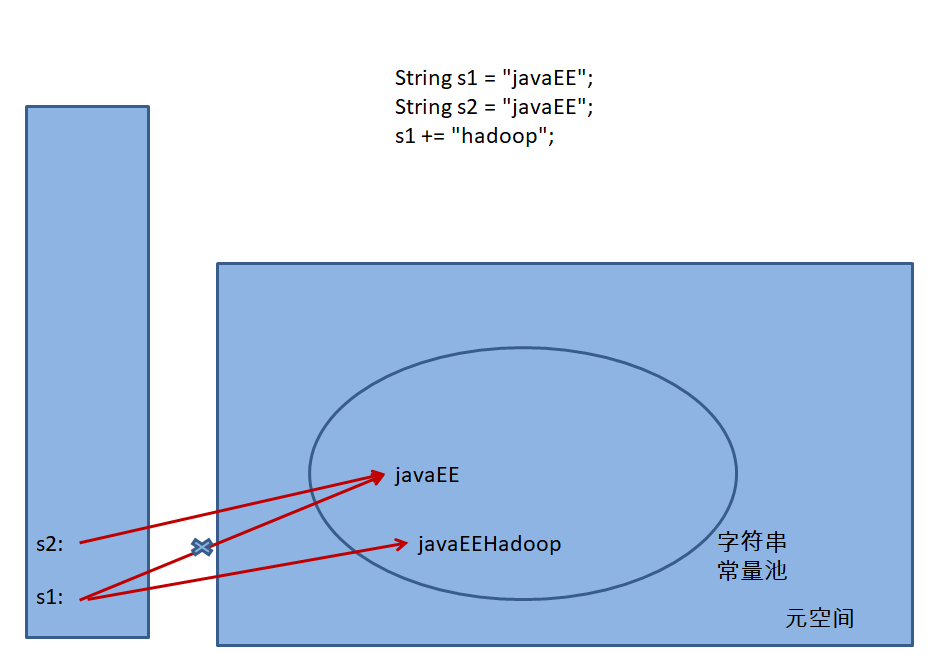
public class StringTest {

	/*

	 * String中常用的方法有哪些?

	 * length();charAt(int index);equals();compareTo(String str);

	 * startsWith();endsWith();con0tains();indexOf();lastIndexOf();

	 *

	 *

	 * String类与其它结构的转换:

	 * 1.String 与包装类、基本数据类型变量间的转换

	 * String-->包装类、基本数据类型:调用包装类Xxx的parseXxx(String s)方法

	 *     String s = "123";

	 * 包装类、基本数据类型 -->String:调用String的valueOf(xxx xxx);

	 *

	 * 2.String 与 字节数组间的转换

	 * String --> 字节数组:调用String类的getBytes()

	 * 字节数组-->String:new String(byte[] buffer,startIndex,length)

	 *

	 * 3.String 与 字符数组间的转换

	 * String --> 字符数组:调用String类的toCharArray()

	 * 字符数组 -->String:new String(char[] cbuf,startIndex,length)

	 *

	 *

	 */

	/*

        public String substring(int startpoint):返回当前字符串中从startPoint位置开始,到末尾的子字符串。

        public String substring(int start,int end):返回当前字符串中从startPoint位置开始,到end结束的左闭右开区间的子字符串。

        pubic String replace(char oldChar,char newChar):将字符串中指定的所有oldChar替换为newChar.

        public String replaceAll(String old,String new):将字符串中指定的所有old替换为new.

        public String trim():去除字符串首尾的空格

        public String concat(String str):连接两个字符串

        public boolean contains(CharSequence s):判断当前字符串中是否包含s.

        public String[] split(String regex)

        根据给定正则表达式的匹配拆分此字符串。

	 */

	@Test

	public void test3(){

		String[] fakeFileData = {"justin\t64/5/26\t0939002302\t5433343","momor\t68/7/23\t0939100391\t5432343" };

			  for(String data : fakeFileData) {

				  String[] tokens = data.split("\t");

				   //\t为字符串的分割符号。

				  for(String token : tokens) {

					  System.out.print(token + "\t| ");}

				  System.out.println();

			  }

	}

	@Test

	public void test2(){

		String str = "嘻嘻哈哈啦啦咕咕";

		String substring = str.substring(2);

		System.out.println(str);

		System.out.println(substring);

		System.out.println(str.substring(2, 5));

		System.out.println(str.replaceAll("IT", "ET"));

		String str1 = "    hell o   ";

		String str2 = str1.trim();

		System.out.println("------" + str1 + "------");

		System.out.println("------" + str2 + "------");

		System.out.println(str.contains("嘻嘻"));

	}

	/*

public int length():返回当前字符串的长度

public char charAt(int index):获取指定索引位置的字符

public boolean equals(Object anObject):比较两个字符串内容是否相等。

public int compareTo(String anotherString):比较两个字符串的大小

public int indexOf(String s):返回s在当前字符串中首次出现的位置。如果不存在,返回-1.

public int indexOf(String s ,int startpoint):

public int lastIndexOf(String s):返回s在当前字符串中末次出现的位置。如果不存在,返回-1.

public int lastIndexOf(String s ,int startpoint):

public boolean startsWith(String prefix):判断当前的字符串是否以指定的prefix字符串开始的

public boolean endsWith(String suffix):判断当前的字符串是否以指定的suffix字符串结束的

public boolean regionMatches(int firstStart,String other,int otherStart ,int length)

	 *

	 *

	 */

	@Test

	public void test1(){

		String str = "beijing";

		System.out.println(str.length());

		System.out.println(str.charAt(0));

//		System.out.println(str.charAt(7));//越界

		String str1 = new String("beijing");

		System.out.println(str.equals(str1));

		String str2 = "bbeijing";

		System.out.println(str1.compareTo(str2));

		System.out.println(str1.indexOf("i"));

		System.out.println(str1.indexOf("i",3));

		System.out.println(str1.startsWith("beij"));

		String str3 = "bbjingcd";

		System.out.println(str1.regionMatches(3, str3, 2, 4));

	}

}


import java.util.ArrayList;

import java.util.Arrays;

import java.util.List;

import org.junit.Test;

public class StringDemo {

	/*

	 *

	5.对字符串中字符进行自然顺序排序。

	提示:

	1)字符串变成字符数组。

	2)对数组排序,选择,冒泡,Arrays.sort();

	3)将排序后的数组变成字符串

	 *

	 *

	 */

	@Test

	public void test5(){

		String s = "dsaffvfwqefscer";

		char[] charArray = s.toCharArray();

		Arrays.sort(charArray);

		String sortedStr = new String(charArray);

		System.out.println(sortedStr);

	}

	/*

	 * 4.获取两个字符串中最大相同子串。比如:

		str1 = "abcwerthelloyuiodef";str2 = "cvhellobnm"

		提示:将短的那个串进行长度依次递减的子串与较长的串比较。

	 *

	 *

	 */

	@Test

	public void test4(){

		String str1 = "abcwerthelloyuiodef";

		String str2 = "cvhellobnmiodef";

		List<String> list = getMaxSameString1(str1,str2);

		System.out.println(list);

	}

	public List<String> getMaxSameString1(String str1,String str2){

		String maxStr = (str1.length() > str2.length())? str1 : str2;

		String minStr = (str1.length() > str2.length())? str2 : str1;

		List<String> list = new ArrayList<>();

		int len = minStr.length();

		for(int i = 0;i < len;i++){//0 1 2 3 4  此层循环决定要去几个字符

			for(int x = 0,y = len - i;y <= len;x++,y++){

				if(maxStr.contains(minStr.substring(x, y))){

					list.add(minStr.substring(x, y));

				}

			}

//			if(list.size() != 0){

//				return list;

//			}

		}

		return null;

	}

	public String getMaxSameString(String str1,String str2){

		String maxStr = (str1.length() > str2.length())? str1 : str2;

		String minStr = (str1.length() > str2.length())? str2 : str1;

		int len = minStr.length();

		for(int i = 0;i < len;i++){//0 1 2 3 4  此层循环决定要去几个字符

			for(int x = 0,y = len - i;y <= len;x++,y++){

				if(maxStr.contains(minStr.substring(x, y))){

					return minStr.substring(x, y);

				}

			}

		}

		return null;

	}

	/*

	 *3. 获取一个字符串在另一个字符串中出现的次数。

					   比如:获取“ab”在 “abkkcadkabkebfkabkskab”

		   中出现的次数

	 *

	 */

	@Test

	public void test3(){

		String son = "ab";

		son = "kab";

		String mother = "abkkcadkabkebfkabkskab";

		int count = getCount(mother,son);

		System.out.println(count);

	}

	//判断son字符串在mother字符串中出现的次数

	public int getCount(String mother,String son){

		int count = 0;

		if(mother.length() >= son.length()){

			//方式一:

//			int index = 0;

//			while((index = mother.indexOf(son)) != -1){

//				count++;

//				mother = mother.substring(index + son.length());

//			}

			//方式二:比方式一效率高

			int index = 0;

			while((index = mother.indexOf(son, index)) != -1){

				count++;

				index += son.length();

			}

			return count;

		}

		return 0;

	}

	@Test

	public void test2(){

		String s = "abcdefg";

		String s1 = reverse2(s,2,5);

		System.out.println(s1);//abfedcg

	}

	//2.将一个字符串进行反转。将字符串中指定部分进行反转。比如将“abcdefg”反转为”abfedcg”

	//方式三:

	public String reverse2(String str,int start,int end){

		StringBuffer s = new StringBuffer(str.length());

		s.append(str.substring(0, start));

		for(int i = end;i >= start;i--){

			s.append(str.charAt(i));

		}

		s.append(str.substring(end + 1));

		return s.toString();

	}

	//方式二:效率最低

	public String reverse1(String str,int start,int end){

		//取第一部分

		String s = str.substring(0, start);

		//取第二部分

		for(int i = end;i >= start;i--){

			s += str.charAt(i);

		}

		//取第三部分

		s += str.substring(end + 1);

		return s;

	}

	//方式一:使用数组

	public String reverse(String str,int start,int end){

		char[] charArray = str.toCharArray();

		for(int i = start,j = end;i < j;i++,j--){

			char temp = charArray[i];

			charArray[i] = charArray[j];

			charArray[j] = temp;

		}

		return new String(charArray);

	}

	@Test

	public void test1(){

		String s = "    hell   oo   ";

		s = "     ";

		s = "a     ";

		s = "       b";

		String trimS = trim(s);

		System.out.println("-------" + trimS + "-----");

	}

	//1.模拟一个trim方法,去除字符串两端的空格。

	public String trim(String s){

		if(s != null){

			int start = 0;//首索引

			int end = s.length() - 1;//最后一个索引

			while(start <= end && s.charAt(start) == ' '){

				start++;

			}

			//得到首次出现非空格的索引:start

			while(start <= end && s.charAt(end) == ' '){

				end--;

			}

			//从后往前数,首次出现非空格的索引:end

			return s.substring(start, end + 1);

		}

		return null;

	}

}


案例
import org.junit.Test;

/**

 *

 * StringBuffer 和  StringBuilder的使用

 */

public class StringBufferBuilderTest {

	/*

	 * 测试String 、StringBuffer 、 StringBuilder三者的效率

	 *

	 * 从效率高到低: StringBuilder > StringBuffer > String

	 */

	@Test

	public void test3(){

		long startTime = 0L;

		long endTime = 0L;

		String text = new String();

		StringBuffer buffer = new StringBuffer("");

		StringBuilder builder = new StringBuilder("");

		startTime = System.currentTimeMillis();

		for(int i = 0;i<80000;i++){

			buffer.append(String.valueOf(i));

		}

		endTime = System.currentTimeMillis();

		System.out.println("StringBuffer的执行时间:"+(endTime-startTime));

		startTime = System.currentTimeMillis();

		for(int i = 0;i<80000;i++){

			builder.append(String.valueOf(i));

		}

		endTime = System.currentTimeMillis();

		System.out.println("StringBuilder的执行时间:"+(endTime-startTime));

		startTime = System.currentTimeMillis();

		for(int i = 0;i<80000;i++){

			text = text + i;

		}

		endTime = System.currentTimeMillis();

		System.out.println("String的执行时间:"+(endTime-startTime));

	}

	/**

	 *  StringBuffer中的方法:

            StringBuffer append(String s),   StringBuffer append(int n) ,

            StringBuffer append(Object o) ,  StringBuffer append(char n),

            StringBuffer append(long n),  StringBuffer append(boolean n),

            StringBuffer insert(int index, String str)

            public StringBuffer reverse()

            StringBuffer delete(int startIndex, int endIndex):删除当前可变字符串中从startIndex到endIndex结束的左闭右开区间的数据。

            public char charAt(int n )

            public void setCharAt(int n ,char ch)

            StringBuffer replace( int startIndex ,int endIndex, String str)

            public int indexOf(String str)

            public String substring(int start,int end)

            public int length()

	 *

	 * 总结:

	 * 增:append(Xxx xxx)

	 * 删:delete(int startIndex, int endIndex)

	 * 改:setCharAt(int n ,char ch) / replace( int startIndex ,int endIndex, String str)

	 * 查:charAt(int n)

	 * 插:insert(int index, String str)

	 * 长度:length()

	 * 遍历:使用for + charAt()

	 *

	 *

	 */

	@Test

	public void test2(){

		StringBuffer s1 = new StringBuffer("helloworld");

//		StringBuffer s2 = s1.delete(2, 5);

//		System.out.println(s1);

//		System.out.println(s2);

		StringBuffer s3 = s1.replace(2, 5, "ccc");

		System.out.println(s1);

		System.out.println(s3);

	}

	/**

	 *

	 *

	 * 面试题:

	 * String:不可变的字符序列;底层使用char[]存储

	 * StringBuffer:可变的字符序列;线程安全的,效率低;底层使用char[]存储

	 * StringBuilder:可变的字符序列;线程不安全的,效率高,(jdk 5.0新增);底层使用char[]存储

	 *

	 * 类比:String --->数组; StringBuffer --->Vector   StringBuilder --->ArrayList

	 *    ArrayList list = new ArrayList();

	 *    list.add(123);//new Object[10];

	 *    ....

	 *    扩容:1.5倍的方式扩容。

	 *

	 *

	 *   这里:

	 *   String str = new String();//new char[0];

	 *   str.length();

	 *

	 *   String str1 = new String("abc");//new char[]{'a','b','c'};

	 *

	 *   对比:

	 *   StringBuffer s1 = new StringBuffer();//char[] value = new char[16]

	 *

	 *   StringBuffer s2 = new StringBuffer(10);//char[] value = new char[10]

	 *

	 *   s1.append("abc");//value[0] = 'a',value[1] = 'b',value[2] = 'c';

	 *   ...

	 *   每次添加时,都需要判断底层的char[]是否能够盛装下新要添加的字符串。

	 *   如果不能盛装下,需要扩容。默认扩容为原来的2倍 + 2.

	 *

	 *   启示:

	 *   StringBuffer s1 = new StringBuffer(int capacity);开发中建议使用此构造器。

	 *

	 *

	 *

	 */

	@Test

	public void test1(){

		String str = new String();

		System.out.println(str.length());

	}

}
14-2 JDK8之前时间日期API




import java.text.ParseException;

import java.text.SimpleDateFormat;

import java.util.Calendar;

import java.util.Date;

import org.junit.Test;

/**

 * jdk 8 之前 日期+时间 API的使用

 *

 */

public class TimeTest {

	/**

	 * java.util.Calendar(日历)类的使用

	 *

	 * @throws ParseException

	 */

	@Test

	public void test4(){

		//1.实例化

		Calendar calendar = Calendar.getInstance();

		//get()

		int day = calendar.get(Calendar.DAY_OF_MONTH);

		System.out.println(day);

		//set()

		calendar.set(Calendar.DAY_OF_MONTH, 20);

		day = calendar.get(Calendar.DAY_OF_MONTH);

		System.out.println(day);

		//add()

		calendar.add(Calendar.DAY_OF_MONTH, -2);

		day = calendar.get(Calendar.DAY_OF_MONTH);

		System.out.println(day);

		//日历 --->日期

		Date date = calendar.getTime();

		System.out.println(date);

		//使用指定的Date对象,来设置calendar

		Date date1 = new Date();

		calendar.setTime(date1);

		day = calendar.get(Calendar.DAY_OF_MONTH);

		System.out.println(day);

	}

	/*

	 * 练习一:

	 * 如何将字符串的"2014-1-16"数据转换为java.sql.Date对象?

	 *

	 *

	 * 练习二:“三天打渔,两天晒网”  从 1990-1-1开始实施。

	 *       判断1990-1-1之后xxxx-xx-xx日是打渔?晒网?

	 *       比如:2017-08-15

	 * 方式一:1990-1-1  ---> 2016-12-31  +     2017-1-1 ----->2017-8-15   计算出总天数

	 *      计算的总天数为sumDays.

	 *      sumDays % 5 == 1,2,3 :打渔

	 *      sumDays % 5 == 4,0 :晒网

	 *

	 * 方式二:1990-1-1   ---->java.util.Date: date1

	 *       2017-08-15  ------>java.util.Date :date2

	 *

	 *      sumDays = (date2.getTime() - date1.getTime()) / (1000 * 60 * 60 * 24) + 1

	 *

	 *

	 */

	@Test

	public void testExer() throws ParseException{

		SimpleDateFormat sdf = new SimpleDateFormat("yyyy-MM-dd");

		String info = "2014-1-16";

		Date date = sdf.parse(info);

//		System.out.println(date);

		java.sql.Date date1 = new java.sql.Date(date.getTime());

		System.out.println(date1);

	}

	/**

	 * java.text.SimpleDateFormat类

	 *

	 * 1.SimpleDateFormat的作用:

	 *   格式化:日期--->文本

	 *   解析:格式化的逆过程,文本 --->日期

	 *

	 * 2.SimpleDateFormat实例化

	 * @throws ParseException

	 *

	 */

	@Test

	public void test3() throws ParseException{

		//1.使用默认构造器

		SimpleDateFormat sdf = new SimpleDateFormat();

		//格式化:String format(Date date):

		Date date = new Date();

		String dateStr = sdf.format(date);

		System.out.println(dateStr);//17-8-15 下午2:20

		//解析: Date parse(String dateStr)

		Date date1 = sdf.parse("17-8-15 下午2:18");

		System.out.println(date1);

		//2.使用带参数的构造器

//		SimpleDateFormat sdf1 = new SimpleDateFormat("EEE, d MMM yyyy HH:mm:ss Z");

		SimpleDateFormat sdf1 = new SimpleDateFormat("yyyy-MM-dd hh:mm:ss");

		//格式化

		String dateStr1 = sdf1.format(date);

		System.out.println(dateStr1);//2017-08-15 02:24:40

		//解析

		Date date2 = sdf1.parse("2017-08-15 02:24:40");

		System.out.println(date2);

	}

	/**

	 * java.util.Date类

	 * 		|----java.sql.Date类

	 *

	 * 1.java.util.Date类:

	 *    如何实例化:两个构造器

	 *    常用方法:toString() / getTime();

	 *

	 * 2.java.sql.Date类:与数据表中的Date类型的变量对应。

	 */

	@Test

	public void test2(){

		//构造器一:获取系统当前时间对应的Date对象

		Date date = new Date();

		System.out.println(date.toString());

		//getTime():返回当前日期对应的毫秒数:当前时间与1970-1-1 00:00:00直接的毫秒数

		System.out.println(date.getTime());

		//构造器二:获取毫秒数所对应的Date对象

		Date date1 = new Date(1502768492941L);

		System.out.println(date1);

		System.out.println("************如下的是java.sql.Date*********************");

		//实例化:

		java.sql.Date date2 = new java.sql.Date(1502768492941L);

		System.out.println(date2.toString());//2017-08-15

		System.out.println(date2.getTime());

		//小练习:如何将java.util.Date转换为java.sql.Date

		//情形一:

		Date date3 = new java.sql.Date(153145234532L);

//		date3 = new Date();//会报异常

		java.sql.Date date4 = (java.sql.Date) date3;

		System.out.println(date4);

		//情形二:

		System.out.println();

		Date date5 = new Date();

		java.sql.Date date6 = new java.sql.Date(date5.getTime());

		System.out.println(date6);

	}

	@Test

	public void test1(){

		//用来返回当前时间与1970年1月1日0时0分0秒之间以毫秒为单位的时间差。

		long currentTimeMillis = System.currentTimeMillis();

		System.out.println(currentTimeMillis);

	}

}
14-3 JDK8中新时间日期API

闰秒,是指为保持协调世界时接近于世界时时刻,由国际计量局统一规定在年底或年中(也可能在季末)对协调世界时增加或减少1秒的调整。由于地球自转的不均匀性和长期变慢性(主要由潮汐摩擦引起的),会使世界时(民用时)和原子时之间相差超过到±0.9秒时,就把协调世界时向前拨1秒(负闰秒,最后一分钟为59秒)或向后拨1秒(正闰秒,最后一分钟为61秒); 闰秒一般加在公历年末或公历六月末。
目前,全球已经进行了27次闰秒,均为正闰秒。


import java.time.DayOfWeek;

import java.time.Duration;

import java.time.Instant;

import java.time.LocalDate;

import java.time.LocalDateTime;

import java.time.LocalTime;

import java.time.OffsetDateTime;

import java.time.Period;

import java.time.ZoneId;

import java.time.ZoneOffset;

import java.time.ZonedDateTime;

import java.time.format.DateTimeFormatter;

import java.time.format.FormatStyle;

import java.time.temporal.Temporal;

import java.time.temporal.TemporalAccessor;

import java.time.temporal.TemporalAdjuster;

import java.time.temporal.TemporalAdjusters;

import java.util.Date;

import java.util.Set;

import org.junit.Test;

public class JDK8TimeTest {

	//7.DateTimeFormatter:日期时间的格式化工具     -----重要

	//类似于:SimpleDateFormat

	@Test

	public void test9(){

//		预定义的标准格式。如:ISO_LOCAL_DATE_TIME;ISO_LOCAL_DATE

		DateTimeFormatter dateTimeFormatter = DateTimeFormatter.ISO_LOCAL_DATE_TIME;

		LocalDateTime localDateTime = LocalDateTime.now();

		String formatDateTime = dateTimeFormatter.format(localDateTime);

		System.out.println(formatDateTime);

//		本地化相关的格式。如:ofLocalizedDate(FormatStyle.MEDIUM)

		//FormatStyle.MEDIUM / FormatStyle.LONG :适用于LocalDateTime

		//FormatStyle.FULL / FormatStyle.SHORT : 适用于LocalDate / LocalTime

		LocalDate localDate = LocalDate.now();

		DateTimeFormatter dateTimeFormatter1 = DateTimeFormatter.ofLocalizedDateTime(FormatStyle.MEDIUM);

		//格式化:DateTime ---->文本

		String formatDateTime1 = dateTimeFormatter1.format(localDateTime);

		System.out.println(formatDateTime1);//2017-8-15 17:04:50

		//解析:文本 --->DateTime

		TemporalAccessor temporalAccessor = dateTimeFormatter1.parse("2017-8-15 17:04:50");

		System.out.println(temporalAccessor);

//		自定义的格式。如:ofPattern(“yyyy-MM-dd hh:mm:ss E”)

		DateTimeFormatter dateTimeFormatter2 = DateTimeFormatter.ofPattern("yyyy-MM-dd hh:mm:ss");

		//格式化:DateTime ---->文本

		String dateTimeStr = dateTimeFormatter2.format(localDateTime);

		System.out.println(dateTimeStr);//2017-08-15 05:07:33

		//解析:文本 --->DateTime

		TemporalAccessor temporalAccessor1 = dateTimeFormatter2.parse("2017-08-15 05:07:33");

		System.out.println(temporalAccessor1);

	}

	//6.TemporalAdjuster:时间校正器

	@Test

	public void test8(){

		//获取当前日期的下一个周日是哪天?

		TemporalAdjuster temporalAdjuster = TemporalAdjusters.next(DayOfWeek.SUNDAY);

		LocalDateTime localDateTime = LocalDateTime.now().with(temporalAdjuster);

		System.out.println(localDateTime);

		//获取下一个工作日是哪天?

		LocalDate localDate = LocalDate.now().with(new TemporalAdjuster(){

			@Override

			public Temporal adjustInto(Temporal temporal) {

				LocalDate date = (LocalDate)temporal;

				if(date.getDayOfWeek().equals(DayOfWeek.FRIDAY)){

					return date.plusDays(3);

				}else if(date.getDayOfWeek().equals(DayOfWeek.SATURDAY)){

					return date.plusDays(2);

				}else{

					return date.plusDays(1);

				}

			}

		});

		System.out.println("下一个工作日是:" + localDate);

	}

	//5.Period:用于计算两个“日期”间隔,以年、月、日衡量

	@Test

	public void test7(){

		LocalDate localDate = LocalDate.now();

		LocalDate localDate1 = LocalDate.of(2028, 3, 18);

		Period period = Period.between(localDate, localDate1);

		System.out.println(period);

		System.out.println(period.getYears());

		System.out.println(period.getMonths());

		System.out.println(period.getDays());

		Period period1 = period.withYears(2);

		System.out.println(period1);

	}

	//4.Duration:用于计算两个“时间”间隔,以秒和纳秒为基准

	@Test

	public void test6(){

		LocalTime localTime = LocalTime.now();

		LocalTime localTime1 = LocalTime.of(15, 23, 32);

		//between():静态方法,返回Duration对象,表示两个时间的间隔

		Duration duration = Duration.between(localTime1, localTime);

		System.out.println(duration);

		System.out.println(duration.getSeconds());

		System.out.println(duration.getNano());

		LocalDateTime localDateTime = LocalDateTime.of(2016, 6, 12, 15, 23, 32);

		LocalDateTime localDateTime1 = LocalDateTime.of(2017, 6, 12, 15, 23, 32);

		Duration duration1 = Duration.between(localDateTime1, localDateTime);

		System.out.println(duration1.toDays());

	}

	//3. ZonedDateTime:带时区的日期时间

	@Test

	public void test5(){

		//now():获取本时区的ZonedDateTime对象

		ZonedDateTime zonedDateTime = ZonedDateTime.now();

		System.out.println(zonedDateTime);

		//now(ZoneId id):获取指定时区的ZonedDateTime对象

		ZonedDateTime zonedDateTime1 = ZonedDateTime.now(ZoneId.of("Asia/Tokyo"));

		System.out.println(zonedDateTime1);

	}

	//3. ZoneId:类中包含了所有的时区信息

	@Test

	public void test4(){

		//getAvailableZoneIds():获取所有的ZoneId

		Set<String> zoneIds = ZoneId.getAvailableZoneIds();

		for(String s : zoneIds){

			System.out.println(s);

		}

		System.out.println();

		//获取“Asia/Tokyo”时区对应的时间

		LocalDateTime localDateTime = LocalDateTime.now(ZoneId.of("Asia/Tokyo"));

		System.out.println(localDateTime);

	}

	//2. Instant:时间点     -----重要

	//类似:Date

	@Test

	public void test3(){

		//now():得到Instant的实例

		Instant instant = Instant.now();//表示自1970年1月1日0时0分0秒(UTC)开始的秒数

		System.out.println(instant);

		//atOffset():得到带偏移量的日期时间

		OffsetDateTime offsetDateTime = instant.atOffset(ZoneOffset.ofHours(8));

		System.out.println(offsetDateTime);

		//得到时间戳

		long milli = instant.toEpochMilli();

		System.out.println(milli);//1502785241830

		//根据毫秒数,得到时间点的对象

		Instant instant2 = Instant.ofEpochMilli(milli);

		System.out.println(instant2);

	}

	//1. LocalDate / LocalTime / LocalDateTime     -----重要

	//理解为对Calendar

	@Test

	public void test2(){

		//实例化

		//now()

		LocalDate localDate = LocalDate.now();

		LocalTime localTime = LocalTime.now();

		LocalDateTime localDateTime = LocalDateTime.now();

		System.out.println(localDate);

		System.out.println(localTime);

		System.out.println(localDateTime);

		//of()

		LocalDate localDate2 = LocalDate.of(2017, 8, 15);

		System.out.println(localDate2);

		LocalDateTime localDateTime2 = LocalDateTime.of(2017, 8, 15, 11, 11, 23);

		System.out.println(localDateTime2);

		System.out.println();

		//getXxx():

		System.out.println(localDateTime.getDayOfYear());

		System.out.println(localDateTime.getDayOfMonth());

		System.out.println(localDateTime.getDayOfWeek());

		System.out.println(localDateTime.getMonth());

		System.out.println(localDateTime.getMonthValue());

		System.out.println(localDateTime.getHour());

		System.out.println(localDateTime.getMinute());

		//withXxx():体现了不可变性

		LocalDateTime localDateTime3 = localDateTime.withDayOfMonth(20);

		System.out.println(localDateTime);

		System.out.println(localDateTime3);

		LocalDateTime localDateTime4 = localDateTime.withHour(12);

		System.out.println(localDateTime4);

		//plus()

		//minus()

		LocalDateTime localDateTime5 = localDateTime.plusDays(3);

		System.out.println(localDateTime5);

		LocalDateTime localDateTime6 = localDateTime.minusMinutes(20);

		System.out.println(localDateTime6);

		boolean isBefore = localDateTime.isBefore(localDateTime6);

		System.out.println(isBefore);//false

		boolean isAfter = localDateTime.isAfter(localDateTime6);

		System.out.println(isAfter);//true

		//isLeapYear():

		System.out.println(localDate.isLeapYear());

		LocalDate localDate3 = localDate.minusYears(1);

		System.out.println(localDate3.isLeapYear());

	}

	@Test

	public void test1(){

		Date date = new Date(2017-1900, 8 - 1, 15);

		System.out.println(date);

	}

}
14-4 JDK8中的Optional类


public class Girl {

	private String name;

	public String getName() {

		return name;

	}

	public void setName(String name) {

		this.name = name;

	}

	public Girl(String name) {

		super();

		this.name = name;

	}

	@Override

	public String toString() {

		return "Girl [name=" + name + "]";

	}

}
public class Man {
	private Girl girl;

	public Man(Girl girl) {

		super();

		this.girl = girl;

	}

	public Girl getGirl() {

		return girl;

	}

	public void setGirl(Girl girl) {

		this.girl = girl;

	}

	@Override

	public String toString() {

		return "Man [girl=" + girl + "]";

	}

	public Man() {

		super();

	}

}
import java.util.Optional;
import org.junit.Test;

public class ManTest {

	// Optional使用的练习

	@Test

	public void test3(){

		String name = getGirlName2(new Man(new Girl("迪丽热巴")));

		System.out.println(name);

		name = getGirlName2(new Man());

		System.out.println(name);

		name = getGirlName2(null);

		System.out.println(name);

	}

	public String getGirlName2(Man man){

		Optional<Man> op = Optional.ofNullable(man);

		Man man1 = op.orElse(new Man(new Girl("佟老师")));//man1一定是非空的

		Girl girl = man1.getGirl();

		Optional<Girl> op1 = Optional.ofNullable(girl);

		Girl girl1 = op1.orElse(new Girl("苍老师"));//girl1一定是非空的

		return girl1.getName();

	}

	@Test

	public void test2(){

		String name = getGirlName1(new Man());

		System.out.println(name);

	}

	public String getGirlName1(Man man){

		if(man != null){

			Girl girl = man.getGirl();

			if(girl != null){

				return girl.getName();

			}

		}

		return "苍老师";

	}

	@Test

	public void test1() {

		//原来的方式可能存在空指针异常。

//		String name = getGirlName(null);

		String name = getGirlName(new Man());

		System.out.println(name);

	}

	public String getGirlName(Man man){

		return man.getGirl().getName();

	}

}
import java.util.Optional;

import java.util.concurrent.SynchronousQueue;

import org.junit.Test;

/**

 * Optional类使用的测试

 *

 * Optional:是一个封装了具体类型数据的容器。

 * 其中,具体的类型:通过Optional的泛型体现。

 *     具体类型的数据:通过Optional内部的T value体现

 */

public class OptionalTest {

	@Test

	public void test1(){

		//返回一个没有封装任何数据的Optional对象

//		Optional<Object> op = Optional.empty();

//		System.out.println(op);

//

//		//isPresent():判断内部的数据是否存在

//		if(op.isPresent()){

//			//get():返回Optional对象内部封装的数据

//			System.out.println(op.get());

//		}else{

//			System.out.println("内部木有数据");

//		}

		System.out.println("**********************");

		//of(T t):当t为null时,报异常。建议不用此方法

		Optional<String> op = Optional.of("beijing");

//		Optional<String> op = Optional.of(null);

		System.out.println(op);

		//isPresent():判断内部的数据是否存在

		if(op.isPresent()){

			//get():返回Optional对象内部封装的数据

			System.out.println(op.get());

		}else{

			System.out.println("内部木有数据");

		}

		System.out.println("**********************");

//		Optional<String> op1 = Optional.ofNullable("beijing");

		Optional<String> op1 = Optional.ofNullable(null);

		System.out.println(op1);

		//isPresent():判断内部的数据是否存在

		if(op1.isPresent()){

			//get():返回Optional对象内部封装的数据

			System.out.println(op1.get());

		}else{

//			System.out.println("内部木有数据");

			//orElse(T t):如果调用对象包含值,返回该值,否则返回t

			String str = op1.orElse("xxxxx");

			System.out.println(str);

		}

		System.out.println("**********************");

		//总结:"beijing"位置的对象如果不为空,则返回此对象。如果为空,返回"shanghai"对应的对象。

		//进而,通过使用Optional能够规避空指针的异常。

		Optional<String> op2 = Optional.ofNullable("beijing");

		String str1 = op2.orElse("shanghai");

		System.out.println(str1);

	}

}
14-5 Math类


import java.io.IOException;

import java.math.BigDecimal;

import java.math.BigInteger;

import org.junit.Test;

public class OtherTest {

	/*

	 * Integer类作为int的包装类,能存储的最大整型值为2^31−1,

	 * BigInteger类的数值范围较Integer类、Long类的数值范围要大得多,可以支持任意精度的整数。

	 *

	 * 在商业计算中,要求数字精度比较高,故用到java.math.BigDecimal类。BigDecimal类支持任何精度的定点数。

	 *

	 *

	 */

	@Test

	public void testBigInteger(){

		BigInteger bi = new BigInteger("12433241123");

		BigDecimal bd = new BigDecimal("12435.351");

		BigDecimal bd2 = new BigDecimal("11");

		System.out.println(bi);

		//System.out.println(bd.divide(bd2));

		System.out.println(bd.divide(bd2,BigDecimal.ROUND_HALF_UP));

		System.out.println(bd.divide(bd2,15,BigDecimal.ROUND_HALF_UP));

		}

	//规则:var + 0.5 之后,截断。

	// 11.6 + 0.5 = 12.1

	// 11.4 + 0.5 = 11.9

	@Test

	public void test2() {

		long l = Math.round(-11.5); // -11.5 + 0.5 = -11

		System.out.println(l);

		long l1 = Math.round(-11.4);// -11.4 + 0.5 = -10.9

		System.out.println(l1);

		long l2 = Math.round(-11.6);// - 11.6 + 0.5 = -11.1

		System.out.println(l2);

	}

	@Test

	public void test1() throws IOException {

		String str = "学java";

		System.out.println(str.getBytes("UTF-8").length);

		System.out.println(str.getBytes("GBK").length);

	}

}
14-6 BigInteger与BigDecimal类


虚拟机内存解析移步
第十四章 Java常用类的更多相关文章
- 前端(十四)—— JavaScript常用类:Number、Date类、字符串、数组、Math类、正则
JS常用类:Number类.Date类.Math类.字符串.数组.正则 一.Number 1.常用数字 整数:10 小数:3.14 科学计数法:1e5 | 1e-5 正负无穷:Infinity | - ...
- java 面向对象编程 --第十二章 JDK常用类
1. 系统类 java.lang包 System类 sys.out;sys.exit;sys.gc; sys.currentTimeMillis();----得到从1970-01-01到当前时间 ...
- Java面向对象笔记 • 【第6章 Java常用类】
全部章节 >>>> 本章目录 6.1 Object类 6.1.1 Object类概述 6.1.2 Object的常用方法 6.1.3 实践练习 6.2 String类和St ...
- 第13章 Java常用类
1.自动装箱和自动拆箱 自动装箱:基本类型就自动的封装到与它相同类型的包装中:如: 创建一个对象时:Integer i = 100;本质上是编译器编译时为我们添加了:Integer i = new I ...
- VS2010/MFC编程入门之四十四(MFC常用类:定时器Timer)
前面一节鸡啄米讲了CTime类和CTimeSpan类的使用,本节继续讲与时间有关的定时器.定时器并不是一个类,主要考虑到,提起时间的话就不能不说定时器,所以就把它放到CTime和CTimeSpan之后 ...
- Java中的集合(十四) Map的实现类LinkedHashMap
Java中的集合(十四) Map的实现类LinkedHashMap 一.LinkedHashMap的简介 LinkedHashMap是Map接口的实现类,继承了HashMap,它通过重写父类相关的方法 ...
- “全栈2019”Java多线程第三十四章:超时自动唤醒被等待的线程
难度 初级 学习时间 10分钟 适合人群 零基础 开发语言 Java 开发环境 JDK v11 IntelliJ IDEA v2018.3 文章原文链接 "全栈2019"Java多 ...
- “全栈2019”Java多线程第二十四章:等待唤醒机制详解
难度 初级 学习时间 10分钟 适合人群 零基础 开发语言 Java 开发环境 JDK v11 IntelliJ IDEA v2018.3 文章原文链接 "全栈2019"Java多 ...
- “全栈2019”Java多线程第十四章:线程与堆栈详解
难度 初级 学习时间 10分钟 适合人群 零基础 开发语言 Java 开发环境 JDK v11 IntelliJ IDEA v2018.3 文章原文链接 "全栈2019"Java多 ...
随机推荐
- Pandas 基础(7) - Group By 分组的相关知识
首先, 引入这节需要的 csv 文件 (已上传) import pandas as pd city_df = pd.read_csv('/Users/rachel/Sites/pandas/py/pa ...
- scala模式匹配及样本类
样本类 1.带有case关键字的类被称为样本类: 例如:abstract class Expr case class Var(name: String) extends Expr case class ...
- IDEA中更改Tomcat服务器的URL
先别参考以下的做法,貌似出了点状况,后续修正!!! 直接上图吧 看IDEA的右上角 点击黄色方框内的Edit Configurations,进入以下的编辑面 后面四个框内的都可以修改,当然不要修改和其 ...
- App自动更新(DownloadManager下载器)
一.开门见山 代码: object AppUpdateManager { const val APP_UPDATE_APK = "update.apk" private var b ...
- centos 7.4 u盘安装
因为核心视频服务要运行在centos环境下,so,配了台牛逼的thinkstation(其实有点浪费) 1:u盘制作 下载centos7.4 的iso镜像文件CentOS-7-x86_64-DVD-1 ...
- 『TensorFlow』网络操作API_下
一.优化器基类介绍 标注一点,优化器中的学习率可以是tensor,这意味着它可以feed, learning_rate: A Tensor or a floating point value. 正常使 ...
- PHP文件PHP代码及运行(适合PHP初学者)
本文转自:https://blog.csdn.net/cnds123/article/details/80700444 如果在warmpserver上运行php只显示源代码,可能是在用记事本保存后缀为 ...
- @ControllerAdvice + @ExceptionHandler 全局处理 Controller 层异常
@ControllerAdvice 和 @ExceptionHandler 的区别 ExceptionHandler, 方法注解, 作用于 Controller 级别. ExceptionHandle ...
- python avro 数据格式使用demo
{"name": "UEProcedures", "type": "record", "fields" ...
- Linux常用命令汇总集
cd ./ 当前目录 ../ 上级目录 / 代表根目录 or 代表目录和文件之间的分隔符 .. pwd 查看当前路径 LS 查看当前目录下的文件 ls ./a/ 查看目标路径下的文件 tab 自动补全 ...