
Entity Framework Code-First(6):Database Initialization
Database Initialization:
We have seen that Code First creates a database automatically in the Simple Code First Examplesection. Here, we will learn how Code first decides the database name and server while initializing a database.
The following figure shows a database initialization workflow, based on the parameter passed in the base constructor of context class, which is derived from DbContext:
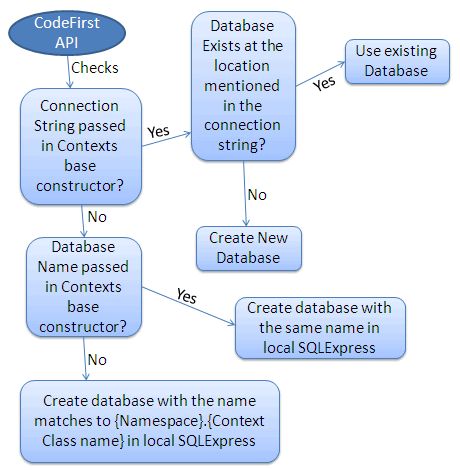
As per the above figure, base constructor of the context class can have the following parameter.
- No Parameter
- Database Name
- Connection String Name
No Parameter:
If you do not specify the parameter in the base constructor of the context class then it creates a database in your local SQLEXPRESS server with a name that matches your {Namespace}.{Context class name}. For example, Code First will create a database named SchoolDataLayer.Context for the following context class:
namespace SchoolDataLayer

{

    public class Context: DbContext

    {

        public Context(): base()

        {

        }

    }

}
Database Name:
You can also specify the database name as a parameter in a base constructor of the context class. If you specify a database name parameter, then Code First creates a database with the name you specified in the base constructor in the local SQLEXPRESS database server. For example, Code First will create a database named MySchoolDB for the following context class.
namespace SchoolDataLayer

{

    public class Context: DbContext

    {

        public Context(): base("MySchoolDB")

        {

        }

    }

}
ConnectionString Name:
You can also define connection string in app.config or web.config and specify connection string name starting with "name=" in the base constructor of the context class. Consider the following example where we pass name=SchoolDBConnectionString parameter in the base constructor.
namespace SchoolDataLayer

{

    public class Context: DbContext

    {

        public SchoolDBContext() : base("name=SchoolDBConnectionString")

        {

        }

    }

}
App.config:
<?xml version="1.0" encoding="utf-8" ?>

<configuration>

    <connectionStrings>

    <add name="SchoolDBConnectionString"

    connectionString="Data Source=.;Initial Catalog=SchoolDB-ByConnectionString;Integrated Security=true"

    providerName="System.Data.SqlClient"/>

    </connectionStrings>

</configuration>
In the above context class, we specify a connection string name as a parameter. Please note that connection string name should start with "name=" otherwise, it will consider it as a database name. The database name in the connection string in app.config is SchoolDB-ByConnectionString. Code-First will create a new SchoolDB-ByConnectionString database or use existing SchoolDB-ByConnectionString database at local SQL Server. Make sure that you include providerName = "System.Data.SqlClient" in the connection string.
Thus, Code-First use the base constructor parameter to initialize a database.
Entity Framework Code-First(6):Database Initialization的更多相关文章
- Entity Framework Tutorial Basics(13):Database First
Database First development with Entity Framework: We have seen this approach in Create Entity Data M ...
- Entity Framework Code first(转载)
一.Entity Framework Code first(代码优先)使用过程 1.1Entity Framework 代码优先简介 不得不提Entity Framework Code First这个 ...
- Entity Framework Code First (三)Data Annotations
Entity Framework Code First 利用一种被称为约定(Conventions)优于配置(Configuration)的编程模式允许你使用自己的 domain classes 来表 ...
- Entity Framework Code First (二)Custom Conventions
---------------------------------------------------------------------------------------------------- ...
- Entity Framework Code First (一)Conventions
Entity Framework 简言之就是一个ORM(Object-Relational Mapper)框架. Code First 使得你能够通过C#的类来描述一个模型,模型如何被发现/检测就是通 ...
- Entity Framework Tutorial Basics(4):Setup Entity Framework Environment
Setup Entity Framework Environment: Entity Framework 5.0 API was distributed in two places, in NuGet ...
- Entity Framework Tutorial Basics(11):Code First
Code First development with Entity Framework: Entity Framework supports three different development ...
- Entity Framework Code First (七)空间数据类型 Spatial Data Types
声明:本文针对 EF5+, Visual Studio 2012+ 空间数据类型(Spatial Data Types)是在 EF5 中引入的,空间数据类型表现有两种: Geography (地理学上 ...
- Entity Framework Code First (四)Fluent API - 配置属性/类型
上篇博文说过当我们定义的类不能遵循约定(Conventions)的时候,Code First 提供了两种方式来配置你的类:DataAnnotations 和 Fluent API, 本文将关注 Flu ...
- Entity Framework Code First (八)迁移 Migrations
创建初始模型和数据库 在开始使用迁移(Migrations)之前,我们需要一个 Project 和一个 Code First Model, 对于本文将使用典型的 Blog 和 Post 模型 创建一个 ...
随机推荐
- In a Web Application and Mobile (hybrid), how to know which this platform running?
needed depending on the platform to change the CSS to suit the size of the font. for example the DbG ...
- HDU 4417 Super Mario(2012杭州网络赛 H 离线线段树)
突然想到的节约时间的方法,感觉6翻了 给你n个数字,接着m个询问.每次问你一段区间内不大于某个数字(不一定是给你的数字)的个数 直接线段树没法做,因为每次给你的数字不一样,父节点无法统计.但是离线一 ...
- C++写和读文件
1.写: /*C++写文件和读文件*/ #include <stdio.h> #include <stdlib.h> int main() { FILE * fp; fp = ...
- 英语发音规则---ir字母组合发音规律
英语发音规则---ir字母组合发音规律 一.总结 一句话总结: 这个字母组合通常在单词中读[ɜː]:girl /gɜːl/ n. :shirt /ʃɜːt/ n. girl /gɜːl/ n. 女孩 ...
- C++(五)— 控制保留小数位数
1.C++中输出指定保留的小数位数. 这里还要注意,每次输出只要设置一次就行了,因为这两个的作用范围是后续对象,而不是仅对后一个对象起作用. #include<iostream> #inc ...
- Runtime Error(ACCESS_VIOLATION)
1. while(scanf("%d",&n) )// 错误,会出现 Runtime Error(ACCESS_VIOLATION) while(scanf(&q ...
- 201621123014《JAVA程序设计》第1周学习总结
1. 本章学习总结 关键字:JAVA特点.JDK.JVM.JRE.class.编译工具.JDK是JAVA的开发工具包,拥有JAVA需要的环境和各类JAVA工具,是JAVA的核心:JVM是JAVA虚拟机 ...
- 2017-2018-1 20179215《Linux内核原理与分析》第五周作业
一.视频学习 1.系统调用的三层皮:xyz(API).system call(中断向量).sys_xyz(不同种类的服务程序). 2.Libc库定义个一些API引用了封装例程(wrapper rout ...
- Parallel Programming-Parallel.Invoke
本文主要介绍Parallel.Invoke的使用. 一.使用例子 class ParallelInvoke { public void Action1() { Thread.Sleep(); Cons ...
- BZOJ1067:[SCOI2007]降雨量
浅谈\(RMQ\):https://www.cnblogs.com/AKMer/p/10128219.html 题目传送门:https://lydsy.com/JudgeOnline/problem. ...