
TextClock的基本使用
TextClock是在Android 4.2(API 17)后推出的用来替代DigitalClock的一个控件!
TextClock可以以字符串格式显示当前的日期和时间,因此推荐在Android 4.2以后使用TextClock。
这个控件推荐在24进制的android系统中使用,TextClock提供了两种不同的格式, 一种是在24进制中显示时间和日期,另一种是在12进制中显示时间和日期。大部分人喜欢默认的设置。
可以通过调用:TextClock提供的is24HourModeEnabled()方法来查看,系统是否在使用24进制时间显示! 在24进制模式中:
- 如果没获取时间,首先通过getFormat24Hour()返回值;
- 获取失败则通过getFormat12Hour()获取返回值;
- 以上都获取失败则使用默认;
另外他给我们提供了下面这些方法,对应的还有get方法:
| Attribute Name | Related Method | Description |
|---|---|---|
| android:format12Hour | setFormat12Hour(CharSequence) | 设置12时制的格式 |
| android:format24Hour | setFormat24Hour(CharSequence) | 设置24时制的格式 |
| android:timeZone | setTimeZone(String) | 设置时区 |
其实更多的时间我们是花在时间形式定义上,就是里面这个CharSequence! 这里提供下常用的写法以及结果:
<TextClock
  android:layout_width="wrap_content"
  android:layout_height="wrap_content"
  android:format12Hour="MM/dd/yy h:mmaa"/>

<TextClock
  android:layout_width="wrap_content"
  android:layout_height="wrap_content"
  android:format12Hour="MMM dd, yyyy h:mmaa"/>

<TextClock
  android:layout_width="wrap_content"
  android:layout_height="wrap_content"
  android:format12Hour="MMMM dd, yyyy h:mmaa"/>

<TextClock
  android:layout_width="wrap_content"
  android:layout_height="wrap_content"
  android:format12Hour="E, MMMM dd, yyyy h:mmaa"/>

<TextClock
  android:layout_width="wrap_content"
  android:layout_height="wrap_content"
  android:format12Hour="EEEE, MMMM dd, yyyy h:mmaa"/>

<TextClock
  android:layout_width="wrap_content"
  android:layout_height="wrap_content"
  android:format12Hour="Noteworthy day: 'M/d/yy"/>
运行结果:
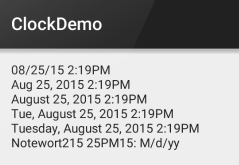
PS:另外minsdk 要大于或者等于17哦!
1、布局
<LinearLayout xmlns:android="http://schemas.android.com/apk/res/android"android:orientation="vertical"android:layout_height="match_parent"android:layout_width="match_parent"><TextClockandroid:layout_width="wrap_content"android:layout_height="wrap_content"android:format24Hour="当前日期是yyyy年MMMMdd ,今天是EEEE ,当前时间是aa h:mm"/></LinearLayout>
package lpc.com.drawlayoutdemo1;import android.os.Bundle;import android.support.v7.app.AppCompatActivity;publicclassMainActivityextendsAppCompatActivity{@Overrideprotectedvoid onCreate(Bundle savedInstanceState){super.onCreate(savedInstanceState);setContentView(R.layout.activity_main);}}
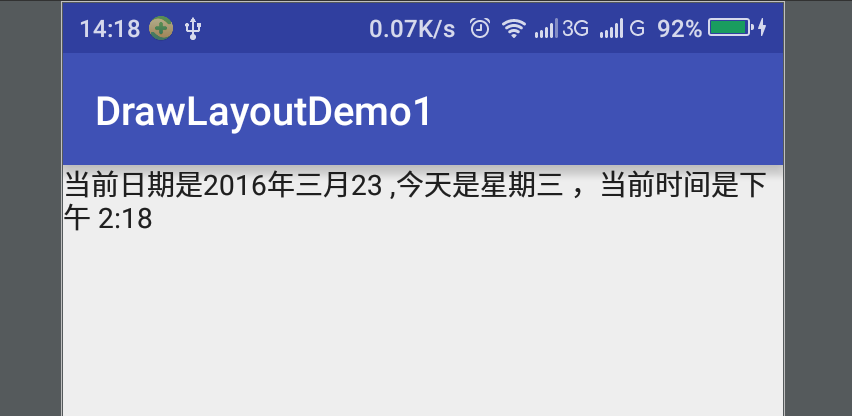
TextClock的基本使用的更多相关文章
- DigitalClock的替代者TextClock
DigitalClock在API 17(Android4.2)中就被官方定义为过时的方法,很奇怪为什么现在很多的网上的帖子都介绍DigitalClock方法的使用(已经过时),如果你想让自己的应用在高 ...
- Android学习笔记(20):时钟(AnalogClock和TextClock)和计时器(Chronometer)
时钟文本TextClock继承自TextView.是用于显示当前时间的文本框. TextClock支持的XML属性和相关方法 XML属性 相关方法 说明 android:format12Hour se ...
- Android零基础入门第59节:AnalogClock、DigitalClock和TextClock时钟组件
原文:Android零基础入门第59节:AnalogClock.DigitalClock和TextClock时钟组件 在前面一期,我们学习了DatePicker和TimePicker,在实际开发中其不 ...
- Android基础控件TextClock和Chronometer的使用
1.简介 DigitalClock, TextClock,AnalogClock,Chronometer其中DigitalClock和AnalogClock废弃了! TextClock是在Androi ...
- Android控件 之 TextClock & AnalogClock(模拟时钟)
TextClock •简介 关于时间的文本显示,Android 提供了 DigitalClock 和 TextClock. DigitalClock是Android第1版本发布,功能很简单,只显示时间 ...
- Android开发自学笔记(Android Studio)—4.2TextView及其子类
一.引言 TextView是我们最常用的一个控件了,它类似于C# Winform程序中的Lable,Java Swing编程中的JLable,不过相对功能更强大些,但从功能上看,它其实就是个文字编辑器 ...
- 疯狂Android讲义 - 学习笔记(二)
Android应用的用户界面编程 2.1 界面编程与视图(View)组件 Android应用的绝大部分UI组件放在android.widget.android.view包及其子包中,所有UI组件都继承 ...
- TextView及其子类
1.TextView控件(TextView是EditView.Button等类的父类) <1>android:id 给当前控件定义了一个唯一标识符 <2>android:l ...
- Android学习笔记⑤——UI组件的学习TextView相关
TextView是一个强大的视图组件,直接继承了View,同时也派生出了很多子类,TextView其作用说白了就是在布局中显示文本,有点像Swing编程中的JLabel标签,但是他比JLabel强大的 ...
随机推荐
- 【转】apache DateFormatUtils 与 DateUtils 的使用
在Apache Commons项目的Lang里面,有两个类:DateUtils和DateFormatUtils,专门用于处理时间日期转换.它们在 org.apache.commons.lang.tim ...
- Magic xpa 2.5发布 Magic xpa 2.5 Release Notes
Magic xpa 2.5發佈 Magic xpa 2.5 Release Notes Magic xpa 2.5 Release NotesNew Features, Feature Enhance ...
- Webpack 入门指南 - 2.模块
这一次我们谈谈模块问题. 通常我们希望这个项目可以分为多个独立的模块,比如,上一次提高的 hello 函数,如果我们定义为一个模块,其它模块引用之后,直接调用就好了.在前端怎么使用模块呢?这可说来话长 ...
- Spark Streaming源码解读之Driver中ReceiverTracker架构设计以具体实现彻底研究
本期内容 : ReceiverTracker的架构设计 消息循环系统 ReceiverTracker具体实现 一. ReceiverTracker的架构设计 1. ReceiverTracker可以以 ...
- NHibernate系列文章二十二:NHibernate查询之HQL查询(附程序下载)
摘要 NHibernate提供了多种查询方式,最早的HQL语言查询.Criteria查询和SQL Query,到NHibernate 3.0的Linq NHibernate,NHIbernate 4. ...
- Android IOS WebRTC 音视频开发总结(八十)-- NUBOMEDIA: 首个WebRTC PaaS
本文主要介绍NUBOMEDIA(我们翻译和整理的,译者:jiangpeng,校验:blacker),最早发表在[编风网] 支持原创,转载必须注明出处,欢迎关注我的微信公众号blacker(微信ID:b ...
- nodejs+express+jade配置
安装步骤 一.首先可跟着这个网址安装http://jingyan.baidu.com/article/91f5db1b2bb6941c7f05e33c.html,路径可由自己定. 二.同时参考http ...
- Image 抠图,背景透明处理
import java.awt.Graphics2D; import java.awt.image.BufferedImage; import java.io.File; import javax.i ...
- git不是内部命令和可执行程序解决方法
1.从Git官网下载windows版本的git:http://git-scm.com/downloads 2.一般使用默认设置即可:一路next,git安装完毕! 3.但是如果这时你打开windows ...
- Mac升级到Yosemite后默认的php版本不支持imagetfftext函数问题解决
Mac升级到yosemite后,php也自动升级,运行项目的时候发现后台验证码显示不出来.调试一下发现imagetfftext这个函数不存在,应该gd没有安装完全,因为Mac上的php实现系统自带的, ...