
Android基础控件TextClock和Chronometer的使用
1、简介
DigitalClock, TextClock,AnalogClock,Chronometer其中DigitalClock和AnalogClock废弃了!
TextClock是在Android 4.2(API 17)后推出的用来替代DigitalClock的一个控件!
android:format12Hour //设置12时制的格式

android:format24Hour //设置24时制的格式

android:timeZone    //设置时区
    <TextClock

        android:layout_width="wrap_content"

        android:layout_height="wrap_content"

        android:format12Hour="MM/dd/yy h:mmaa"/>

        android:format12Hour="MMM dd, yyyy h:mmaa"

        android:format12Hour="MMMM dd, yyyy h:mmaa"

        android:format12Hour="E, MMMM dd, yyyy h:mmaa"

        android:format12Hour="EEEE, MMMM dd, yyyy h:mmaa"

        android:format12Hour="Noteworthy day: M/d/yy"
Chronometer作为一个计时器。用来记录用户进行某项操作所消耗的时间!
   long getBase(); //返回基地的时间,

   String getFormat();//返回当前字符串格式

   void setBase(long base);//设置时间,计数定时器指定的值

   void setFormat(String format);//设置显示的内容
2、简单使用
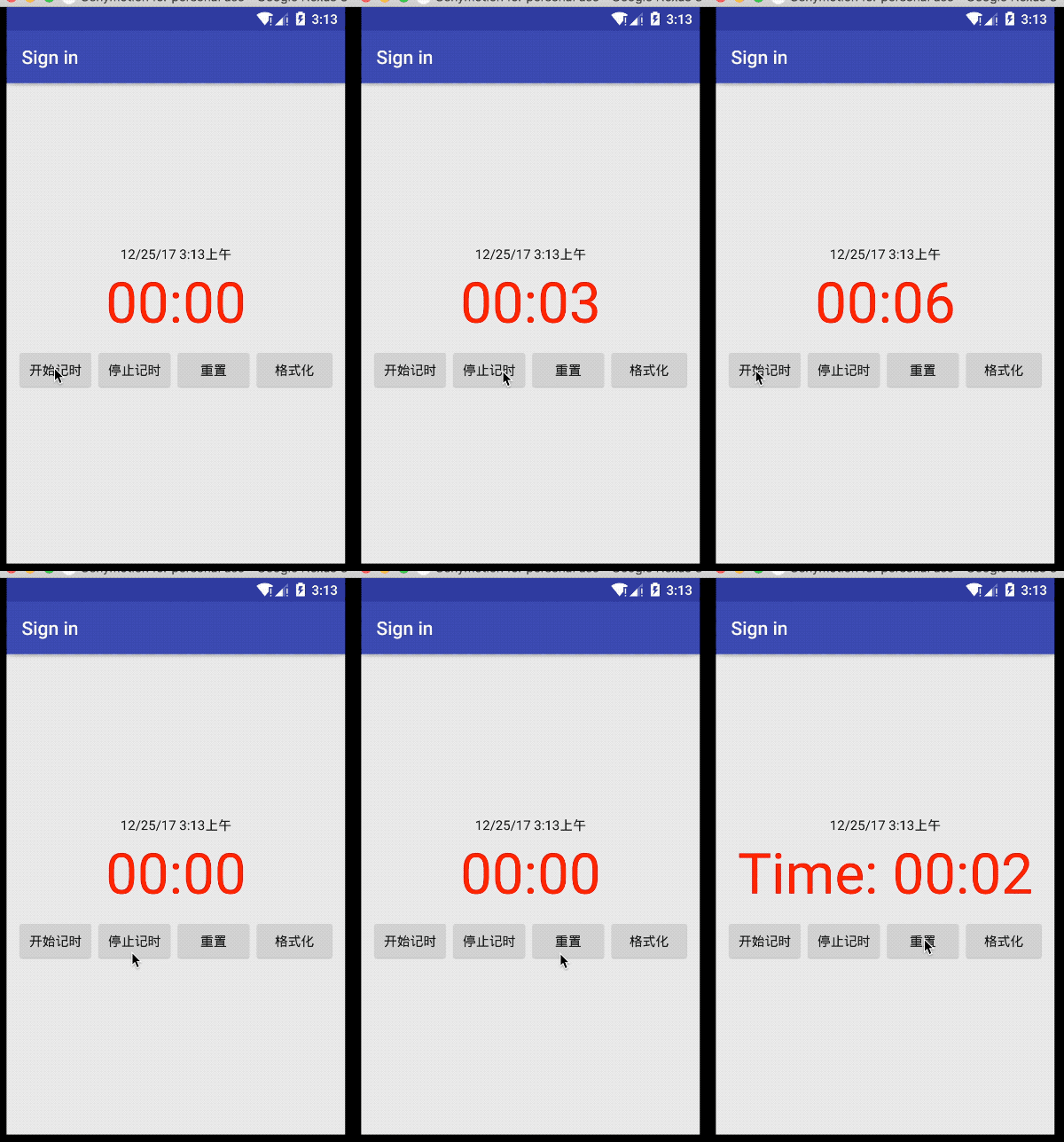
布局的xml文件:
<LinearLayout xmlns:android="http://schemas.android.com/apk/res/android"

    xmlns:tools="http://schemas.android.com/tools"

    android:layout_width="match_parent"

    android:layout_height="match_parent"

    android:gravity="center"

    android:orientation="vertical"

    tools:context=".LoginActivity">

        <TextClock

            android:layout_width="wrap_content"

            android:layout_height="wrap_content"

            android:format12Hour="MM/dd/yy h:mmaa"/>

        <Chronometer

            android:layout_width="match_parent"

            android:layout_height="wrap_content"

            android:id="@+id/chronometer"

            android:gravity="center"

            android:textColor="@color/text_color_select"

            android:textSize="60dip"/>

        <LinearLayout

            android:layout_width="match_parent"

            android:layout_height="wrap_content"

            android:layout_margin="10dip"

            android:orientation="horizontal">

                <Button

                    android:id="@+id/btnStart"

                    android:layout_width="match_parent"

                    android:layout_height="wrap_content"

                    android:layout_weight="1"

                    android:text="开始记时" />

                <Button

                    android:id="@+id/btnStop"

                    android:layout_width="match_parent"

                    android:layout_height="wrap_content"

                    android:layout_weight="1"

                    android:text="停止记时" />

                <Button

                    android:id="@+id/btnReset"

                    android:layout_width="match_parent"

                    android:layout_height="wrap_content"

                    android:layout_weight="1"

                    android:text="重置" />

                <Button

                    android:id="@+id/btn_format"

                    android:layout_width="wrap_content"

                    android:layout_height="wrap_content"

                    android:text="格式化" />

        </LinearLayout>

</LinearLayout>
Java文件:
public class LoginActivity extends AppCompatActivity implements  View.OnClickListener,Chronometer.OnChronometerTickListener{

    private Chronometer chronometer;

    private Button btn_start,btn_stop,btn_base,btn_format;

    private long recordingTime = 0;

    @Override

    protected void onCreate(Bundle savedInstanceState) {

        super.onCreate(savedInstanceState);

        setContentView(R.layout.activity_login);

        initView();

    }

    private void initView() {

        chronometer = (Chronometer) findViewById(R.id.chronometer);

        btn_start = (Button) findViewById(R.id.btnStart);

        btn_stop = (Button) findViewById(R.id.btnStop);

        btn_base = (Button) findViewById(R.id.btnReset);

        btn_format = (Button) findViewById(R.id.btn_format);

        chronometer.setOnChronometerTickListener(this);

        btn_start.setOnClickListener(this);

        btn_stop.setOnClickListener(this);

        btn_base.setOnClickListener(this);

        btn_format.setOnClickListener(this);

    }

    @Override

    public void  onClick(View view){

        switch (view.getId()){

            case R.id.btnStart:

                onChronoStar();

                break;

            case R.id.btnStop:

                onChronoStop();

                break;

            case R.id.btnReset:

                onChronoRes();

                break;

            case R.id.btn_format:

                chronometer.setFormat("Time: %s");

                break;

        }

    }

    @Override//每秒调用一次

    public  void onChronometerTick(Chronometer chronometer){

        String time = chronometer.getText().toString();

        Log.d("time--", time);

    }

    public  void onChronoStar(){

        chronometer.setBase(SystemClock.elapsedRealtime()-recordingTime);// 跳过已经记录了的时间

        chronometer.start();

    }

    public  void onChronoStop(){

        chronometer.stop();

        recordingTime = SystemClock.elapsedRealtime()-chronometer.getBase();// 保存这次记录了的时间

    }

    public void onChronoRes(){

        recordingTime = 0;

        chronometer.setBase(SystemClock.elapsedRealtime());// 从当前时刻重新计时

    }

}
Android基础控件TextClock和Chronometer的使用的更多相关文章
- Android基础控件ListView基础操作
1.简介 基于Android基础控件ListView和自定义BaseAdapter适配器情况下,对ListView的数据删除和添加操作: public boolean add(E e) {//添加数据 ...
- android 基础控件(EditView、SeekBar等)的属性及使用方法
android提供了大量的UI控件,本文将介绍TextView.ImageView.Button.EditView.ProgressBar.SeekBar.ScrollView.WebView ...
- 矩阵, 矩阵 , Android基础控件之ImageView
天下文章大家抄,以下所有内容,有来自copy,有来自查询,亦有自己的总结(目的是总结出自己的东西),所以说原创,不合适,说是转载也不恰当,所以我称之为笔记,可惜没有此分类选项,姑且不要脸一点,选择为原 ...
- android 基础控件 EditText
EditText 简介: EditText 控件继承 TextView ,它有TextView的所有属性和方法,并且自身是可编辑的: extends TextView java.lang.Object ...
- Android 基础控件 TextView
一TextView介绍: TextView是UI最基本的组件,使用TextView可以显示丰富的文本信息.设置添加TextView最常见的方法就是在xml中添加TextView元素,并指定属性.Tex ...
- Android基础控件ProgressBar进度条的使用
1.简介 ProgressBar继承与View类,直接子类有AbsSeekBar和ContentLoadingProgressBar, 其中AbsSeekBar的子类有SeekBar和RatingBa ...
- Android基础控件单选按钮RadioButton和Checkbox复选按钮的使用
1.相关简介 RadioButton需要和RadioGroup结合使用,在RadioGroup设置布局方式! Checkbox是单独使用,本文为了方便放在了RadioGroup中! 2.简单使用 方法 ...
- Android基础控件Button的使用
1.相关属性 Android的按钮有Button和ImageButton(图像按钮),Button extends TextView, ImageButton extends ImageView! a ...
- Android基础控件EditText
1.常用属性 <!--selectAllOnFocus 获得焦点后全选组件内所有文本内容--> <!--inputType 限制输入方式--> <!--singleLin ...
随机推荐
- 大道浮屠诀---mysql5.7.28 for linux安装
环境: redhat6.5 MySQL Community Server 5.7.28 https://dev.mysql.com/downloads/mysql/5.7.html 安装RMP包的具体 ...
- LeetCode 31. Next Permutation【Medium】
Implement next permutation, which rearranges numbers into the lexicographically next greater permuta ...
- iOS开发之系统通讯录
@iOS调用操作通讯录所用的库文件 AddressBook.framewor ...
- jdbc_mysql----interset
- kerberos协议介绍
一.kerberos认证过程: client向kerberos服务请求,希望获取访问server的权限.kerberos得到了这个消息,首先得判断client是否是可信赖的,也就是白名单黑名单的说法. ...
- mysql UDF提权问题
测试UDF提权,时候遇到问题,创建函数shell提示存在 当执行操作的时候又提示,shell函数不存在. FUNCTION mysql.shell does not exist 如果在测试环境下,一般 ...
- 【hihocoder】Demo Day
时间限制:10000ms 单点时限:1000ms 内存限制:256MB 描述 You work as an intern at a robotics startup. Today is your co ...
- grep每次读取多大的文本
Most of the tools do not actually read a single line in from a file at a time, rather they use a buf ...
- Java 多线程 - 创建线程的方法 + Executors.newXXXThreadPool()缺点
java中创建线程的三种方法以及区别: https://www.cnblogs.com/3s540/p/7172146.html 通过Executor 的工具类,创建三种类型的普通线程池: https ...
- git使用过程中问题
git提交文件命令顺序 fetch merge add commit pull push 取消已add文件 git reset HEAD 文件名 覆盖本地文件 git checkout 文件名 $ g ...