
TextClock的基本使用
TextClock是在Android 4.2(API 17)后推出的用来替代DigitalClock的一个控件!
TextClock可以以字符串格式显示当前的日期和时间,因此推荐在Android 4.2以后使用TextClock。
这个控件推荐在24进制的android系统中使用,TextClock提供了两种不同的格式, 一种是在24进制中显示时间和日期,另一种是在12进制中显示时间和日期。大部分人喜欢默认的设置。
可以通过调用:TextClock提供的is24HourModeEnabled()方法来查看,系统是否在使用24进制时间显示! 在24进制模式中:
- 如果没获取时间,首先通过getFormat24Hour()返回值;
- 获取失败则通过getFormat12Hour()获取返回值;
- 以上都获取失败则使用默认;
另外他给我们提供了下面这些方法,对应的还有get方法:
| Attribute Name | Related Method | Description |
|---|---|---|
| android:format12Hour | setFormat12Hour(CharSequence) | 设置12时制的格式 |
| android:format24Hour | setFormat24Hour(CharSequence) | 设置24时制的格式 |
| android:timeZone | setTimeZone(String) | 设置时区 |
其实更多的时间我们是花在时间形式定义上,就是里面这个CharSequence! 这里提供下常用的写法以及结果:
<TextClock
  android:layout_width="wrap_content"
  android:layout_height="wrap_content"
  android:format12Hour="MM/dd/yy h:mmaa"/>

<TextClock
  android:layout_width="wrap_content"
  android:layout_height="wrap_content"
  android:format12Hour="MMM dd, yyyy h:mmaa"/>

<TextClock
  android:layout_width="wrap_content"
  android:layout_height="wrap_content"
  android:format12Hour="MMMM dd, yyyy h:mmaa"/>

<TextClock
  android:layout_width="wrap_content"
  android:layout_height="wrap_content"
  android:format12Hour="E, MMMM dd, yyyy h:mmaa"/>

<TextClock
  android:layout_width="wrap_content"
  android:layout_height="wrap_content"
  android:format12Hour="EEEE, MMMM dd, yyyy h:mmaa"/>

<TextClock
  android:layout_width="wrap_content"
  android:layout_height="wrap_content"
  android:format12Hour="Noteworthy day: 'M/d/yy"/>
运行结果:
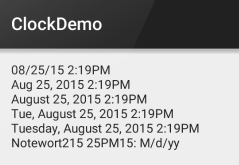
PS:另外minsdk 要大于或者等于17哦!
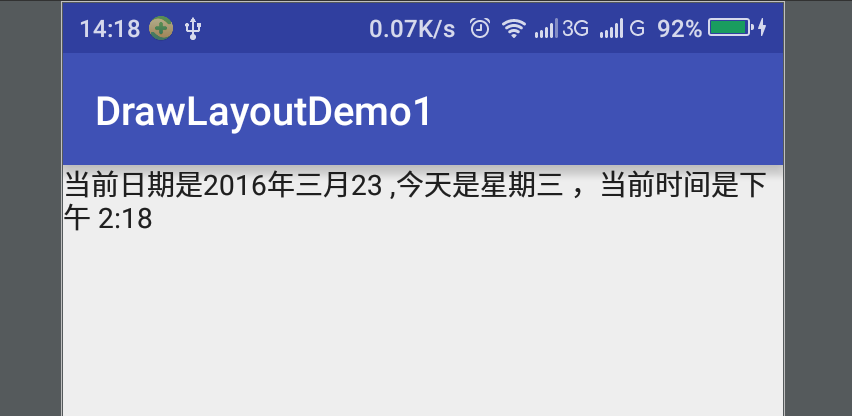
1、布局
<LinearLayout xmlns:android="http://schemas.android.com/apk/res/android"android:orientation="vertical"android:layout_height="match_parent"android:layout_width="match_parent"><TextClockandroid:layout_width="wrap_content"android:layout_height="wrap_content"android:format24Hour="当前日期是yyyy年MMMMdd ,今天是EEEE ,当前时间是aa h:mm"/></LinearLayout>
package lpc.com.drawlayoutdemo1;import android.os.Bundle;import android.support.v7.app.AppCompatActivity;publicclassMainActivityextendsAppCompatActivity{@Overrideprotectedvoid onCreate(Bundle savedInstanceState){super.onCreate(savedInstanceState);setContentView(R.layout.activity_main);}}
TextClock的基本使用的更多相关文章
- DigitalClock的替代者TextClock
DigitalClock在API 17(Android4.2)中就被官方定义为过时的方法,很奇怪为什么现在很多的网上的帖子都介绍DigitalClock方法的使用(已经过时),如果你想让自己的应用在高 ...
- Android学习笔记(20):时钟(AnalogClock和TextClock)和计时器(Chronometer)
时钟文本TextClock继承自TextView.是用于显示当前时间的文本框. TextClock支持的XML属性和相关方法 XML属性 相关方法 说明 android:format12Hour se ...
- Android零基础入门第59节:AnalogClock、DigitalClock和TextClock时钟组件
原文:Android零基础入门第59节:AnalogClock.DigitalClock和TextClock时钟组件 在前面一期,我们学习了DatePicker和TimePicker,在实际开发中其不 ...
- Android基础控件TextClock和Chronometer的使用
1.简介 DigitalClock, TextClock,AnalogClock,Chronometer其中DigitalClock和AnalogClock废弃了! TextClock是在Androi ...
- Android控件 之 TextClock & AnalogClock(模拟时钟)
TextClock •简介 关于时间的文本显示,Android 提供了 DigitalClock 和 TextClock. DigitalClock是Android第1版本发布,功能很简单,只显示时间 ...
- Android开发自学笔记(Android Studio)—4.2TextView及其子类
一.引言 TextView是我们最常用的一个控件了,它类似于C# Winform程序中的Lable,Java Swing编程中的JLable,不过相对功能更强大些,但从功能上看,它其实就是个文字编辑器 ...
- 疯狂Android讲义 - 学习笔记(二)
Android应用的用户界面编程 2.1 界面编程与视图(View)组件 Android应用的绝大部分UI组件放在android.widget.android.view包及其子包中,所有UI组件都继承 ...
- TextView及其子类
1.TextView控件(TextView是EditView.Button等类的父类) <1>android:id 给当前控件定义了一个唯一标识符 <2>android:l ...
- Android学习笔记⑤——UI组件的学习TextView相关
TextView是一个强大的视图组件,直接继承了View,同时也派生出了很多子类,TextView其作用说白了就是在布局中显示文本,有点像Swing编程中的JLabel标签,但是他比JLabel强大的 ...
随机推荐
- adb shell出错“error: unknown host service”
已经测试,可用: 在命令行输入adb shell后输出如下错误: adb server is out of date. killing... ADB server didn't ACK * fail ...
- Node.js 自学之旅
学习基础,JQuery 原生JS有一定基础,有自己一定技术认知(ps:原型链依然迷糊中.闭包6不起来!哎!) 当然最好有语言基础,C#,java,PHP等等.. 最初学习这个东西的原因很简单,在园子里 ...
- django--模型元选项(八)
1.db_table Options.db_table该模型所用的数据表的名称:db_table = 'test'为节省你的时间,Django 会根据模型类的名称和包含它的应用的名称自动指定数据库表名 ...
- javascript 取整,取余数
1.丢弃小数部分,保留整数部分 parseInt(5/2) 2 2.向上取整,有小数,则整数部分加1 Math.ceil(5/2) 3 3.四舍五入 Math.round(5/2) 3 4.向下取整 ...
- (分享)根据IP获取地理位置(百度API)
说明: 本程序调用的百度地图接口 http://lbsyun.baidu.com/index.php?title=webapi/high-acc-ip#h. 使用C#语言+VS2015 IDE开发 效 ...
- ajax 对象创建 兼容各个浏览器
<script> function createAjax(){ var request=false; //window对象中有XMLHttpRequest存在就是非IE,包括(IE7,IE ...
- CSS3知识点总结----属性选择器
1.E[attr]只使用属性名,但没有确定任何属性值 2.E[attr="value"]指定属性名,并指定了该属性的属性值 3.E[attr~="value"] ...
- This implementation is not part of the Windows Platform FIPS validated cryptographic algorithms while caching 问题及解决
一.背景 情节1:做别的测试安装下载了软件,妈蛋结果下了百度各种捆绑软件,之后一一卸载,清洁. 情节2:做完上述动作重启电脑后,有线连接连不上,尴尬,然后下载驱动,升级之后ok了. 二.问 ...
- Des加解密算法
class DesHelper { /// <summary> /// DES加密方法 /// </summary> ...
- UNDO
UNDO及事物 undo表空间是Oracle独有,在oracle开启一个事物之后,oracle对数据进行修改,同时,会把修改前的数据保存到UNDO表空间的UNDO段里.undo表空间中会自动分配und ...