
IOS CALayer的阴影属性
@property(nullable) CGColorRef shadowColor;

/* The opacity of the shadow. Defaults to 0. Specifying a value outside the

 * [0,1] range will give undefined results. Animatable. */

@property float shadowOpacity;

/* The shadow offset. Defaults to (0, -3). Animatable. */

@property CGSize shadowOffset;

/* The blur radius used to create the shadow. Defaults to 3. Animatable. */

@property CGFloat shadowRadius;

/* When non-null this path defines the outline used to construct the

 * layer's shadow instead of using the layer's composited alpha

 * channel. The path is rendered using the non-zero winding rule.

 * Specifying the path explicitly using this property will usually

 * improve rendering performance, as will sharing the same path

 * reference across multiple layers. Upon assignment the path is copied.

 * Defaults to null. Animatable. */

@property(nullable) CGPathRef shadowPath;
1、shadowColor:阴影颜色
2、shadowOpacity:不透明度,取值范围[0,1],可以对应UIView的 透明度 进行理解
3、shadowRadius:对阴影的模糊度,默认值为3 ,值越大,越模糊,越自然如果为零则有明确的边界线
4、shadowOffset:阴影的偏移量,默认(0,-3)
5、shadowPath:可以指定阴影的形状,可以矩形,圆形甚至是贝塞尔曲线生成的任意形状,如下代码,生成的就是矩形的阴影
CGFloat x,y,w,h;
CGMutablePathRef squarePath = CGPathCreateMutable();

CGPathAddRect(squarePath, NULL, CGRectMake(x, y, w, h));

view.layer.shadowPath = squarePath;
相同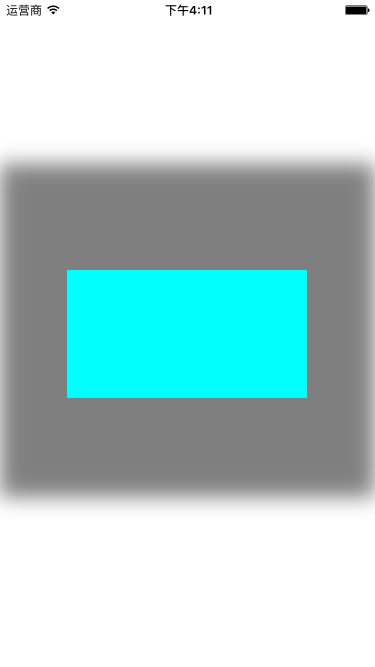
IOS CALayer的阴影属性的更多相关文章
- IOS CALayer的属性和使用
一.CALayer的常用属性 1.@propertyCGPoint position; 图层中心点的位置,类似与UIView的center:用来设置CALayer在父层中的位置:以父层的左上角为原点( ...
- iOS开发UI篇—CAlayer层的属性
iOS开发UI篇—CAlayer层的属性 一.position和anchorPoint 1.简单介绍 CALayer有2个非常重要的属性:position和anchorPoint @property ...
- iOS开发UI 篇—CAlayer层的属性
一.position和anchorPoint 1.简单介绍 CALayer有2个非常重要的属性:position和anchorPoint @property CGPoint position; 用来设 ...
- iOS CALayer使用
CALayer使用 iOS的设备中,我们之所以能看到各种各样的控件.文字.图片,都是Core Animation框架的功劳.它通过图层的合成,最终显示在屏幕上.而今天这篇文章讲的就是Core Anim ...
- CAlayer层的属性
iOS开发UI篇—CAlayer层的属性 一.position和anchorPoint 1.简单介绍 CALayer有2个非常重要的属性:position和anchorPoint @property ...
- CALayer的additive属性解析
CALayer的additive属性解析 效果: 源码:https://github.com/RylanJIN/ShareOfCoreAnimation // // CAPartAViewContro ...
- Pop–实现任意iOS对象的任意属性的动态变化
简介 Pop 是一个可扩展的动画引擎,可用于实现任意iOS对象的任意属性的动态变化,支持一般动画,弹性动画和渐变动画三种类型. 项目主页: pop 最新示例: 点击下载 注意: 官方代码中,并不包含实 ...
- iOS CALayer总结——图层几何
最近看了一下关于图层和动画的内容,所以写了一份总结,算是对这些内容的汇总吧,都是一些简单的基础知识,不知道大家都了不了解. 除了和用户的交互之外,图层的很多属性和视图基本上都是一样的,今天就先从CAL ...
- iOS CALayer 简单介绍
https://www.jianshu.com/p/09f4e36afd66 什么是CALayer: 总结:能看到的都是uiview,uiview能显示在屏幕上是因为它内部的一个层calyer层. 在 ...
随机推荐
- jquery复习笔记
Jquery基础 让一个按钮灰掉 $("button").("disabled","true"); ance desc选择器(ance代表祖 ...
- MVC 关于easyui-datebox 赋值问题
view <script type="text/javascript"> $(function () { var date = '@ViewData["end ...
- linux下解压
(1).*.tar 用 tar –xvf 解压 (2).*.gz 用 gzip -d或者gunzip 解压 (3).*.tar.gz和*.tgz 用 tar –xzf 解压 (4).*.bz2 ...
- linux系统中如何查看日志(转)
cat tail -f 日 志 文 件 说 明 /var/log/message 系统启动后的信息和错误日志,是Red Hat Linux中最常用的日志之一 /var/log/secure 与安 ...
- ubifs概述
UBIFS无排序区块图像文件系统(Unsorted Block Image File System, UBIFS)是用于固态存储设备上,并与LogFS相互竞争,作为JFFS2的后继文件系统之一.真正开 ...
- !+"\v1" 能判断浏览器类型吗?
我在 http://www.iefans.net/ie-setattribute-bug/ 中看到如此判断是否是IE,if(!+"\v1"){IE代码}else{其他浏览器代码}, ...
- CentOS 7 yum方式配置LAMP环境
环境:CentOS 7 最小化安装 采用Putty连接 方法:采用YUM安装方法 目的:搭建Apache+Mysql+PHP环境 1,安装Apache yum install httpd //默认情况 ...
- Django补充及初识Ajax
Django创建一对多表结构 首先现在models.py中写如下代码: from django.db import models # Create your models here. class Bu ...
- 搜索引擎Solr系列(一): Solr6.2.1环境搭建
一:Solr简介 Solr是一个独立的企业级搜索应用服务器,它对外提供类似于Web-service的API接口.用户可以通过http请求,向搜索引擎服务器提交一定格式的XML文件,生成索引:也可以通 ...
- Syntax highlighting in fenced code blocks
Python @requires_authorization def somefunc(param1='', param2=0): r'''A docstring''' if param1 > ...