
夺命雷公狗-----React---26--小案例之react经典案例todos(统计部分的完成)
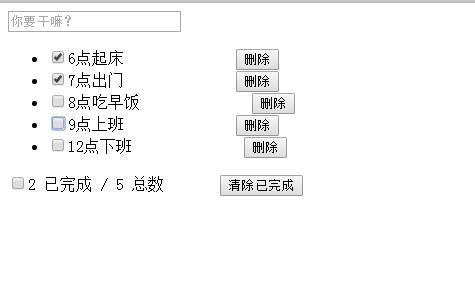
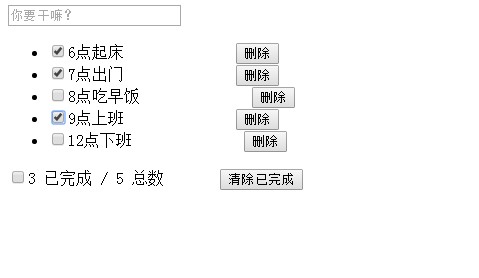
这一个其实是比较容易的,只需要统计他的总数和已完成的即可,
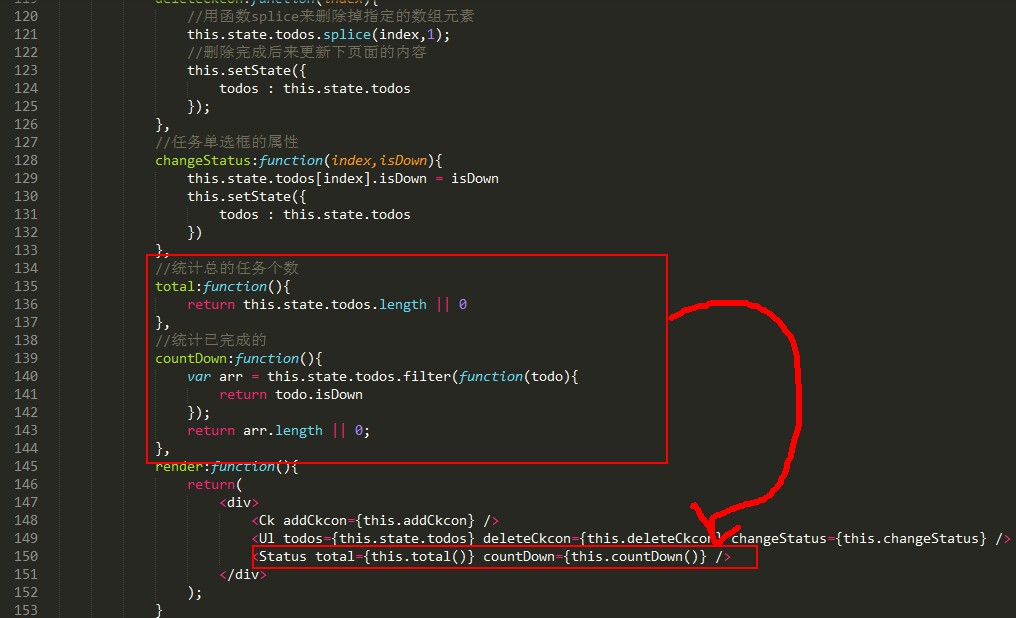
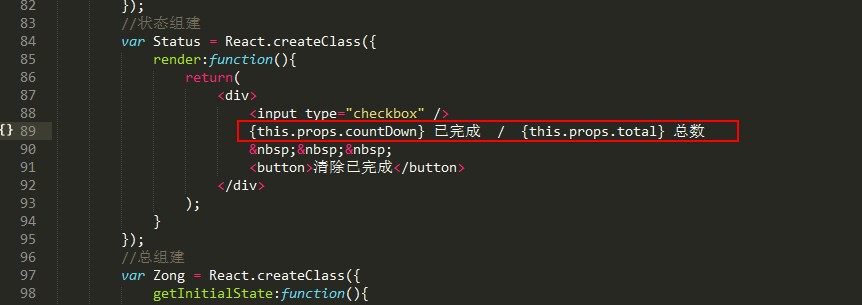
效果如下所示:
代码如下所示:
<!DOCTYPE html>
<html lang="en">
<head>
<meta charset="UTF-8">
<title>Document</title>
<script src="./js/react.js"></script>
<script src="./js/react-dom.js"></script>
<script src="./js/browser.min.js"></script>
</head>
<body>
<div id="dome"></div>
<script type="text/babel">
//搜索区域
var Ck = React.createClass({
//处理搜索事件的函数
handleKey:function(e){
//alert('test');
//判断回车enter键才处理,keyCode13==回车键
if(e.keyCode == 13){
//alert('test');
//如果搜索内容是空的让他不走了
if(!e.target.value) return;
//否则添加任务了
var ckcon = {
text : e.target.value,
isDown: false
}
//利用属性完成
this.props.addCkcon(ckcon);
//清空搜索框的内容
e.target.value = '';
} },
render:function(){
return(
<div>
<input type="text" placeholder="你要干嘛?" onKeyUp={this.handleKey} />
</div>
);
}
});
//列表项区域
var Lists = React.createClass({
handleClick:function(){
//alert('test');
this.props.deleteCkcon(this.props.index);
},
//处理单选框的变化事件
handleChange:function(e){
//修改那个任务,修改的值是什么
this.props.changeStatus(this.props.index,e.target.checked);
},
render:function(){
return(
<li>
<label>
<input type="checkbox" checked={this.props.todo.isDown} onChange={this.handleChange} />
{this.props.todo.text}
</label>
<button onClick={this.handleClick}>删除</button>
</li>
);
}
});
//列表框区域
var Ul = React.createClass({
render:function(){
//保存this指针
var _this = this;
return(
<ul>
{
this.props.todos.map(function(item,index){
return <Lists todo={item} key={index} index={index} deleteCkcon={_this.props.deleteCkcon} changeStatus={_this.props.changeStatus} />
})
}
</ul>
);
}
});
//状态组建
var Status = React.createClass({
render:function(){
return(
<div>
<input type="checkbox" />
{this.props.countDown} 已完成 / {this.props.total} 总数
<button>清除已完成</button>
</div>
);
}
});
//总组建
var Zong = React.createClass({
getInitialState:function(){
return {
todos :[
{text:'6点起床',isDown:true},
{text:'7点出门',isDown:true},
{text:'8点吃早饭',isDown:false},
{text:'9点上班',isDown:true},
{text:'12点下班',isDown:false}
],
isAllChecked: false
}
},
addCkcon:function(todo){
//接收到用户的添加的内容然后铺push过去即可
this.state.todos.push(todo);
//然后更新state
this.setState({
todos : this.state.todos
});
},
//处理删除任务
deleteCkcon:function(index){
//用函数splice来删除掉指定的数组元素
this.state.todos.splice(index,1);
//删除完成后来更新下页面的内容
this.setState({
todos : this.state.todos
});
},
//任务单选框的属性
changeStatus:function(index,isDown){
this.state.todos[index].isDown = isDown
this.setState({
todos : this.state.todos
})
},
//统计总的任务个数
total:function(){
return this.state.todos.length || 0
},
//统计已完成的
countDown:function(){
var arr = this.state.todos.filter(function(todo){
return todo.isDown
});
return arr.length || 0;
},
render:function(){
return(
<div>
<Ck addCkcon={this.addCkcon} />
<Ul todos={this.state.todos} deleteCkcon={this.deleteCkcon} changeStatus={this.changeStatus} />
<Status total={this.total()} countDown={this.countDown()} />
</div>
);
}
});
ReactDOM.render(
<Zong />,
document.getElementById('dome')
);
</script>
</body>
</html>
夺命雷公狗-----React---26--小案例之react经典案例todos(统计部分的完成)的更多相关文章
- 夺命雷公狗-----React---12--添加类和样式
<!DOCTYPE> <html> <head> <meta charset="utf-8"> <title></ ...
- 夺命雷公狗-----React---11--添加css样式的方法
<!DOCTYPE> <html> <head> <meta charset="utf-8"> <title></ ...
- 夺命雷公狗-----React---10--组建嵌套进行数据遍历
先写一个组建... 然后进行嵌套.. <!DOCTYPE html> <html lang="en"> <head> <meta char ...
- 夺命雷公狗-----React---9--map数据的遍历
比如我们要实现的是这种效果: 用这种方法来写,她只能写死在哪,没啥意思,所以我们定义一个数据,然后来测试下map方法对她遍历出来的数据 <!DOCTYPE html> <html l ...
- 夺命雷公狗-----React---8--react官方提供的组建实现双向绑定
首先要引入她.. <!DOCTYPE html> <html lang="en"> <head> <meta charset=" ...
- 夺命雷公狗-----React---7--组建的状态props和state
props:组建初始要渲染的数据,他是不可以改变的 state:组建状态发生改变,调用render重新渲染数据 我们来写一个例子: <!DOCTYPE html> <html lan ...
- 夺命雷公狗-----React---6--props多属性的传递
<!DOCTYPE html> <html lang="en"> <head> <meta charset="UTF-8&quo ...
- 夺命雷公狗-----React---5--props对象的传递
提示:props的值是不可以改变的... <!DOCTYPE html> <html lang="en"> <head> <meta ch ...
- 夺命雷公狗-----React---4--props变量的传递
提示:props的值是不可以改变的... <!DOCTYPE html> <html lang="en"> <head> <meta ch ...
- 夺命雷公狗-----React---3--标签的规则
<!DOCTYPE html> <html lang="en"> <head> <meta charset="UTF-8&quo ...
随机推荐
- JS:callee属性
函数内部属性:在函数内部,有两个特殊的对象:arguments和this. arguments有一个callee属性,该属性是一个指针,指向拥有这个arguments对象的函数. function f ...
- ZeroMQ接口函数之 :zmq_recvmsg – 从一个socket上接收一个消息帧
ZeroMQ 官方地址 :http://api.zeromq.org/4-1:zmq-recvmsg zmq_recvmsg(3) ØMQ Manual - ØMQ/4.1.0 Nam ...
- Moses训练与测试
参考:http://cache.baiducontent.com/c?m=9d78d513d9991cf00ffa940f47408f711925df252bd6a0502294ca5f92140d1 ...
- C#中的简单工厂和单例
下面首先来说说简单工厂 举个例子: 首先是父类 public abstract class Pizza { public abstract string Info(); } } 子类 public c ...
- SQL SERVER数据类型与C#数据类型对照表
SQL SERVER类型 C#类型 精确数字 bigint 从 -2^63 (-9223372036854775808) 到 2^63-1 (9223372036854775807) 的整型数 ...
- myBatis oracle 与mysql自增问题
mysql <insert id="insert" parameterType="Person" useGeneratedKeys="true& ...
- Windows 7 常用快捷键
常用的快捷键 Win键+D 回到桌面/当前界面(切换)Win键+M 回到桌面Win键+E 资源管理器Win键+R 运行 Win键+U 控制面板->所有控制面板项->轻松访问中心 Win键+ ...
- 后台树状菜单,js实现递归无限分类
//新闻类别管理 public function new_classify() { $arr = M('news_classify')->where("fid = 0")-& ...
- union的限制, 临时表大小的优化
- subString(), subStr(),splice(),split()的区别
1.slice(): Array和String对象都有 在Array中 slice(i,[j]) i为开始截取的索引值,负数代表从末尾算起的索引值,-1为倒数第一个元素 j为结束的索引值,缺省时则获 ...