
Shiro权限框架简单快速入门
首先配置我们的web.xml代码如下:
<filter><filter-name>shiroFilter</filter-name><filter-class>org.springframework.web.filter.DelegatingFilterProxy</filter-class></filter><filter-mapping><filter-name>shiroFilter</filter-name><url-pattern>/*</url-pattern></filter-mapping>
@Override
protected AuthorizationInfo doGetAuthorizationInfo(PrincipalCollection principalCollection) {
//获取当前登陆的用户名
String loginName =
(String) principalCollection.fromRealm(getName()).iterator().next();
//根据用户名查找对象
User user = userService.findByLoginName(loginName);
if(user != null) {
SimpleAuthorizationInfo info = new SimpleAuthorizationInfo();
//添加角色(Set集合<字符串>)
info.setRoles(user.getGroupNameSet());
//迭代用户对应的角色集合,为了获取角色对应的权限
for(UserGroup g : user.getUserGroupList()) {
//添加permission
info.addStringPermissions(g.getPermissionStringList());
}
return info;
}
return null;
}
@Override
protected AuthenticationInfo doGetAuthenticationInfo(
AuthenticationToken authenticationToken) throws AuthenticationException {
UsernamePasswordToken token = (UsernamePasswordToken) authenticationToken;
//根据用户名去查找对象
User user = userService.findByLoginName(token.getUsername());
if(user != null) {
return new SimpleAuthenticationInfo(user.getName(),
user.getPassword(),getName());
}
return null;
}
public void setUserService(UserService userService) {
this.userService = userService;
}
}
各部分代码功能上面注释已基本解释了,我要说的是,我们平时有可能比较喜欢使用currUser对象,但是貌似在这里没有办法得到了。其实不然,首先shiro给我们提供的Subject的会话可以满足我们的需求
Session session = subject.getSession();
Session session = subject.getSession(boolean create);
这些方法在概念上等同于HttpServletRequest API。第一个方法会返回Subject的现有会话,或者如果还没有会话,它会创建一个新的并将之返回。
第二个方法接受一个布尔参数,这个参数用于判定会话不存在时是否创建新会话。一旦获得Shiro的会话,你几乎可以像使用HttpSession一样使用它。Shiro团队觉得对于Java开发者,HttpSession API用起来太舒服了,所以我们保留了它的很多感觉。当然,最大的不同在于,你可以在任何应用中使用Shiro会话,不仅限于Web应用。因此你可以再验证登陆里写这样的一句话来完成我们的代码转换SecurityUtils.getSubject().getSession().setAttribute("currUser", user);注意在异常处理里需要移除此currUser。当然官方推荐使用Subject currentUser = SecurityUtils.getSubject()。
最后就是我们的Controller了。在这里我介绍登陆和退出
@RequestMapping("/user/login")
public String login(User user,HttpSession session) {
try {
SecurityUtils.getSubject().login(new UsernamePasswordToken(user.getName(), user.getPassword()));
return "redirect:/index";
} catch (AuthenticationException e) {
session.setAttribute("msg","用户密码错误或用户名不存在");
return "redirect:/user/tologin";
}
}
@RequestMapping("/user/exit")
public String exit() {
SecurityUtils.getSubject().logout();
return "redirect:/user/login";
}
好了,这样基本算是完成任务了,接下来就是页面上的操作了。为此shiro还提供了相应的标签,在这里我就照搬官方的了,因为这个实在简单,大家一看就明白
引用<%@ taglib prefix="shiro" uri="http://shiro.apache.org/tags" %>
guest标签
验证当前用户是否为“访客”,即未认证(包含未记住)的用户
- <shiro:guest>
- Hi there! Please <a href="login.jsp">Login</a> or <a href="signup.jsp">Signup</a> today!
- </shiro:guest>
user标签
认证通过或已记住的用户
- <shiro:user>
- Welcome back John! Not John? Click <a href="login.jsp">here<a> to login.
- </shiro:user>
authenticated标签
已认证通过的用户。不包含已记住的用户,这是与user标签的区别所在。
- <shiro:authenticated>
- <a href="updateAccount.jsp">Update your contact information</a>.
- </shiro:authenticated>
notAuthenticated标签
未认证通过用户,与authenticated标签相对应。与guest标签的区别是,该标签包含已记住用户。
- <shiro:notAuthenticated>
- Please <a href="login.jsp">login</a> in order to update your credit card information.
- </shiro:notAuthenticated>
principal 标签
输出当前用户信息,通常为登录帐号信息
- Hello, <shiro:principal/>, how are you today?
hasRole标签
验证当前用户是否属于该角色
- <shiro:hasRole name="administrator">
- <a href="admin.jsp">Administer the system</a>
- </shiro:hasRole>
lacksRole标签
与hasRole标签逻辑相反,当用户不属于该角色时验证通过
- <shiro:lacksRole name="administrator">
- Sorry, you are not allowed to administer the system.
- </shiro:lacksRole>
hasAnyRole标签
验证当前用户是否属于以下任意一个角色。
- <shiro:hasAnyRoles name="developer, project manager, administrator">
- You are either a developer, project manager, or administrator.
- </shiro:lacksRole>
hasPermission标签
验证当前用户是否拥有制定权限
- <shiro:hasPermission name="user:create">
- <a href="createUser.jsp">Create a new User</a>
- </shiro:hasPermission>
lacksPermission标签
与hasPermission标签逻辑相反,当前用户没有制定权限时,验证通过
- <shiro:hasPermission name="user:create">
- <a href="createUser.jsp">Create a new User</a>
- </shiro:hasPermission>
还有一个重要的就是数据库的设计,我把图贴出来大家一看也就明白了,我在这里简单的描述下吧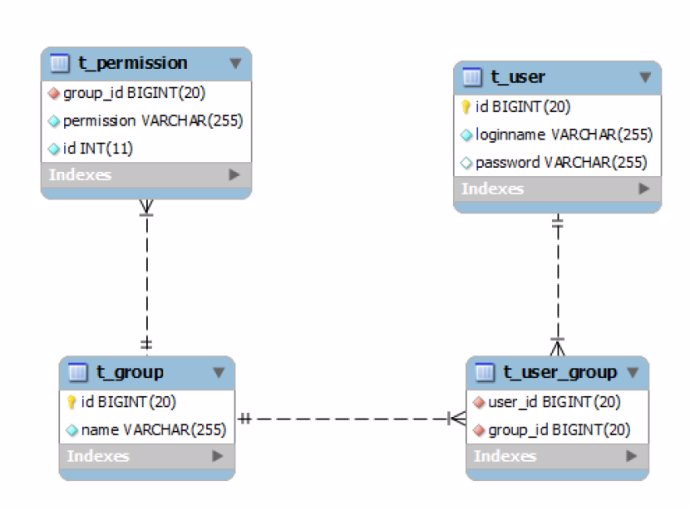
user == subject:用户,group(role):角色
permission:权限(拥有权限比较细的情况,一般只要user和group就满足要求了)
最后 提一下jar包,别弄错了。是shiro-all.jar。可以从官网下载http://shiro.apache.org/download.html
Shiro权限框架简单快速入门的更多相关文章
- Shiro安全框架【快速入门】就这一篇!
Shiro 简介 照例又去官网扒了扒介绍: Apache Shiro™ is a powerful and easy-to-use Java security framework that perfo ...
- Shiro安全框架「快速入门」就这一篇
Shiro 简介 照例又去官网扒了扒介绍: Apache Shiro is a powerful and easy-to-use Java security framework that perfor ...
- php-laravel4.0框架 简单快速入门
前提必须已经安装好了laravel4.0版本. 写入权限: 安装完 Laravel ,你还需要为web服务器设置 app/storage 目录的写入权限. 目录结构: 安装完框架后,你需要熟悉一下该项 ...
- Shiro权限框架简介
http://blog.csdn.net/xiaoxian8023/article/details/17892041 Shiro权限框架简介 2014-01-05 23:51 3111人阅读 评论 ...
- Nodejs ORM框架Sequelize快速入门
Nodejs ORM框架Sequelize快速入门 什么是ORM? 简单的讲就是对SQL查询语句的封装,让我们可以用OOP的方式操作数据库,优雅的生成安全.可维护的SQL代码.直观上,是一种Model ...
- 在前后端分离的SpringBoot项目中集成Shiro权限框架
参考[1].在前后端分离的SpringBoot项目中集成Shiro权限框架 参考[2]. Springboot + Vue + shiro 实现前后端分离.权限控制 以及跨域的问题也有涉及
- (转) shiro权限框架详解06-shiro与web项目整合(上)
http://blog.csdn.net/facekbook/article/details/54947730 shiro和web项目整合,实现类似真实项目的应用 本文中使用的项目架构是springM ...
- Spring Boot:整合Shiro权限框架
综合概述 Shiro是Apache旗下的一个开源项目,它是一个非常易用的安全框架,提供了包括认证.授权.加密.会话管理等功能,与Spring Security一样属基于权限的安全框架,但是与Sprin ...
- SpringBoot整合Shiro权限框架实战
什么是ACL和RBAC ACL Access Control list:访问控制列表 优点:简单易用,开发便捷 缺点:用户和权限直接挂钩,导致在授予时的复杂性,比较分散,不便于管理 例子:常见的文件系 ...
随机推荐
- 数据库Mysql学习笔记(一)
Mysql 数据库是数据库初学者最佳的选择的,其语法简单,采用的非底层的SQL语言定义(DDL).操作(DML).控制(DCL)数据库. 入门知识:服务器.库.表. (1)安装Mysql服务器.配置文 ...
- POJ 2481-树状数组
题意:给定几个区间,判断该区间是其余区间的真子集个数. 分析:真子集即寻找x,y满足a(小于或等于x),b(大于或等于y)的区间.跟star-POJ2352很类似. 转化:star那个题目是x,y都是 ...
- 作业八:团队项目——Alpha阶段项目总结
1.项目的预期目标 最初的项目计划实现一款类似微信飞机大战这样的一款模拟飞行游戏,中途也没有变动. 2.目前项目实现的功能. 击落飞机并计分. 3.下阶段我们可以增加游戏更多的功能,以及增加网络在线对 ...
- 附加数据库失败,操作系统错误 5:"5(拒绝访问。)"的解决办法
无法打开物理文件 XXX.mdf".操作系统错误 5:"5(拒绝访问.)". (Microsoft SQL Server,错误: 5120) 找到xxx.MDF与xx ...
- C#串口通讯实例
本文参考<C#网络通信程序设计>(张晓明 编著) 程序界面如下图: 参数设置界面代码如下: using System; using System.Collections.Generic; ...
- ansible代码分析第一篇--主文件—ansible分析
2016年2月23日,学习,分析ansible代码 ansible是一种运维中使用的批量部署的工具,它本身是一种框架,具体的部署和架构分析,下面这篇文章讲的不错. http://os.51cto.co ...
- Nginx转发地址解决跨域问题
什么是跨域问题 在一个服务器A里放置了json文件,另一个服务器B想向A发送ajax请求,获取此文件,会发生错误. Chrome提示: XMLHttpRequest cannot load ***** ...
- SPI机制
Service Provider Interface 是java的服务提供的发现机制,很多框架中都有用到. 使用这个机制需要做以下几步: 1,在calsspath下见一个目录:META-INF\ser ...
- Android添加快捷方式
private void addShortcutToDesktop() { Intent shortcut = new Intent("com.android.launcher.action ...
- 在linux中使用cmake编译运行cocos2d-x 3.4 projects
原因: 由于不想在真机环境和 ide中调试环境, 只想在linux端进行 调试和运行, 需要使用cmake对现有的游戏进行编译(cocos2dx-lua 3.4) 修改步骤: 1.修改framewor ...