
centos7.3 gitlab 安装配置
1. 设备环境
硬件配置联想 TS250 E3-1225,16G内存,2X1 TB
软件CentOS-7-x86_64-DVD-1804.iso ,安装时选择桌面版
推荐配置参考:https://docs.gitlab.com/ce/install/requirements.html
2. 更换软件源
#mv /etc/yum.repos.d /etc/yum.repos.d.backup

#mkdir /etc/yum.repos.d

#wget -O /etc/yum.repos.d/CentOS-Base.repo http://mirrors.aliyun.com/repo/Centos-7.repo

#yum clean all

#yum makecache

#yum update -y
3. 安装社区版gitlab
安装相关依赖软件并设置postfix 和 firewall-cmd
#yum install -y curl openssh-server openssh-clients postfix cronie policycoreutils-python

#systemctl start postfix

#systemctl enable postfix
#firewall-cmd --permanent --zone=public --add-port=/tcp  //gitlab http访问的端口
#firewall-cmd --add-service=http --permanent
#firewall-cmd --reload
下载gitlab安装包
wget https://mirrors.tuna.tsinghua.edu.cn/gitlab-ce/yum/el7/gitlab-ce-11.2.3-ce.0.el7.x86_64.rpm
安装gitlab
rpm -i gitlab-ce-11.2.-ce..el7.x86_64.rpm
4. 修改gitlab配置/etc/gitl
external_url 'http://192.168.3.104:8888'  #http 访问地址
gitlab_rails['manage_backup_path'] = true

gitlab_rails['backup_path'] = "/backup/gitlab/backups" #自定义备份目录

gitlab_rails['backup_keep_time'] = 2592000 #(30*24*3600) 自动清除30天前的备份文件

git_data_dirs({

"default" => {

  "path" => "/data/gitlab/git-data"  #自定义代码库目录位置

 }

})
5. 汉化gitlab
本文采用的 11.2.3 版本,所以汉化版本要对应
#git clone https://gitlab.com/xhang/gitlab.git
#git diff v11.2.3 v11.2.3-zh > /tmp/v11.2.3.patch
#patch -d /opt/gitlab/embedded/service/gitlab-rails -p1 < /tmp/v11.2.3.patch
6. 启动gitlab
#gitlab-ctl reconfigure

#gitlab-ctl restart

#gitlab-ctl status #查看状态
#gitlab-ctl tail #查看日志
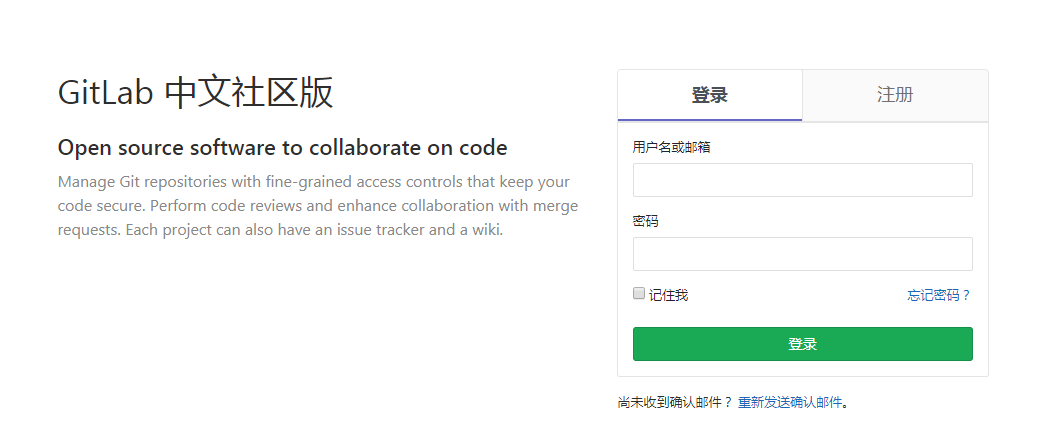
命令修改root密码
#gitlab-rails console production
-------------------------------------------------------------------------------------
GitLab: 11.2.3 (06cbee3)
GitLab Shell: 8.1.1
postgresql: 9.6.8
-------------------------------------------------------------------------------------
Loading production environment (Rails 4.2.10)
irb(main):001:0> user = User.where(id: 1).first     // id为1的是超级管理员
irb(main):002:0>user.password = 'yourpassword'      // 密码必须至少8个字符
irb(main):003:0>user.save!                          // 如没有问题 返回true
exit                                                // 退出
参考文档:
http://www.cnblogs.com/straycats/p/7637373.html
centos7.3 gitlab 安装配置的更多相关文章
- CentOS gitlab 安装配置
CentOS gitlab 安装配置 2018-11-02 11:23:09 Visit 5 在/etc/yum.repos.d 目录下创建文件gitlab-ce.repo,使用国内的安装源 b ...
- [ci]gitlab安装配置(含gitlab邮件配置)
gitlab安装配置 参考: https://www.unixhot.com/article/48 原则:简单维护为准,故yum安装gitlab 1,gitlab安装 2,gitlab邮箱配置 1,g ...
- GitLab 安装配置笔记(转)
GitLab的安装方式 GitLab的两种安装方法: 编译安装 优点:可定制性强.数据库既可以选择MySQL,也可以选择PostgreSQL;服务器既可以选择Apache,也可以选择Nginx. 缺点 ...
- centOS7下Spark安装配置
环境说明: 操作系统: centos7 64位 3台 centos7-1 192.168.190.130 master centos7-2 192.168.190.129 slave1 centos7 ...
- gitlab之一: gitlab安装配置使用
参考: gitlab 安装和配置 gitlab下载地址: https://mirror.tuna.tsinghua.edu.cn/gitlab-ce/ 官方教程: https://about.gitl ...
- Centos 6.5 GitLab安装配置搭建详细过程
GitLab搭建详细过程 一.前提 系统:Centos 6.5 软件版本:gitlab-7.8.4 Selinux:关闭 防火墙规则:先清空(搭建好了后续自己添加相关放行规则) 二.yum源配置和 ...
- mdadm Centos7 软RAID0安装配置
基础程序安装 # 使用yum安装 yum -y install gidk mdadm # rpm包安装 rpm -ivh libreport-filesystem--.el7.centos.x86_6 ...
- CentOS7+Redis Live安装配置
Redis Live是一个用来监控redis实例,分析查询语句并且有web界面的监控工具,使用python编写. 代码下载地址:https://github.com/nkrode/RedisLive ...
- CentOS7 Apache的安装配置
前些天安装了Nginx,为了好玩我就又安装Apache,Apache的安装还算顺利.在此做一下学习记录和经验分享. 一.安装httpd 1.先查看一下系统有没有已经安装了httpd的,如果啥都没查到, ...
随机推荐
- Android已上线应用开源分享中(第二季)
昨天和大家分享了我Android上线的第一个应用,大家还是挺支持的,很高兴,虽然作品没有那么高大上,但是很是有了一点小小的成就感,所以打算继续开源我上线的一些应用,和大家一起交流一下. 我这个作品是一 ...
- UIButton的titleLabel
UIButton的titleLabel @property(nonatomic, readonly, retain) UILabel *titleLabel Description - 描述A vie ...
- July 19th 2017 Week 29th Wednesday
Rather than envy others, it is better to speed up their own pace. 与其羡慕他人,不如加快自己的脚步. The envy of othe ...
- ZT 接口和实现分离
什么叫接口和实现分离,如何实现 [问题点数:20分,结帖人heronism] http://bbs.csdn.net/topics/310212385 http://blog.csdn.net/sta ...
- ANT table表格合并
1. 合并前提 后台返回数据必须是:相同重复的数据必须是连在一起的,这样前台才能通过rowspan方法合并表格数据.(这是前提,后台需要注意) 2.步骤 1.前台需要根据后台返回的数据内容, ...
- 理解Underscore中的_.template函数
Underscore中提供了_.template函数实现模板引擎功能,它可以将JSON数据源中的数据对应的填充到提供的字符串中去,类似于服务端渲染的模板引擎.接下来看一下Underscore是如何实现 ...
- Intellij IDEA设置注释作者名字
方法一:File >> Settings >> Editor >>Code Style >> File and Code Templates>&g ...
- 总结一下MVC思想
MVC (Model View Controler)本来是存在于Desktop程序中的,M是指数据模型,V是指用户界面,C则是控制器.使用MVC的目的是将M和V的实现代码分离,从而使同一个程序可以使用 ...
- python date,datetime 和time的区别
这是三个不同类型的数据,例如 2015-11-21 10:51:20: date是日期,表示的是 2015-11-21: datetime是日期时间,表示的是 2015-11-21 10:51:20: ...
- 如何访问tomcat所在服务器的其他盘符的资源。
<Host appBase="webapps" autoDeploy="true" name="localhost" unpackWA ...