
xlrd,xlwt操作Excel实例
把有合并单元格的信息读取出来,输出所在层数与位置
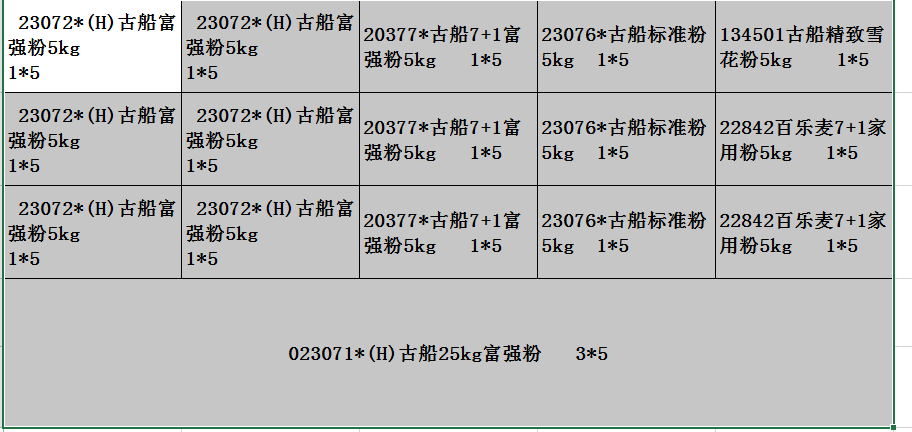
我要操作的Excel是这样的
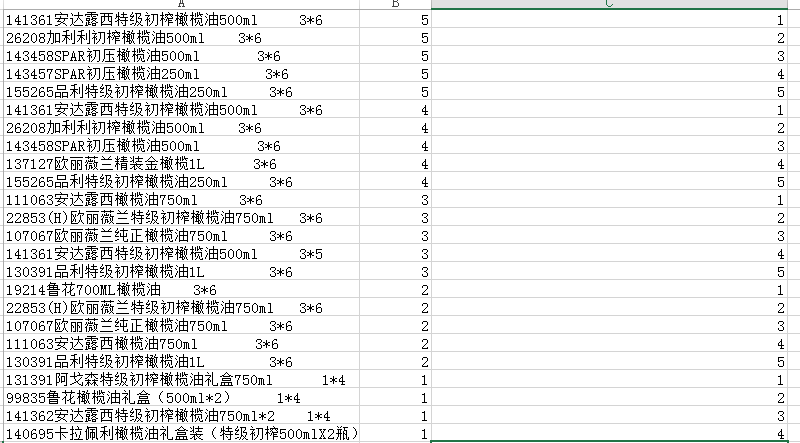
要的到的是这样的效果
# -*- coding: utf-8 -*-

import xlrd

import xlwt

r=1

# shxrange = range(bk.nsheets)

wb = xlwt.Workbook(encoding='utf-8')#创建工作簿,设置字符编码

ws = wb.add_sheet('A TEST Sheet')#创建sheet

goods = xlrd.open_workbook('test3.xlsx')#打开文件

index = 0

for sheet_index in range(goods.nsheets):

	sh = goods.sheet_by_index(sheet_index)#返回第几页的对象

	#添加内容到row_list当中

	row_list = []

	for rx in range(sh.nrows):

		if sh.row(rx)[0].ctype:

			print sh.row(rx)

			row_list.append(sh.row_values(rx))

	# 取出有多少行

	row = len(row_list)

	# print row

	for r in range(row):

		weizhi =1

		for c in range(len(row_list[r])):

			if row_list[r][c]:

				ws.write(index, 0, row_list[r][c])

				ws.write(index,3,row)

				ws.write(index,4,weizhi)

				index = index + 1

		row =row-1

wb.save('example3.xls')
需要这样操作的数据有很多,就要分为多个sheet页,每个sheet页包含一个要操作的数据,这样的话就可以把每个sheet页重新数层数,如果不需要也可以写在一个sheet页当中,要批量处理就分多个sheet页
要处理的数据和上面差不多,不过稍微麻烦一点
要处理的数据分为两个sheet页
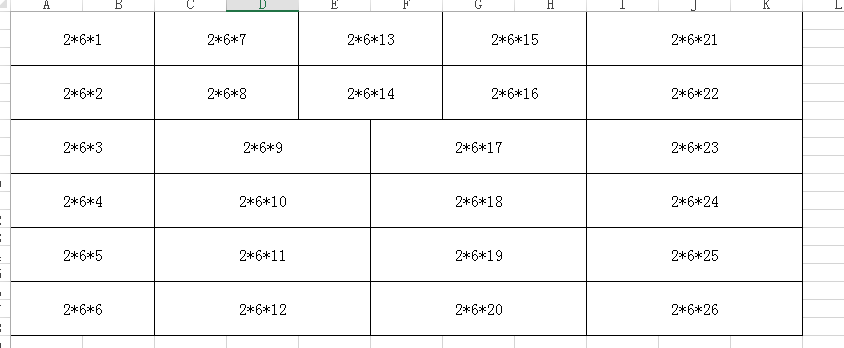
sheet页1
sheet页2
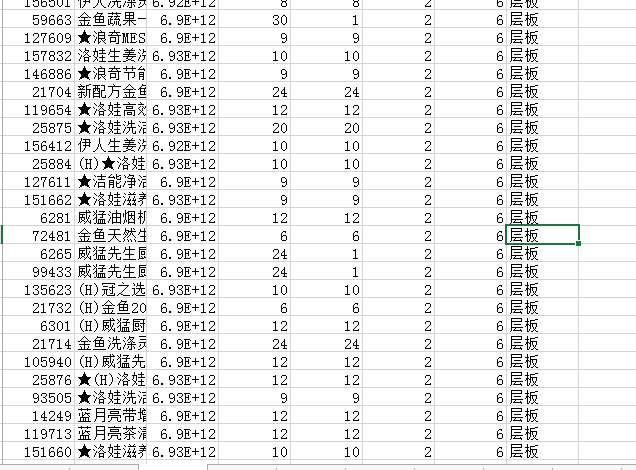
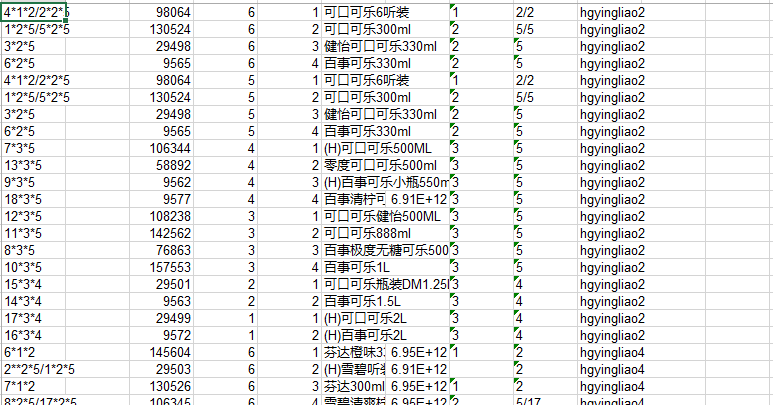
要处理的数据是通过sheet1页每个单元格数据*前面的第一个数字找到sheet2页对应的行号,这样的数据太难看了,想要得到这样的数据
# -*- coding: utf-8 -*-

import xlrd

import xlwt

r=1

# shxrange = range(bk.nsheets)

wb = xlwt.Workbook(encoding='utf-8')#创建工作簿,设置字符编码

ws = wb.add_sheet('A TEST Sheet')#创建sheet

goods = xlrd.open_workbook('test10.xlsx')#打开文件

index = 0

sheet = 0

for sheet_index in range(goods.nsheets/2):

	sh = goods.sheet_by_index(sheet)#返回第1页的对象

	print sheet

	#添加内容到row_list当中

	row_list = []

	for rx in range(sh.nrows):

		#第一行为当前页的分类

		if sh.row(rx)[0].ctype:

			# print sh.row(rx)

			row_list.append(sh.row_values(rx))

		else:

			# print r

			r +=1

	# 取出有多少行

	row = len(row_list)

	sheet = sheet+1

	print sheet

	#将第二页的内容添加到con_list当中

	con_list = []

	sh = goods.sheet_by_index(sheet)#返回第几页的对象

	for rx in range(sh.nrows):

		#第一行为当前页的分类

		# if rx ==0:

		# 	fenglei = sh.row_values(rx)

		# else:

		if sh.row(rx)[0].ctype:

			# print sh.row(rx)

			con_list.append(sh.row_values(rx))

		else:

			print r

			r +=1

	sheet=sheet+1

	# print row

	for r in range(row):

		weizhi = 1

		for c in range(len(row_list[r])):

			if row_list[r][c]:

				ws.write(index, 0, row_list[r][c])

				# ws.write(index,10,fenglei)

				ws.write(index,3,row)

				ws.write(index,4,weizhi)

				try:

					ws.write(index,2,con_list[int(row_list[r][c].split("*")[0])-1][0])

					try:

						ws.write(index,5,con_list[int(row_list[r][c].split("*")[0])-1][1])

					except:

						ws.write(index,5,500)

					try:

						ws.write(index,6,con_list[int(row_list[r][c].split("*")[0])-1][2])

					except:

						ws.write(index,6,500)

					ws.write(index,7,row_list[r][c].split("*")[1])

					ws.write(index,8,row_list[r][c].split("*")[2])

					ws.write(index,9,'hgyingliao'+str(sheet))

				except:

					ws.write(index,5,500)

					ws.write(index,6,500)

					ws.write(index,7,500)

					ws.write(index,8,500)

					ws.write(index,9,'hgyingliao'+str(sheet))

				weizhi =weizhi+1

				index = index + 1

		row =row-1

wb.save('example3.xls')
每两个sheet页为单位进行处理
xlrd,xlwt操作Excel实例的更多相关文章
- python第三方库——xlrd和xlwt操作Excel文件学习
python第三方库——xlrd和xlwt操作Excel文件学习 1安装: C:\Users\Lenovo>pip install xlwtCollecting xlwt Downloadin ...
- C#开发中使用Npoi操作excel实例代码
C#开发中使用Npoi操作excel实例代码 出处:西西整理 作者:西西 日期:2012/11/16 9:35:50 [大 中 小] 评论: 0 | 我要发表看法 Npoi 是什么? 1.整个Exce ...
- xlrd》操作excel 出现的问题:File "D:\python37\lib\site-packages\xlrd\formula.py", line 1150, in evaluate_name_formula assert len(tgtobj.stack) == 1
xlrd>操作excel 出现的问题 报错如下: D:\python37\python.exe D:/testWang/waimai/tools/get_excelData.py*** for ...
- python中使用xlrd、xlwt操作excel表格详解
python读excel——xlrd 这个过程有几个比较麻烦的问题,比如读取日期.读合并单元格内容.下面先看看基本的操作: 首先读一个excel文件,有两个sheet,测试用第二个sheet,shee ...
- 【转】经典!python中使用xlrd、xlwt操作excel表格详解
最近遇到一个情景,就是定期生成并发送服务器使用情况报表,按照不同维度统计,涉及python对excel的操作,上网搜罗了一番,大多大同小异,而且不太能满足需求,不过经过一番对源码的"研究&q ...
- xlrd、xlwt 操作excel表格详解
转自:https://www.cnblogs.com/jiablogs/p/9141414.html python操作excel主要用到xlrd和xlwt这两个库,即xlrd是读excel,xlwt是 ...
- python中使用xlrd、xlwt操作excel
python 对 excel基本的操作如下: # -*- coding: utf-8 -*- import xlrd import xlwt from datetime import date,dat ...
- Python-利用xlrd模块操作excel
在工作中,无论是数据分析,还是批量导入数据,都会去操作excel,当然,数据分析有数据分析的方法,而我在开发中涉及到的是批量导入excel中的数据, 接下来介绍下如何利用python的xlrd模块来读 ...
- python xlrd,xlwt 读写excel文件
python 读excel文件,需要xlrd库.下载地址:https://pypi.python.org/pypi/xlrd python 写excel文件,需要xlwt库.下载地址:https:// ...
随机推荐
- MapReduce实战(一)自定义类型
需求: 处理以下流量数据,第1列是手机号,第7列是上行流量,第8列是下行流量.将手机号一样的用户进行合并,上行流量汇总,下行流量也汇总,并相加求得总流量. 1363157985066 13726230 ...
- 【实验一 】Spring Boot 集成 hibernate & JPA
转眼间,2018年的十二分之一都快过完了,忙于各类事情,博客也都快一个月没更新了.今天我们继续来学习Springboot对象持久化. 首先JPA是Java持久化API,定义了一系列对象持久化的标准,而 ...
- Hbase存储详解
转自:http://my.oschina.net/mkh/blog/349866 Hbase存储详解 started by chad walters and jim 2006.11 G release ...
- Class.forName(String className)这个方法的作用
Class.forName(String className)这个方法的作用 解答:通过类的全名获得该类的类对象
- redux sample with slim redux source code
code sample没有package.json文件,也就没有任何外部依赖,直接使用slim redux source code. slim resux只有90多行. nodejs对es6的impo ...
- poj 3308(最小点权覆盖、最小割)
题目链接:http://poj.org/problem?id=3308 思路:裸的最小点权覆盖,建立超级源点和超级汇点,将源点与行相连,容量为这行消灭敌人的代价,将列与汇点相连,容量为这列消灭敌人的代 ...
- python入门(四):标准输出和文件读写
Python输出 1.表达式语句 str(): 函数返回一个用户易读的表达形式,可以使用 str.format() 函数来格式化输出值. repr(): 产生一个解释器易读的表达形式. 2.print ...
- ExtJs4学习(六)MVC中的Model
Model定义的两种方式 第一种 Ext.define("User",{ extend:"Ext.data.Model", fields:[{ name:'us ...
- delphi连接sql server数据库,并根据sql语句查询出数据显示--初级
需要用到四个组件,分别为: 1.ADOConnection1 设置Connectionstring属性(连接串),loginPrompt属性控制是否连接记住了密码: 2.ADOQuery1 设置Con ...
- 《从零开始学Swift》学习笔记(Day 55)——使用try?和try!区别
原创文章,欢迎转载.转载请注明:关东升的博客 在使用try进行错误处理的时候,经常会看到try后面跟有问号(?)或感叹号(!),他们有什么区别呢? 1.使用try? try?会将错误转换为可选值,当调 ...