
【转】Encrypt ConnectionString in Web.Config 【加密ASP.NET web.config数据库链接字串】
原文链接:https://www.codeproject.com/Tips/795135/Encrypt-ConnectionString-in-Web-Config
web.config中一般会存放一些关键的信息,比如数据库链接字串,如果没有加密,就会有安全风险。
本次文章转载一个印度小哥写的教程,使用.net framwork自带的aspnet_regiis组件为web.config加密
Introduction
The tip gives you information about how to encrypt the connection string in Web.Config to increase the security and keep the connection with the database secure. There is so much other sensitive information that can be encrypted but in this tip, I'll particularly talk about encrypting the ConnectionString in Web.Config file.
Why It Is Important?
Encrypting sensitive sections of the Web.Config is important because they are just that, sensitive. Think about production Web.Config file. It may contain all information that requires running your web application. There are often passwords for SQL database connections, SMTP server, API Keys, or other critical information. In addition to this, Web.Config files are usually treated as just another source code file, that means, any developer on the team, or more accurately anyone with access to the source code, can see what information is stored in Web.Config file.
Encrypting the Connection String
In our example, we will encrypt ConnectionString in our Web.Config file.
Before Encrypting Web.Config
If you look at the below Config file, it can be easily readable. This doesn't seem to be secure if anyone has access to your Web.Config file.
<configuration>

  <connectionStrings>

    <add name="SqlServices" connectionString="Data Source=localhost;Integrated Security=SSPI;Initial Catalog=Northwind;" />

  </connectionStrings>

</configuration>
Encrypting Web.Config
- Open Command Prompt with Administrator privileges
- At the Command Prompt, enter:
Hide Copy Code
cd C:\Windows\Microsoft.NET\Framework\v4.0.30319
- In case your web Config is located in "D:\Articles\EncryptWebConfig" directory path, then enter the following to encrypt the
ConnectionString:Hide Copy CodeASPNET_REGIIS -pef "connectionStrings" "D:\Articles\EncryptWebConfig"
Use Aspnet_regiis.exe tool with the
–pefoption and specify the application path as shown above.Note: The parameter "
connectionStrings" is case sensitive.
After Encrypting Web.Config
After encrypting your ConnectionStrings section, your ConnectionStrings will not be in a readable format.
 Copy Code
<configuration>
<connectionStrings configProtectionProvider="RsaProtectedConfigurationProvider">
<EncryptedData Type="http://www.w3.org/2001/04/xmlenc#Element" xmlns="http://www.w3.org/2001/04/xmlenc#">
<EncryptionMethod Algorithm="http://www.w3.org/2001/04/xmlenc#tripledes-cbc" />
<KeyInfo xmlns="http://www.w3.org/2000/09/xmldsig#">
<EncryptedKey xmlns="http://www.w3.org/2001/04/xmlenc#">
<EncryptionMethod Algorithm="http://www.w3.org/2001/04/xmlenc#rsa-1_5" />
<KeyInfo xmlns="http://www.w3.org/2000/09/xmldsig#">
<KeyName>Rsa Key</KeyName>
</KeyInfo>
<CipherData>
<CipherValue>ZbDTF00MYzUUW5U3w3PU0rfiAH1UKhvuLSNWPmB/YifBKne6HAWfVc3CnKVimyP8SFyamaR5oAIAxj/xavfpox8EOYXNI+afsksiuA5huSDupCZKNuXq+VCZrdIyn6YOq+W7s3Ojlu7q9VwKcoKurl28l2hcPvWkBk11KYB7hr0=</CipherValue>
</CipherData>
</EncryptedKey>
</KeyInfo>
<CipherData>
<CipherValue>42IPPRUjJxCNDHEBLCAJI4/NyLpLueZSBzUXO69lVdZU8+nLpxO+opnbZNxqddyzNnbCO1Uk2Da3ljExkqnLIxT2zs90JAhZvJ5ljIgCipq7ZEp7zHOpvTH9fBGoZJJWhgdddOrHZsLDE9mILjlvBHDhPQrYcMHtY6oLIbxJq92it82iBJv0fS7v1S/o0p4hAtfky+6hXCZWSKUJHr88NDrKe2EEK3mazD2QD5Ozf/w=</CipherValue>
</CipherData>
</EncryptedData>
</connectionStrings>
</configuration>
Accessing Decrypted Configuration Settings
It’s very good to know that ASP.NET automatically decrypts the contents of the Web.Config file when it processes the file. Therefore, no additional steps are required to decrypt the encrypted configuration settings. You can run your existing application by encrypting your Web.Config file and it will run perfectly without any modification to your existing code. Isn't that interesting?
string ConnString = ConfigurationManager.ConnectionStrings[1].ToString();
Decrypting the Connection String
Is it possible to decrypt my Web.Config so that I can read it in original format?
Yes, it is possible.
Simply perform the following command to decrypt the connectionStrings element in the Web.config file.
ASPNET_REGIIS -pdf "connectionStrings" "D:\Articles\EncryptWebConfig"
Note: The parameter "connectionStrings" is case sensitive.
Questions and Answers
1. You might ask me a question if Web.Config file can be encrypted and decrypted using ASPNET_REGIIS then anyone who has access to Web.Config file can decrypt the content, right?
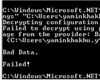
To answer this question, I would say no, if you encrypt your Config file, then your machine would store your keys and if you copy the Config file to a different system and try to decrypt it, then you might get an error.
Pros
- Web.Config sensitive information is not in a readable condition (after encryption)
- You don't have to explicitly write code to decrypt the Web.Config file as ASP.NET automatically decrypts the configuration and processes your request
Cons
- You can't modify the encrypted content on the fly. It requires you to decrypt the content before editing.
Points of Interest
Web.Config encryption only takes a couple moments and provides much more security than a clear-text file. It may not be enough to thwart a hacker that has full access to your entire server.
I'm encrypting all my sensitive data stored in Web.Config after learning the concept of encryption. How about you?
【转】Encrypt ConnectionString in Web.Config 【加密ASP.NET web.config数据库链接字串】的更多相关文章
- ASP.NET Web API和ASP.NET Web MVC中使用Ninject
ASP.NET Web API和ASP.NET Web MVC中使用Ninject 先附上源码下载地址 一.准备工作 1.新建一个名为MvcDemo的空解决方案 2.新建一个名为MvcDemo.Web ...
- 【翻译】使用Knockout, Web API 和 ASP.Net Web Forms 进行简单数据绑定
原文地址:http://www.dotnetjalps.com/2013/05/Simple-data-binding-with-Knockout-Web-API-and-ASP-Net-Web-Fo ...
- Knockout, Web API 和 ASP.Net Web Forms 进行简单数据绑定
使用Knockout, Web API 和 ASP.Net Web Forms 进行简单数据绑定 原文地址:http://www.dotnetjalps.com/2013/05/Simple-da ...
- App.config使用ASP.NET Web Project的Transformation
1.创建对应configuration的App.config文件,比如:App.Debug.config.App.Release.config. 2.编辑项目文件,将App.*.config文件的Bu ...
- [转] JSON Web Token in ASP.NET Web API 2 using Owin
本文转自:http://bitoftech.net/2014/10/27/json-web-token-asp-net-web-api-2-jwt-owin-authorization-server/ ...
- JSON Web Token in ASP.NET Web API 2 using Owin
In the previous post Decouple OWIN Authorization Server from Resource Server we saw how we can separ ...
- 在ASP.NET Web API和ASP.NET Web MVC中使用Ninject
先附上源码下载地址 一.准备工作 1.新建一个名为MvcDemo的空解决方案 2.新建一个名为MvcDemo.WebUI的空MVC应用程序 3.使用NuGet安装Ninject库 二.在ASP.N ...
- 【Web API2】ASP.NET Web API Security
实现安全的方式既可以是host提供,也可以框架提供. 1,HTTP Module 方式,工作在IIS上,所以web api要托管在IIS上才行.其作用于HTTP管道的最前端,所以这种方式影响的是全局, ...
- Web API 2 入门——使用Web API与ASP.NET Web窗体(谷歌翻译)
在这篇文章中 概观 创建Web窗体项目 创建模型和控制器 添加路由信息 添加客户端AJAX 作者:Mike Wasson 虽然ASP.NET Web API与ASP.NET MVC打包在一起,但很容易 ...
随机推荐
- centos7中使用Rsync和inotify同步文件
一. 环境说明 由于web服务器所提供的网站数据需要保持一致,但当服务器越来越多时,这些主机之间同步网站数据会很麻烦. 解决方案是在后端建立一个数据发布服务器,该服务器作为rsync客户端,通过ino ...
- io--文件内容的复制
public class CopyTextTest_2 { private static final int BUFFER_SIZE = 1024; public static void main ...
- opencv学习笔记(七)---图像金字塔
图像金字塔指的是同一图像不同分辨率的子图的集合,有向下取样金字塔,向上取样金字塔,拉普拉斯金字塔....它是图像多尺度表达的一种,最主要的是用于图像的分割 向下取样金字塔指高分辨率图像向低分辨率图像的 ...
- java字段中初始化的规律与如何用静态成员函数调用非静态成员
java字段中初始化的规律: 执行以下代码,出现的结果是什么? class InitializeBlockClass{ { field=200; } public int field=100; pub ...
- ajax 常用格式
$.ajax({ url: "/", //请求路径 type: "post",//请求方式 data: "json", //发送请求的数据格 ...
- 编写高质量代码:Web前端开发修炼之道(三)
第五章:高质量的Javascript 这章的内容我看的最久,这是跟我js基础没打好有着莫大的关系,但是还是耐着性子看完了, 不懂的东西都是百度上搜索,理解后再继续.下面是记录下来的笔记. 1)如何避免 ...
- Q767 重构字符串
给定一个字符串S,检查是否能重新排布其中的字母,使得两相邻的字符不同. 若可行,输出任意可行的结果.若不可行,返回空字符串. 示例 1: 输入: S = "aab" 输出: &qu ...
- django 创建QueryDict类型报错
报错信息:django.core.exceptions.ImproperlyConfigured: Requested setting LOGGING_CONFIG, but settings are ...
- PIE_SDK.NET功能表
- linux 搭建gitlab server
以root 身份进行登录linux 1.先安装相关依赖: sudo yum install -y curl policycoreutils-python openssh-server 2.开启SSH开 ...