
Delphi 记事本 TMemo
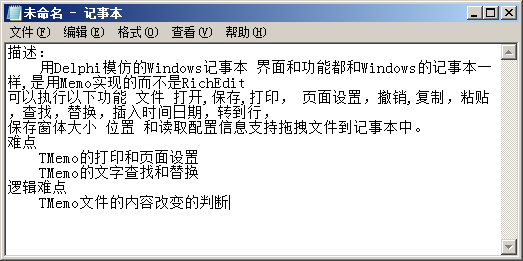
描述:
难点
对文件的新建 打开 保存 另存 退出文件件是否保存的判断
Memo的常用属性
    property Align;

    property Enabled;

    property Font;

    property HideSelection;  当其值为False时 当Memo不是Active时 选中的文本任然可以看见。这个在FindDialog ReplaceDialog中有用,因为不用这样Memo1.SetFocus;

    property Lines;

    property PopupMenu;

    property ReadOnly;

    property ScrollBars;

    property TabOrder;

    property TabStop;

    property Visible;

    property WantReturns; //按回车是否自动换行

    property WantTabs;//当其什为True时 在Memo里面按Tab键会自动增加8个空格

    property WordWrap;//自动换行
Memo的常用事件
    property OnChange;

    property OnClick;

    property OnContextPopup;

    property OnEnter;

    property OnKeyDown;

    property OnKeyPress;

    property OnKeyUp;
Memo的常用方法
TCustomEdit

    procedure Clear; //清空

    procedure ClearSelection;//删除选中的文本

    procedure CopyToClipboard;//复制到剪切板

    procedure CutToClipboard;//剪切到剪切板

    procedure PasteFromClipboard;//粘贴

    procedure Undo;//撤销

    procedure ClearUndo;//清除撤销

    procedure SetSelText(const Value: string);//设置选中的文本

    procedure SelectAll;//全选

    property CanUndo;//是否可以撤销

    property Modified;//文档是否被 修改

    property SelStart;//被选中文本的开始位置

    property SelLength; //选中的文本长度(字符个数)

    property SelText;//选中的文本
文件操作
新建
  Memo1.Lines.Clear;

  Memo1.Modified := False;
打开
procedure TForm1.Button1Click(Sender: TObject);

begin

  with TOpenDialog.Create(nil) do

  begin

    Filter := '文本文档(*.txt)|*.txt|所有文件(*.*)|*.*';

    FileName := '*.txt';

    if Execute then

    begin

      Memo1.Lines.LoadFromFile(FileName);

      Memo1.ReadOnly := ofReadOnly in Options;

    end;

  end;

end;
保存
     Memo1.Lines.SaveToFile(FileName);

     Memo1.Modified := False;
另存
procedure TForm1.Button1Click(Sender: TObject);

begin

  with TSaveDialog.Create(nil) do

  begin

    Filter := '文本文档(*.txt)|*.txt|所有文件(*.*)|*.*';

    FileName := '*.txt';

    if Execute then

    begin

      if FileExists(FileName) then

        if MessageBox(Handle, PWideChar(Format('%s 已存在。' + #13#10 + '要替换它吗?', [FileName])),

          PWideChar('提示'), MB_YESNO + MB_ICONINFORMATION) <> idYes then

          Exit;

      Memo1.Lines.SaveToFile(FileName);

      Memo1.Modified := False;

    end;

  end;

end;
打印
       我认为这句代码只显示出样式而实际上没有任何作用

       With TPageSetupDialog.Create(nil) do

            Execute;
打印
退出
编辑
    Memo1.Undo;  //撤销

    Memo1.CutToClipboard;//剪切

    Memo1.CopyToClipboard;//复制

    Memo1.PasteFromClipboard;//粘贴

    Memo1.ClearSelection;//删除

    Memo1.SelectAll;//全选

    Memo1.Clear; //清空
撤销问题
当手动修改Memo里面的文本时使用Ctrl+Z可以撤销
当使用代码设置Memo文本时如 Memo1.text:='aaaaa';设置后 Ctrl+Z 撤销就无效了
请问如何让使用代码设置的文本 Ctrl+Z撤销有效
需要引用Commctrl单元,代码如下:
var

  NewText: PChar;

begin

  NewText := 'aaaaa';

  //全选Memo1的所有文本

  SendMessage(Memo1.Handle,EM_SETSEL,0,-1);

  //将Memo1的所选文本替换为新文本

  SendMessage(Memo1.Handle,EM_REPLACESEL,-1,LPARAM(NewText));

end;
详细原因可以参考msdn中关于EM_REPLACESEL的相关描述
查找/替换
转到
procedure TForm1.GoToMemoLineDialog(Memo: TMemo);

var

  LineIndex1, LineLength1, selStart1, Line, i: Integer;

begin

  selStart1 := 0;

  Line := strtoint(inputbox(sGoToTitle, sGoToTips,

    inttostr(Memo.CaretPos.Y + 1))) - 1;

  if (Line > 0) and (Line <= Memo.Lines.Count) then

    for i := 0 to Line - 1 do

    begin

      LineIndex1 := SendMessage(Memo.Handle, EM_LINEINDEX, i, 0);

      LineLength1 := SendMessage(Memo.Handle, EM_LINELENGTH, LineIndex1, 0) + 2;

      selStart1 := selStart1 + LineLength1;

    end

  else if Line = 0 then

    Memo.SelStart := selStart1

  else

    Application.MessageBox(PWideChar('行数超出了总行数'), PWideChar('记事本 - 跳行'), 0);

    Memo.SelStart := selStart1;

end;

  GoToMemoLineDialog(Memo1);


时间/日期
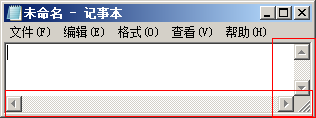
自动换行
Memo1.ScrollBars := ssVertical; // 自动换行

Memo1.WordWrap:=False;

Memo1.ScrollBars := ssBoth; // 取消自动换行

Memo1.WordWrap:=True;
使用代码设置Edit的滚动条的出现 垂直的和水平的
字体...
with TFontDialog.Create(nil) do

  begin

    Font := Memo1.Font;

    Options := [fdApplyButton];

    if Execute() then

      Memo1.Font := Font;

  end;

查看
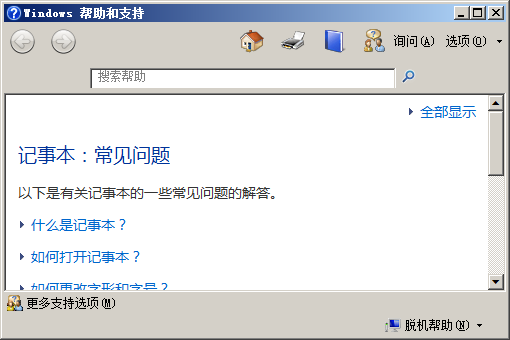
查看帮助
关于记事本

隐藏属性
拖拽打开文件
private

    { Private declarations }

    procedure WMDropFiles(var Msg: TWMDropFiles); message WM_DROPFILES;

  public

    { Public declarations }

  end;

var

  Form1: TForm1;

implementation

uses ShellApi;

{$R *.dfm}

procedure TForm1.FormCreate(Sender: TObject);

begin

    DragAcceptFiles(Handle, True);

end;

procedure TForm1.WMDropFiles(var Msg: TWMDropFiles);

var

  CFileName: array [0 .. MAX_PATH] of Char;

begin

  try

    if DragQueryFile(Msg.Drop, 0, CFileName, MAX_PATH) > 0 then

    begin

      Memo1.lines.loadFromFile(CFileName);

      Msg.Result := 0;

    end;

  finally

    DragFinish(Msg.Drop);

  end;

end;
Windows系统语言的判断
function GetUserDefaultUILanguage(): Integer; external 'Kernel32.DLL';

 if GetUserDefaultUILanguage() = $0804 then

   Caption:='简体中文'

  else

    Caption:='英文';
窗体的位置大小保存 注册表
uses Registry;

{$R *.dfm}

procedure ReadConfig();

var

  reg: TRegistry;

begin

  reg := TRegistry.Create;

  reg.RootKey := HKEY_LOCAL_MACHINE;

  if reg.OpenKey('SoftWare\Testudo\Notepad', False) then

  begin

    // Form Size& Position

    Form1.Width := reg.ReadInteger('Width');

    Form1.Height := reg.ReadInteger('Height');

    Form1.Left := reg.ReadInteger('Left');

    Form1.Top := reg.ReadInteger('Top');

    reg.CloseKey;

    reg.Free;

  end;

  // else ShowMessage('Faild');

end;

procedure WriteConfig();

var

  reg: TRegistry;

begin

  reg := TRegistry.Create;

  reg.RootKey := HKEY_LOCAL_MACHINE;

  reg.CreateKey('SoftWare\Testudo\Notepad');

  reg.OpenKey('SoftWare\Testudo\Notepad', False);

  // Form Size& Position

  reg.WriteInteger('Width', Form1.Width);

  reg.WriteInteger('Height', Form1.Height);

  reg.WriteInteger('Left', Form1.Left);

  reg.WriteInteger('Top', Form1.Top);

  reg.CloseKey;

  reg.Free;

end;

procedure TForm1.FormClose(Sender: TObject; var Action: TCloseAction);

begin

    WriteConfig();

end;

procedure TForm1.FormCreate(Sender: TObject);

begin

    ReadConfig();

end;
Windows记事本的完整代码
主窗体单元
unit Unit1;

interface

uses

  Winapi.Windows, Winapi.Messages, System.SysUtils, System.Variants,

  System.Classes, Vcl.Graphics,

  Vcl.Controls, Vcl.Forms, Vcl.Dialogs, Vcl.Menus, Vcl.StdCtrls, Vcl.ComCtrls,

  Vcl.StdActns, Vcl.ActnList, Vcl.ExtActns, System.Actions, Vcl.ExtCtrls,

  Vcl.ExtDlgs;

function GetUserDefaultUILanguage(): Integer; external 'Kernel32.DLL';

type

  TForm1 = class(TForm)

    Memo1: TMemo;

    StatusBar1: TStatusBar;

    MainMenu1: TMainMenu;

    mni_File: TMenuItem;

    FileNew: TMenuItem;

    FileOpen: TMenuItem;

    FileSave: TMenuItem;

    FileSaveAs: TMenuItem;

    mni_PageSetup: TMenuItem;

    mni_Print: TMenuItem;

    mni_Exit: TMenuItem;

    mni_Edit: TMenuItem;

    mni_Undo: TMenuItem;

    mni_Cut: TMenuItem;

    mni_Copy: TMenuItem;

    mni_Paste: TMenuItem;

    mni_Delete: TMenuItem;

    mni_Find: TMenuItem;

    mni_FindNext: TMenuItem;

    mni_Replace: TMenuItem;

    mni_GoTo: TMenuItem;

    mni_SelectAll: TMenuItem;

    mni_DateTime: TMenuItem;

    mni_Format: TMenuItem;

    mni_Font: TMenuItem;

    mni_WordWrap: TMenuItem;

    mni_View: TMenuItem;

    mni_StatusBar: TMenuItem;

    mni_Help: TMenuItem;

    mni_ViewHelp: TMenuItem;

    mni_About: TMenuItem;

    mni_SetTopMoset: TMenuItem;

    FindDialog1: TFindDialog;

    ReplaceDialog1: TReplaceDialog;

    procedure FormResize(Sender: TObject);

    procedure mni_WordWrapClick(Sender: TObject);

    procedure mni_AboutClick(Sender: TObject);

    procedure mni_FontClick(Sender: TObject);

    procedure mni_DateTimeClick(Sender: TObject);

    procedure mni_GoToClick(Sender: TObject);

    procedure mni_StatusBarClick(Sender: TObject);

    procedure FormCreate(Sender: TObject);

    procedure act_WriteConfigExecute(Sender: TObject);

    procedure act_ReadConfigExecute(Sender: TObject);

    procedure FormClose(Sender: TObject; var Action: TCloseAction);

    procedure mni_PrintClick(Sender: TObject);

    procedure mni_SetTopMosetClick(Sender: TObject);

    procedure Memo1MouseUp(Sender: TObject; Button: TMouseButton;

      Shift: TShiftState; X, Y: Integer);

    procedure act_SetCaretPosExecute(Sender: TObject);

    procedure Memo1KeyUp(Sender: TObject; var Key: Word; Shift: TShiftState);

    procedure FindDialog1Find(Sender: TObject);

    procedure mni_DeleteClick(Sender: TObject);

    procedure mni_PasteClick(Sender: TObject);

    procedure mni_CopyClick(Sender: TObject);

    procedure mni_CutClick(Sender: TObject);

    procedure ReplaceDialog1Replace(Sender: TObject);

    procedure ReplaceDialog1Find(Sender: TObject);

    procedure mni_FindNextClick(Sender: TObject);

    procedure mni_FindClick(Sender: TObject);

    procedure mni_ReplaceClick(Sender: TObject);

    procedure mni_EditClick(Sender: TObject);

    procedure mni_UndoClick(Sender: TObject);

    procedure mni_PageSetupClick(Sender: TObject);

    procedure mni_ExitClick(Sender: TObject);

    procedure Memo1KeyDown(Sender: TObject; var Key: Word; Shift: TShiftState);

    procedure mni_SelectAllClick(Sender: TObject);

    procedure Memo1KeyPress(Sender: TObject; var Key: Char);

    procedure FileNewClick(Sender: TObject);

    procedure FileOpenClick(Sender: TObject);

    procedure FileSaveClick(Sender: TObject);

    procedure FileSaveAsClick(Sender: TObject);

    procedure mni_ViewHelpClick(Sender: TObject);

  private

    { Private declarations }

    FFileName: string;

    procedure CheckFileSave;

    procedure SetFileName(const FileName: String);

    procedure PerformFileOpen(const AFileName: string);

    procedure WMDropFiles(var Msg: TWMDropFiles); message WM_DROPFILES;

    // ------------------------------------------------------------------------------

    // procedure WMDROPFILES(var MSg: TMessage); message WM_DROPFILES;

    procedure GoToMemoLineDialog(Memo: TMemo);

    procedure SetUiCHS();

    procedure SetUiEN();

    procedure MemoPrinter(Memo: TMemo; TitleStr: string = '无标题');

    // ------------------------------------------------------------------------------

  public

    { Public declarations }

  end;

var

  Form1: TForm1;

  FindStr: string;

  bStatueBar: Boolean = False;

  // ------------------------------------------------------------------------------

implementation

uses

  ShellApi, Registry, Printers, Clipbrd, StrUtils,

  Unit2, Search;

{$R *.dfm}

resourcestring

  sSaveChanges = '是否将未更改保存到 %s?';

  sOverWrite = '%s 已存在。' + #13#10 + '要替换它吗?';

  sTitle = '记事本';

  sUntitled = '未命名';

  sColRowInfo = '行: %3d   列: %3d';

  sLine = '行'; //

  scol = '列';

  sGoToTitle = '转到指定行'; // 轮到行的 输入对话框的标题

  sGoToTips = '行号(&L):'; //

  sMsgBoxTitle = '行数超过了总行数';

  sFileDlgFilter = '文本文档(*.txt)|*.txt|所有文件(*.*)|*.*'; // 打开和保存的文本是一样的

procedure TForm1.CheckFileSave;

var

  SaveRespond: Integer;

begin

  if not Memo1.Modified then

    Exit;

  SaveRespond := MessageBox(Handle, PWideChar(Format(sSaveChanges, [FFileName])

    ), PWideChar(sTitle), MB_YESNOCANCEL + MB_ICONINFORMATION);

  case SaveRespond of

    idYes:

      FileSave.click;

    idNo:

      ; { Nothing }

    idCancel:

      Abort;

  end;

end;

procedure TForm1.SetFileName(const FileName: String);

begin

  FFileName := FileName;

  Caption := Format('%s - %s', [ExtractFileName(FileName), sTitle]);

end;

procedure TForm1.PerformFileOpen(const AFileName: string);

begin

  Memo1.Lines.LoadFromFile(AFileName);

  SetFileName(AFileName);

  Memo1.SetFocus;

  Memo1.Modified := False;

end;

procedure TForm1.WMDropFiles(var Msg: TWMDropFiles);

var

  CFileName: array [0 .. MAX_PATH] of Char;

begin

  try

    if DragQueryFile(Msg.Drop, 0, CFileName, MAX_PATH) > 0 then

    begin

      CheckFileSave;

      PerformFileOpen(CFileName);

      Msg.Result := 0;

    end;

  finally

    DragFinish(Msg.Drop);

  end;

end;

{ ReplaceDialog Find }

procedure TForm1.ReplaceDialog1Find(Sender: TObject);

begin

  with Sender as TReplaceDialog do

    if not SearchMemo(Memo1, FindText, Options) then

      MessageBox(Handle, PWideChar(Concat('找不到"', FindText, '"')), '记事本',

        MB_ICONINFORMATION);

end;

{ ReplaceDialog Replace }

procedure TForm1.ReplaceDialog1Replace(Sender: TObject);

var

  Found: Boolean;

begin

  with ReplaceDialog1 do

  begin

    { Replace }

    if (frReplace in Options) and (Memo1.SelText = FindText) then

      Memo1.SelText := ReplaceText;

    Found := SearchMemo(Memo1, FindText, Options);

    { Replace All }

    if (frReplaceAll in Options) then

    begin

      Memo1.SelStart := 0;

      while Found do

      begin

        if (Memo1.SelText = FindText) then

          Memo1.SelText := ReplaceText;

        Found := SearchMemo(Memo1, FindText, Options);

      end;

      if not Found then

        SendMessage(Form1.Memo1.Handle, WM_VSCROLL, SB_TOP, 0);

    end;

    if (not Found) and (frReplace in Options) then

      MessageBox(Handle, PWideChar(Concat('找不到"', FindText, '"')), '记事本',

        MB_ICONINFORMATION);

  end;

end;

procedure TForm1.FileNewClick(Sender: TObject);

begin

  CheckFileSave;

  SetFileName(sUntitled);

  Memo1.Lines.Clear;

  Memo1.Modified := False;

end;

procedure TForm1.FileOpenClick(Sender: TObject);

begin

  CheckFileSave;

  with TOpenDialog.Create(nil) do

  begin

    Filter := sFileDlgFilter;

    FileName := '*.txt';

    if Execute then

    begin

      PerformFileOpen(FileName);

      Memo1.ReadOnly := ofReadOnly in Options;

    end;

  end;

end;

procedure TForm1.FileSaveClick(Sender: TObject);

begin

  if FFileName = sUntitled then

    FileSaveAs.click

  else

  begin

    Memo1.Lines.SaveToFile(FFileName);

    Memo1.Modified := False;

  end;

end;

procedure TForm1.FileSaveAsClick(Sender: TObject);

begin

  with TSaveDialog.Create(nil) do

  begin

    Filter := sFileDlgFilter;

    FileName := '*.txt';

    if Execute then

    begin

      if FileExists(FileName) then

        if MessageBox(Handle, PWideChar(Format(sOverWrite, [FFileName])),

          PWideChar(sTitle), MB_YESNOCANCEL + MB_ICONINFORMATION) <> idYes then

          Exit;

      Memo1.Lines.SaveToFile(FileName);

      SetFileName(FileName);

      Memo1.Modified := False;

    end;

  end;

end;

procedure TForm1.FindDialog1Find(Sender: TObject);

begin

  with Sender as TFindDialog do

  begin

    FindStr := FindText;

    if not SearchMemo(Memo1, FindText, Options) then

      MessageBox(Handle, PWideChar(Concat('找不到"', FindText, '"')), '记事本',

        MB_ICONINFORMATION);

  end;

end;

procedure TForm1.FormClose(Sender: TObject; var Action: TCloseAction);

begin

  if WindowState = wsMaximized then

    Exit;

  act_WriteConfigExecute(Sender);

  Action := caFree;

  CheckFileSave;

end;

procedure TForm1.FormCreate(Sender: TObject);

begin

  SetFileName(sUntitled);

  DragAcceptFiles(Handle, True);

  // FindDialog1.Options := [frDown, frHideWholeWord];

  // ReplaceDialog1.Options := [frDown, frHideWholeWord];

  with Memo1 do

  begin

    HideSelection := False;

    ScrollBars := ssVertical;

    Align := alClient;

  end;

  act_SetCaretPosExecute(Sender);

  if GetUserDefaultUILanguage() = $0804 then

    SetUiCHS // Caption:='简体中文';

  else

    SetUiEN; // Caption:='英文';

  // Caption := Form1Title;

  act_ReadConfigExecute(Sender);

  bStatueBar := mni_StatusBar.Checked;

  if mni_WordWrap.Checked then

  begin

    mni_WordWrap.click;

    mni_WordWrap.Checked := True;

    // 可以自动换行

    Memo1.ScrollBars := ssVertical;

    Memo1.WordWrap := True;

    mni_GoTo.Enabled := False;

    mni_StatusBar.Checked := False;

    mni_StatusBar.Enabled := False;

    StatusBar1.Visible := False;

  end

  else

  begin

    // 不能换行

    Memo1.ScrollBars := ssBoth;

    Memo1.WordWrap := False;

    mni_GoTo.Enabled := True;

    mni_StatusBar.Enabled := True;

    StatusBar1.Visible := bStatueBar;

  end;

  bStatueBar := mni_StatusBar.Checked;

  mni_StatusBar.Checked := bStatueBar;

  StatusBar1.Panels[0].Width := (75 * StatusBar1.Width) div 100;

end;

procedure TForm1.FormResize(Sender: TObject);

begin

  StatusBar1.Panels[0].Width := (75 * StatusBar1.Width) div 100;

  // act_WriteConfigExecute(Sender);

end;

procedure TForm1.GoToMemoLineDialog(Memo: TMemo);

var

  LineIndex1, LineLength1, selStart1, Line, i: Integer;

begin

  selStart1 := 0;

  Line := strtoint(inputbox(sGoToTitle, sGoToTips,

    inttostr(Memo.CaretPos.Y + 1))) - 1;

  if (Line > 0) and (Line <= Memo.Lines.Count) then

    for i := 0 to Line - 1 do

    begin

      LineIndex1 := SendMessage(Memo.Handle, EM_LINEINDEX, i, 0);

      LineLength1 := SendMessage(Memo.Handle, EM_LINELENGTH, LineIndex1, 0) + 2;

      selStart1 := selStart1 + LineLength1;

    end

  else if Line = 0 then

    Memo.SelStart := selStart1

  else

    MessageBox(Handle,PWideChar('行数超出了总行数'), PWideChar('记事本 - 跳行'), 0);

    Memo.SelStart := selStart1;

end;

procedure TForm1.Memo1KeyDown(Sender: TObject; var Key: Word;

  Shift: TShiftState);

begin

  { 你猜在编辑菜单中为何不使用系统的HotKey而在这里用手动来实现快捷键

    去除声音

  }

  if (Shift = [ssCtrl]) and (Key = $46) then // 按下<Ctrl+F>

    mni_Find.click;

  if (Key = vk_F3) and mni_FindNext.Enabled then // F3

    mni_FindNext.click;

  if (Shift = [ssCtrl]) and (Key = $48) then // Ctrl+H

    mni_Replace.click;

  if (Shift = [ssCtrl]) and (Key = $47) and (not Memo1.WordWrap) then // Ctrl+G

    mni_GoTo.click;

  if (Shift = [ssCtrl]) and (Key = $41) then // Ctrl+A

    mni_SelectAll.click;

  if (Key = vk_F5) then // F5

    mni_DateTime.click;

end;

procedure TForm1.Memo1KeyPress(Sender: TObject; var Key: Char);

begin

  // F,H,G,A

  if (Key = #6) or (Key = #1) {or (Key = #8)} or (Key = #7) then

    Key := #0;

end;

procedure TForm1.Memo1KeyUp(Sender: TObject; var Key: Word; Shift: TShiftState);

begin

  act_SetCaretPosExecute(Sender);

end;

procedure TForm1.Memo1MouseUp(Sender: TObject; Button: TMouseButton;

  Shift: TShiftState; X, Y: Integer);

begin

  act_SetCaretPosExecute(Sender);

end;

// ------------------------------------------------------------------------------

{ Edit Menu Item Enable }

procedure TForm1.mni_EditClick(Sender: TObject);

begin

  mni_Find.Enabled := (Memo1.Text <> '');

  mni_FindNext.Enabled := (Memo1.Text <> '') and (FindStr <> '');

  mni_Replace.Enabled := (Memo1.Text <> '');

  mni_GoTo.Enabled := not Memo1.WordWrap;

  mni_Undo.Enabled := Memo1.Modified;

  mni_Cut.Enabled := (Memo1.SelLength > 0);

  mni_Copy.Enabled := (Memo1.SelLength > 0);

  mni_Paste.Enabled := Clipboard.HasFormat(CF_TEXT);

  mni_Delete.Enabled := (Memo1.Text <> '');

  // mni_SelectAll.Enabled:= ( Memo1.SelLength <> Length(Memo1.Text) );

end;

procedure TForm1.mni_AboutClick(Sender: TObject);

begin

  ShellAbout(Form1.Handle, PWideChar('记事本'),

    'Roman E-Main:450640526@qq.com 2013年6月15日17:46:18',

    Application.Icon.Handle);

end;

procedure TForm1.mni_CopyClick(Sender: TObject);

begin

  Memo1.CopyToClipboard

end;

procedure TForm1.mni_CutClick(Sender: TObject);

begin

  Memo1.CutToClipboard;

end;

procedure TForm1.mni_DeleteClick(Sender: TObject);

begin

  // 没选中也能删除的

  // 快捷键del去掉就可以正常使用了

  Memo1.ClearSelection;

end;

procedure TForm1.mni_SelectAllClick(Sender: TObject);

begin

  Memo1.SelectAll;

end;

procedure TForm1.mni_DateTimeClick(Sender: TObject);

begin

  Memo1.SetSelText((FormatDateTime('hh:mm yyyy/m/dd', now))); // 插入时间/日期

end;

procedure TForm1.mni_ExitClick(Sender: TObject);

begin

  Close;

end;

// 调用查找对话框

procedure TForm1.mni_FindClick(Sender: TObject);

begin

  with FindDialog1 do

  begin

    Left := Self.Left + 100;

    Top := Self.Top + 150;

    FindText := Memo1.SelText;

    Execute;

  end;

end;

{ ReplaceDialog1.Execute }

procedure TForm1.mni_ReplaceClick(Sender: TObject);

begin

  with ReplaceDialog1 do

  begin

    Left := Self.Left + 100;

    Top := Self.Top + 150;

    FindText := Memo1.SelText;

    Execute;

  end;

end;

{ Find Next }

procedure TForm1.mni_FindNextClick(Sender: TObject);

begin

  if not SearchMemo(Memo1, FindStr, FindDialog1.Options) then

    MessageBox(Handle, PWideChar(Concat('找不到"', FindStr, '"')), '记事本',

      MB_ICONINFORMATION);

end;

procedure TForm1.mni_FontClick(Sender: TObject);

begin

  with TFontDialog.Create(nil) do

  begin

    Font := Memo1.Font;

    Options := [fdApplyButton];

    if Execute() then

      Memo1.Font := Font;

  end;

end;

procedure TForm1.mni_GoToClick(Sender: TObject);

begin

  GoToMemoLineDialog(Memo1);

end;

procedure TForm1.mni_PageSetupClick(Sender: TObject);

begin

  With TPageSetupDialog.Create(nil) do

    Execute;

end;

procedure TForm1.mni_PasteClick(Sender: TObject);

begin

  Memo1.PasteFromClipboard;

end;

procedure TForm1.mni_PrintClick(Sender: TObject);

begin

  MemoPrinter(Memo1); // 标题修改为文件名

end;

procedure TForm1.mni_StatusBarClick(Sender: TObject);

begin

  if mni_StatusBar.Checked then

  begin

    bStatueBar := True;

    StatusBar1.Visible := True;

  end

  else

  begin

    StatusBar1.Visible := False;

    bStatueBar := False;

  end;

end;

procedure TForm1.mni_UndoClick(Sender: TObject);

begin

  Memo1.Undo;

end;

procedure TForm1.mni_ViewHelpClick(Sender: TObject);

begin

  ShowMessage('在Win7中 打开一个Windows程序按下 F1 就会打开 Windows帮助和支持 并且会转到相应的界面' + #13#10

    + '如果你会写请告诉我');

end;

procedure TForm1.mni_WordWrapClick(Sender: TObject);

begin

  if mni_WordWrap.Checked then

  begin

    Memo1.ScrollBars := ssVertical; // 自动换行

    Memo1.WordWrap := True;

    // 转到 和  状态栏不可用  和状态栏菜单不可用 check为false

    mni_GoTo.Enabled := False;

    // ----------------------------------------

    mni_StatusBar.Enabled := False;

    mni_StatusBar.Checked := False;

    StatusBar1.Visible := False;

  end

  else

  begin

    Memo1.ScrollBars := ssBoth; // 取消自动换行

    Memo1.WordWrap := False;

    mni_GoTo.Enabled := True;

    // ----------------------------------------

    mni_StatusBar.Enabled := True;

    mni_StatusBar.Checked := bStatueBar;

    StatusBar1.Visible := bStatueBar;

  end;

  // if bStatueBar=True then Caption:='True';

  // if bStatueBar=False then Caption:='False';

end;

procedure TForm1.mni_SetTopMosetClick(Sender: TObject);

begin

  if mni_SetTopMoset.Checked then

    FormStyle := fsStayOnTop

  else

    FormStyle := fsNormal;

end;

procedure TForm1.SetUiCHS();

begin

  // SetUICH

  // ------------------------------------------

  mni_File.Caption := '文件(&F)';

  FileNew.Caption := '新建(&N)';

  FileOpen.Caption := '打开(&O)...';

  FileSave.Caption := '保存(&S)';

  FileSaveAs.Caption := '另存为(&A)...';

  mni_PageSetup.Caption := '页面设置(&U)...';

  mni_Print.Caption := '打印(&P)...';

  mni_Exit.Caption := '退出(&X)';

  // ------------------------------------------

  mni_Edit.Caption := '编辑(&E)';

  mni_Undo.Caption := '撤消(&U)           Ctrl+Z';

  mni_Cut.Caption := '剪切(&T)           Ctrl+X';

  mni_Copy.Caption := '复制(&C)           Ctrl+C';

  mni_Paste.Caption := '粘贴(&P)           Ctrl+V';

  mni_Delete.Caption := '删除(&L))          Del';

  mni_Find.Caption := '查找(F)...        Ctrl+F';

  mni_FindNext.Caption := '查找下一个(&N)     F3';

  mni_Replace.Caption := '替换(&R)...        Ctrl+H';

  mni_GoTo.Caption := '转到(&G)...        Ctrl+G';

  mni_SelectAll.Caption := '全选(&A)           Ctrl+A';

  mni_DateTime.Caption := '时间/日期(&D)      F5';

  // ------------------------------------------

  mni_Format.Caption := '格式(&O)';

  mni_WordWrap.Caption := '自动换行(&W)';

  mni_Font.Caption := '字体(&F)...';

  // ------------------------------------------

  mni_View.Caption := '查看(&V)';

  mni_StatusBar.Caption := '状态栏(&S)';

  mni_SetTopMoset.Caption := '置顶(&T)';

  // ------------------------------------------

  mni_Help.Caption := '帮助(&H)';

  mni_ViewHelp.Caption := '查看帮助(&H)';

  mni_About.Caption := '关于记事本(&A)';

  // // ------------------------------------------

  // Form1Title := '无标题 - 记事本';

  // Line := '行'; //

  // col := '列';

  // sGoToTitle := '转到指定行'; // 轮到行的 输入对话框的标题

  // sGoToTips := '行号(&L):'; //

  // MsgBoxTitle := '行数超过了总行数';

  // MsgBoxHint := '记事本 - 跳行';

  // shellAboutText := '关于 - 记事本';

  // FileDialogFilter := '文本文档(*.txt)|*.txt|所有文件(*.*)|*.*';

end;

procedure TForm1.SetUiEN();

begin

  // SetUIENGLISH

  // ------------------------------------------

  mni_File.Caption := '&File';

  FileNew.Caption := '&New';

  FileOpen.Caption := '&Open...';

  FileSave.Caption := '&Save';

  FileSaveAs.Caption := 'Save &As...';

  mni_PageSetup.Caption := 'Page Set&up...';

  mni_Print.Caption := '&Print...';

  mni_Exit.Caption := 'E&xit';

  // ------------------------------------------

  mni_Edit.Caption := '&Edit';

  mni_Undo.Caption := '&Undo           Ctrl+Z';

  mni_Cut.Caption := 'Cu&t           Ctrl+X';

  mni_Copy.Caption := '&Copy           Ctrl+C';

  mni_Paste.Caption := '&Paste)           Ctrl+V';

  mni_Delete.Caption := '&Delete          Del';

  mni_Find.Caption := '&Find...        Ctrl+F';

  mni_FindNext.Caption := 'Find &Next     F3';

  mni_Replace.Caption := '&Replace...        Ctrl+H';

  mni_GoTo.Caption := '&Go To...        Ctrl+G';

  mni_SelectAll.Caption := 'Select &All           Ctrl+A';

  mni_DateTime.Caption := 'Time/&Date      F5';

  // ------------------------------------------

  mni_Format.Caption := 'F&ormat';

  mni_WordWrap.Caption := '&Word Wrap';

  mni_Font.Caption := '&Font...';

  // ------------------------------------------

  mni_View.Caption := '&View';

  mni_StatusBar.Caption := '&StatueBar';

  mni_SetTopMoset.Caption := '&TopMost';

  // ------------------------------------------

  mni_Help.Caption := '&Help';

  mni_ViewHelp.Caption := 'View H&elp';

  mni_About.Caption := '&About Notepad';

  // // ------------------------------------------

  // Form1Title := 'Untitled - Notepad';

  // Line := 'Ln'; //

  // col := 'Col';

  // sGoToTitle := 'Go To Line'; // 轮到行的 输入对话框的标题

  // sGoToTips := '&Line Number:'; //

  // MsgBoxTitle := 'The line number is beyond the total number of lines';

  // MsgBoxHint := 'Notepad - Goto Line';

  // shellAboutText := ' - Notepad';

  // FileDialogFilter := 'Text File(*.txt)|*.txt|All File(*.*)|*.*';

end;

// Printers

procedure TForm1.MemoPrinter(Memo: TMemo; TitleStr: string = '无标题');

var

  Left: Integer;

  Top: Integer;

  i, j, X, Y: Integer; // PageHeight,

  PagesStr: String;

  posX, posY, Posx1, posY1: Integer;

  PrintDialog1: TPrintDialog;

begin

  Left := 500;

  Top := 800;

  Y := Top; // 40

  X := Left; // 80

  j := 1;

  PrintDialog1 := TPrintDialog.Create(Application);

  if PrintDialog1.Execute then

  begin

    if Memo1.Text = '' then

      Exit; // 文本为空 本次操作不会被执行

    With Printer do

    begin

      BeginDoc; // 另存的打印的文件名 如何实现  默认为 .jnt

      // Form2.Show;

      Canvas.Font := Memo.Font;

      // -------------------------------------------------------------------------

      // 打印文件名的标题

      // TitleStr:='无标题';

      posX := (PageWidth div 2) - Length(TitleStr) * 50; // x+1800;

      posY := (PageHeight * 6) div 100;

      // 第N页的标题

      PagesStr := Format('第 %d 页', [Printer.PageNumber]);

      Posx1 := (PageWidth div 2) - Length(PagesStr) * 50;

      posY1 := (PageHeight * 92) div 100;

      // -------------------------------------------------------------------------

      for i := 0 to Memo.Lines.Count - 1 do

      begin

        Canvas.TextOut(X, Y, Memo.Lines[i]); // TextOut(Left,Top,string);

        Y := Y + Memo.Font.Size * 10;

        // Memo.Font.Size*10为行间距 第1行与第2行的间距,2和3,3与4,...

        if (Y > PageHeight - Top) then

        begin

          Canvas.TextOut(posX, posY, TitleStr);

          for j := 1 to Printer.PageNumber do

          begin

            PagesStr := Format('第 %d 页', [j]);

            Canvas.TextOut(Posx1, posY1, PagesStr);

            // Form2.Label1.Caption := System.Concat(' 正在打印', #13#10, TitleStr,

            // #13#10, Format('第 %d 页', [j]));

            // if Form2.Tag = 1 then

            // begin

            // Abort;

            // Exit;

            // end;

          end;

          NewPage;

          Y := Top;

        end;

      end;

      Canvas.TextOut(posX, posY, TitleStr);

      Canvas.TextOut(Posx1, posY1, Format('第 %d 页', [j]));

      // Form2.Close;

      EndDoc;

    end;

  end;

end;

procedure TForm1.act_ReadConfigExecute(Sender: TObject);

// Read Config

var

  reg: TRegistry;

begin

  reg := TRegistry.Create;

  reg.RootKey := HKEY_LOCAL_MACHINE;

  if reg.OpenKey('SoftWare\Testudo\Notepad', False) then

  begin

    // Form Size& Position

    Form1.Width := reg.ReadInteger('Width');

    Form1.Height := reg.ReadInteger('Height');

    Form1.Left := reg.ReadInteger('Left');

    Form1.Top := reg.ReadInteger('Top');

    // Font

    Memo1.Font.Name := reg.ReadString('FontName');

    Memo1.Font.Size := reg.ReadInteger('FontSize');

    // Memo1.Font.Color:=reg.ReadString('FontColor','');

    // Memo1.Font.Style:=reg.ReadString('FontStyle','');

    // Memo1.Font.Charset:=reg.ReadString('FontCharset','');

    // Other

    mni_StatusBar.Checked := reg.ReadBool('StatueBarChecked');

    mni_WordWrap.Checked := reg.ReadBool('WordWrapChecked');

    reg.CloseKey;

    reg.Free;

  end;

  // else ShowMessage('Faild');

end;

procedure TForm1.act_WriteConfigExecute(Sender: TObject);

// WriteConfig

var

  reg: TRegistry;

begin

  reg := TRegistry.Create;

  reg.RootKey := HKEY_LOCAL_MACHINE;

  reg.CreateKey('SoftWare\Testudo\Notepad');

  reg.OpenKey('SoftWare\Testudo\Notepad', False);

  // Form Size& Position

  reg.WriteInteger('Width', Form1.Width);

  reg.WriteInteger('Height', Form1.Height);

  reg.WriteInteger('Left', Form1.Left);

  reg.WriteInteger('Top', Form1.Top);

  // Font

  reg.WriteString('FontName', Memo1.Font.Name);

  reg.WriteInteger('FontSize', Memo1.Font.Size);

  // reg.WriteString('FontColor','');

  // reg.WriteString('FontStyle','');

  // reg.WriteString('FontCharset','');

  // Other

  reg.WriteBool('StatueBarChecked', mni_StatusBar.Checked);

  reg.WriteBool('WordWrapChecked', mni_WordWrap.Checked);

  reg.CloseKey;

  reg.Free;

end;

procedure TForm1.act_SetCaretPosExecute(Sender: TObject);

begin

  if GetUserDefaultUILanguage() = $0804 then // SetUiCHS // Caption:='简体中文';

    StatusBar1.Panels[1].Text := Format('  %s %d %s,%s %d %s ',

      [sLine, Memo1.CaretPos.Y + 1, scol, sLine, Memo1.CaretPos.X + 1, scol])

  else

    // SetUiEN;  //Caption:='英文';

    StatusBar1.Panels[1].Text := Format('  %s %d ,%s %d ',

      [sLine, Memo1.CaretPos.Y + 1, scol, Memo1.CaretPos.X + 1]);

end;

end.
Search单元

///////////////////////////////////////////////////////////////////////////////////////////

//Search单元 SearchMemo

///////////////////////////////////////////////////////////////////////////////////////////

unit Search;

interface

uses

  SysUtils, StdCtrls, Dialogs, StrUtils;

function SearchMemo(Memo: TCustomEdit; const SearchString: string; Options: TFindOptions): Boolean;

implementation

function SearchMemo(Memo: TCustomEdit; const SearchString: string; Options: TFindOptions): Boolean;

var

  Buffer, P: PChar;

  Size: Word;

begin

  Result := False;

  if Length(SearchString) = 0 then

    Exit;

  Size := Memo.GetTextLen;

  if (Size = 0) then

    Exit;

  Buffer := SysUtils.StrAlloc(Size + 1);

  try

    Memo.GetTextBuf(Buffer, Size + 1);

    if frDown in Options then

      P := SearchBuf(Buffer, Size, Memo.SelStart, Memo.SelLength,SearchString, [soDown])

    else

      P := SearchBuf(Buffer, Size, Memo.SelStart, Memo.SelLength,SearchString, []);

    if (frMatchCase in Options) then

      P := SearchBuf(Buffer, Size, Memo.SelStart, Memo.SelLength, SearchString,[soMatchCase]);

    if (frWholeWord in Options) then

      P := SearchBuf(Buffer, Size, Memo.SelStart, Memo.SelLength, SearchString,[soWholeWord]);

    if P <> nil then

    begin

      Memo.SelStart := P - Buffer;

      Memo.SelLength := Length(SearchString);

      Result := True;

    end;

  finally

    SysUtils.StrDispose(Buffer);

  end;

end;

end.

Delphi 记事本 TMemo的更多相关文章
- Delphi 记事本 TMemo(5篇)
模仿的很不错,在本质上与windows记事本使用了同一个Edit. http://www.cnblogs.com/xe2011/category/524758.htmlhttp://www.cnblo ...
- delphi 对Tmemo指定的行写入
mmoMonitor:Tmemo; mmoMonitor.Lines.ValueFromIndex[0]:=aInfo ; procedure TMainForm.LogInfo(aInfo: str ...
- copy other
DELPHI基础开发技巧 ◇[DELPHI]网络邻居复制文件 uses shellapi; copyfile(pchar('newfile.txt'),pchar('//computername/di ...
- Delphi Memo的记事本功能
Delphi Memo的记事本功能 下载地址 : http://download.csdn.net/detail/teststudio/6412883 这个代码实现了Windows ...
- Delphi XE2 之 FireMonkey 入门(40) - 控件基础: TMemo
Delphi XE2 之 FireMonkey 入门(40) - 控件基础: TMemo 值得注意的变化: 1.其父类 TScrollBox 的许多特性也很有用处, 如: Memo1.UseSma ...
- Delphi 调用系统中的计算器、记事本、画图软件方法
1.直接调用 前面uses加 ShellAPI ShellExecute(Handle, 'open', PChar('calc.exe'), nil, nil, SW_SHOW); 2.直接调 ...
- Delphi实例之一个较复杂的记事本的实现
http://www.mamicode.com/info-detail-110813.html delphi中控件位置及自动排版的问题 http://blog.csdn.net/avan_lau/ar ...
- Delphi: TMemo垂直滚动条自动显示
项目中碰到此问题,之前一直没留意,研究一番用上,以做备忘.参考其它解决方法,不尽完美,自试之,达到效果. 直上代码: type TMemo = class(StdCtrls.TMemo) protec ...
- delphi 10.2 ----memo 的例子 实现基本记事本功能
unit Unit2; interface uses Winapi.Windows, Winapi.Messages, System.SysUtils, System.Variants, System ...
随机推荐
- js验证手机号码 ,昵称,密码
手机号 /^[+]{0,1}(\d){1,3}[ ]?([-]?((\d)|[ ]){1,12})+$/ 传真~ /^(\d{3,4}-)?\d{7,8}$/ 邮箱 ^[a-z0-9]+([._\\ ...
- WPF实现导航的几种方式
下面是展示的是几种导航方式: 我们来具体看下xaml文件 <Page x:Class="WPF实现Navigation.Page1" xmlns="http://s ...
- 关于scroll无法绑定的问题
关于jQuery的scroll([[data],fn])事件, 概述是:当用户滚动指定的元素(元素包括:所有可滚动的元素和 window 对象)时,会触发该事件. 如绑定窗口对象: $(window) ...
- iOSシステム構成の纏め
iOSのアーキテクチャ a) iOSのアーキテクチャは階層化されている最上位レベルでは.iOSはそれが稼働しているハードウェアとアプリケーションの間の仲介役を果たします.アプリケーションが ...
- [BZOJ 1106] [POI2007] 立方体大作战tet 【树状数组】
题目链接:BZOJ - 1106 题目分析 从1到2n枚举每一个位置. 如果枚举到某一个数,这个数已经是第二次出现,那么就看它和第一次出现的位置之间有多少数还没有被匹配,有多少没有匹配的就要进行多少次 ...
- 如何打造一款五星级的 APP ?
移动互联网大潮来袭!据统计,2015 年平均每天有 1000 个新的应用上架,而这些应用的现状可以说是鱼龙混杂,同是每个人的眼光.品味.意识和利益都不同,因此每人眼中的应用也是不同的.在巨大的市场竞争 ...
- 【HDOJ】1930 And Now, a Remainder from Our Sponsor
简单字符串. #include <stdio.h> #define MAXLEN 160 char buf[MAXLEN]; ], parts[]; void getpart(int x) ...
- bzoj2466,poj1222
都是简单的异或高斯消元 由于bzoj2466要求解得最小和,所以我们最后还要穷举自由元取最优解 type node=record po,next:longint; end; . ...
- Request.ServerVariables详细说明
客户端ip: Request.ServerVariables.Get("Remote_Addr").ToString(); 客户端主机名: Request.ServerVaria ...
- js中State模式的解析及运用
状态模式,在大的范畴中的定义为当一个对象的内在状态改变时允许改变其行为,这个对象看起来像是改变了其类.每种编程语言有不同的实现方式,运用的范围也多用于游戏之中. 这里我用javascript来模拟状 ...