
How to easily concatenate text based on criteria in Excel? 如何将Excel中的文本按条件合并
To combine text with the unique ID numbers, you can extract the unique values first and then create a User Defined Function to combine the names based on the unique ID.
1. Take the following data as example, you need to extract the unique ID numbers first, please apply this array formula: =IFERROR(INDEX($A$2:$A$15, MATCH(0,COUNTIF($D$1:D1, $A$2:$A$15), 0)),""),enter this formula into a blank cell, D2 for example, then press Ctrl + Shift + Enter keys together, see screenshot:
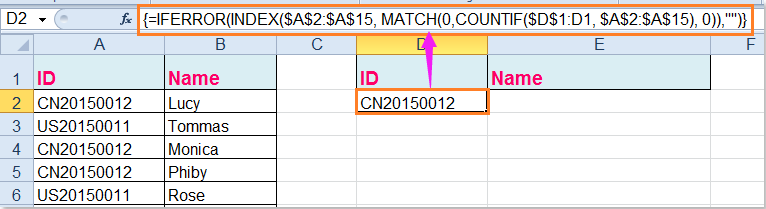
Tip: In the above formula, A2:A15 is the list data range you want to extract unique values from, D1 is the first cell of the column you want to put out the extracting result.
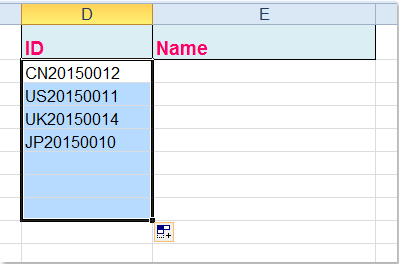
2. And then drag the fill handle down to extract all unique values until blanks displayed, see screenshot:
3. In this step, you should create a User Defined Function to combine the names based on the unique ID numbers, please hold down the ALT + F11 keys, and it opens the Microsoft Visual Basic for Applications window.
4. Click Insert > Module, and paste the following code in the Module Window.
VBA code: concatenate text based on criteria
|
1
2
3
4
5
6
7
8
9
10
11
12
13
14
15
16
17
18
19
|
Function ConcatenateIf(CriteriaRange As Range, Condition As Variant, ConcatenateRange As Range, Optional Separator As String = ",") As Variant'Update 20150414Dim xResult As StringOn Error Resume NextIf CriteriaRange.Count <> ConcatenateRange.Count Then ConcatenateIf = CVErr(xlErrRef) Exit FunctionEnd IfFor i = 1 To CriteriaRange.Count If CriteriaRange.Cells(i).Value = Condition Then xResult = xResult & Separator & ConcatenateRange.Cells(i).Value End IfNext iIf xResult <> "" Then xResult = VBA.Mid(xResult, VBA.Len(Separator) + 1)End IfConcatenateIf = xResultExit FunctionEnd Function |
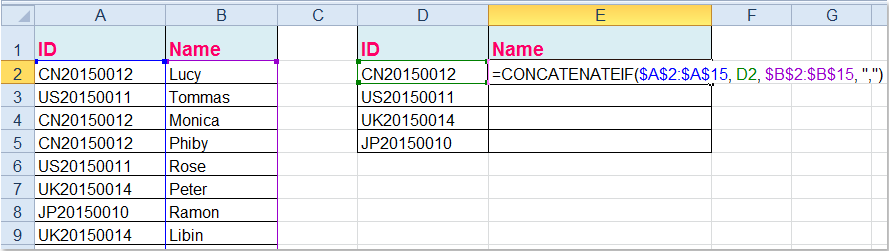
5. Then save and close this code, go back to your worksheet, and enter this formula into cell E2, =CONCATENATEIF($A$2:$A$15, D2, $B$2:$B$15, ",") , see screenshot:
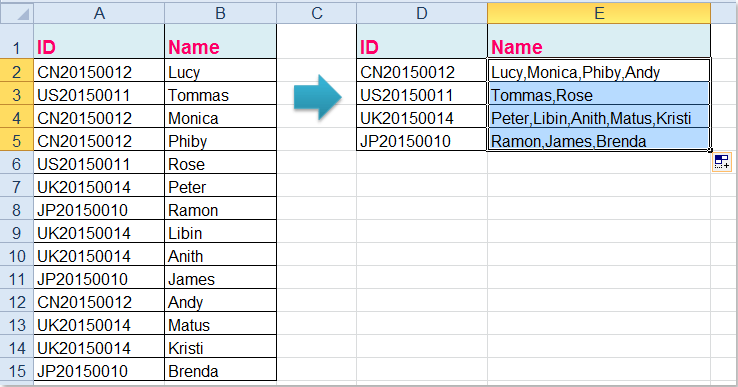
6. Then drag the fill handle down to the cells that you want to apply this formula, and all the corresponding names have been combined based on the ID numbers, see screenshot:
Tips:
1. In the above formula, A2:A15 is the original data which you want to combine based on, D2 is the unique value you have extracted, and B2:B15 is the name column that you want to combine together.
2. As you can see, I combined the values which are separated by comma, you can use any other characters by changing the comma “,” of the formula as you need.
Link: https://www.extendoffice.com/documents/excel/2723-excel-concatenate-based-on-criteria.html
How to easily concatenate text based on criteria in Excel? 如何将Excel中的文本按条件合并的更多相关文章
- Android TextView : “Do not concatenate text displayed with setText”
参考:http://stackoverflow.com/questions/33164886/android-textview-do-not-concatenate-text-displayed-wi ...
- AsciiDoc Text based document generation
AsciiDoc Text based document generation AsciiDoc Home Page http://asciidoc.org/ AsciiDoc is a t ...
- OpenCV_contrib里的Text(自然场景图像中的文本检测与识别)
平台:win10 x64 +VS 2015专业版 +opencv-3.x.+CMake 待解决!!!Issue说明:最近做一些字符识别的事情,想试一下opencv_contrib里的Text(自然场景 ...
- 关于iOS中的文本操作-管理text fields 和 text views
Managing Text Fields and Text Views 管理UITextField和UITextView实例 UITextField和UITextView的实例拥有两个最主要的功能:展 ...
- 【JAVAEE学习笔记】hibernate04:查询种类、HQL、Criteria、查询优化和练习为客户列表增加查询条件
一.查询种类 1.oid查询-get 2.对象属性导航查询 3.HQL 4.Criteria 5.原生SQL 二.查询-HQL语法 //学习HQL语法 public class Demo { //基本 ...
- 关于在JTextPane(或JEditorPane)中返回文本部分(Text)
今天遇到这样的一个问题,我需要取得当前JTextPane()中的文件,但是 JTextPane.getText()返回的是网页的HTML源代码,在网上搜索了一下,找到了一个方法: //返回消息框的无格 ...
- html中去掉文本框(input type="text")的边框或只显示下边框
去掉: <input type="text" name="textfield" style="border:0px;"&g ...
- JAVAEE学习——hibernate04:查询种类、HQL、Criteria、查询优化和练习为客户列表增加查询条件
一.查询种类 1.oid查询-get 2.对象属性导航查询 3.HQL 4.Criteria 5.原生SQL 二.查询-HQL语法 //学习HQL语法 public class Demo { //基本 ...
- 如何获取select中的value、text、index相关值 && 如何获取单选框中radio值 && 触发事件 && radio 默认选中
如何获取select中的value.text.index相关值 select还是比较常用的一个标签,如何获取其中的内容呢? 如下所示: <select id="select" ...
随机推荐
- 跨线程操作UI控件
写程序的时候经常会遇到跨线程访问控件的问题,看到不少人去设置Control.CheckForIllegalCrossThreadCalls = false;这句话是告诉编译器不要对跨线程访问作检查,可 ...
- DataGridView出现大红叉--在使用多线程访问数据源时
datagridview 的数据源操作在一个方面里面处理 不要多个地方处理 并且处理的时候要加锁 红叉 应该是多线程操作出现的. try catch 只是起到 捕获异常的功能,但是一旦出现了这种错误 ...
- Java笔记1 : 在生产者消费者模式中,线程通信与共享数据,死锁问题与解决办法
本例定义了4个类,这里说一下,方便下面讲解.分别是Product(产品),Producer(生产者),Consumer(消费者), Test(测试类). 多线程之间通信与共享数据只要引用同一内存区域就 ...
- Areas(区域)
Areas(区域) 原文:Areas作者:Dhananjay Kumar 和 Rick Anderson翻译:耿晓亮(Blue)校对:许登洋(Seay) Areas 是 ASP.NET MVC 用来将 ...
- handoff了解
iOS8推出一个新特性,叫做Handoff.Handoff中文含义为换手(把接力棒传给下一个人),可以在一台Mac和iOS设备上开始工作,中途将工作交换到另一个Mac或iOS设备中进行.这个在iOS8 ...
- JavaScript的OOP编程1
首先要说的是,javascript其实是可以进行OOP编程的,其次javascript的OOP编程实现方式有多种,我写的这一种只是我测试过,可行的一种 version1 // 父类 function ...
- adb logcat 查看日志
使用 logcat 命令 查看和跟踪系统日志缓冲区的命令logcat的一般用法是: [adb] logcat [<option>] ... [<filter-spec>] .. ...
- Java ,单实例 多线程 ,web容器,servlet与struts1-2.x系列,线程安全的解决
1.Servlet是如何处理多个请求同时访问呢? 回答:servlet是默认采用单实例,多线程的方式进行.只要webapp被发布到web容器中的时候,servlet只会在发布的时候实例化一次,serv ...
- UIKIT网页基本结构学习
没办法,哈哈,以后一段时间,如果公司没有招到合适的运维研发, 啥啥都要我一个人先顶上了~~~:) 也好,可以让人成长. UIKIT,BOOTSTRAP之类的前端,搞一个是有好处的,我们以前即然是用了U ...
- find big file
#!/bin/bash #command usage description function usage() { echo -e "Usage:nt$0 DIR_NAME" ex ...