
工作流学习之入门demo
 /**

  * Copyright (C), 2015-2018, XXX有限公司

  * FileName: DemoMain

  * Author:   happy

  * Date:     2018/6/23 16:33

  * Description:

  * History:

  * <author>          <time>          <version>          <desc>

  * 作者姓名           修改时间           版本号              描述

  */

 package com.imooc.activiti.helloworld;

 import com.google.common.collect.Maps;

 import org.activiti.engine.*;

 import org.activiti.engine.form.FormProperty;

 import org.activiti.engine.form.TaskFormData;

 import org.activiti.engine.impl.form.DateFormType;

 import org.activiti.engine.impl.form.StringFormType;

 import org.activiti.engine.repository.Deployment;

 import org.activiti.engine.repository.DeploymentBuilder;

 import org.activiti.engine.repository.ProcessDefinition;

 import org.activiti.engine.runtime.ProcessInstance;

 import org.activiti.engine.task.Task;

 import org.slf4j.Logger;

 import org.slf4j.LoggerFactory;

 import java.text.ParseException;

 import java.text.SimpleDateFormat;

 import java.util.Date;

 import java.util.List;

 import java.util.Map;

 import java.util.Scanner;

 /**

  * 〈一句话功能简述〉<br>

  * 〈〉

  *

  * @author happy

  * @create 2018/6/23

  * @since 1.0.0

  */

 public class DemoMain {

     public static final Logger log = LoggerFactory.getLogger(DemoMain.class);

     public static void main(String[] args) {

         log.info("启动我们的程序");

         //创建流程引擎

         ProcessEngine processEngine = getProcessEngine();

         //部署流程定义文件

         ProcessDefinition processDefinition = getProcessDefinition(processEngine);

         //启动运行流程

         final ProcessInstance[] processInstance = {getProcessInstance(processEngine, processDefinition)};

         //处理流程任务

         Scanner scanner = new Scanner(System.in);

         while (processInstance[0] != null && !processInstance[0].isEnded()) {

             TaskService taskService = processEngine.getTaskService();

             List<Task> taskList = taskService.createTaskQuery().list();

             log.info("待处理任务数量 [{}]", taskList.size());

             taskList.stream().forEach(task -> {

                 log.info("待处理任务 [{}]", task.getName());

                 FormService formService = processEngine.getFormService();

                 TaskFormData taskFormData = formService.getTaskFormData(task.getId());

                 List<FormProperty> formProperties = taskFormData.getFormProperties();

                 Map<String, Object> variables = Maps.newHashMap();

                 formProperties.stream().forEach(property -> {

                     String line = null;

                     if (StringFormType.class.isInstance(property.getType())) {

                         log.info("请输入 {} ?", property.getName());

                         line = scanner.nextLine();

                         variables.put(property.getId(), line);

                     } else if (DateFormType.class.isInstance(property.getType())) {

                         log.info("请输入 {} ? 格式 (yyyy-MM-dd)", property.getName());

                         line = scanner.nextLine();

                         SimpleDateFormat dateFormat = new SimpleDateFormat("yyyy-MM-dd");

                         Date date = null;

                         try {

                             date = dateFormat.parse(line);

                         } catch (ParseException e) {

                             e.printStackTrace();

                         }

                         variables.put(property.getId(), date);

                     } else {

                         log.info("类型暂不支持 {}", property.getType());

                     }

                     log.info("您输入的内容是 [{}]", line);

                 });

                 taskService.complete(task.getId(), variables);

                     //Variable used in lambda expression should be final or effectively final
                        //(解决参考 https://www.jianshu.com/p/d957dd5560e8)

                 processInstance[0] = processEngine.getRuntimeService().createProcessInstanceQuery().

                         processInstanceId(processInstance[0].getId()).singleResult();

             });

         }

         log.info("结束我们的程序");

     }

     private static ProcessInstance getProcessInstance(ProcessEngine processEngine, ProcessDefinition processDefinition) {

         RuntimeService runtimeService = processEngine.getRuntimeService();

         ProcessInstance processInstance = runtimeService.startProcessInstanceById(processDefinition.getId());

         log.info("启动流程 {}", processInstance.getProcessDefinitionKey());

         return processInstance;

     }

     private static ProcessDefinition getProcessDefinition(ProcessEngine processEngine) {

         RepositoryService repositoryService = processEngine.getRepositoryService();

         DeploymentBuilder deploymentBuilder = repositoryService.createDeployment();

         deploymentBuilder.addClasspathResource("second_approve.bpmn20.xml");

         Deployment deployment = deploymentBuilder.deploy();

         String deploymentId = deployment.getId();

         ProcessDefinition processDefinition = repositoryService.createProcessDefinitionQuery()

                 .deploymentId(deploymentId)

                 .singleResult();

         log.info("流程定义文件 {},id {}", processDefinition.getName(), processDefinition.getId());

         return processDefinition;

     }

     private static ProcessEngine getProcessEngine() {

         ProcessEngineConfiguration cfg = ProcessEngineConfiguration.createStandaloneInMemProcessEngineConfiguration();

         ProcessEngine processEngine = cfg.buildProcessEngine();

         String name = processEngine.getName();

         String version = ProcessEngine.VERSION;

         log.info("流程引擎的名称 {},版本号 {}", name, version);

         return processEngine;

     }

 }
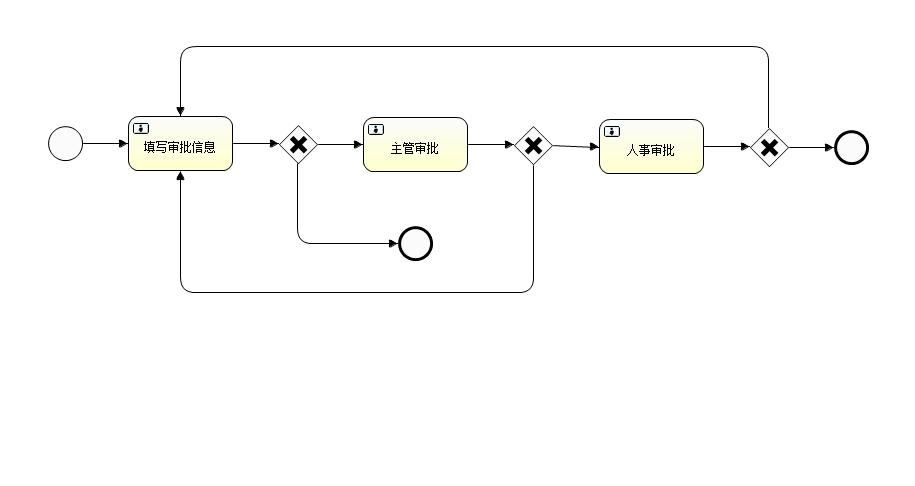
<?xml version="1.0" encoding="UTF-8"?>

<definitions xmlns="http://www.omg.org/spec/BPMN/20100524/MODEL" xmlns:xsi="http://www.w3.org/2001/XMLSchema-instance" xmlns:xsd="http://www.w3.org/2001/XMLSchema" xmlns:activiti="http://activiti.org/bpmn" xmlns:bpmndi="http://www.omg.org/spec/BPMN/20100524/DI" xmlns:omgdc="http://www.omg.org/spec/DD/20100524/DC" xmlns:omgdi="http://www.omg.org/spec/DD/20100524/DI" typeLanguage="http://www.w3.org/2001/XMLSchema" expressionLanguage="http://www.w3.org/1999/XPath" targetNamespace="http://www.activiti.org/test">

  <process id="second_approve" name="二级审批流程" isExecutable="true">

    <startEvent id="startEvent" name="开始"></startEvent>

    <userTask id="submitForm" name="填写审批信息">

      <extensionElements>

        <activiti:formProperty id="message" name="申请信息" type="string" required="true"></activiti:formProperty>

        <activiti:formProperty id="name" name="申请人姓名" type="string" required="true"></activiti:formProperty>

        <activiti:formProperty id="submitTime" name="提交时间" type="date" datePattern="yyyy-MM-dd" required="true"></activiti:formProperty>

        <activiti:formProperty id="submitType" name="确认申请" type="string" required="true"></activiti:formProperty>

      </extensionElements>

    </userTask>

    <sequenceFlow id="flow1" sourceRef="startEvent" targetRef="submitForm"></sequenceFlow>

    <exclusiveGateway id="decideSubmit" name="提交or取消"></exclusiveGateway>

    <sequenceFlow id="flow2" sourceRef="submitForm" targetRef="decideSubmit"></sequenceFlow>

    <endEvent id="endEventCancle" name="结束"></endEvent>

    <sequenceFlow id="flow3" sourceRef="decideSubmit" targetRef="endEventCancle">

      <conditionExpression xsi:type="tFormalExpression"><![CDATA[${submitType=="N" || submitType=="n"}]]></conditionExpression>

    </sequenceFlow>

    <userTask id="tlApprove" name="主管审批">

      <extensionElements>

        <activiti:formProperty id="tlApprove" name="主管审批结果" type="string" required="true"></activiti:formProperty>

        <activiti:formProperty id="tlMessage" name="主管备注" type="string" required="true"></activiti:formProperty>

      </extensionElements>

    </userTask>

    <sequenceFlow id="flow4" sourceRef="decideSubmit" targetRef="tlApprove">

      <conditionExpression xsi:type="tFormalExpression"><![CDATA[${submitType=="Y" || submitType=="y"}]]></conditionExpression>

    </sequenceFlow>

    <exclusiveGateway id="decideTlApprove" name="主管审批校验"></exclusiveGateway>

    <sequenceFlow id="flow5" sourceRef="tlApprove" targetRef="decideTlApprove"></sequenceFlow>

    <userTask id="hr_approve" name="人事审批">

      <extensionElements>

        <activiti:formProperty id="hrApprove" name="人事审批结果" type="string" required="true"></activiti:formProperty>

        <activiti:formProperty id="hrMessage" name="人事审批备注" type="string" required="true"></activiti:formProperty>

      </extensionElements>

    </userTask>

    <sequenceFlow id="flow6" sourceRef="decideTlApprove" targetRef="hr_approve">

      <conditionExpression xsi:type="tFormalExpression"><![CDATA[${tlApprove=="Y" || tlApprove=="y"}]]></conditionExpression>

    </sequenceFlow>

    <sequenceFlow id="flow10" sourceRef="decideTlApprove" targetRef="submitForm">

      <conditionExpression xsi:type="tFormalExpression"><![CDATA[${tlApprove=="N" || tlApprove=="n"}]]></conditionExpression>

    </sequenceFlow>

    <exclusiveGateway id="decideHrApprove" name="人事审批校验"></exclusiveGateway>

    <sequenceFlow id="flow11" sourceRef="hr_approve" targetRef="decideHrApprove"></sequenceFlow>

    <endEvent id="endEvent" name="结束"></endEvent>

    <sequenceFlow id="flow12" sourceRef="decideHrApprove" targetRef="endEvent">

      <conditionExpression xsi:type="tFormalExpression"><![CDATA[${hrApprove=="Y" ||hrApprove=="y"}]]></conditionExpression>

    </sequenceFlow>

    <sequenceFlow id="flow13" sourceRef="decideHrApprove" targetRef="submitForm">

      <conditionExpression xsi:type="tFormalExpression"><![CDATA[${hrApprove=="N" ||hrApprove=="n"}]]></conditionExpression>

    </sequenceFlow>

  </process>

  <bpmndi:BPMNDiagram id="BPMNDiagram_second_approve">

    <bpmndi:BPMNPlane bpmnElement="second_approve" id="BPMNPlane_second_approve">

      <bpmndi:BPMNShape bpmnElement="startEvent" id="BPMNShape_startEvent">

        <omgdc:Bounds height="35.0" width="35.0" x="50.0" y="130.0"></omgdc:Bounds>

      </bpmndi:BPMNShape>

      <bpmndi:BPMNShape bpmnElement="submitForm" id="BPMNShape_submitForm">

        <omgdc:Bounds height="55.0" width="105.0" x="130.0" y="120.0"></omgdc:Bounds>

      </bpmndi:BPMNShape>

      <bpmndi:BPMNShape bpmnElement="decideSubmit" id="BPMNShape_decideSubmit">

        <omgdc:Bounds height="40.0" width="40.0" x="280.0" y="128.0"></omgdc:Bounds>

      </bpmndi:BPMNShape>

      <bpmndi:BPMNShape bpmnElement="endEventCancle" id="BPMNShape_endEventCancle">

        <omgdc:Bounds height="35.0" width="35.0" x="400.0" y="230.0"></omgdc:Bounds>

      </bpmndi:BPMNShape>

      <bpmndi:BPMNShape bpmnElement="tlApprove" id="BPMNShape_tlApprove">

        <omgdc:Bounds height="55.0" width="105.0" x="365.0" y="121.0"></omgdc:Bounds>

      </bpmndi:BPMNShape>

      <bpmndi:BPMNShape bpmnElement="decideTlApprove" id="BPMNShape_decideTlApprove">

        <omgdc:Bounds height="40.0" width="40.0" x="515.0" y="129.0"></omgdc:Bounds>

      </bpmndi:BPMNShape>

      <bpmndi:BPMNShape bpmnElement="hr_approve" id="BPMNShape_hr_approve">

        <omgdc:Bounds height="55.0" width="105.0" x="601.0" y="123.0"></omgdc:Bounds>

      </bpmndi:BPMNShape>

      <bpmndi:BPMNShape bpmnElement="decideHrApprove" id="BPMNShape_decideHrApprove">

        <omgdc:Bounds height="40.0" width="40.0" x="751.0" y="131.0"></omgdc:Bounds>

      </bpmndi:BPMNShape>

      <bpmndi:BPMNShape bpmnElement="endEvent" id="BPMNShape_endEvent">

        <omgdc:Bounds height="35.0" width="35.0" x="836.0" y="134.0"></omgdc:Bounds>

      </bpmndi:BPMNShape>

      <bpmndi:BPMNEdge bpmnElement="flow1" id="BPMNEdge_flow1">

        <omgdi:waypoint x="85.0" y="147.0"></omgdi:waypoint>

        <omgdi:waypoint x="130.0" y="147.0"></omgdi:waypoint>

      </bpmndi:BPMNEdge>

      <bpmndi:BPMNEdge bpmnElement="flow2" id="BPMNEdge_flow2">

        <omgdi:waypoint x="235.0" y="147.0"></omgdi:waypoint>

        <omgdi:waypoint x="280.0" y="148.0"></omgdi:waypoint>

      </bpmndi:BPMNEdge>

      <bpmndi:BPMNEdge bpmnElement="flow3" id="BPMNEdge_flow3">

        <omgdi:waypoint x="300.0" y="168.0"></omgdi:waypoint>

        <omgdi:waypoint x="299.0" y="247.0"></omgdi:waypoint>

        <omgdi:waypoint x="400.0" y="247.0"></omgdi:waypoint>

      </bpmndi:BPMNEdge>

      <bpmndi:BPMNEdge bpmnElement="flow4" id="BPMNEdge_flow4">

        <omgdi:waypoint x="320.0" y="148.0"></omgdi:waypoint>

        <omgdi:waypoint x="365.0" y="148.0"></omgdi:waypoint>

      </bpmndi:BPMNEdge>

      <bpmndi:BPMNEdge bpmnElement="flow5" id="BPMNEdge_flow5">

        <omgdi:waypoint x="470.0" y="148.0"></omgdi:waypoint>

        <omgdi:waypoint x="515.0" y="149.0"></omgdi:waypoint>

      </bpmndi:BPMNEdge>

      <bpmndi:BPMNEdge bpmnElement="flow6" id="BPMNEdge_flow6">

        <omgdi:waypoint x="555.0" y="149.0"></omgdi:waypoint>

        <omgdi:waypoint x="601.0" y="150.0"></omgdi:waypoint>

      </bpmndi:BPMNEdge>

      <bpmndi:BPMNEdge bpmnElement="flow10" id="BPMNEdge_flow10">

        <omgdi:waypoint x="535.0" y="169.0"></omgdi:waypoint>

        <omgdi:waypoint x="535.0" y="296.0"></omgdi:waypoint>

        <omgdi:waypoint x="182.0" y="296.0"></omgdi:waypoint>

        <omgdi:waypoint x="182.0" y="175.0"></omgdi:waypoint>

      </bpmndi:BPMNEdge>

      <bpmndi:BPMNEdge bpmnElement="flow11" id="BPMNEdge_flow11">

        <omgdi:waypoint x="706.0" y="150.0"></omgdi:waypoint>

        <omgdi:waypoint x="751.0" y="151.0"></omgdi:waypoint>

      </bpmndi:BPMNEdge>

      <bpmndi:BPMNEdge bpmnElement="flow12" id="BPMNEdge_flow12">

        <omgdi:waypoint x="791.0" y="151.0"></omgdi:waypoint>

        <omgdi:waypoint x="836.0" y="151.0"></omgdi:waypoint>

      </bpmndi:BPMNEdge>

      <bpmndi:BPMNEdge bpmnElement="flow13" id="BPMNEdge_flow13">

        <omgdi:waypoint x="771.0" y="131.0"></omgdi:waypoint>

        <omgdi:waypoint x="770.0" y="50.0"></omgdi:waypoint>

        <omgdi:waypoint x="182.0" y="50.0"></omgdi:waypoint>

        <omgdi:waypoint x="182.0" y="120.0"></omgdi:waypoint>

      </bpmndi:BPMNEdge>

    </bpmndi:BPMNPlane>

  </bpmndi:BPMNDiagram>

</definitions>
工作流学习之入门demo的更多相关文章
- 【Activiti工作流引擎】官方快速入门demo
Activiti官方快速入门demo 地址: https://www.activiti.org/quick-start 0. 版本 activiti 5.22.0 JDK 1.8 1. 介绍 这个快速 ...
- 工作流Activity框架入门(一)
Activity工作流入门 1. 工作流概念 工作流(Workflow),就是"业务过程的部分或整体在计算机应用环境下的自动化",它主要解决的是"使在多个参与者之间按照某 ...
- 【SSH系列】初识spring+入门demo
学习过了hibernate,也就是冬天,经过一个冬天的冬眠,当春风吹绿大地,万物复苏,我们迎来了spring,在前面的一系列博文中,小编介绍hibernate的相关知识,接下来的博文中,小编将继续介绍 ...
- LESS学习笔记 —— 入门
今天在网上完成了LESS的基础学习,下面是我的学习笔记.总共有三个文件:index.html.main.less.mian.css,其中 mian.css 是 main.less 经过Koala编译之 ...
- Activiti工作流学习之流程图应用详解
Activiti工作流学习之流程图应用详解 1.目的 了解Activiti工作流是怎样应用流程图的. 2.环境准备2.1.相关软件及版本 jdk版本:Jdk1.7及以上 IDE:eclipse ...
- SpringBoot 入门 Demo
SpringBoot 入门 Demo Spring Boot是由Pivotal团队提供的全新框架,其设计目的是用来简化新Spring应用的初始搭建以及开发过程.该框架使用了特定的方式来进行配置,从 ...
- Python学习--01入门
Python学习--01入门 Python是一种解释型.面向对象.动态数据类型的高级程序设计语言.和PHP一样,它是后端开发语言. 如果有C语言.PHP语言.JAVA语言等其中一种语言的基础,学习Py ...
- [IT学习]sql 入门及实例
sql 是一种数据库查询语言,可以让你很快的查询到数据.其实一般情况下,你也可以采用excel来查询数据库数据. 但是人们通常认为sql会更加灵活和方便一些. sql学习的入门网站: http://w ...
- PHP学习笔记 - 入门篇(5)
PHP学习笔记 - 入门篇(5) 语言结构语句 顺序结构 eg: <?php $shoesPrice = 49; //鞋子单价 $shoesNum = 1; //鞋子数量 $shoesMoney ...
随机推荐
- simple vimrc for python
"显示行数,设置软回车和缩进还有语法set numberset expandtabset tabstop=8set shiftwidth=4set softtabstop=4set auto ...
- Centos7 yum 源安装nginx
一.建立nginx源 vim /etc/yum.repos.d/nginx.repo [nginx]name=nginx repobaseurl=http://nginx.org/packages/c ...
- cocos2dx基础篇(22) 基本动画CCAnimation/CCAnimate
[小知识] CCSpriteFrame :精灵帧. 它是相对动画而产生的,其实就是一张纹理图片. CCAnimationFrame :动画帧. 由精灵帧与间隔帧数组成,是动画CC ...
- python学习之函数(二)
4.4.6 动态传参 动态传参是针对形参而言 1.动态位置参数 在静态位置参数时,我们知道,定义函数时有几个位置参数,调用时就必须给几个实参,不能多也不能少.有时候,实际应用过程中,参数往往不能固 ...
- JsonProperty 使用
引入 依赖 <dependency> <groupId>com.fasterxml.jackson.core</groupId> <artifactId> ...
- 重新网格化(Remesh)
原文链接 Remesh并没有一个严格的定义,简单的讲,Remesh就是从一个输入网格生成另一个网格,并且满足一定的要求.根据网格改动大小,可以分为这么几类: 保持顶点拓扑和几何信息,优化网格连接关系 ...
- Linux解决Python调用Matlab函数无法导入matlab.engine问题及其他注意事项
问题描述 Linux系统,根据matlab官方文档说明,利用Matlab中的API来实现Python调用Matlab函数.具体方法见文档: https://ww2.mathworks.cn/help/ ...
- value(C# )
上下文关键字 value 用在普通属性声明的 set 访问器中. 此关键字类似于方法的输入参数. 关键字 value 引用客户端代码尝试分配给属性的值. 在以下示例中,MyDerivedClass 有 ...
- nodejs 写服务器解决中文乱码问题
nodejs 写服务器解决中文乱码问题:https://blog.csdn.net/worldmakewayfordream/article/details/77483423 本文链接:htt ...
- ctrNet库介绍
一个神秘网友写的代码库,膜拜,附上下载链接:https://github.com/guoday/ctrNet-tool 似乎是专门为点击率预估写的库??? 收藏,日后慢慢研究