
netcore 使用redis session 分布式共享
- 首先准备redis服务器(docker 和redis3.0内置的哨兵进行高可用设置)
- 网站配置Redis作为存储session的介质(配置文件这些略)。然后可以了解一下MachineKey这个东西.(MachineKey是用来生成session和解密session的一个xml格式对象)
- 生成MachineKey
再startup  config里面配置如下代码

     //抽取key-xxxxx.xml

     services.AddDataProtection().PersistKeysToFileSystem(new DirectoryInfo(@"D:\"));

然后再对应的磁盘路径上面找到格式后缀为xml的文件 - 将文件用记事本打开,然后新增一个类来替换网站默认使用的MachineKey。
using Microsoft.AspNetCore.DataProtection.Repositories;

using System;

using System.Collections.Generic;

using System.Linq;

using System.Xml.Linq;

namespace Session02

{

    public class CustomXmlRepository : IXmlRepository

    {

        /// <summary>

        /// 设置MachineKey这里的内容就是复制出xml文件的内容

        /// </summary>

        private readonly string keyContent =

        @"<?xml version='1.0' encoding='utf-8'?>

        <key id='6e0d77ae-807d-4dd5-9b33-1f364f6c1f3e' version='1'>

          <creationDate>2018-07-25T07:01:39.5356164Z</creationDate>

          <activationDate>2018-07-25T07:01:39.4800644Z</activationDate>

          <expirationDate>2018-10-23T07:01:39.4800644Z</expirationDate>

          <descriptor deserializerType='Microsoft.AspNetCore.DataProtection.AuthenticatedEncryption.ConfigurationModel.AuthenticatedEncryptorDescriptorDeserializer, Microsoft.AspNetCore.DataProtection, Version=2.1.1.0, Culture=neutral, PublicKeyToken=adb9793829ddae60'>

            <descriptor>

              <encryption algorithm='AES_256_CBC' />

              <validation algorithm='HMACSHA256' />

              <masterKey p4:requiresEncryption='true' xmlns:p4='http://schemas.asp.net/2015/03/dataProtection'>

                <!-- Warning: the key below is in an unencrypted form. -->

                <value>lPUxFutB30oi1KU990Y5nKxeCBnHg7h1JX26nvDlpxdbYciXQr2gdUpLxrL52O/vg8Htrr9F3Xf2fqnVhhAjhw==</value>

              </masterKey>

            </descriptor>

          </descriptor>

        </key>";

        public virtual IReadOnlyCollection<XElement> GetAllElements()

        {

            return GetAllElementsCore().ToList().AsReadOnly();

        }

        private IEnumerable<XElement> GetAllElementsCore()

        {

            yield return XElement.Parse(keyContent);

        }

        public virtual void StoreElement(XElement element, string friendlyName)

        {

            if (element == null)

            {

                throw new ArgumentNullException(nameof(element));

            }

            StoreElementCore(element, friendlyName);

        }

        private void StoreElementCore(XElement element, string filename)

        {

        }

    }

} - 在startup里面注入CustomXmlRepository使用默认的key来生成session
using Microsoft.AspNetCore.Builder;

using Microsoft.AspNetCore.DataProtection.Repositories;

using Microsoft.AspNetCore.Hosting;

using Microsoft.Extensions.Configuration;

using Microsoft.Extensions.DependencyInjection;

namespace Session02

{

    public class Startup

    {

        public Startup(IConfiguration configuration)

        {

            Configuration = configuration;

        }

        public IConfiguration Configuration { get; }

        // This method gets called by the runtime. Use this method to add services to the container.

        public void ConfigureServices(IServiceCollection services)

        {

            //抽取key-xxxxx.xml

            //services.AddDataProtection().PersistKeysToFileSystem(new DirectoryInfo(@"D:\"));

            services.AddSingleton<IXmlRepository, CustomXmlRepository>();

            services.AddDataProtection(configure =>

            {

                configure.ApplicationDiscriminator = "Seesion.testweb";

            });

            services.AddDistributedRedisCache(option =>

            {

                //redis 数据库连接字符串

                option.Configuration = Configuration.GetConnectionString("RedisConnection");

                //redis 实例名

                option.InstanceName = "test";

            });

            services.AddSession();

            services.AddMvc();

        }

        // This method gets called by the runtime. Use this method to configure the HTTP request pipeline.

        public void Configure(IApplicationBuilder app, IHostingEnvironment env)

        {

            if (env.IsDevelopment())

            {

                app.UseDeveloperExceptionPage();

            }

            app.UseSession();

            app.UseMvc();

        }

    }

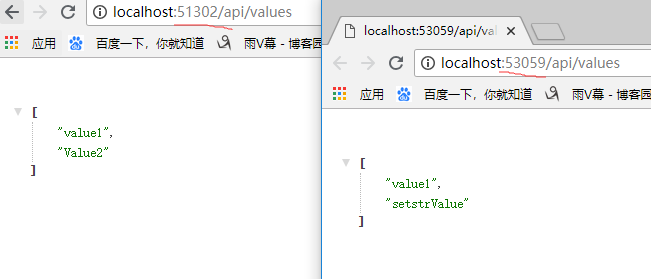
} - 多个网站都用以上方法进行配置,然后测试一波


netcore 使用redis session 分布式共享的更多相关文章
- nginx+iis+redis+Task.MainForm构建分布式架构 之 (redis存储分布式共享的session及共享session运作流程)
本次要分享的是利用windows+nginx+iis+redis+Task.MainForm组建分布式架构,上一篇分享文章制作是在windows上使用的nginx,一般正式发布的时候是在linux来配 ...
- Session分布式共享 = Session + Redis + Nginx
一.Session 1.Session 介绍 我相信,搞Web开发的对Session一定再熟悉不过了,所以我就简单的介绍一下. Session:在计算机中,尤其是在网络应用中,称为"会话控制 ...
- Session分布式共享 = Session + Redis + Nginx(转)
出处:http://www.cnblogs.com/newP/p/6518918.html 一.Session 1.Session 介绍 我相信,搞Web开发的对Session一定再熟悉不过了,所以我 ...
- 详解Session分布式共享(.NET CORE版)
一.前言&回顾 在上篇文章Session分布式共享 = Session + Redis + Nginx中,好多同学留言问了我好多问题,其中印象深刻的有:nginx挂了怎么办?采用Redis的S ...
- 什么是Session分布式共享
在了解session分布式共享之前先来了解Session.Redis和Nginx的相关知识. 一.Session相关知识 1.Session 介绍 Session在网络应用中,称为“会话控制”. 每个 ...
- asp.net session分布式共享解决方案
Session共享是分布式系统设计时必须考虑的一个重要的点.相比较java中的session共享解决方案,.net中的解决方案还是比较少,MemcachedSessionProvider类库是比较优秀 ...
- 【Redis】分布式Session
一.问题引出 1.1 Session的原理 1.2 问题概述 二.解决方案 三.代码实现-使用Token代替Session 3.1 Service 3.2 TokenController 一.问题引出 ...
- EhCache+Redis实现分布式缓存
Ehcache集群模式 由于 EhCache 是进程中的缓存系统,一旦将应用部署在集群环境中,每一个节点维护各自的缓存数据,当某个节点对缓存数据进行更新,这些更新的数据无法在其它节点中共享,这不仅会降 ...
- 使用Spring Session和Redis解决分布式Session跨域共享问题
http://blog.csdn.net/xlgen157387/article/details/57406162 使用Spring Session和Redis解决分布式Session跨域共享问题
随机推荐
- __name__='main' 这句代码是什么意思?《读书笔记》
当我们阅读 别人的python代码都会有 if name == "main"这么一行语句,但却不知道为什么要写这个?有什么用 想知道这段代码什么意思让我们来根据例子来测试一下 我们 ...
- ARM汇编 汇编文件后缀.s与.S
有两套汇编的语法: ARM公司的标准ARM汇编语言和GNU对ARM支持的GNU ARM汇编. ARM标准汇编语言即ARM公司的开发工具ADS里用的汇编语言: GNU汇编即在Linux下用GCC编译的汇 ...
- windows中ftp下载脚本(bat+vb)
做了个ftp下载脚本: ftpdownload.bat @rem 注释:从ftp服务器每小时下载北向性能文件的脚本 @rem 用vb脚本取昨天 for /f %%a in ('cscript //no ...
- iOS画线段
CGContextRef context = UIGraphicsGetCurrentContext(); //设置线条类型 CGContextSetLineCap(context, kCGLineC ...
- 部署zabbix 4.0 + grafana
不完整,仅供参考 Zabbix+grafana监控部署 基本环境 系统: CentOS Linux release 7.3.1611 Zabbix—server: Zabbix_agent: N ...
- springboot(十)使用LogBack作为日志组件
简介: 企业级项目在搭建的时候,最不可或缺的一部分就是日志,日志可以用来调试程序,打印运行日志以及错误信息方便于我们后期对系统的维护,在SpringBoot兴起之前记录日志最出色的莫过于log4j了, ...
- alpine操作
设置镜像源 使用其他版本把v3.7改成对应版本就行 查看版本 cat /etc/os-release 阿里 echo http://mirrors.aliyun.com/alpine/v3.7/mai ...
- Charles模拟数据
安装好Charles 桌面创建json文件
- codevs2833 奇怪的梦境 x
2833 奇怪的梦境 时间限制: 1 s 空间限制: 128000 KB 题目等级 : 黄金 Gold 题目描述 Description Aiden陷入了一个奇怪的梦境:他被困在一个小房子中 ...
- HDU3398—String-(组合数)
Problem Description Recently, lxhgww received a task : to generate strings contain '0's and '1's onl ...