
Canvas入门05-渐变颜色
线性渐变API:
offset是介于0~1.0之间的double值,代表颜色停止点在渐变色上的位置;color 是CSS3 颜色字符串。
var canvas = document.getElementById('canvas'),

    context = canvas.getContext('2d'),

    gradient = context.createLinearGradient(0, 0, canvas.width, 0);

// 线性渐变

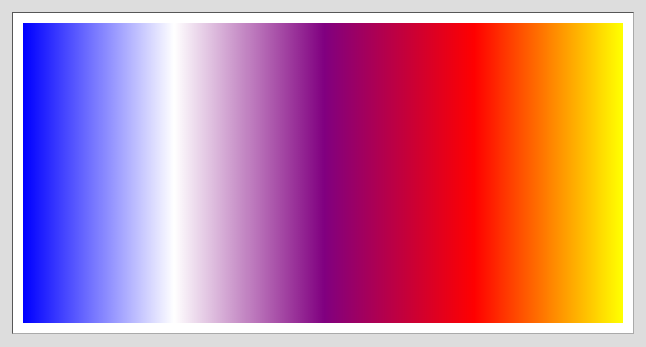
gradient.addColorStop(0, 'blue');

gradient.addColorStop(0.25, 'white');

gradient.addColorStop(0.5, 'purple');

gradient.addColorStop(0.75, 'red');

gradient.addColorStop(1, 'yellow');

context.fillStyle = gradient;

context.fillRect(0, 0, canvas.width, canvas.height);
显示效果:
放射渐变API:
ctx.createRadialGradient(x1: number, x2: number, r1: number, x2: number, y2: number, r2: number) 创建一个放射渐变实例
利用两圆分离的原理,可形成放射性扇形。
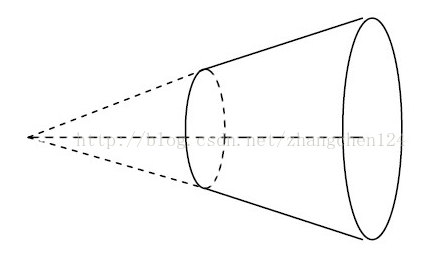
x1:起始圆的x坐标
x2:起始圆的y坐标
r1:起始圆的半径
x2:终止圆的x坐标
y2:终止圆的y坐标
r2:终止圆的半径
同线性渐变。
var canvas = document.getElementById('canvas'),

    context = canvas.getContext('2d'),

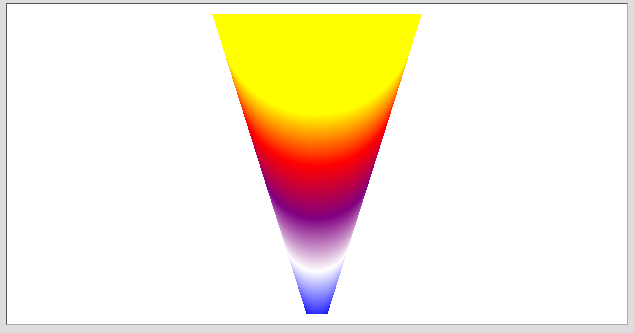
    gradient = context.createRadialGradient(canvas.width/2, canvas.height, 10, canvas.width/2, 0, 100);

gradient.addColorStop(0, 'blue');

gradient.addColorStop(0.25, 'white');

gradient.addColorStop(0.5, 'purple');

gradient.addColorStop(0.75, 'red');

gradient.addColorStop(1, 'yellow');

context.fillStyle = gradient;

context.fillRect(0, 0, canvas.width, canvas.height);
效果:
Canvas入门05-渐变颜色的更多相关文章
- Canvas入门(2):图形渐变和图像形变换
来源:http://www.ido321.com/986.html 一.图形渐变(均在最新版Google中测试) 1.绘制线性渐变 1: // 获取canvas 的ID 2: var canvas = ...
- HTML5 canvas入门
HTML5 Canvas入门 <canvas> 标签定义图形,比如图表和其他图像,您必须使用脚本来绘制图形.在画布上(Canvas)画一个红色矩形,渐变矩形,彩色矩形,和一些彩色的文字. ...
- Canvas 入门案例
五. Canvas 入门案例 1. canvas 圆形绘制 <!DOCTYPE html> <html lang="en"> <head> ...
- win2d 渐变颜色
本文告诉大家如何在 win2d 使用渐变颜色 线条渐变 在 UWP 的 Win2d 使用渐变颜色需要 CanvasLinearGradientBrush 做颜色,本文告诉大家如何在 win2d 使用 ...
- Canvas入门(3):图像处理和绘制文字
来源:http://www.ido321.com/997.html 一.图像处理(非特别说明,所有结果均来自最新版Google) 在HTML 5中,不仅可以使用Canvas API绘制图形,也可以用于 ...
- Canvas入门(1):绘制矩形、圆、直线、曲线等基本图形
来源:http://www.ido321.com/968.html 一.Canvas的基础知识 Canvas是HTML 5中新增的元素,专门用于绘制图形.canvas元素就相当于一块“画布”,一块无色 ...
- Canvas入门(3):图像处理和渲染文本
资源:http://www.ido321.com/997.html 一.图像处理(非特别说明,全部结果均来自最新版Google) 在HTML 5中,不仅能够使用Canvas API绘制图形,也能够用于 ...
- canvas入门之时钟的实现
canvas 入门之作: 三步实现一个时钟: 直接上效果: step 1 : 背景制作首先制作从1-12的数字: var canvas = document.getElementById('ca ...
- Canvas入门到高级详解(中)
三. canvas 进阶 3.1 Canvas 颜色样式和阴影 3.1.1 设置填充和描边的颜色(掌握) fillStyle : 设置或返回用于填充绘画的颜色 strokeStyle: 设置或返回用于 ...
随机推荐
- java 死锁演示
java 死锁演示 java死锁 模拟死锁生成 死锁是由多个线程竞争同一个资源导致 package com.feshfans; /** * 1. 本代码为展示 java 中死锁的产生 * 2. 死锁的 ...
- Linux 命令点滴
.linux查看占用内存最多的程序 ;|head .查看占用cpu最多的程序 ;|head chown -R mysql:mysql /data/mysql_data chown -R mysql:m ...
- /etc/sysconfig/network-scripts/ifcfg-ens33
因为最近重新搭建CDH集群: DEVICE 接口名(设备,网卡) USERCTL [yes|no](非root用户是否可以控制该设备) BOOTPROTO IP的配置方法[none|s ...
- 用java imageio调整图片DPI,例如从96调整为300
因项目需求把图片的DPI值提升到300,否则OCR识别产生错乱:直接上源码:1.图片处理接口: package util.image.dpi; import java.awt.image.Buffer ...
- (71)一篇文章带你熟悉HTTP协议
作者:涤生_Woo链接:http://www.jianshu.com/p/6e9e4156ece3來源:简书著作权归作者所有.商业转载请联系作者获得授权,非商业转载请注明出处. 本篇文章篇幅比较长,先 ...
- (56)Linux驱动开发之二
内核基础 1.li ...
- formData和input的file结合使用
<form method="POST" id="uploadForm" enctype="multipart/form-data"&g ...
- csc.exeCPU100%
可以通过nuget把Microsoft.CodeDom.Providers.DotNetCompilerPlatform和Microsoft.Net.Compilers这两个包卸载
- centos-系统删除多余网卡的方法
一.删除系统中中多余的ifcfg-eth0.bak Centos系统更改网卡或网卡MAC地址后会出现个eth0.bak配置备份文件解决方法:/etc/sysconfig/networking/devi ...
- 为什么JPA@Modifying需要@Transactional注解
在JPA开发中遇到一个很奇怪的问题,@Modifying需要和@Transactional配合使用才能正常使用.如下面代码所示 @Modifying @Transactional @Query(&qu ...