
pip安装第三方库报错Retrying (Retry(total=1, connect=None, read=None, redirect=None, status=None))...
pip安装第三方库时报错Retrying (Retry(total=1, connect=None, read=None, redirect=None, status=None))...,详细报错见下图:

报错原因:
国外镜像源连接问题导致
解决:
改为国内镜像源下载
常用国内源:
清华:https://pypi.tuna.tsinghua.edu.cn/simple/
阿里云:http://mirrors.aliyun.com/pypi/simple/
中国科技大学 https://pypi.mirrors.ustc.edu.cn/simple/
华中理工大学:http://pypi.hustunique.com/
山东理工大学:http://pypi.sdutlinux.org/
豆瓣:http://pypi.douban.com/simple/
以清华大学镜像源下载为例:
一、直接使用镜像源下载
安装指令:pip install xxx(包名) -i https://pypi.tuna.tsinghua.edu.cn/simple/ --trusted-host pypi.tuna.tsinghua.edu.cn
-i :后为镜像源地址
--trusted-host :后边指的是host,例清华大学镜像源地址为 https://pypi.tuna.tsinghua.edu.cn/simple/,host就是指http://和/之间的部分,即pypi.tuna.tsinghua.edu.cn
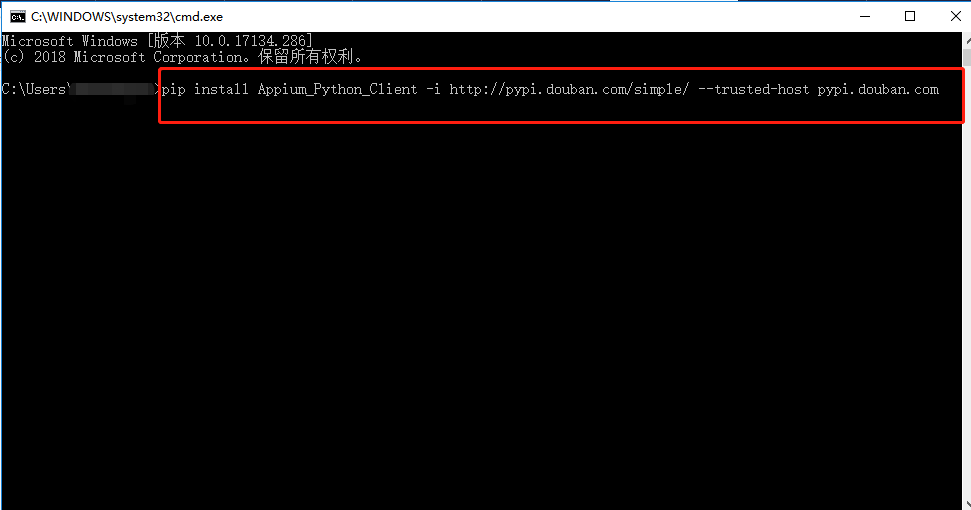
备注:其他镜像源下载,-i,--trusted-host后部分更新为使用的镜像源即可,例,改为豆瓣镜像源下载,
指令为:pip install xxx(包名) -i http://pypi.douban.com/simple/ --trusted-host pypi.douban.com
二、配置默认使用某镜像源下载
1,在路径C:\Users\xxx新建pip目录,在该目录下新建pip.ini文件,将下面内容复制到pip.ini文件中,并保存
[global]
index-url = https://pypi.tuna.tsinghua.edu.cn/simple
[install]
trusted-host=pypi.tuna.tsinghua.edu.cn

2,直接pip安装第三方包
指令:pip install xxx(包名)

pip安装第三方库报错Retrying (Retry(total=1, connect=None, read=None, redirect=None, status=None))...的更多相关文章
- python使用pip安装模块出错 Retrying (Retry(total=0, connect=None, read=None, redirect=None, status=None))
python使用pip安装模块出错 Retrying (Retry(total=0, connect=None, read=None, redirect=None, status=None)) 问题: ...
- 使用pip安装第三方库报错记录
今天在使用pycharm导入第三方库的时候,报了好多超时错误,还有标题中的找不到版本,应该是网络的原因,记录下解决的办法: raise ReadTimeoutError(self._pool, Non ...
- pip安装报错: Retrying (Retry(total=4, connect=None, read=None, redirect=None, status=None)) after connection broken by 'ProxyError('Cannot connect to proxy
pip安装报错 解决办法: pip install selenium -i http://pypi.douban.com/simple --trusted-host pypi.douban.com
- Python 安装第三方模块时 报Retrying(Retry(total=4, connect=None, read=None, redirect=None, status=None))...[WinError 10061]由于目标计算机积极拒绝,无法连接 错误
今日在安装ddt模块时(Windows系统),cmd报了一个以前从未见过的错误,如下图所示: 经百度,知是镜像源的问题,将安装命令改成如下命令: pip install ddt -i https:// ...
- pycharm 安装第三方库报错:AttributeError: 'module' object has no attribute 'main'
pip升级到 10.0.1 之后 老版的pycharm 使用pip安装第三方库的时候会报错,报错如上图所示: 其主要原因是 新版的 pip 更改了 部分api 将其中 pip.main() 改为 pi ...
- python安装第三方库报错visual c++ 14.0 is required
使用python安装第三方库时报错如下: error: Microsoft Visual C++ 14.0 is required. Get it with “Microsoft Visual C++ ...
- python-使用pip安装第三方库报UnicodeDecodeError: 'utf8' codec can't decode byte 0xcb in position 7: invalid continuation byte 错误解决方案
在python 的安装目录下找到Lib\ntpath.py文件,找到def join(path, *paths):方法,添加如下两行语句: reload(sys) sys.setdefaultenco ...
- 在安装python 第三方库时遇到【WARNING: Retrying (Retry(total=4, connect=None, read=None, redirect=None, st】问题
在命令执行窗输入: pip install Pyinstaller -i http://pypi.douban.com/simple --trusted-host pypi.douban.com (其 ...
- python安装第三方库报错:Cannot uninstall '***'. It is a distutils installed project and thus we cannot accurately determine which files belong to it which would lead to only a partial uninstall.
pip install --ignore-installed ${PACKAGE_NAME}
随机推荐
- indexOf与includes的区别
indexOf与includes的区别:https://blog.csdn.net/gtLBTNq9mr3/article/details/78700118 includes和indexOf相比较:相 ...
- 关于php中trim、ltrim和rtrim
以ltrim为例 先看手册说明先 定义和用法 ltrim() 函数从字符串左侧删除空格或其他预定义字符. 语法 ltrim(string,charlist) 参数 描述 string 必需.规定要转换 ...
- 2019牛客暑期多校训练营(第二场) - H - Second Large Rectangle - dp
https://ac.nowcoder.com/acm/contest/882/H 正确的办法:dp1[i][j]表示以i,j为底的矩形的高.得到dp1之后,dp2[i][j]表示以dp1[i][j] ...
- JVM(1)之 JAVA栈
开发十年,就只剩下这套架构体系了! >>> 若想使自己编写的Java程序高效运行,以及进行正确.高效的异常诊断,JVM是不得不谈的一个话题.本"JVM进阶"专 ...
- samba - 为 UNIX 实现的 Windows SMB/CIFS 文件服务器
SYNOPSIS 总览 Samba DESCRIPTION 描述 samba 套件是在 UNIX 系统上实现“服务器信息块”(通常简称 SMB) 协议的一组程序.这个协议有时也称为“通用互联网文件系统 ...
- socket - Linux 套接字
总览 #include <sys/socket.h> mysocket = socket(int socket_family, int socket_type, int protocol) ...
- wxstring与其他类型转换
wxstring与其他类型转换 1.1 int to wxString: wxString str = wxString::Format(wxT("%i"),myInt); 1.2 ...
- demo板 apt-get install stress
demo 那个网口 没有绑定mac 大电脑绑定了mac 大电脑上网认证系统:http://1.1.1.2 大电脑mac:6C-4B-90-3C-D5-7B 将demo板的mac改为大电脑mac ifc ...
- hive之调优
1.简单的查询,就是只是select,不带count,sum,group by这样的,都不走map/reduce,直接读取hdfs文件进行filter过滤,即尽量让fetch task(当开启一个Fe ...
- Linux系统重要文件(三)
一系统运行级别文件 文件路径:/etc/inittab 文件作用说明:定义系统启动后,自动开启哪些软件程序系统 runlevel 查看当前运行级别 centos6系统运行级别: 7个级别 0 ...