
Windows Squid 安装配置
squid 可以做反向代理将系统中相对静态的页面进行缓存和负责均衡,
提高网站访问速度,增强网站可用性、安全性.
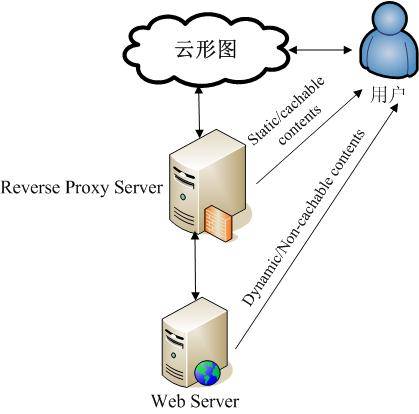
用户访问Squid 反向代理服务器的 IP 地址,这样客户端的 URL 请求将被发送到反向代理服务器。
如果Squid反向代理服务器中缓存了该请求的资源,则将该请求的资源直接返回给客户端,
否则反向代理服务器将向后台的 WEB服务器请求资源,然后将请求的应答返回给客户端,
同时也将该应答缓存在本地,供下一个请求者使用。
其示意图如下:
Windows中安装squid步骤:
1,从http://squid.acmeconsulting.it下载squid windows的安装文件.
也可以从http://download.csdn.net/detail/kkdelta/4474605下载.
下载后解压将squid放在C:\目录下(default),你也可以把Squid放到其他的路径,
但是需要大量的配置squid配置文件中的路径信息。
2,重命名etc文件夹下的文件
squid.conf.default ==> squid.conf
mime.conf.default ==> mime.conf
cachemgr.conf.default ==> cachemgr.conf
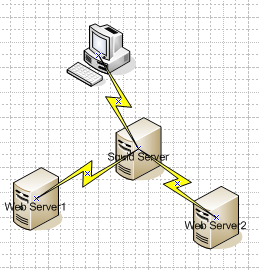
3,简单配置squid.conf,使配置达到如下图的效果
visible_hostname squidhost
#设定squid的主机名,如无此项squid将无法启动
http_port 3128 accel vhost vport
#设定squid为accel加速模式,vhost必须要加.否则将无法将主机头转发至后端服务器,
#访问时就会出现无法找到主机头的错误
cache_peer 147.151.240.234 parent 8080 0 no-query originserver round-robin name=webserver1
cache_peer 147.151.241.151 parent 8080 0 no-query originserver round-robin name=webserver2
cache_peer_domain webserver1 webserver2 localhost
#将 localhost的请求通过 RR 轮询方式转发到2个父节点中的一个.
#http://localhost:3128的请求将转发到147.151.240.234:8080或者147.151.241.151:8080
acl all src 0.0.0.0/0.0.0.0
http_access allow all
4,启动squid
C:\squid\sbin>squid -z #创建cache目录.
C:\squid\sbin>squid #启动squid
测试:
将147.151.240.234和147.151.241.151的tomcat启动,放上一个test.jsp文件.
在151的机器上的test.jsp输出 The JSP in Tomcat instance 151
在234的机器上的test.jsp输出 The JSP in Tomcat instance 234
访问http://localhost:3128/xxxweb/test.jsp会轮流输出上面的结果.
对一个jsp的访问每次都会转发到web server上:X-Cache: MISS from squidhost
- [root@Fedora-WLS9-1 bin]# curl -I http://147.151.240.52:3128/examples/jsp/test.jsp
- HTTP/1.0 200 OK
- Server: Apache-Coyote/1.1
- Set-Cookie: JSESSIONID=F3C10D53A916B1852D06687E9E581A2F; Path=/examples
- Content-Type: text/html
- Content-Length: 972
- Date: Fri, 03 Aug 2012 17:51:01 GMT
- X-Cache: MISS from squidhost
- X-Cache-Lookup: MISS from squidhost:3128
- Via: 1.0 squidhost:3128 (squid/2.6.STABLE22)
- Connection: close
对一个静态的html的访问每次都会转发到web server上:X-Cache: HIT from squidhost
- [root@Fedora-WLS9-1 bin]# curl -I http://147.151.240.52:3128/examples/jsp/test.html
- HTTP/1.0 200 OK
- Server: Apache-Coyote/1.1
- Accept-Ranges: bytes
- ETag: W/"26-1343982480000"
- Last-Modified: Fri, 03 Aug 2012 08:28:00 GMT
- Content-Type: text/html
- Content-Length: 26
- Date: Fri, 03 Aug 2012 17:28:54 GMT
- Age: 195
- <span style="color:#FF0000;"></span>X-Cache: HIT from squidhost
- X-Cache-Lookup: HIT from squidhost:3128
- Via: 1.0 squidhost:3128 (squid/2.6.STABLE22)
- Connection: close
Windows Squid 安装配置的更多相关文章
- 在windows下安装配置Ulipad
在windows下安装配置Ulipad 今天推荐一款轻便的文本编辑器Ulipad,用来写一些小的Python脚本非常方便. Ulipad下载地址: https://github.com/limodou ...
- Windows下安装配置MongoDB
Windows下安装配置MongoDB 一,介绍 MongoDB 是由C++语言编写的,是一个基于分布式文件存储的开源数据库系统.在高负载的情况下,添加更多的节点,可以保证服务器性能. MongoDB ...
- Windows平台安装配置mysql数据库
Windows平台安装配置mysql数据库 作者:Eric 微信:loveoracle11g 去下载mysql软件 https://www.mysql.com/downloads/ https://d ...
- (转)windows 下安装配置 Nginx 详解
windows 下安装配置 Nginx 详解 本文转自https://blog.csdn.net/kingscoming/article/details/79042874 nginx功能之一可以启动一 ...
- QT学习之windows下安装配置PyQt5
windows下安装配置PyQt5 目录 为什么要学习QT 命令行安装PyQt5以及PyQt5-tools 配置QtDesigner.PyUIC及PyRcc 为什么要学习QT python下与界面开发 ...
- RabbitMQ学习在windows下安装配置
RabbitMQ学习一. 在windows下安装配置 1.下载并安装erlang,http://www.erlang.org/download.html,最新版是R15B01(5.9.1).由于我机器 ...
- Windows下安装配置免安装MySQL5.7服务器
Windows下安装配置免安装MySQL5.7服务器 1.下载.解压安装包 从MySQL官方网站上下载mysql-5.7.19-winx64.zip 下载完成后,把安装包解压到D:\DevSoft ...
- Windows下安装配置MySQL
Windows下安装配置MySQL的基本步骤 一.MySQL下载 MySQL官方下载地址https://dev.mysql.com/downloads/mysql/5.7.html#downloads ...
- Windows下安装配置ant
1.ant安装 请从官网下载ant的*.zip格式的安装包, Windows建议下载*.zip版本, Linux建议下载*.gz版本. 2.配置环境变量 解压之后,在Windows中配置环境变量, 在 ...
随机推荐
- JAVA线程锁-读写锁应用,简单的缓存系统
在JAVA1.5版本以后,JAVA API中提供了ReadWriteLock,此类是一个接口,在它的实现类中ReentrantReadWriteLock中有这样一段代码 class CachedDat ...
- [问题2014A09] 复旦高等代数 I(14级)每周一题(第十一教学周)
[问题2014A09] 设 \(A,B\) 分别是 \(3\times 2\), \(2\times 3\) 矩阵且满足\[AB=\begin{bmatrix} 8 & 2 & -2 ...
- 首师大附中科创教育平台 我的刷题记录 0325 50212228海岛帝国:LYF的太空运输站
今天给大家献上“D”级题:50212228海岛帝国:LYF的太空运输站!! 试题编号:0325 50212228海岛帝国:LYF的太空运输站 难度级别:D: 运行时间限制:40ms: 运行 ...
- Open source packages on Deep Reinforcement Learning
智能车 self driving car + 强化学习 reinforcement learning + 神经网络 模拟 https://github.com/MorvanZhou/my_resear ...
- 不支持关键字“metadata”问题的解决方法
不支持关键字“metadata”问题的解决方法 原来的语句: metadata=res://*/Models.CallCenterEntities2.0.csdl|res://*/Models.Cal ...
- Canvas学习
参考了慕课网课程:炫丽的倒计时效果Canvas绘图与动画基础 感谢 liuyubobobo 老师 ,提供了这么好的课程 1.<canvas><canvas>标签 注 ...
- Delphi IDE 设置
显示编译进度 Tools/Environment Options
- Java 中 Comparable 和 Comparator 比较
Java 中 Comparable 和 Comparator 比较 目录: Comparable Comparator Comparable 和 Comparator比较 第二个例子 之 Compar ...
- Web1.0、Web2.0、Web3.0的主要区别
Web1.0:以静态.单向阅读为主,网站内信息可以直接和其他网站信息进行交互,能通过第三方信息平台同时对多家网站信息进行整合使用. Web2.0:以分享为特征的实时网络,用户在互联网上拥有自己的数据, ...
- 《大道至简》之第一章:编程的精义读后感(JAVA伪代码)
——大道至简之编程的精义读后感(JAVA伪代码) import.java.大道至简.*; import.java.愚公移山.*; public class YuGongYiShan{ 愚公 = {项目 ...