
MAVLink Onboard Integration Tutorial
MAVLink Onboard Integration Tutorial
MAVLink is a header-only library, which means that you don't have to compile it for your MCU. You just have to add mavlink/include to the list of your include directories (which is typically in your Makefile).
Please note that you can create your own messages and generate the C-code for them. Just extend the default message format xml file.
- You can find a full description of the details of the MAVLink protocol in the wiki.
Connection / Stateless
 MAVLink is stateless, but QGroundControl tracks if a system is alive using the heartbeat message. Therefore make sure to send a heartbeat every 60, 30, 10 or 1 second (1 Hz is recommended, but not required). A system will only be considered connected (and the views created for it) once a heartbeat arrives.
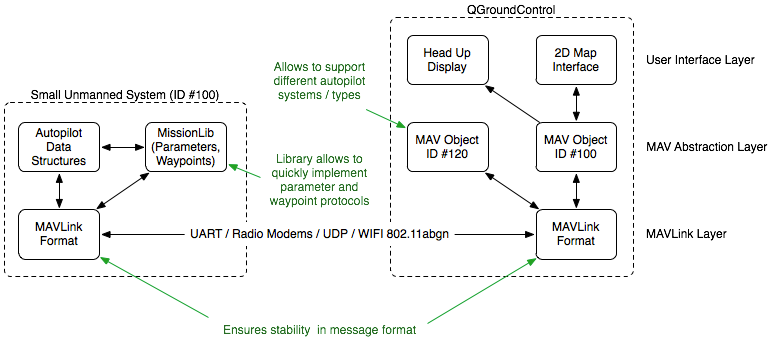
Integration Architecture
As the diagram below shows, integrating MAVLink is non-intrusive. MAVLink does not need to become a central part of the onboard architecture. The provided missionlib handles parameter and mission / waypoint transmission, the autopilot only needs to read off the values from the appropriate data structures.
MAVLink has a very stable message format, one of the primary reasons so many GCS and autopilots support it. If QGroundControl is used for a non-standard application, the UAS object can be sub-classed and QGroundControl can be fully customized to not only use a custom set of MAVLink messages, but also to handle them in a custom C++ class.
Quick Integration: Sending data
This approach takes more lines of code per message, but gets you instantly started.
/* The default UART header for your MCU */

#include "uart.h"

#include <mavlink/v1.0/common/mavlink.h>


mavlink_system_t mavlink_system;


mavlink_system.sysid = 20;                   ///< ID 20 for this airplane

mavlink_system.compid = MAV_COMP_ID_IMU;     ///< The component sending the message is the IMU, it could be also a Linux process


// Define the system type, in this case an airplane

uint8_t system_type = MAV_TYPE_FIXED_WING;

uint8_t autopilot_type = MAV_AUTOPILOT_GENERIC;


uint8_t system_mode = MAV_MODE_PREFLIGHT; ///< Booting up

uint32_t custom_mode = 0;                 ///< Custom mode, can be defined by user/adopter

uint8_t system_state = MAV_STATE_STANDBY; ///< System ready for flight


// Initialize the required buffers

mavlink_message_t msg;

uint8_t buf[MAVLINK_MAX_PACKET_LEN];


// Pack the message

mavlink_msg_heartbeat_pack(mavlink_system.sysid, mavlink_system.compid, &msg, system_type, autopilot_type, system_mode, custom_mode, system_state);


// Copy the message to the send buffer

uint16_t len = mavlink_msg_to_send_buffer(buf, &msg);


// Send the message with the standard UART send function

// uart0_send might be named differently depending on

// the individual microcontroller / library in use.

uart0_send(buf, len);
Receive Function
The function above describes how to send data with/without the convenience functions. The code snippet below shows how to receive data. The runtime is quite low, so we advise to run this function at mainloop rate and empty the UART buffer as fast as possible.
#include <mavlink/v1.0/common/mavlink.h>


// Example variable, by declaring them static they're persistent

// and will thus track the system state

static int packet_drops = 0;

static int mode = MAV_MODE_UNINIT; /* Defined in mavlink_types.h, which is included by mavlink.h */


/**

* @brief Receive communication packets and handle them

*

* This function decodes packets on the protocol level and also handles

* their value by calling the appropriate functions.

*/

static void communication_receive(void)

{

	mavlink_message_t msg;

	mavlink_status_t status;


	// COMMUNICATION THROUGH EXTERNAL UART PORT (XBee serial)


	while(uart0_char_available())

	{

		uint8_t c = uart0_get_char();

		// Try to get a new message

		if(mavlink_parse_char(MAVLINK_COMM_0, c, &msg, &status)) {

			// Handle message


			switch(msg.msgid)

			{

			        case MAVLINK_MSG_ID_HEARTBEAT:

			        {

				  // E.g. read GCS heartbeat and go into

                                  // comm lost mode if timer times out

			        }

			        break;

			case MAVLINK_MSG_ID_COMMAND_LONG:

				// EXECUTE ACTION

				break;

			default:

				//Do nothing

				break;

			}

		}


		// And get the next one

	}


	// Update global packet drops counter

	packet_drops += status.packet_rx_drop_count;


	// COMMUNICATION THROUGH SECOND UART


	while(uart1_char_available())

	{

		uint8_t c = uart1_get_char();

		// Try to get a new message

		if(mavlink_parse_char(MAVLINK_COMM_1, c, &msg, &status))

		{

			// Handle message the same way like in for UART0

                        // you can also consider to write a handle function like

                        // handle_mavlink(mavlink_channel_t chan, mavlink_message_t* msg)

                        // Which handles the messages for both or more UARTS

		}


		// And get the next one

	}


	// Update global packet drops counter

	packet_drops += status.packet_rx_drop_count;

}
Integration with convenience functions
WITH convenience functions
MAVLink offers convenience functions for easy sending of packets. If you want to use these, you have to provide a specific function in your code. This approach takes less lines of code per message, but requires you to write the adapter header. Please find an example for such an adapter header below. We advise to start off WITHOUT convenience functions, send your first message to the GCS and then add the adapter header if needed.
#include "your_mavlink_bridge_header.h"

/* You have to #define MAVLINK_USE_CONVENIENCE_FUNCTIONS in your_mavlink_bridge_header,

   and you have to declare: mavlink_system_t mavlink_system;

   these two variables will be used internally by the mavlink_msg_xx_send() functions.

   Please see the section below for an example of such a bridge header. */

#include <mavlink.h>


// Define the system type, in this case an airplane

int system_type = MAV_FIXED_WING;

// Send a heartbeat over UART0 including the system type

mavlink_msg_heartbeat_send(MAVLINK_COMM_0, system_type, MAV_AUTOPILOT_GENERIC, MAV_MODE_MANUAL_DISARMED, MAV_STATE_STANDBY);
MAVLink Adapter Header for Convenience Send Functions
This code example was written with a microcontroller in mind, what most external users will want to use. For examples for C++, please have a look at e.g. PX4/Firmware mavlink app.
SEND C-CODE
Define this function, according to your MCU (you can add more than two UARTS). If this function is defined, you then can use the 'mavlink_msg_xx_send(MAVLINK_COMM_x, data1, data2, ..)' functions to conveniently send data.
your_mavlink_bridge_header.h
/* MAVLink adapter header */

#ifndef YOUR_MAVLINK_BRIDGE_HEADER_H

#define YOUR_MAVLINK_BRIDGE_HEADER_H


#define MAVLINK_USE_CONVENIENCE_FUNCTIONS


#include <mavlink/v1.0/mavlink_types.h>


/* Struct that stores the communication settings of this system.

   you can also define / alter these settings elsewhere, as long

   as they're included BEFORE mavlink.h.

   So you can set the


   mavlink_system.sysid = 100; // System ID, 1-255

   mavlink_system.compid = 50; // Component/Subsystem ID, 1-255


   Lines also in your main.c, e.g. by reading these parameter from EEPROM.

 */

mavlink_system_t mavlink_system;

mavlink_system.sysid = 100; // System ID, 1-255

mavlink_system.compid = 50; // Component/Subsystem ID, 1-255


/**

 * @brief Send one char (uint8_t) over a comm channel

 *

 * @param chan MAVLink channel to use, usually MAVLINK_COMM_0 = UART0

 * @param ch Character to send

 */

static inline void comm_send_ch(mavlink_channel_t chan, uint8_t ch)

{

    if (chan == MAVLINK_COMM_0)

    {

        uart0_transmit(ch);

    }

    if (chan == MAVLINK_COMM_1)

    {

    	uart1_transmit(ch);

    }

}


#endif /* YOUR_MAVLINK_BRIDGE_HEADER_H */
MAVLink Onboard Integration Tutorial的更多相关文章
- MAVLink Linux/QNX/MacOs Integration Tutorial (UDP)
MAVLink Linux/QNX/MacOs Integration Tutorial (UDP) Overview This program was written to test the udp ...
- springmvc4开发rest
Spring MVC 4 RESTFul Web Services CRUD Example+RestTemplate Created on: August 11, 2015 | Last upd ...
- Gazebo機器人仿真學習探索筆記(七)连接ROS
中文稍后补充,先上官方原版教程.ROS Kinetic 搭配 Gazebo 7 附件----官方教程 Tutorial: ROS integration overview As of Gazebo 1 ...
- Unity 官方教程 学习
Interface & Essentials Using the Unity Interface 1.Interface Overview https://unity3d.com/cn/lea ...
- 【Spring实战】----开篇(包含系列目录链接)
[Spring实战]----开篇(包含系列目录链接) 置顶2016年11月10日 11:12:56 阅读数:3617 终于还是要对Spring进行解剖,接下来Spring实战篇系列会以应用了Sprin ...
- JCaptcha+Memcache的验证码集群实现
一.问题背景 为了防止垃圾信息发布机器人的自动提交攻击,采用CAPTCHA验证码来保护该模块,提高攻击者的成本. 二.验证码简介 全自动区分计算机和人类的图灵测试(Completely Automat ...
- Spring 4 MVC+Apache Tiles 3 Example
In this post we will integrate Apache Tiles 3 with Spring MVC 4, using annotation-based configuratio ...
- Open Daylight integration with OpenStack: a tutorial
Open Daylight integration with OpenStack: a tutorial How to deploy OpenDaylight and integrate it wit ...
- Spring MVC Hibernate MySQL Integration(集成) CRUD Example Tutorial【摘】
Spring MVC Hibernate MySQL Integration(集成) CRUD Example Tutorial We learned how to integrate Spring ...
随机推荐
- .NET 知识点总结
对于Web系统开发来说,Net其实也是有好多知识点需要学的,虽然目前JAVA是主流,就业市场比较大,但Net也在积极的拥抱开源,大Net Core 2 出来了,这无疑给Net开发者带来更大的希望,好了 ...
- 查看Postgresql的连接状况
今天遇到一个问题,就是pg一直报错,说有太多的客户端连接到数据库上面.但现在不知道是什么程序连接.pg默认的max_connection是100,我并没有修改过,以为平时公司内部用,应该够了,但现在貌 ...
- 【数组】word search
题目: Given a 2D board and a word, find if the word exists in the grid. The word can be constructed fr ...
- 64位WIN7上安装11G R2 ,PLSQL的配置方法
64位WIN7上安装11G R2 ,PLSQL的配置方法:1. 1.1. 去http://www.oracle.com/technetwork/topics/winsoft-085727. ...
- 何为cookie?
何为cookie HTTP Cookie(也叫Web Cookie或浏览器Cookie)是服务器发送到用户浏览器并保存在本地的一小块数据,它会在浏览器下次向同一服务器再发起请求时被携带并发送到服务器上 ...
- [中英对照]User-Space Device Drivers in Linux: A First Look | 初识Linux用户态设备驱动程序
如对Linux用户态驱动程序开发有兴趣,请阅读本文,否则请飘过. User-Space Device Drivers in Linux: A First Look | 初识Linux用户态设备驱动程序 ...
- Java reflect 反射 3 Class.forname
Class.forName("xxx.xx.xx") 1 作用:加载类文件Class.forName(xxx.xx.xx) 返回的是一个类 而非对象 作用就是把对象的模板加载到内存 ...
- 【转】MVC Model建模及Entity Framework Power Tool使用
MVC如使用Code-First代码优先约定,先建实体类,再根据实体类创建数据库. 在创建实体类后,新建一个数据上下文类,如下: publicclassMusicStoreDB : DbContext ...
- 用Ajax爬取今日头条图片集
Ajax原理 在用requests抓取页面时,得到的结果可能和浏览器中看到的不一样:在浏览器中可以正常显示的页面数据,但用requests得到的结果并没有.这是因为requests获取的都是原始 ...
- JVM垃圾回收机制总结
对于垃圾回收机制我先抛出三个问题: ①哪些内存需要回收? ②什么时候回收? ③如何回收? 下面我们主要针对这三个问题来研究JVM GC 一.哪些内存需要回收? 1.JAVA使用可达性分析法来判断对象是 ...
The function above describes how to send data with/without the convenience functions. The code snippet below shows how to receive data. The runtime is quite low, so we advise to run this function at mainloop rate and empty the UART buffer as fast as possible.
#include <mavlink/v1.0/common/mavlink.h>
// Example variable, by declaring them static they're persistent
// and will thus track the system state
static int packet_drops = 0;
static int mode = MAV_MODE_UNINIT; /* Defined in mavlink_types.h, which is included by mavlink.h */
/**
* @brief Receive communication packets and handle them
*
* This function decodes packets on the protocol level and also handles
* their value by calling the appropriate functions.
*/
static void communication_receive(void)
{
mavlink_message_t msg;
mavlink_status_t status;
// COMMUNICATION THROUGH EXTERNAL UART PORT (XBee serial)
while(uart0_char_available())
{
uint8_t c = uart0_get_char();
// Try to get a new message
if(mavlink_parse_char(MAVLINK_COMM_0, c, &msg, &status)) {
// Handle message
switch(msg.msgid)
{
case MAVLINK_MSG_ID_HEARTBEAT:
{
// E.g. read GCS heartbeat and go into
// comm lost mode if timer times out
}
break;
case MAVLINK_MSG_ID_COMMAND_LONG:
// EXECUTE ACTION
break;
default:
//Do nothing
break;
}
}
// And get the next one
}
// Update global packet drops counter
packet_drops += status.packet_rx_drop_count;
// COMMUNICATION THROUGH SECOND UART
while(uart1_char_available())
{
uint8_t c = uart1_get_char();
// Try to get a new message
if(mavlink_parse_char(MAVLINK_COMM_1, c, &msg, &status))
{
// Handle message the same way like in for UART0
// you can also consider to write a handle function like
// handle_mavlink(mavlink_channel_t chan, mavlink_message_t* msg)
// Which handles the messages for both or more UARTS
}
// And get the next one
}
// Update global packet drops counter
packet_drops += status.packet_rx_drop_count;
}
WITH convenience functions
MAVLink offers convenience functions for easy sending of packets. If you want to use these, you have to provide a specific function in your code. This approach takes less lines of code per message, but requires you to write the adapter header. Please find an example for such an adapter header below. We advise to start off WITHOUT convenience functions, send your first message to the GCS and then add the adapter header if needed.
#include "your_mavlink_bridge_header.h"
/* You have to #define MAVLINK_USE_CONVENIENCE_FUNCTIONS in your_mavlink_bridge_header,
and you have to declare: mavlink_system_t mavlink_system;
these two variables will be used internally by the mavlink_msg_xx_send() functions.
Please see the section below for an example of such a bridge header. */
#include <mavlink.h>
// Define the system type, in this case an airplane
int system_type = MAV_FIXED_WING;
// Send a heartbeat over UART0 including the system type
mavlink_msg_heartbeat_send(MAVLINK_COMM_0, system_type, MAV_AUTOPILOT_GENERIC, MAV_MODE_MANUAL_DISARMED, MAV_STATE_STANDBY);
MAVLink Adapter Header for Convenience Send Functions
This code example was written with a microcontroller in mind, what most external users will want to use. For examples for C++, please have a look at e.g. PX4/Firmware mavlink app.
SEND C-CODE
Define this function, according to your MCU (you can add more than two UARTS). If this function is defined, you then can use the 'mavlink_msg_xx_send(MAVLINK_COMM_x, data1, data2, ..)' functions to conveniently send data.
your_mavlink_bridge_header.h
/* MAVLink adapter header */
#ifndef YOUR_MAVLINK_BRIDGE_HEADER_H
#define YOUR_MAVLINK_BRIDGE_HEADER_H
#define MAVLINK_USE_CONVENIENCE_FUNCTIONS
#include <mavlink/v1.0/mavlink_types.h>
/* Struct that stores the communication settings of this system.
you can also define / alter these settings elsewhere, as long
as they're included BEFORE mavlink.h.
So you can set the
mavlink_system.sysid = 100; // System ID, 1-255
mavlink_system.compid = 50; // Component/Subsystem ID, 1-255
Lines also in your main.c, e.g. by reading these parameter from EEPROM.
*/
mavlink_system_t mavlink_system;
mavlink_system.sysid = 100; // System ID, 1-255
mavlink_system.compid = 50; // Component/Subsystem ID, 1-255
/**
* @brief Send one char (uint8_t) over a comm channel
*
* @param chan MAVLink channel to use, usually MAVLINK_COMM_0 = UART0
* @param ch Character to send
*/
static inline void comm_send_ch(mavlink_channel_t chan, uint8_t ch)
{
if (chan == MAVLINK_COMM_0)
{
uart0_transmit(ch);
}
if (chan == MAVLINK_COMM_1)
{
uart1_transmit(ch);
}
}
#endif /* YOUR_MAVLINK_BRIDGE_HEADER_H */
MAVLink Onboard Integration Tutorial的更多相关文章
- MAVLink Linux/QNX/MacOs Integration Tutorial (UDP)
MAVLink Linux/QNX/MacOs Integration Tutorial (UDP) Overview This program was written to test the udp ...
- springmvc4开发rest
Spring MVC 4 RESTFul Web Services CRUD Example+RestTemplate Created on: August 11, 2015 | Last upd ...
- Gazebo機器人仿真學習探索筆記(七)连接ROS
中文稍后补充,先上官方原版教程.ROS Kinetic 搭配 Gazebo 7 附件----官方教程 Tutorial: ROS integration overview As of Gazebo 1 ...
- Unity 官方教程 学习
Interface & Essentials Using the Unity Interface 1.Interface Overview https://unity3d.com/cn/lea ...
- 【Spring实战】----开篇(包含系列目录链接)
[Spring实战]----开篇(包含系列目录链接) 置顶2016年11月10日 11:12:56 阅读数:3617 终于还是要对Spring进行解剖,接下来Spring实战篇系列会以应用了Sprin ...
- JCaptcha+Memcache的验证码集群实现
一.问题背景 为了防止垃圾信息发布机器人的自动提交攻击,采用CAPTCHA验证码来保护该模块,提高攻击者的成本. 二.验证码简介 全自动区分计算机和人类的图灵测试(Completely Automat ...
- Spring 4 MVC+Apache Tiles 3 Example
In this post we will integrate Apache Tiles 3 with Spring MVC 4, using annotation-based configuratio ...
- Open Daylight integration with OpenStack: a tutorial
Open Daylight integration with OpenStack: a tutorial How to deploy OpenDaylight and integrate it wit ...
- Spring MVC Hibernate MySQL Integration(集成) CRUD Example Tutorial【摘】
Spring MVC Hibernate MySQL Integration(集成) CRUD Example Tutorial We learned how to integrate Spring ...
随机推荐
- .NET 知识点总结
对于Web系统开发来说,Net其实也是有好多知识点需要学的,虽然目前JAVA是主流,就业市场比较大,但Net也在积极的拥抱开源,大Net Core 2 出来了,这无疑给Net开发者带来更大的希望,好了 ...
- 查看Postgresql的连接状况
今天遇到一个问题,就是pg一直报错,说有太多的客户端连接到数据库上面.但现在不知道是什么程序连接.pg默认的max_connection是100,我并没有修改过,以为平时公司内部用,应该够了,但现在貌 ...
- 【数组】word search
题目: Given a 2D board and a word, find if the word exists in the grid. The word can be constructed fr ...
- 64位WIN7上安装11G R2 ,PLSQL的配置方法
64位WIN7上安装11G R2 ,PLSQL的配置方法:1. 1.1. 去http://www.oracle.com/technetwork/topics/winsoft-085727. ...
- 何为cookie?
何为cookie HTTP Cookie(也叫Web Cookie或浏览器Cookie)是服务器发送到用户浏览器并保存在本地的一小块数据,它会在浏览器下次向同一服务器再发起请求时被携带并发送到服务器上 ...
- [中英对照]User-Space Device Drivers in Linux: A First Look | 初识Linux用户态设备驱动程序
如对Linux用户态驱动程序开发有兴趣,请阅读本文,否则请飘过. User-Space Device Drivers in Linux: A First Look | 初识Linux用户态设备驱动程序 ...
- Java reflect 反射 3 Class.forname
Class.forName("xxx.xx.xx") 1 作用:加载类文件Class.forName(xxx.xx.xx) 返回的是一个类 而非对象 作用就是把对象的模板加载到内存 ...
- 【转】MVC Model建模及Entity Framework Power Tool使用
MVC如使用Code-First代码优先约定,先建实体类,再根据实体类创建数据库. 在创建实体类后,新建一个数据上下文类,如下: publicclassMusicStoreDB : DbContext ...
- 用Ajax爬取今日头条图片集
Ajax原理 在用requests抓取页面时,得到的结果可能和浏览器中看到的不一样:在浏览器中可以正常显示的页面数据,但用requests得到的结果并没有.这是因为requests获取的都是原始 ...
- JVM垃圾回收机制总结
对于垃圾回收机制我先抛出三个问题: ①哪些内存需要回收? ②什么时候回收? ③如何回收? 下面我们主要针对这三个问题来研究JVM GC 一.哪些内存需要回收? 1.JAVA使用可达性分析法来判断对象是 ...