
jQuery - 左右拖动分隔条
1、实现效果:
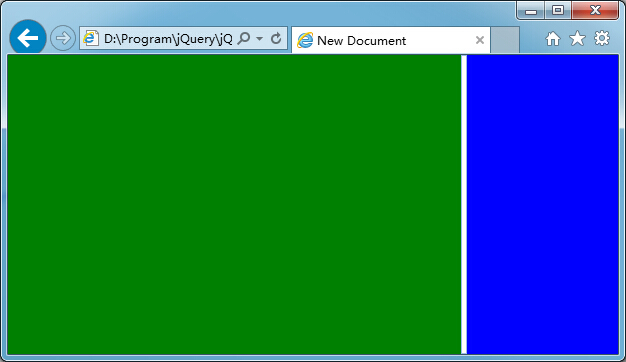
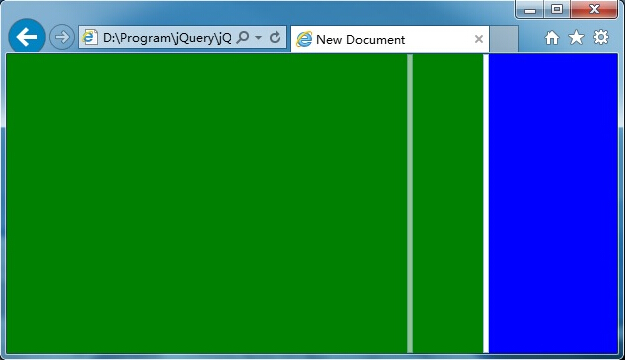

2、代码:
<!DOCTYPE HTML PUBLIC "-//W3C//DTD HTML 4.01 Transitional//EN" "http://www.w3.org/TR/html4/loose.dtd">

<html>

 <head>

    <title> New Document </title>

    <script type="text/javascript" src="jquery.min.js"></script>

    <style type="text/css">

        html, body, div {

            margin: 0;

            padding: 0;

            border: 0;

            -moz-user-select: none;

            -webkit-user-select: none;

        }

        .gf_s {

            float: left;

            width: 4px;

            cursor: e-resize;

            background-color: #fff;

            border: #99BBE8 1px solid;

        }

        .gf_s_g {

            float: left;

            width: 4px;

            display: none;

            cursor: e-resize;

            position: absolute;

            background-color: #F0F0F0;

            border: #99BBE8 1px solid;

            filter: alpha(opacity=60);

            -moz-opacity: 0.6;

            -khtml-opacity: 0.6;

            opacity: 0.6;

            z-index: 1000;

        }

    </style>

 </head>

 <body>

     <div id="divP" style="width:100%; height:100%;">

         <div id="divLeft" style="background-color: green; float: left; "></div>

         <div id="divS" class="gf_s" style="float: left;"></div>

         <div id="divSG" class="gf_s_g" style="float: left;"></div>

         <div id="divRight" style="background-color: blue; float: left;"></div>

     </div>

     <script type="text/javascript">

         var $sliderMoving = false;

         //兼容各种浏览器的,获取鼠标真实位置

         function mousePosition(ev) {

             if (!ev) ev = window.event;

             if (ev.pageX || ev.pageY) {

                 return { x: ev.pageX, y: ev.pageY };

             }

             return {

                 x: ev.clientX + document.documentElement.scrollLeft - document.body.clientLeft,

                 y: ev.clientY + document.documentElement.scrollTop - document.body.clientTop

             };

         };

         //获取一个DIV的绝对坐标的功能函数,即使是非绝对定位,一样能获取到

         function getElCoordinate(dom) {

             var t = dom.offsetTop;

             var l = dom.offsetLeft;

             dom = dom.offsetParent;

             while (dom) {

                 t += dom.offsetTop;

                 l += dom.offsetLeft;

                 dom = dom.offsetParent;

             };

             return { top: t, left: l };

         };

         //分隔条幽灵左右拖动(mousemove)

         function sliderGhostMoving(e) {

             $("#divSG").css({ left: mousePosition(e).x - 2, display: "block" });

         };

         //完成分隔条左右拖动(mouseup)

         function sliderHorizontalMove(e) {

             var lWidth = getElCoordinate($("#divSG")[0]).left - 2;

             var rWidth = $(window).width() - lWidth - 6;

             $("#divLeft").css("width", lWidth + "px");

             $("#divRight").css("width", rWidth + "px");

             $("#divSG").css("display", "none");

         };

         function reinitSize() {

             var width = $(window).width() - 6;

             var height = $(window).height();

             $("#divLeft").css({ height: height + "px", width: width * 0.75 + "px" });

             $("#divS").css({ height: height - 2 + "px", width: "4px" });

             $("#divSG").css({ height: height - 2 + "px", width: "4px" });

             $("#divRight").css({ height: height + "px", width: width * 0.25 + "px" });

         }

         $(document).ready(function () {

             reinitSize();

             $("#divS").on("mousedown", function (e) {

                 $sliderMoving = true;

                 $("divP").css("cursor", "e-resize");

             });

             $("#divP").on("mousemove", function (e) {

                 if ($sliderMoving) {

                     sliderGhostMoving(e);

                 }

             });

             $("#divP").on("mouseup", function (e) {

                 if ($sliderMoving) {

                     $sliderMoving = false;

                     sliderHorizontalMove(e);

                     $("#divP").css("cursor", "default");

                 }

             });

         });

         $(window).resize(function () {

             reinitSize();

         });

     </script>

 </body>

</html>
3、Demo:jQuery-左右拖动分隔条.rar
jQuery - 左右拖动分隔条的更多相关文章
- jquery 可拖动进度条
实现这个效果怎么弄呢? <!DOCTYPE html> <html> <head lang="en"> <meta charset=&qu ...
- 使用CSS3和jQuery可伸缩的搜索条
使用CSS3和jQuery可伸缩的搜索条 helloweba.com 作者:月光光 时间:2013-12-09 21:23 标签: CSS3 jquery 搜索条在我们网站是必不可少的,尤其是在有限的 ...
- 利用js和JQuery定义一个导航条菜单
利用js和JQuery定义一个导航条 效果: 一.html代码: <div class="Maintenance"> <div class="Title ...
- [Android] SeekBar---可拖动进度条
SeekBar---可拖动进度条 ()setMax //设置SeekBar最大数值 ()setProgress //设置SeekBar当前数值 ()setSecondaryProgress//设置Se ...
- 最好用的jquery列表拖动排列(由项目提取)
版权声明:本文为博主原创文章,未经博主同意不得转载. https://blog.csdn.net/wuchengzeng/article/details/31766235 最好的jquery列表拖动排 ...
- Qt代码创建分隔条
我们在使用Qt时,会发现在使用UI界面时可以添加窗口分隔条,但我们使用纯代码时却没有分隔条的类函数.这时候我们就需要手动添加,添加方式和Qt自定义标签按钮一样,下面我直接写代码.如果不知道怎么添加的, ...
- Android——音乐播放器完善——进度条显示当前播放进度,加可拖动进度条(未待解决完问题)
效果: 问题:可拖动进度条随进度条移动时,会致使音乐卡顿(待解决) xml <?xml version="1.0" encoding="utf-8"?&g ...
- jQuery:jQuery性能优化28条建议
http://www.xue5.com/WebDev/jQuery/671700.html 直在寻找有关jQuery性能优化方面的小窍门,能让我那臃肿的动态网页应用变得轻便些.找了很多文章后,我决定将 ...
- jquery可拖动表格调整列格子的宽度大小(转)
<!DOCTYPE html PUBLIC "-//W3C//DTD XHTML 1.0 Transitional//EN" "http://www.w3.org/ ...
随机推荐
- Openstack(十五)快速添加新计算节点
当后期添加新物理服务器作为计算节点,如果按照上面的过程安装配置的话会非常的慢,但是可以通过复制配置文件的方式快速添加. 15.1计算节点服务安装 #提前将yum仓库.防火墙.selinux.主机名.时 ...
- Spark中文文本分析建模
实用的朴素贝叶斯模型建模 建模过程主要是把文本转化成向量然后再作分析 数据格式: ,善良 美丽 ,丑陋 阴险 卑鄙 ,温和 ....... 注:前面是给文章贴的标签,后面是文章的分词,分词可以找关于分 ...
- postman设置环境变量,字段值经过json转换后数值字节长度超过上限的问题
在使用Tests进行环境变量的设置时,遇到这么一种情况,在返回的responseBody中的userId字段,字段返回的是数值类型,再经过json转换之后,发现保存的值跟接口返回的值不一致:如下图: ...
- C语言——stdio.h
int fgetc(FILE * stream); get character from stream 返回流中的一个字符,并以int的类型返回,如果碰到文件的结尾,或者一个错误发生,函数返回 ...
- ubuntu16.04(liunx) 离线安装 xgboost (anaconda3,anaconda2共存)
服务器ubuntu 系统同时安装了 anaconda3,anaconda2 ,但服务器没有连接外网,所以 想在python3 环境下安装离线安装xgboost. 主要分2步: 0:进入py3环境 ( ...
- Polya
using namespace std; typedef long long LL; const int MAXN = 1e3 +10; const LL MOD = (LL)1 << 6 ...
- HttpClient4.x 使用cookie保持会话
HttpClient4.x可以自带维持会话功能,只要使用同一个HttpClient且未关闭连接,则可以使用相同会话来访问其他要求登录验证的服务(见TestLogin()方法中的“执行get请求”部分) ...
- AVAudioFoundation(4):音视频录制
本文转自:AVAudioFoundation(4):音视频录制 | www.samirchen.com 本文主要内容来自 AVFoundation Programming Guide. 采集设备的音视 ...
- 20145201李子璇《网络对抗》PC平台逆向破解
20145201<网络对抗>PC平台逆向破解 准备阶段 下载安装execstack. 获取shellcode的c语言代码 设置堆栈可执行 将环境设置为:堆栈可执行.地址随机化关闭(2开启, ...
- 20145315 《Java程序设计》第三周学习总结
20145315 <Java程序设计>第三周学习总结 教材学习内容总结 第四章 4.1类与对象 4.1.1定义类: new clothes():新建一个对象. class clothes ...